varc (V Application Runtime & Containers) is a self-contained, zero-daemon, rootless container runtime, single-file image packager, zero-root virtual network overlay, Copy-on-Write (CoW) volume engine, and declarative multi-service orchestrator. It packages OS containers, OCI directory layouts, and WebAssembly 3.0 sandboxes into cryptographically signed .varc single-file bundles that verify and launch in milliseconds without requiring root privileges, background daemons, or external container tooling.
Core Capabilities
Capability
Operational Benefit
Single-File .varc Bundles
Package application binaries, assets, OCI layouts, or Wasm modules into one immutable, Ed25519-signed .varc artifact with 4 KB SHA-256 Merkle chunk deduplication.
Rootless Multi-Backend Runtime
Launch workloads across native Linux unprivileged namespaces (CLONE_NEWUSER, CLONE_NEWNS, CLONE_NEWPID, CLONE_NEWNET), transparent Windows-to-WSL2 bridges, or vvm WebAssembly 3.0 sandboxes.
Seccomp-BPF Monitor-to-Enforce
Profile real workload system calls in monitor learning mode while blocking 41 high-risk kernel calls, then lock deterministic enforce BPF filters with one command or UI click.
Zero-Root 127.64.x.y VNet Mesh
Assign collision-free 127.64.x.y loopback Virtual IPs and .varc / .vgate service DNS records without CAP_NET_ADMIN, TUN devices, or privileged CNI plugins.
Packed CAS CoW Volumes
Capture, stream, and restore power-of-2 chunked (4 KB to 1024 KB) persistent volumes backed by an indexed Content-Addressable Storage arena (chunks.pack + chunks.idx).
Declarative Stacks & 1-Second Rollback
Reconcile multi-service varc.conf stacks, Cron/Batch jobs, and horizontal autoscaling policies with atomic container + volume snapshot rollback.
4-Workspace Web Studio & REST API
Operate clusters through an embedded Light/Dark Web Control Plane (/ui/auth, /ui/portal, /ui/delegated, /ui/admin) and OpenAPI 3.1 HTTP/1.1 server.
60-Second Quickstart
1. Generate a Signing Keypair & Package an Application
POWERSHELL
# Generate and pin a local Ed25519 bundle signing keypair
varc keygen --signer prod-release-ca --data-dir ./varc-data

# Package an application directory into a signed single-file .varc bundle
varc pack `
  --name hello-service `
  --version 1.0.0 `
  --dir ./examples/hello-service `
  --signer prod-release-ca `
  --tier network-service `
  --vip 127.64.2.10 `
  --out ./hello-service.varc `
  --data-dir ./varc-data

# Verify CRC32 framing, 4 KB Merkle root, and Ed25519 signature offline
varc verify ./hello-service.varc
2. Launch a Rootless Container & Inspect State
POWERSHELL
# Seal an encrypted runtime secret with AES-256-GCM
varc secret set db_password --value "s3cr3t-prod-credential" --data-dir ./varc-data

# Verify, materialize into CAS, and start the rootless container
varc run ./hello-service.varc `
  --id ctr-hello-01 `
  --name hello-api `
  --stack edge-api `
  --secret db_password `
  --data-dir ./varc-data

# List running containers, seccomp modes, and 127.64.x.y loopback VIPs
varc ps --data-dir ./varc-data
3. Start the 4-Workspace Web Studio Control Plane
POWERSHELL
# Start the HTTP/1.1 Control Plane and Web Studio on 127.0.0.1:8460
$env:VARC_API_TOKEN = "replace-with-strong-64-hex-operator-token"
varc serve --listen 127.0.0.1:8460 --data-dir ./varc-data
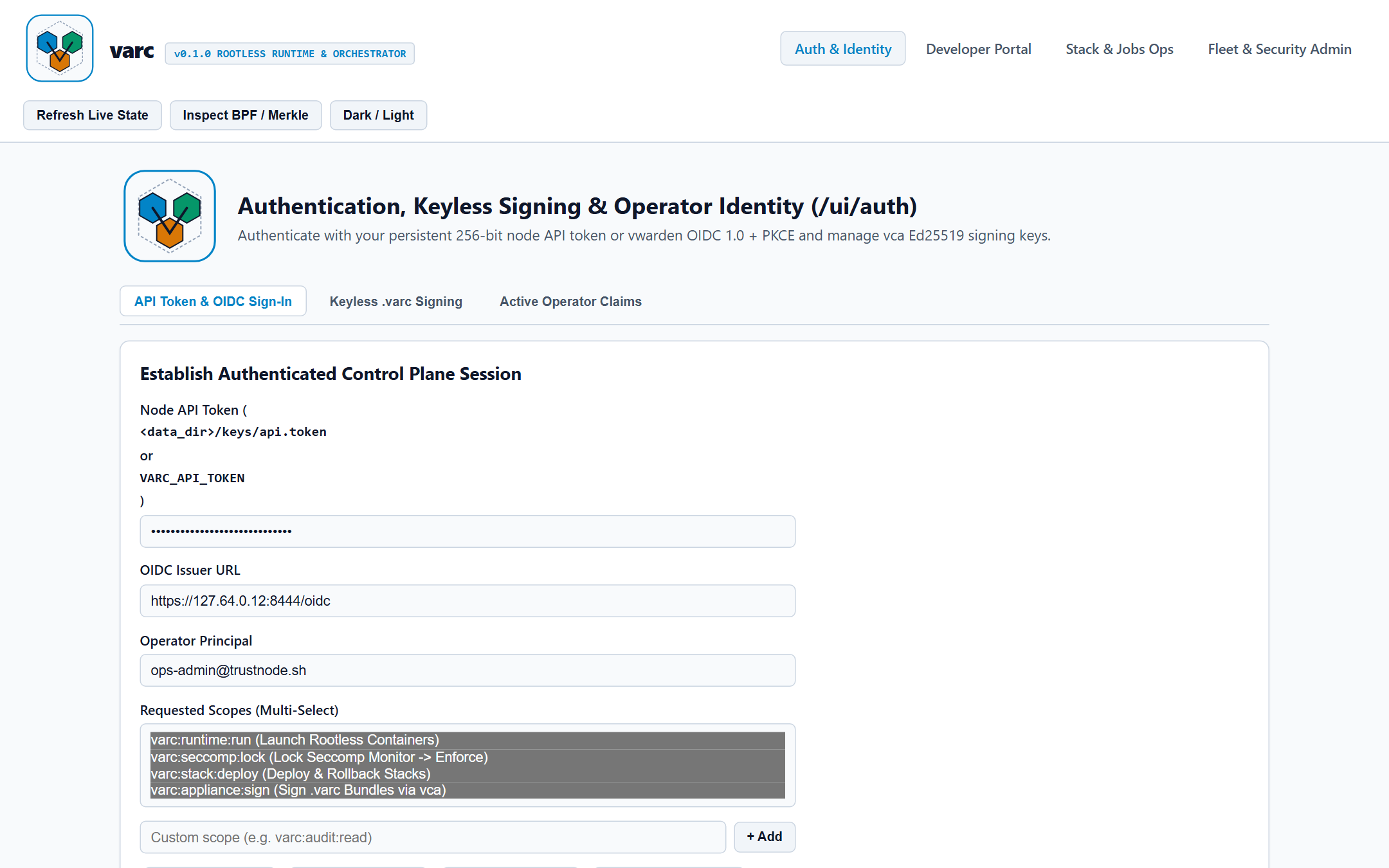
Open http://127.0.0.1:8460/ui/auth in any modern browser to authenticate and manage bundles, containers, seccomp policies, stacks, virtual networks, volumes, and hash-chained audit logs.
Comprehensive walkthrough of workload lifecycles, Wasm 3.0 sandboxes, resource quotas, declarative stacks, Cron/Batch jobs, and all four Web Studio workspaces.
This guide provides step-by-step operational recipes for the most common packaging, runtime, security policy, networking, storage, and Web Studio workflows in varc.
1. Sign and Package a Directory into a .varc Bundle
Use varc keygen and varc pack to turn any self-contained service directory into an immutable, Ed25519-signed .varc bundle.
Convert an unpacked OCI image directory (containing config.json and rootfs/) into a verified single-file .varc bundle with automatic path-traversal and tarbomb bounds checking:
During import, varc validates archive relative paths, strips unsafe setuid/setgid mode bits (04000 / 02000), enforces a 1 GiB cumulative extraction ceiling, computes 4 KB SHA-256 Merkle chunk hashes, and signs the output bundle.
3. Launch Rootless Isolated Containers with Encrypted Secrets
Seal sensitive credentials in the node AES-256-GCM vault and mount them into a container's ephemeral secret directory without exposing plaintext in environment variables or image manifests:
POWERSHELL
# Store encrypted secrets in the node vault
varc secret set pg_dsn --value "postgres://app:s3cr3t@127.64.4.10:5432/orders" --data-dir ./varc-data
varc secret set jwt_hmac_key --value "9f8e7d6c5b4a39281716151413121110" --data-dir ./varc-data

# Run the verified bundle with strict signer verification and injected secrets
varc run ./dist-bundles/checkout-api-2.4.0.varc `
  --id ctr-checkout-01 `
  --name checkout-api `
  --stack commerce `
  --trust strict `
  --secret pg_dsn,jwt_hmac_key `
  --env LOG_LEVEL=info,PORT=8080 `
  --data-dir ./varc-data

# Check container status, runtime backend, and loopback VIP
varc ps --data-dir ./varc-data
When you stop and remove the container (varc stop ctr-checkout-01 followed by varc rm ctr-checkout-01), varc overwrites materialized secret files with zeros before unlinking the isolated rootfs.
4. Run an Unpacked Directory in an Ephemeral Rootless Sandbox
When testing a local binary or dynamically linked tool without building a .varc image first, use varc sandbox (alias varc jail):
5. Profile System Calls in Monitor Mode and Lock an Enforce BPF Filter
Instead of hand-writing brittle seccomp JSON profiles, start a workload in monitor mode, feed observed system calls from staging integration tests, and lock the container into kernel enforce mode:
POWERSHELL
# Record observed staging syscalls against the network-service baseline and lock Enforce BPF
varc policy-learn `
  --container ctr-checkout-01 `
  --tier network-service `
  --syscalls "read,write,openat,close,socket,bind,listen,accept4,epoll_ctl,epoll_wait,futex,clock_gettime" `
  --data-dir ./varc-data
6. Configure Zero-Root Virtual Networks and .varc Service DNS
Deploy a multi-service stack manifest (varc.conf) to automatically allocate deterministic 127.64.x.y loopback Virtual IPs and .varc / .vgate service discovery domains:
POWERSHELL
# Deploy a multi-service stack
varc up -f ./examples/postgres-ha-stack/varc.conf --data-dir ./varc-data

# Inspect allocated 127.64.x.y VIPs, .varc/.vgate DNS records, and synthesized hosts entries
varc net --data-dir ./varc-data
varc net --hosts --data-dir ./varc-data
7. Manage Copy-on-Write Persistent Volumes and Snapshots
Capture deduplicated CoW snapshots before schema migrations, convert chunk granularity for large database/model files, and compute delta replication plans:
POWERSHELL
# Capture a 16 KB chunked CoW snapshot into the Packed CAS Arena
varc volume snapshot orders-db `
  --dir ./examples/hello-service `
  --mode merkle_chunk_stream `
  --chunk-kb 16 `
  --data-dir ./varc-data

# Re-chunk an existing volume to 64 KB blocks for sequential I/O workloads
varc volume convert orders-db --dir ./examples/hello-service --chunk-kb 64 --data-dir ./varc-data

# Inspect delta transfer requirements and restore to a target directory
varc volume sync-plan orders-db --data-dir ./varc-data
varc volume restore orders-db --target ./restored-orders-db --data-dir ./varc-data
8. Authenticate and Operate the Web Studio Control Plane
Start varc serve and open http://127.0.0.1:8460/ui/auth to establish an authenticated operator session:
Paste the 256-bit node API token (from <data_dir>/keys/api.token or VARC_API_TOKEN) into Node API Token.
Select your required operational scopes (varc:runtime:run, varc:seccomp:lock, varc:stack:deploy, varc:appliance:sign) and click Sign In & Establish Session.
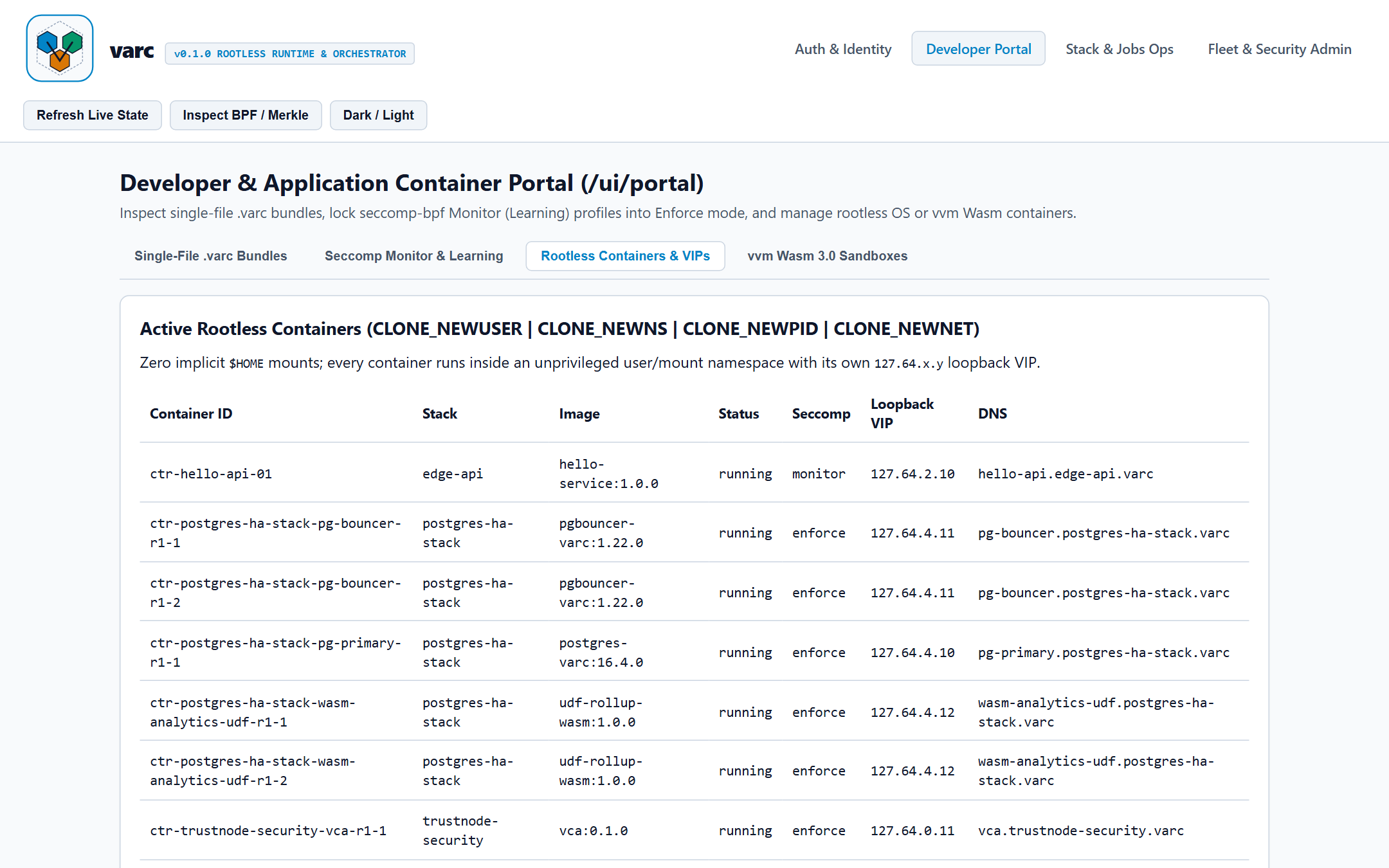
Switch to Developer Portal (/ui/portal) -> Rootless Containers & VIPs to inspect live container statuses, enforce/monitor seccomp modes, loopback VIPs, and .varc DNS records:
User Guide
This guide explains varc core concepts, container and WebAssembly workload lifecycles, resource controls, declarative stack orchestration, and the 4-Workspace Web Studio interface.
1. Single-File .varc Bundles and Content-Addressable Storage
Traditional container workflows split images across dozens of compressed tar layers, registry manifests, and root-owned overlay filesystems. varc replaces layered tar archives with a deterministic single-file .varc container bundle:
Integrity & Provenance: Every bundle carries an IEEE CRC32 envelope checksum, per-file SHA-256 digests, a 4 KB chunked SHA-256 Merkle tree root, and an Ed25519 signature bound to a named signer identity.
Deduplicated CAS Materialization: When varc run or varc extract processes a bundle, verified chunks are stored once inside <data_dir>/cas/ and materialized into an isolated per-container root filesystem (<data_dir>/rootfs/<container_id>/) with sanitized permissions (0755 executables, 0644 regular files, zero setuid/setgid bits).
Trust Policies:
tofu (Trust On First Use, default for local development): Pins a newly encountered signer's Ed25519 public key on first verification and rejects any subsequent key mismatch for that signer ID.
strict (recommended for production): Requires the bundle's signer ID and public key to be pre-pinned via varc keygen or varc trust add.
2. Workload Kinds and Lifecycle Management
varc supports two first-class workload kinds under a unified CLI and REST API:
Workload Kind
Target Platform
Execution Backend
Primary Use Case
os_container
linux/amd64, linux/arm64
linux-rootless-ns on Linux; wsl2-linux-bridge on Windows
For wasm_vvm containers, varc wasm-snap captures page-granular (4 KB) linear-memory snapshots directly into the node CAS arena so warm instances can be restored without re-running initialization:
Every container enforces explicit CPU, memory, process-count, filesystem, and network boundaries:
CPU & Memory Quotas: Configured at pack time (--cpu <millicores>, --memory <mb>) or per-service in varc.conf (cpu_millicores, memory_max_mb, pids_max). On Linux cgroups v2 hosts, varc maps these directly to cpu.max, memory.max, and pids.max.
Zero Implicit Host Mounts: Unlike desktop container wrappers that bind-mount $HOME or host credential sockets by default, varc sets expose_host_home = false unconditionally and rejects mounts targeting sensitive host paths (host root, etc, proc, sys, dev, root, var/run, ~/.ssh).
Telemetry & Stats: Inspect live per-container CPU millicores, memory usage, and cluster capacity headroom with varc stats:
4. Declarative Stacks, Cron/Batch Jobs, and Autoscaling
A single varc.conf file declares services, persistent volumes, scheduled Cron or parallel Batch jobs, and horizontal autoscaling rules.
POWERSHELL
# Reconcile a declarative stack
varc up -f ./examples/ecommerce-stack/varc.conf --data-dir ./varc-data

# Scale a specific service horizontally
varc scale commerce/checkout --replicas 4 --data-dir ./varc-data

# List and manually trigger scheduled Cron/Batch jobs
varc jobs --data-dir ./varc-data
varc job-run nightly-settlement --data-dir ./varc-data

# Evaluate horizontal autoscale policy against observed metrics
varc autoscale commerce/checkout --cpu 82 --memory 65 --rps 420 --data-dir ./varc-data

# Instant 1-second rollback to previous healthy stack & volume snapshot revision
varc rollback commerce --data-dir ./varc-data
5. Navigating the 4-Workspace Web Studio
varc serve hosts a zero-dependency Web Studio divided into four role-focused workspaces:
Workspace 1: Auth & Identity (/ui/auth)
Authenticate with your 256-bit node API token or OIDC provider, select granular session scopes using removable multi-select chips, inspect keyless Ed25519 bundle signing settings, and verify active rootless UID/GID namespace mappings.
Browse registered .varc container and Wasm bundles with their 4 KB Merkle roots, transition containers from monitor learning mode into enforce BPF mode, and inspect active containers alongside their 127.64.x.y loopback VIPs:
Workspace 3: Stack, Rollback & Jobs Operations (/ui/delegated)
Monitor WAL-backed multi-service stack revisions, trigger 1-Click Rollback across containers and CoW volume snapshots, trigger Cron/Batch jobs on demand, and review horizontal autoscaling policies:
Deploy turnkey trustnode.sh appliance suites (security, core, data, ai), inspect the zero-root 127.64.x.y VNet DNS mesh, monitor persistent volume replication states, and audit the SHA-256 hash-chained event ledger in either Light Mode or Dark Mode (Dark / Light toggle in the top header).
Administrator Guide
This guide covers node bootstrap, authentication hardening, cryptographic signer governance, admission policy enforcement, multi-node cluster management, storage compaction, and tamper-evident audit verification for varc operators.
1. Node Data Directory Layout and Bootstrap Security
When varc initializes a node (--data-dir <path>, default data/varc), it creates a structured, self-contained state hierarchy:
2. Control Plane Authentication and Session Governance
All mutating and state-reading /api/v1/* endpoints require authentication via either:
Bearer API Token: Set VARC_API_TOKEN in the service environment (minimum 32 hex/ASCII characters recommended) or read the auto-generated 256-bit token at <data_dir>/keys/api.token.
HttpOnly Session Cookie: Established via POST /api/v1/auth/session (used by /ui/auth) with mandatory CSRF header enforcement (X-Varc-Requested-With: 1) and SameSite=Strict.
POWERSHELL
# Start Control Plane bound strictly to loopback or a private management interface
$env:VARC_API_TOKEN = "d4e5f60718293a4b5c6d7e8f90a1b2c3d4e5f60718293a4b5c6d7e8f90a1b2c3"
varc serve --listen 127.0.0.1:8460 --data-dir ./data
3. Admission Policy Enforcement and Trusted Signers
Pinning and Revoking Ed25519 Bundle Signers
In production clusters, enforce --trust strict so only bundles signed by explicitly pinned release keys can execute:
POWERSHELL
# Pin an offline CI/CD release signing public key
varc trust add `
  --signer prod-release-ca `
  --pubkey 9261829d380df711264bb9feef978c77a04cb4177899a56e30673f9cdb5bd81e `
  --data-dir ./data

# Audit currently trusted signers and trust sources
varc trust list --data-dir ./data

# Immediately revoke a retired or compromised signing identity
varc trust rm prod-release-ca --data-dir ./data
Baseline Seccomp-BPF Tiers
Every OS container is assigned a baseline syscall tier combined with an unconditional 41-syscall kernel deny list:
Tier
Baseline Syscalls
Intended Workloads
strict-compute
24
Pure compute workers, parsers, batch transformers (net=none).
4. Zero-Root VNet Mesh and Multi-Node Cluster Scheduling
varc assigns each node a /24 slice inside 127.64.<subnet>.0/24 and resolves .varc and .vgate service domains without requiring root privileges or kernel bridge modules:
Managing Cluster Nodes
Register worker nodes with CPU, memory, subnet, and topology zone labels for anti-affinity bin-packing scheduling:
POWERSHELL
# Register two availability-zone worker nodes
varc node join node-east-01 --addr 10.20.1.11:8460 --subnet 11 --cpu 16000 --memory 32768 --labels zone=us-east-a,tier=compute --data-dir ./data
varc node join node-east-02 --addr 10.20.1.12:8460 --subnet 12 --cpu 16000 --memory 32768 --labels zone=us-east-b,tier=compute --data-dir ./data

# Inspect node capacity and health
varc node list --data-dir ./data

# Cordoning/draining a node prior to OS patching
varc node drain node-east-01 --data-dir ./data
varc node rm node-east-01 --data-dir ./data
5. Storage Compaction, CAS Garbage Collection, and Audit Verification
Run routine Day-2 storage maintenance and cryptographic audit verification via varc system:
POWERSHELL
# 1. Compact commit.log into an atomic state.snap checkpoint and truncate WAL
varc system checkpoint --data-dir ./data

# 2. Run streaming Tri-Root Mark-and-Sweep CAS Garbage Collection
#    (preserves chunks referenced by active images, retained stack revisions, and volume snapshots)
varc system gc --data-dir ./data

# 3. Cryptographically verify the SHA-256 hash-chained RFC 5424 audit ledger
varc system audit-verify --data-dir ./data

# 4. Stream recent security and lifecycle audit events
varc events --tail 50 --data-dir ./data
6. Upgrades, Backup, and Disaster Recovery
Pre-Upgrade Checkpoint: Run varc system checkpoint and capture fresh volume snapshots (varc volume snapshot <vol_id> --dir <mount_path> --mode merkle_chunk_stream).
Atomic Binary Upgrade: Because varc is a single static-style executable with zero background daemon lock-in, replace the varc binary in place and verify varc version.
Post-Upgrade Verification: Run varc system audit-verify and varc health <stack_name> to confirm WAL state recovery, intact audit hash chains, and healthy service VIPs.
Operations & Use Cases
This guide presents production deployment architectures, end-to-end configuration manifests, REST API automation workflows, and incident response runbooks for varc.
Use Case 1: Stateful HA PostgreSQL + Wasm Analytics Stack with 1-Second Rollback
Organizations running transactional PostgreSQL clusters alongside low-latency analytics functions often struggle to coordinate schema upgrades, connection pooler updates, and data volume snapshots. With varc, a single declarative varc.conf manages OS containers, vvm WebAssembly 3.0 UDF workers, CoW persistent volumes, and health-gated rollback.
Deployment, Health Probing, and Automated Rollback
POWERSHELL
# Apply the stack (automatically snapshots CoW volumes prior to revision rollout)
varc up -f ./postgres-ha.varc.conf --data-dir ./data

# Probe TCP health across stack VIPs and auto-rollback if any replica fails readiness
varc health postgres-ha-stack --probe-tcp --auto-rollback --data-dir ./data

# Or trigger explicit rollback to a specific historical revision
varc rollback postgres-ha-stack --revision 1 --data-dir ./data
Use Case 2: Air-Gapped & Edge Single-File Appliance Delivery
Remote industrial gateways, defense enclaves, and retail edge nodes frequently lack outbound container registry connectivity and prohibit root daemons. varc enables deterministic single-file delivery over optical diodes or USB media:
   # Pin the public key once during host provisioning
   varc trust add --signer edge-release-2026 --pubkey <64-hex-ed25519-pubkey> --data-dir ./data

   # Offline cryptographic verification (CRC32 + 4 KB Merkle + Ed25519)
   varc verify ./edge-telemetry-3.1.0.varc

   # Launch unprivileged with strict trust enforcement
   varc run ./edge-telemetry-3.1.0.varc --trust strict --seccomp enforce --data-dir ./data
Use Case 3: Turnkey trustnode.sh Security & Infrastructure Fleet
varc includes built-in appliance packaging and one-command suite orchestration for the 11 trustnode.sh infrastructure services (vca, vwarden, vsight, vgate, vvm, vprevail, vstore, vft, vkbm, vllm, vsite):
POWERSHELL
# Package an individual appliance with deterministic VIP and seccomp tier defaults
varc appliance --project vgate --out ./bundles/vgate.varc --data-dir ./data

# Deploy the security suite (vca, vwarden, vsight on 127.64.0.11..13)
varc trustnode-up --suite security --data-dir ./data

# Or deploy via the authenticated Control Plane REST API
curl -sS -X POST http://127.0.0.1:8460/api/v1/stacks/apply \
  -H "Authorization: Bearer $VARC_API_TOKEN" \
  -H "X-Varc-Requested-With: 1" \
  -H "Content-Type: application/json" \
  -d '{"suites":"security,core"}'
Use Case 4: Private AI & Knowledge Retrieval Appliance (ai-rag-stack)
Teams deploying internal retrieval-augmented generation (RAG) pipelines need strict isolation between public ingress, vector/knowledge indexing, and compute-heavy model inference—without relying on external cloud registries or privileged container daemons. The examples/ai-rag-appliance/varc.conf blueprint pairs vgate-ingress, vkbm-index, and vllm-inference over the 127.64.x.y loopback mesh:
Large-Chunk Model Weights (512 KB): The model-weights volume uses 512 KB CoW chunks (quota_mb = 32768, merkle_chunk_stream) so multi-gigabyte model files deduplicate and stream with minimal index overhead.
Tiered Seccomp Isolation: vgate-ingress runs under network-service, vkbm-index under filesystem-worker, and vllm-inference under strict-compute.
Scheduled Index Compaction & RPS Autoscaling: A 6-hour Cron job (30 */6 * * *) compacts knowledge indexes while vllm-inference scales between 1 and 6 replicas based on CPU (75%) and request rate (50 RPS per replica).
POWERSHELL
# Deploy the AI & Knowledge Retrieval stack
varc up -f ./examples/ai-rag-appliance/varc.conf --data-dir ./data

# Verify VNet VIPs (.varc / .vgate DNS) and volume chunk geometry
varc net --hosts --data-dir ./data
varc volumes --data-dir ./data

# Evaluate inference autoscaling under load (e.g., 82% CPU, 240 RPS)
varc autoscale ai-rag-stack/vllm-inference --cpu 82 --memory 68 --rps 240 --data-dir ./data
Use Case 5: E-Commerce Microservices with Secrets, Batch Jobs & Safe Rollback
Multi-service transactional applications must coordinate encrypted API credentials, stateful order storage, background batch reindexing, and instant rollback when a release degrades readiness checks. The examples/ecommerce-stack/varc.conf manifest demonstrates this full lifecycle:
Seal Runtime Credentials First:
POWERSHELL
   varc secret set db_password --value "prod-orders-db-pass" --data-dir ./data
   varc secret set stripe_webhook_secret --value "whsec_live_example" --data-dir ./data
Deploy the Stack (edge-proxy, checkout-api, orders-worker):
POWERSHELL
   # Applies 3 services, 16 KB-chunk orders-data volume, nightly cron, and 4-way batch reindex
   varc up -f ./examples/ecommerce-stack/varc.conf --data-dir ./data

   # Inspect running containers and health probe status across 127.64.2.10..12
   varc ps --data-dir ./data
   varc health ecommerce-stack --probe-tcp --data-dir ./data
Roll Back Atomically on Regression:
POWERSHELL
   # Revert containers, secrets bindings, and orders-data volume snapshot in one command
   varc rollback ecommerce-stack --data-dir ./data
Use Case 6: Ephemeral Scratch Sandboxing for Untrusted Binaries & Plugins
When you need to run a third-party CLI tool, vendor diagnostic binary, or CI build plugin without packing a .varc image—and without exposing host /usr, /lib, or home directories—use varc sandbox in --mode scratch. Using examples/dynamic-sandbox/:
BASH
# Run an unpacked app with explicitly staged vendor libraries and zero network access
varc sandbox --id sbx-vendor-audit --mode scratch \
  --dir ./examples/dynamic-sandbox/app \
  --lib-dir ./examples/dynamic-sandbox/vendor-libs \
  --lib-path ./lib:./lib64:./vendor/lib \
  --seccomp monitor --tier strict-compute \
  --net none \
  -- ./bin/worker.sh

# Inspect sandbox telemetry and exit status as JSON
varc sandbox --id sbx-vendor-audit --mode scratch \
  --dir ./examples/dynamic-sandbox/app \
  --lib-dir ./examples/dynamic-sandbox/vendor-libs \
  --json -- ./bin/worker.sh
Once the sandbox run finishes, any temporary rootfs state is discarded, leaving the host filesystem untouched.
Use Case 7: Hybrid Native + WebAssembly 3.0 (vvm) Edge Workers
For latency-sensitive request filters, webhook transformers, or untrusted tenant plugins, you can package WebAssembly 3.0 / WASI 0.3 modules as first-class .varc bundles and run them alongside native OS containers:
POWERSHELL
# 1. Package a Wasm 3.0 module into a signed .varc bundle
varc pack `
  --name webhook-filter `
  --version 1.0.0 `
  --kind wasm_vvm `
  --dir ./build/wasm-filter `
  --entrypoint ./filter.wasm `
  --tier strict-compute `
  --seccomp enforce `
  --vip 127.64.5.20 `
  --signer prod-release-ca `
  --out ./bundles/webhook-filter-1.0.0.varc `
  --data-dir ./data

# 2. Verify and launch inside the vvm CoW sandbox
varc verify ./bundles/webhook-filter-1.0.0.varc
varc run ./bundles/webhook-filter-1.0.0.varc --id ctr-wasm-filter-01 --data-dir ./data
Because vvm isolates linear memory with 4 KB Copy-on-Write pages, multiple tenant invocations can be snapshotted and restored in microseconds without spinning up separate OS namespaces per request.
Use Case 8: Live & Air-Gapped Host Migration for OS Containers (varc migrate & .varc-mig)
When draining a host for kernel maintenance or rebalancing stateful services across nodes, varc supports both live HTTP/1.1 node-to-node migration and offline/air-gapped .varc-mig staged bundle migration. Both paths enforce 3-pass pre-copy volume Merkle delta sync, hybrid AES-256-GCM secret re-wrapping, .learn.tsv seccomp session continuity, and monotonic migration_epoch split-brain fencing.
Form A: One-Command Live HTTP/1.1 Migration (varc migrate <id> --to <node>)
When both nodes are reachable over the Control Plane API, run a single command (or POST /api/v1/migrations/live) to execute the entire flow—pre-condition checks, pre-drain hook, 3-pass pre-copy CAS delta sync, HTTP/1.1 transfer, vnet500–2000 ms hold-buffer cutover, and source fencing:
POWERSHELL
# One-command live migration with a pre-drain hook
varc migrate ctr-checkout-01 `
  --to node-b `
  --target-addr 127.0.0.1:8470 `
  --pre-drain-hook "http://127.64.2.11:8080/drain" `
  --secrets pg_dsn,jwt_hmac_key `
  --volume-dir ./volumes/orders `
  --data-dir ./data
Or trigger the same one-shot live migration over HTTP:
For disconnected enclaves or shared-storage handoffs without direct node-to-node HTTP connectivity:
POWERSHELL
# 1. On Source Host: export signed .varc-mig bundle with re-wrapped secrets
varc migrate export ctr-checkout-01 `
  --to node-b `
  --out ./ctr-checkout-01.varc-mig `
  --volume-dir ./volumes/orders `
  --secrets pg_dsn,jwt_hmac_key `
  --target-pubkey <target-ed25519-pub-hex> `
  --data-dir ./data

# 2. On Target Host: verify CRC32 + Ed25519 + per-chunk SHA-256 and commit at epoch+1
varc migrate import ./ctr-checkout-01.varc-mig `
  --trusted-pubkey <source-ed25519-pub-hex> `
  --data-dir ./data

# 3. On Source Host: fence old instance and zeroize local secrets
varc migrate fence ctr-checkout-01 --migration <mig-id> --epoch 2 --data-dir ./data
Use Case 9: Live Cross-OS & Cross-Architecture wasm_vvm Migration (.varc-ckpt)
Unlike native OS binaries (os_container), which require matching CPU architectures and compatible Linux/WSL2 hosts, wasm_vvm sandboxes execute portable WebAssembly 3.0 bytecode. When varc migrates a wasm_vvm workload (for example, moving an edge worker from a linux/x86_64 node to a macos/arm64 node), it suspends execution at a cooperative safe point and emits a signed .varc-ckpt (VARCCKPT) checkpoint envelope:
Pre-Copy 4 KB Dirty Pages: Only 4 KB linear-memory pages modified since the baseline snapshot are included, verified per page via SHA-256.
Deterministic Execution State: Globals, indirect-call table slots, call frames, remaining fuel quota, instruction pointer, and virtualized WASI 0.3 file descriptors (with seek cursors) are serialized alongside the memory delta.
Sub-Second Resume: The target vvm runtime verifies the Ed25519 signature and aggregate Merkle root, patches the 4 KB dirty pages, and resumes execution from the exact safe point.
Migration Best Practices, Pre/Post Conditions & Gotchas
Pre-Conditions (Checked Before Migration Starts)
Source Container State: The container must be running or paused, and its migration_state must be none (not already migrating_out or fenced).
Target Node Readiness & Headroom: In live cluster mode, the target node must be ready (not draining, cordoned, or offline) with enough available CPU millicores and memory MB.
OS & Architecture Compatibility:os_container workloads require matching CPU architecture and compatible OS (linux <-> wsl2). wasm_vvm workloads can migrate across any OS and CPU architecture.
Trust & Secret Keying: For air-gapped .varc-mig transfers, pin the source signer's Ed25519 public key (--trusted-pubkey) on the target and pass --target-pubkey during export so secrets are wrapped specifically for the target node.
Post-Conditions (Guaranteed After Successful Migration)
Target Active at epoch + 1: The target container is running with migration_state = none and migration_epoch = epoch + 1.
Source Fenced & Zeroized: The source container is stopped, migration_state = fenced at epoch + 1, and its materialized secrets are zeroized. Any partitioned node reconnecting with a stale epoch self-fences automatically.
Audit & Continuity Preserved:seccomp monitor-mode .learn.tsv sessions, CAS delta chunks, and SHA-256 hash-chained audit events are intact on both nodes.
Best Practices & Common Gotchas
Use a Pre-Drain Hook (--pre-drain-hook) for Stateful Apps: Point --pre-drain-hook to a loopback endpoint (http://127.64.x.y:port/drain) or signal (signal:SIGUSR1) so databases and workers flush write buffers before the final delta pass. Non-loopback HTTP hooks are blocked by the built-in SSRF guard.
Watch for Write-Heavy Churn (--force-pause):varc caps pre-copy at 3 passes. If a workload mutates volume chunks faster than they can sync, varc aborts safely without touching the running container. Use --force-pause during a maintenance window if you want varc to pause the workload and force the final delta.
Open TCP Connections on os_container:varc stays 100% rootless and zero-dependency (no CRIU), so vnet's 500–2000 ms hold buffer buffers new connections during cutover while existing connections drain. Place vgate ingress in front of services if clients need automatic retry on in-flight HTTP requests.
Use vprevail Quorum Fencing for Multi-Node HA: For 3+ node clusters, configure VprevailQuorumFenceProvider so lease acquisition requires a strict majority (N/2 + 1), preventing split-brain even during asymmetric network partitions.
Production Day-2 Incident Runbooks
Runbook A: Immediate SOAR Container Quarantine
When an anomaly detector (such as vsight) flags suspicious egress or unexpected behavior in a running workload, quarantine the container without destroying forensic rootfs or memory state:
Quarantine atomically pauses the container execution state, revokes its 127.64.x.y virtual network peer routes, and appends a signed container.quarantine event to the SHA-256 hash-chained audit log.
Runbook B: Live Traffic Spike & Horizontal Autoscale Reconciliation
Runbook C: Corrupted Disk Tail Recovery & Audit Verification
If a host suffers an unclean power loss mid-deployment:
Run varc system audit-verify --data-dir ./data. During store open, varc validates every 32-byte VPRV IEEE CRC32 WAL frame and automatically truncates any incomplete torn tail frame cleanly to the last committed transaction boundary.
Run varc system checkpoint --data-dir ./data to persist a fresh state.snap image.
Run varc ps --data-dir ./data and varc health <stack_name> --probe-tcp to confirm service availability.
Configuration & CLI Reference
This reference documents all varc command-line subcommands, flags, environment variables, varc.conf declarative stack directives, and HTTP/1.1 Control Plane REST API endpoints.
1. Global Node Flags and Environment Variables
All stateful CLI subcommands accept the following node flags:
Flag
Default
Description
--data-dir <path>
data/varc
Path to the node state directory containing WAL, CAS arena, keys, rootfs, and volume snapshots.
--listen <host:port>
127.0.0.1:8460
TCP bind address for varc serve and node discovery metadata.
--json / -j
false
Emit structured JSON output on supported inspection and listing commands.
Environment Variables
Variable
Purpose
VARC_API_TOKEN
Overrides the on-disk <data_dir>/keys/api.token Bearer token used by varc serve for HTTP API and Web Studio authentication.
VARC_DATA_DIR
Optional default override for --data-dir when not explicitly passed on the command line.
VARC_LISTEN_ADDR
Optional default override for --listen (127.0.0.1:8460).
All /api/v1/* routes (except /healthz, /readyz, and /api/v1/auth/session) require Authorization: Bearer <token> (or an active varc_session cookie) and X-Varc-Requested-With: 1 on POST mutations.
Method
Path
Purpose
GET
/healthz, /readyz
Unauthenticated liveness and readiness probes (200 OK).
GET
/openapi.json
Full OpenAPI 3.1.0 Control Plane schema.
GET
/ui/auth, /ui/portal, /ui/delegated, /ui/admin
4-Workspace Web Studio HTML5 Control Plane views.
POST
/api/v1/auth/session
Validate API token and issue HttpOnly; SameSite=Strict operator session cookie.
POST
/api/v1/auth/logout
Invalidate active operator session cookie.
GET
/api/v1/images
List registered .varc bundles and 4 KB Merkle roots.
GET
/api/v1/containers
List containers, statuses, seccomp modes, loopback VIPs, and DNS domains.
GET
/api/v1/stacks
List deployed stack revisions and container memberships.
GET
/api/v1/jobs
List registered Cron and Batch jobs with execution counters.
GET
/api/v1/network
List zero-root 127.64.x.y VIP allocations and .varc/.vgate DNS records.
GET
/api/v1/volumes
List persistent volumes, chunk sizes, replication modes, and latest snapshot IDs.
GET
/api/v1/stats
Retrieve container CPU/memory telemetry, cluster node headroom, and autoscale rules.
GET
/api/v1/audit
Retrieve SHA-256 hash-chained RFC 5424 security and lifecycle audit events.
POST
/api/v1/seccomp/lock
Lock a container's learned monitor syscall profile into enforce mode ({"container_id":"..."}).
POST
/api/v1/stacks/apply
Deploy one or more trustnode.sh appliance suites ({"suites":"security,core"}).
POST
/api/v1/stacks/rollback
Roll back a stack and its CoW volumes ({"stack_name":"...","target_revision":"0"}).
POST
/api/v1/jobs/trigger
Trigger immediate execution of a registered Cron/Batch job ({"job_id":"..."}).
POST
/api/v1/containers/quarantine
Atomically pause a container, isolate its VIP, and log a SOAR quarantine audit event ({"container_id":"..."}).
GET
/api/v1/migrations
List durable cross-host migration records, phases, and monotonic migration_epoch values.
POST
/api/v1/migrations/export
Run pre-flight checks, 3-pass pre-copy CAS delta sync, and export a signed .varc-mig payload.
POST
/api/v1/migrations/import
Verify .varc-mig, apply CAS deltas and wrapped secrets, and commit target container at epoch+1.
POST
/api/v1/migrations/fence
Fence a migrated source container at epoch+1 and zeroize its materialized secrets.
POST
/api/v1/migrations/live
Execute one-command live migration (pre-conditions, pre-drain hook, 3-pass pre-copy, HTTP stream, and source fence).
Performance & Sizing Guide
varc includes a built-in, deterministic 9-workload benchmark harness (varc bench) that measures cryptographic secret sealing, 4 KB SHA-256 Merkle tree reduction, single-file .varc bundle signing and verification, seccomp-bpf compilation, VPRV Write-Ahead Log replay, Packed CAS Copy-on-Write volume streaming, and declarative stack rollback.
1. Running the Built-In Benchmark Suite
Run the empirical benchmark suite on any host to measure local CPU, memory, and storage performance:
POWERSHELL
# Console summary table
varc bench

# GitHub-flavored Markdown report for release validation or capacity baselining
varc bench --markdown

# Benchmark against a specific storage mount (e.g., NVMe production volume)
varc bench --dir ./data/bench-tmp --markdown
2. Empirical 9-Workload Benchmark Baseline
The table below records measured production-build (-prod) throughput, bandwidth, and average per-operation latency across all nine core runtime and control-plane hot paths:
4.8x higher sequential snapshot/restore bandwidth (31.39 MB/s vs 6.49 MB/s) with 16x to 64x smaller chunks.idx maps.
512 KB - 1024 KB
Large immutable model weights, firmware blobs, offline air-gapped datasets.
Minimal metadata overhead and maximum sequential NVMe read/write throughput.
You can re-chunk an existing volume online using varc volume convert <vol_id> --dir <mount_path> --chunk-kb <new_kb> followed by varc system gc to reclaim superseded blocks.
4. Memory Footprint and Cluster Sizing Guidelines
Zero Idle Daemon Overhead: CLI commands (pack, verify, run, ps, up, rollback) run to completion and exit immediately with zero resident daemon memory when the Web Studio is not needed.
Control Plane Server (varc serve): Uses bounded in-memory maps plus a rotating 4,096-event active audit window (audit-archive.log holds historical segments on disk), keeping control-plane RAM usage under 25 MB for typical single-node and edge clusters.
Constant-Memory Volume Restoration & Compaction: Both varc volume restore and varc system gc stream chunks via positional file reads (O(chunk_size) buffer), preventing out-of-memory spikes even on multi-gigabyte chunks.pack arenas.
varc (V Application Runtime & Containers) is a self-contained, zero-daemon, rootless container runtime, single-file image packager, zero-root virtual network overlay, Copy-on-Write (CoW) volume engine, and declarative multi-service orchestrator. It packages OS containers, OCI directory layouts, and WebAssembly 3.0 sandboxes into cryptographically signed .varc single-file bundles that verify and launch in milliseconds without requiring root privileges, background daemons, or external container tooling.
Core Capabilities
Capability
Operational Benefit
Single-File .varc Bundles
Package application binaries, assets, OCI layouts, or Wasm modules into one immutable, Ed25519-signed .varc artifact with 4 KB SHA-256 Merkle chunk deduplication.
Rootless Multi-Backend Runtime
Launch workloads across native Linux unprivileged namespaces (CLONE_NEWUSER, CLONE_NEWNS, CLONE_NEWPID, CLONE_NEWNET), transparent Windows-to-WSL2 bridges, or vvm WebAssembly 3.0 sandboxes.
Seccomp-BPF Monitor-to-Enforce
Profile real workload system calls in monitor learning mode while blocking 41 high-risk kernel calls, then lock deterministic enforce BPF filters with one command or UI click.
Zero-Root 127.64.x.y VNet Mesh
Assign collision-free 127.64.x.y loopback Virtual IPs and .varc / .vgate service DNS records without CAP_NET_ADMIN, TUN devices, or privileged CNI plugins.
Packed CAS CoW Volumes
Capture, stream, and restore power-of-2 chunked (4 KB to 1024 KB) persistent volumes backed by an indexed Content-Addressable Storage arena (chunks.pack + chunks.idx).
Declarative Stacks & 1-Second Rollback
Reconcile multi-service varc.conf stacks, Cron/Batch jobs, and horizontal autoscaling policies with atomic container + volume snapshot rollback.
4-Workspace Web Studio & REST API
Operate clusters through an embedded Light/Dark Web Control Plane (/ui/auth, /ui/portal, /ui/delegated, /ui/admin) and OpenAPI 3.1 HTTP/1.1 server.
60-Second Quickstart
1. Generate a Signing Keypair & Package an Application
POWERSHELL
# Generate and pin a local Ed25519 bundle signing keypair
varc keygen --signer prod-release-ca --data-dir ./varc-data

# Package an application directory into a signed single-file .varc bundle
varc pack `
  --name hello-service `
  --version 1.0.0 `
  --dir ./examples/hello-service `
  --signer prod-release-ca `
  --tier network-service `
  --vip 127.64.2.10 `
  --out ./hello-service.varc `
  --data-dir ./varc-data

# Verify CRC32 framing, 4 KB Merkle root, and Ed25519 signature offline
varc verify ./hello-service.varc
2. Launch a Rootless Container & Inspect State
POWERSHELL
# Seal an encrypted runtime secret with AES-256-GCM
varc secret set db_password --value "s3cr3t-prod-credential" --data-dir ./varc-data

# Verify, materialize into CAS, and start the rootless container
varc run ./hello-service.varc `
  --id ctr-hello-01 `
  --name hello-api `
  --stack edge-api `
  --secret db_password `
  --data-dir ./varc-data

# List running containers, seccomp modes, and 127.64.x.y loopback VIPs
varc ps --data-dir ./varc-data
3. Start the 4-Workspace Web Studio Control Plane
POWERSHELL
# Start the HTTP/1.1 Control Plane and Web Studio on 127.0.0.1:8460
$env:VARC_API_TOKEN = "replace-with-strong-64-hex-operator-token"
varc serve --listen 127.0.0.1:8460 --data-dir ./varc-data
Open http://127.0.0.1:8460/ui/auth in any modern browser to authenticate and manage bundles, containers, seccomp policies, stacks, virtual networks, volumes, and hash-chained audit logs.
Comprehensive walkthrough of workload lifecycles, Wasm 3.0 sandboxes, resource quotas, declarative stacks, Cron/Batch jobs, and all four Web Studio workspaces.
This guide provides step-by-step operational recipes for the most common packaging, runtime, security policy, networking, storage, and Web Studio workflows in varc.
1. Sign and Package a Directory into a .varc Bundle
Use varc keygen and varc pack to turn any self-contained service directory into an immutable, Ed25519-signed .varc bundle.
Convert an unpacked OCI image directory (containing config.json and rootfs/) into a verified single-file .varc bundle with automatic path-traversal and tarbomb bounds checking:
During import, varc validates archive relative paths, strips unsafe setuid/setgid mode bits (04000 / 02000), enforces a 1 GiB cumulative extraction ceiling, computes 4 KB SHA-256 Merkle chunk hashes, and signs the output bundle.
3. Launch Rootless Isolated Containers with Encrypted Secrets
Seal sensitive credentials in the node AES-256-GCM vault and mount them into a container's ephemeral secret directory without exposing plaintext in environment variables or image manifests:
POWERSHELL
# Store encrypted secrets in the node vault
varc secret set pg_dsn --value "postgres://app:s3cr3t@127.64.4.10:5432/orders" --data-dir ./varc-data
varc secret set jwt_hmac_key --value "9f8e7d6c5b4a39281716151413121110" --data-dir ./varc-data

# Run the verified bundle with strict signer verification and injected secrets
varc run ./dist-bundles/checkout-api-2.4.0.varc `
  --id ctr-checkout-01 `
  --name checkout-api `
  --stack commerce `
  --trust strict `
  --secret pg_dsn,jwt_hmac_key `
  --env LOG_LEVEL=info,PORT=8080 `
  --data-dir ./varc-data

# Check container status, runtime backend, and loopback VIP
varc ps --data-dir ./varc-data
When you stop and remove the container (varc stop ctr-checkout-01 followed by varc rm ctr-checkout-01), varc overwrites materialized secret files with zeros before unlinking the isolated rootfs.
4. Run an Unpacked Directory in an Ephemeral Rootless Sandbox
When testing a local binary or dynamically linked tool without building a .varc image first, use varc sandbox (alias varc jail):
5. Profile System Calls in Monitor Mode and Lock an Enforce BPF Filter
Instead of hand-writing brittle seccomp JSON profiles, start a workload in monitor mode, feed observed system calls from staging integration tests, and lock the container into kernel enforce mode:
POWERSHELL
# Record observed staging syscalls against the network-service baseline and lock Enforce BPF
varc policy-learn `
  --container ctr-checkout-01 `
  --tier network-service `
  --syscalls "read,write,openat,close,socket,bind,listen,accept4,epoll_ctl,epoll_wait,futex,clock_gettime" `
  --data-dir ./varc-data
6. Configure Zero-Root Virtual Networks and .varc Service DNS
Deploy a multi-service stack manifest (varc.conf) to automatically allocate deterministic 127.64.x.y loopback Virtual IPs and .varc / .vgate service discovery domains:
POWERSHELL
# Deploy a multi-service stack
varc up -f ./examples/postgres-ha-stack/varc.conf --data-dir ./varc-data

# Inspect allocated 127.64.x.y VIPs, .varc/.vgate DNS records, and synthesized hosts entries
varc net --data-dir ./varc-data
varc net --hosts --data-dir ./varc-data
7. Manage Copy-on-Write Persistent Volumes and Snapshots
Capture deduplicated CoW snapshots before schema migrations, convert chunk granularity for large database/model files, and compute delta replication plans:
POWERSHELL
# Capture a 16 KB chunked CoW snapshot into the Packed CAS Arena
varc volume snapshot orders-db `
  --dir ./examples/hello-service `
  --mode merkle_chunk_stream `
  --chunk-kb 16 `
  --data-dir ./varc-data

# Re-chunk an existing volume to 64 KB blocks for sequential I/O workloads
varc volume convert orders-db --dir ./examples/hello-service --chunk-kb 64 --data-dir ./varc-data

# Inspect delta transfer requirements and restore to a target directory
varc volume sync-plan orders-db --data-dir ./varc-data
varc volume restore orders-db --target ./restored-orders-db --data-dir ./varc-data
8. Authenticate and Operate the Web Studio Control Plane
Start varc serve and open http://127.0.0.1:8460/ui/auth to establish an authenticated operator session:
Paste the 256-bit node API token (from <data_dir>/keys/api.token or VARC_API_TOKEN) into Node API Token.
Select your required operational scopes (varc:runtime:run, varc:seccomp:lock, varc:stack:deploy, varc:appliance:sign) and click Sign In & Establish Session.
Switch to Developer Portal (/ui/portal) -> Rootless Containers & VIPs to inspect live container statuses, enforce/monitor seccomp modes, loopback VIPs, and .varc DNS records:
Part III: User Guide
This guide explains varc core concepts, container and WebAssembly workload lifecycles, resource controls, declarative stack orchestration, and the 4-Workspace Web Studio interface.
1. Single-File .varc Bundles and Content-Addressable Storage
Traditional container workflows split images across dozens of compressed tar layers, registry manifests, and root-owned overlay filesystems. varc replaces layered tar archives with a deterministic single-file .varc container bundle:
Integrity & Provenance: Every bundle carries an IEEE CRC32 envelope checksum, per-file SHA-256 digests, a 4 KB chunked SHA-256 Merkle tree root, and an Ed25519 signature bound to a named signer identity.
Deduplicated CAS Materialization: When varc run or varc extract processes a bundle, verified chunks are stored once inside <data_dir>/cas/ and materialized into an isolated per-container root filesystem (<data_dir>/rootfs/<container_id>/) with sanitized permissions (0755 executables, 0644 regular files, zero setuid/setgid bits).
Trust Policies:
tofu (Trust On First Use, default for local development): Pins a newly encountered signer's Ed25519 public key on first verification and rejects any subsequent key mismatch for that signer ID.
strict (recommended for production): Requires the bundle's signer ID and public key to be pre-pinned via varc keygen or varc trust add.
2. Workload Kinds and Lifecycle Management
varc supports two first-class workload kinds under a unified CLI and REST API:
Workload Kind
Target Platform
Execution Backend
Primary Use Case
os_container
linux/amd64, linux/arm64
linux-rootless-ns on Linux; wsl2-linux-bridge on Windows
For wasm_vvm containers, varc wasm-snap captures page-granular (4 KB) linear-memory snapshots directly into the node CAS arena so warm instances can be restored without re-running initialization:
Every container enforces explicit CPU, memory, process-count, filesystem, and network boundaries:
CPU & Memory Quotas: Configured at pack time (--cpu <millicores>, --memory <mb>) or per-service in varc.conf (cpu_millicores, memory_max_mb, pids_max). On Linux cgroups v2 hosts, varc maps these directly to cpu.max, memory.max, and pids.max.
Zero Implicit Host Mounts: Unlike desktop container wrappers that bind-mount $HOME or host credential sockets by default, varc sets expose_host_home = false unconditionally and rejects mounts targeting sensitive host paths (host root, etc, proc, sys, dev, root, var/run, ~/.ssh).
Telemetry & Stats: Inspect live per-container CPU millicores, memory usage, and cluster capacity headroom with varc stats:
4. Declarative Stacks, Cron/Batch Jobs, and Autoscaling
A single varc.conf file declares services, persistent volumes, scheduled Cron or parallel Batch jobs, and horizontal autoscaling rules.
POWERSHELL
# Reconcile a declarative stack
varc up -f ./examples/ecommerce-stack/varc.conf --data-dir ./varc-data

# Scale a specific service horizontally
varc scale commerce/checkout --replicas 4 --data-dir ./varc-data

# List and manually trigger scheduled Cron/Batch jobs
varc jobs --data-dir ./varc-data
varc job-run nightly-settlement --data-dir ./varc-data

# Evaluate horizontal autoscale policy against observed metrics
varc autoscale commerce/checkout --cpu 82 --memory 65 --rps 420 --data-dir ./varc-data

# Instant 1-second rollback to previous healthy stack & volume snapshot revision
varc rollback commerce --data-dir ./varc-data
5. Navigating the 4-Workspace Web Studio
varc serve hosts a zero-dependency Web Studio divided into four role-focused workspaces:
Workspace 1: Auth & Identity (/ui/auth)
Authenticate with your 256-bit node API token or OIDC provider, select granular session scopes using removable multi-select chips, inspect keyless Ed25519 bundle signing settings, and verify active rootless UID/GID namespace mappings.
Browse registered .varc container and Wasm bundles with their 4 KB Merkle roots, transition containers from monitor learning mode into enforce BPF mode, and inspect active containers alongside their 127.64.x.y loopback VIPs:
Workspace 3: Stack, Rollback & Jobs Operations (/ui/delegated)
Monitor WAL-backed multi-service stack revisions, trigger 1-Click Rollback across containers and CoW volume snapshots, trigger Cron/Batch jobs on demand, and review horizontal autoscaling policies:
Deploy turnkey trustnode.sh appliance suites (security, core, data, ai), inspect the zero-root 127.64.x.y VNet DNS mesh, monitor persistent volume replication states, and audit the SHA-256 hash-chained event ledger in either Light Mode or Dark Mode (Dark / Light toggle in the top header).
Part IV: Administrator Guide
This guide covers node bootstrap, authentication hardening, cryptographic signer governance, admission policy enforcement, multi-node cluster management, storage compaction, and tamper-evident audit verification for varc operators.
1. Node Data Directory Layout and Bootstrap Security
When varc initializes a node (--data-dir <path>, default data/varc), it creates a structured, self-contained state hierarchy:
2. Control Plane Authentication and Session Governance
All mutating and state-reading /api/v1/* endpoints require authentication via either:
Bearer API Token: Set VARC_API_TOKEN in the service environment (minimum 32 hex/ASCII characters recommended) or read the auto-generated 256-bit token at <data_dir>/keys/api.token.
HttpOnly Session Cookie: Established via POST /api/v1/auth/session (used by /ui/auth) with mandatory CSRF header enforcement (X-Varc-Requested-With: 1) and SameSite=Strict.
POWERSHELL
# Start Control Plane bound strictly to loopback or a private management interface
$env:VARC_API_TOKEN = "d4e5f60718293a4b5c6d7e8f90a1b2c3d4e5f60718293a4b5c6d7e8f90a1b2c3"
varc serve --listen 127.0.0.1:8460 --data-dir ./data
3. Admission Policy Enforcement and Trusted Signers
Pinning and Revoking Ed25519 Bundle Signers
In production clusters, enforce --trust strict so only bundles signed by explicitly pinned release keys can execute:
POWERSHELL
# Pin an offline CI/CD release signing public key
varc trust add `
  --signer prod-release-ca `
  --pubkey 9261829d380df711264bb9feef978c77a04cb4177899a56e30673f9cdb5bd81e `
  --data-dir ./data

# Audit currently trusted signers and trust sources
varc trust list --data-dir ./data

# Immediately revoke a retired or compromised signing identity
varc trust rm prod-release-ca --data-dir ./data
Baseline Seccomp-BPF Tiers
Every OS container is assigned a baseline syscall tier combined with an unconditional 41-syscall kernel deny list:
Tier
Baseline Syscalls
Intended Workloads
strict-compute
24
Pure compute workers, parsers, batch transformers (net=none).
4. Zero-Root VNet Mesh and Multi-Node Cluster Scheduling
varc assigns each node a /24 slice inside 127.64.<subnet>.0/24 and resolves .varc and .vgate service domains without requiring root privileges or kernel bridge modules:
Managing Cluster Nodes
Register worker nodes with CPU, memory, subnet, and topology zone labels for anti-affinity bin-packing scheduling:
POWERSHELL
# Register two availability-zone worker nodes
varc node join node-east-01 --addr 10.20.1.11:8460 --subnet 11 --cpu 16000 --memory 32768 --labels zone=us-east-a,tier=compute --data-dir ./data
varc node join node-east-02 --addr 10.20.1.12:8460 --subnet 12 --cpu 16000 --memory 32768 --labels zone=us-east-b,tier=compute --data-dir ./data

# Inspect node capacity and health
varc node list --data-dir ./data

# Cordoning/draining a node prior to OS patching
varc node drain node-east-01 --data-dir ./data
varc node rm node-east-01 --data-dir ./data
5. Storage Compaction, CAS Garbage Collection, and Audit Verification
Run routine Day-2 storage maintenance and cryptographic audit verification via varc system:
POWERSHELL
# 1. Compact commit.log into an atomic state.snap checkpoint and truncate WAL
varc system checkpoint --data-dir ./data

# 2. Run streaming Tri-Root Mark-and-Sweep CAS Garbage Collection
#    (preserves chunks referenced by active images, retained stack revisions, and volume snapshots)
varc system gc --data-dir ./data

# 3. Cryptographically verify the SHA-256 hash-chained RFC 5424 audit ledger
varc system audit-verify --data-dir ./data

# 4. Stream recent security and lifecycle audit events
varc events --tail 50 --data-dir ./data
6. Upgrades, Backup, and Disaster Recovery
Pre-Upgrade Checkpoint: Run varc system checkpoint and capture fresh volume snapshots (varc volume snapshot <vol_id> --dir <mount_path> --mode merkle_chunk_stream).
Atomic Binary Upgrade: Because varc is a single static-style executable with zero background daemon lock-in, replace the varc binary in place and verify varc version.
Post-Upgrade Verification: Run varc system audit-verify and varc health <stack_name> to confirm WAL state recovery, intact audit hash chains, and healthy service VIPs.
Part V: Operations & Use Cases
This guide presents production deployment architectures, end-to-end configuration manifests, REST API automation workflows, and incident response runbooks for varc.
Use Case 1: Stateful HA PostgreSQL + Wasm Analytics Stack with 1-Second Rollback
Organizations running transactional PostgreSQL clusters alongside low-latency analytics functions often struggle to coordinate schema upgrades, connection pooler updates, and data volume snapshots. With varc, a single declarative varc.conf manages OS containers, vvm WebAssembly 3.0 UDF workers, CoW persistent volumes, and health-gated rollback.
Deployment, Health Probing, and Automated Rollback
POWERSHELL
# Apply the stack (automatically snapshots CoW volumes prior to revision rollout)
varc up -f ./postgres-ha.varc.conf --data-dir ./data

# Probe TCP health across stack VIPs and auto-rollback if any replica fails readiness
varc health postgres-ha-stack --probe-tcp --auto-rollback --data-dir ./data

# Or trigger explicit rollback to a specific historical revision
varc rollback postgres-ha-stack --revision 1 --data-dir ./data
Use Case 2: Air-Gapped & Edge Single-File Appliance Delivery
Remote industrial gateways, defense enclaves, and retail edge nodes frequently lack outbound container registry connectivity and prohibit root daemons. varc enables deterministic single-file delivery over optical diodes or USB media:
   # Pin the public key once during host provisioning
   varc trust add --signer edge-release-2026 --pubkey <64-hex-ed25519-pubkey> --data-dir ./data

   # Offline cryptographic verification (CRC32 + 4 KB Merkle + Ed25519)
   varc verify ./edge-telemetry-3.1.0.varc

   # Launch unprivileged with strict trust enforcement
   varc run ./edge-telemetry-3.1.0.varc --trust strict --seccomp enforce --data-dir ./data
Use Case 3: Turnkey trustnode.sh Security & Infrastructure Fleet
varc includes built-in appliance packaging and one-command suite orchestration for the 11 trustnode.sh infrastructure services (vca, vwarden, vsight, vgate, vvm, vprevail, vstore, vft, vkbm, vllm, vsite):
POWERSHELL
# Package an individual appliance with deterministic VIP and seccomp tier defaults
varc appliance --project vgate --out ./bundles/vgate.varc --data-dir ./data

# Deploy the security suite (vca, vwarden, vsight on 127.64.0.11..13)
varc trustnode-up --suite security --data-dir ./data

# Or deploy via the authenticated Control Plane REST API
curl -sS -X POST http://127.0.0.1:8460/api/v1/stacks/apply \
  -H "Authorization: Bearer $VARC_API_TOKEN" \
  -H "X-Varc-Requested-With: 1" \
  -H "Content-Type: application/json" \
  -d '{"suites":"security,core"}'
Use Case 4: Private AI & Knowledge Retrieval Appliance (ai-rag-stack)
Teams deploying internal retrieval-augmented generation (RAG) pipelines need strict isolation between public ingress, vector/knowledge indexing, and compute-heavy model inference—without relying on external cloud registries or privileged container daemons. The examples/ai-rag-appliance/varc.conf blueprint pairs vgate-ingress, vkbm-index, and vllm-inference over the 127.64.x.y loopback mesh:
Large-Chunk Model Weights (512 KB): The model-weights volume uses 512 KB CoW chunks (quota_mb = 32768, merkle_chunk_stream) so multi-gigabyte model files deduplicate and stream with minimal index overhead.
Tiered Seccomp Isolation: vgate-ingress runs under network-service, vkbm-index under filesystem-worker, and vllm-inference under strict-compute.
Scheduled Index Compaction & RPS Autoscaling: A 6-hour Cron job (30 */6 * * *) compacts knowledge indexes while vllm-inference scales between 1 and 6 replicas based on CPU (75%) and request rate (50 RPS per replica).
POWERSHELL
# Deploy the AI & Knowledge Retrieval stack
varc up -f ./examples/ai-rag-appliance/varc.conf --data-dir ./data

# Verify VNet VIPs (.varc / .vgate DNS) and volume chunk geometry
varc net --hosts --data-dir ./data
varc volumes --data-dir ./data

# Evaluate inference autoscaling under load (e.g., 82% CPU, 240 RPS)
varc autoscale ai-rag-stack/vllm-inference --cpu 82 --memory 68 --rps 240 --data-dir ./data
Use Case 5: E-Commerce Microservices with Secrets, Batch Jobs & Safe Rollback
Multi-service transactional applications must coordinate encrypted API credentials, stateful order storage, background batch reindexing, and instant rollback when a release degrades readiness checks. The examples/ecommerce-stack/varc.conf manifest demonstrates this full lifecycle:
Seal Runtime Credentials First:
POWERSHELL
   varc secret set db_password --value "prod-orders-db-pass" --data-dir ./data
   varc secret set stripe_webhook_secret --value "whsec_live_example" --data-dir ./data
Deploy the Stack (edge-proxy, checkout-api, orders-worker):
POWERSHELL
   # Applies 3 services, 16 KB-chunk orders-data volume, nightly cron, and 4-way batch reindex
   varc up -f ./examples/ecommerce-stack/varc.conf --data-dir ./data

   # Inspect running containers and health probe status across 127.64.2.10..12
   varc ps --data-dir ./data
   varc health ecommerce-stack --probe-tcp --data-dir ./data
Roll Back Atomically on Regression:
POWERSHELL
   # Revert containers, secrets bindings, and orders-data volume snapshot in one command
   varc rollback ecommerce-stack --data-dir ./data
Use Case 6: Ephemeral Scratch Sandboxing for Untrusted Binaries & Plugins
When you need to run a third-party CLI tool, vendor diagnostic binary, or CI build plugin without packing a .varc image—and without exposing host /usr, /lib, or home directories—use varc sandbox in --mode scratch. Using examples/dynamic-sandbox/:
BASH
# Run an unpacked app with explicitly staged vendor libraries and zero network access
varc sandbox --id sbx-vendor-audit --mode scratch \
  --dir ./examples/dynamic-sandbox/app \
  --lib-dir ./examples/dynamic-sandbox/vendor-libs \
  --lib-path ./lib:./lib64:./vendor/lib \
  --seccomp monitor --tier strict-compute \
  --net none \
  -- ./bin/worker.sh

# Inspect sandbox telemetry and exit status as JSON
varc sandbox --id sbx-vendor-audit --mode scratch \
  --dir ./examples/dynamic-sandbox/app \
  --lib-dir ./examples/dynamic-sandbox/vendor-libs \
  --json -- ./bin/worker.sh
Once the sandbox run finishes, any temporary rootfs state is discarded, leaving the host filesystem untouched.
Use Case 7: Hybrid Native + WebAssembly 3.0 (vvm) Edge Workers
For latency-sensitive request filters, webhook transformers, or untrusted tenant plugins, you can package WebAssembly 3.0 / WASI 0.3 modules as first-class .varc bundles and run them alongside native OS containers:
POWERSHELL
# 1. Package a Wasm 3.0 module into a signed .varc bundle
varc pack `
  --name webhook-filter `
  --version 1.0.0 `
  --kind wasm_vvm `
  --dir ./build/wasm-filter `
  --entrypoint ./filter.wasm `
  --tier strict-compute `
  --seccomp enforce `
  --vip 127.64.5.20 `
  --signer prod-release-ca `
  --out ./bundles/webhook-filter-1.0.0.varc `
  --data-dir ./data

# 2. Verify and launch inside the vvm CoW sandbox
varc verify ./bundles/webhook-filter-1.0.0.varc
varc run ./bundles/webhook-filter-1.0.0.varc --id ctr-wasm-filter-01 --data-dir ./data
Because vvm isolates linear memory with 4 KB Copy-on-Write pages, multiple tenant invocations can be snapshotted and restored in microseconds without spinning up separate OS namespaces per request.
Use Case 8: Live & Air-Gapped Host Migration for OS Containers (varc migrate & .varc-mig)
When draining a host for kernel maintenance or rebalancing stateful services across nodes, varc supports both live HTTP/1.1 node-to-node migration and offline/air-gapped .varc-mig staged bundle migration. Both paths enforce 3-pass pre-copy volume Merkle delta sync, hybrid AES-256-GCM secret re-wrapping, .learn.tsv seccomp session continuity, and monotonic migration_epoch split-brain fencing.
Form A: One-Command Live HTTP/1.1 Migration (varc migrate <id> --to <node>)
When both nodes are reachable over the Control Plane API, run a single command (or POST /api/v1/migrations/live) to execute the entire flow—pre-condition checks, pre-drain hook, 3-pass pre-copy CAS delta sync, HTTP/1.1 transfer, vnet500–2000 ms hold-buffer cutover, and source fencing:
POWERSHELL
# One-command live migration with a pre-drain hook
varc migrate ctr-checkout-01 `
  --to node-b `
  --target-addr 127.0.0.1:8470 `
  --pre-drain-hook "http://127.64.2.11:8080/drain" `
  --secrets pg_dsn,jwt_hmac_key `
  --volume-dir ./volumes/orders `
  --data-dir ./data
Or trigger the same one-shot live migration over HTTP:
For disconnected enclaves or shared-storage handoffs without direct node-to-node HTTP connectivity:
POWERSHELL
# 1. On Source Host: export signed .varc-mig bundle with re-wrapped secrets
varc migrate export ctr-checkout-01 `
  --to node-b `
  --out ./ctr-checkout-01.varc-mig `
  --volume-dir ./volumes/orders `
  --secrets pg_dsn,jwt_hmac_key `
  --target-pubkey <target-ed25519-pub-hex> `
  --data-dir ./data

# 2. On Target Host: verify CRC32 + Ed25519 + per-chunk SHA-256 and commit at epoch+1
varc migrate import ./ctr-checkout-01.varc-mig `
  --trusted-pubkey <source-ed25519-pub-hex> `
  --data-dir ./data

# 3. On Source Host: fence old instance and zeroize local secrets
varc migrate fence ctr-checkout-01 --migration <mig-id> --epoch 2 --data-dir ./data
Use Case 9: Live Cross-OS & Cross-Architecture wasm_vvm Migration (.varc-ckpt)
Unlike native OS binaries (os_container), which require matching CPU architectures and compatible Linux/WSL2 hosts, wasm_vvm sandboxes execute portable WebAssembly 3.0 bytecode. When varc migrates a wasm_vvm workload (for example, moving an edge worker from a linux/x86_64 node to a macos/arm64 node), it suspends execution at a cooperative safe point and emits a signed .varc-ckpt (VARCCKPT) checkpoint envelope:
Pre-Copy 4 KB Dirty Pages: Only 4 KB linear-memory pages modified since the baseline snapshot are included, verified per page via SHA-256.
Deterministic Execution State: Globals, indirect-call table slots, call frames, remaining fuel quota, instruction pointer, and virtualized WASI 0.3 file descriptors (with seek cursors) are serialized alongside the memory delta.
Sub-Second Resume: The target vvm runtime verifies the Ed25519 signature and aggregate Merkle root, patches the 4 KB dirty pages, and resumes execution from the exact safe point.
Migration Best Practices, Pre/Post Conditions & Gotchas
Pre-Conditions (Checked Before Migration Starts)
Source Container State: The container must be running or paused, and its migration_state must be none (not already migrating_out or fenced).
Target Node Readiness & Headroom: In live cluster mode, the target node must be ready (not draining, cordoned, or offline) with enough available CPU millicores and memory MB.
OS & Architecture Compatibility:os_container workloads require matching CPU architecture and compatible OS (linux <-> wsl2). wasm_vvm workloads can migrate across any OS and CPU architecture.
Trust & Secret Keying: For air-gapped .varc-mig transfers, pin the source signer's Ed25519 public key (--trusted-pubkey) on the target and pass --target-pubkey during export so secrets are wrapped specifically for the target node.
Post-Conditions (Guaranteed After Successful Migration)
Target Active at epoch + 1: The target container is running with migration_state = none and migration_epoch = epoch + 1.
Source Fenced & Zeroized: The source container is stopped, migration_state = fenced at epoch + 1, and its materialized secrets are zeroized. Any partitioned node reconnecting with a stale epoch self-fences automatically.
Audit & Continuity Preserved:seccomp monitor-mode .learn.tsv sessions, CAS delta chunks, and SHA-256 hash-chained audit events are intact on both nodes.
Best Practices & Common Gotchas
Use a Pre-Drain Hook (--pre-drain-hook) for Stateful Apps: Point --pre-drain-hook to a loopback endpoint (http://127.64.x.y:port/drain) or signal (signal:SIGUSR1) so databases and workers flush write buffers before the final delta pass. Non-loopback HTTP hooks are blocked by the built-in SSRF guard.
Watch for Write-Heavy Churn (--force-pause):varc caps pre-copy at 3 passes. If a workload mutates volume chunks faster than they can sync, varc aborts safely without touching the running container. Use --force-pause during a maintenance window if you want varc to pause the workload and force the final delta.
Open TCP Connections on os_container:varc stays 100% rootless and zero-dependency (no CRIU), so vnet's 500–2000 ms hold buffer buffers new connections during cutover while existing connections drain. Place vgate ingress in front of services if clients need automatic retry on in-flight HTTP requests.
Use vprevail Quorum Fencing for Multi-Node HA: For 3+ node clusters, configure VprevailQuorumFenceProvider so lease acquisition requires a strict majority (N/2 + 1), preventing split-brain even during asymmetric network partitions.
Production Day-2 Incident Runbooks
Runbook A: Immediate SOAR Container Quarantine
When an anomaly detector (such as vsight) flags suspicious egress or unexpected behavior in a running workload, quarantine the container without destroying forensic rootfs or memory state:
Quarantine atomically pauses the container execution state, revokes its 127.64.x.y virtual network peer routes, and appends a signed container.quarantine event to the SHA-256 hash-chained audit log.
Runbook B: Live Traffic Spike & Horizontal Autoscale Reconciliation
Runbook C: Corrupted Disk Tail Recovery & Audit Verification
If a host suffers an unclean power loss mid-deployment:
Run varc system audit-verify --data-dir ./data. During store open, varc validates every 32-byte VPRV IEEE CRC32 WAL frame and automatically truncates any incomplete torn tail frame cleanly to the last committed transaction boundary.
Run varc system checkpoint --data-dir ./data to persist a fresh state.snap image.
Run varc ps --data-dir ./data and varc health <stack_name> --probe-tcp to confirm service availability.
Part VI: Configuration & CLI Reference
This reference documents all varc command-line subcommands, flags, environment variables, varc.conf declarative stack directives, and HTTP/1.1 Control Plane REST API endpoints.
1. Global Node Flags and Environment Variables
All stateful CLI subcommands accept the following node flags:
Flag
Default
Description
--data-dir <path>
data/varc
Path to the node state directory containing WAL, CAS arena, keys, rootfs, and volume snapshots.
--listen <host:port>
127.0.0.1:8460
TCP bind address for varc serve and node discovery metadata.
--json / -j
false
Emit structured JSON output on supported inspection and listing commands.
Environment Variables
Variable
Purpose
VARC_API_TOKEN
Overrides the on-disk <data_dir>/keys/api.token Bearer token used by varc serve for HTTP API and Web Studio authentication.
VARC_DATA_DIR
Optional default override for --data-dir when not explicitly passed on the command line.
VARC_LISTEN_ADDR
Optional default override for --listen (127.0.0.1:8460).
All /api/v1/* routes (except /healthz, /readyz, and /api/v1/auth/session) require Authorization: Bearer <token> (or an active varc_session cookie) and X-Varc-Requested-With: 1 on POST mutations.
Method
Path
Purpose
GET
/healthz, /readyz
Unauthenticated liveness and readiness probes (200 OK).
GET
/openapi.json
Full OpenAPI 3.1.0 Control Plane schema.
GET
/ui/auth, /ui/portal, /ui/delegated, /ui/admin
4-Workspace Web Studio HTML5 Control Plane views.
POST
/api/v1/auth/session
Validate API token and issue HttpOnly; SameSite=Strict operator session cookie.
POST
/api/v1/auth/logout
Invalidate active operator session cookie.
GET
/api/v1/images
List registered .varc bundles and 4 KB Merkle roots.
GET
/api/v1/containers
List containers, statuses, seccomp modes, loopback VIPs, and DNS domains.
GET
/api/v1/stacks
List deployed stack revisions and container memberships.
GET
/api/v1/jobs
List registered Cron and Batch jobs with execution counters.
GET
/api/v1/network
List zero-root 127.64.x.y VIP allocations and .varc/.vgate DNS records.
GET
/api/v1/volumes
List persistent volumes, chunk sizes, replication modes, and latest snapshot IDs.
GET
/api/v1/stats
Retrieve container CPU/memory telemetry, cluster node headroom, and autoscale rules.
GET
/api/v1/audit
Retrieve SHA-256 hash-chained RFC 5424 security and lifecycle audit events.
POST
/api/v1/seccomp/lock
Lock a container's learned monitor syscall profile into enforce mode ({"container_id":"..."}).
POST
/api/v1/stacks/apply
Deploy one or more trustnode.sh appliance suites ({"suites":"security,core"}).
POST
/api/v1/stacks/rollback
Roll back a stack and its CoW volumes ({"stack_name":"...","target_revision":"0"}).
POST
/api/v1/jobs/trigger
Trigger immediate execution of a registered Cron/Batch job ({"job_id":"..."}).
POST
/api/v1/containers/quarantine
Atomically pause a container, isolate its VIP, and log a SOAR quarantine audit event ({"container_id":"..."}).
GET
/api/v1/migrations
List durable cross-host migration records, phases, and monotonic migration_epoch values.
POST
/api/v1/migrations/export
Run pre-flight checks, 3-pass pre-copy CAS delta sync, and export a signed .varc-mig payload.
POST
/api/v1/migrations/import
Verify .varc-mig, apply CAS deltas and wrapped secrets, and commit target container at epoch+1.
POST
/api/v1/migrations/fence
Fence a migrated source container at epoch+1 and zeroize its materialized secrets.
POST
/api/v1/migrations/live
Execute one-command live migration (pre-conditions, pre-drain hook, 3-pass pre-copy, HTTP stream, and source fence).
Part VII: Performance & Sizing Guide
varc includes a built-in, deterministic 9-workload benchmark harness (varc bench) that measures cryptographic secret sealing, 4 KB SHA-256 Merkle tree reduction, single-file .varc bundle signing and verification, seccomp-bpf compilation, VPRV Write-Ahead Log replay, Packed CAS Copy-on-Write volume streaming, and declarative stack rollback.
1. Running the Built-In Benchmark Suite
Run the empirical benchmark suite on any host to measure local CPU, memory, and storage performance:
POWERSHELL
# Console summary table
varc bench

# GitHub-flavored Markdown report for release validation or capacity baselining
varc bench --markdown

# Benchmark against a specific storage mount (e.g., NVMe production volume)
varc bench --dir ./data/bench-tmp --markdown
2. Empirical 9-Workload Benchmark Baseline
The table below records measured production-build (-prod) throughput, bandwidth, and average per-operation latency across all nine core runtime and control-plane hot paths:
4.8x higher sequential snapshot/restore bandwidth (31.39 MB/s vs 6.49 MB/s) with 16x to 64x smaller chunks.idx maps.
512 KB - 1024 KB
Large immutable model weights, firmware blobs, offline air-gapped datasets.
Minimal metadata overhead and maximum sequential NVMe read/write throughput.
You can re-chunk an existing volume online using varc volume convert <vol_id> --dir <mount_path> --chunk-kb <new_kb> followed by varc system gc to reclaim superseded blocks.
4. Memory Footprint and Cluster Sizing Guidelines
Zero Idle Daemon Overhead: CLI commands (pack, verify, run, ps, up, rollback) run to completion and exit immediately with zero resident daemon memory when the Web Studio is not needed.
Control Plane Server (varc serve): Uses bounded in-memory maps plus a rotating 4,096-event active audit window (audit-archive.log holds historical segments on disk), keeping control-plane RAM usage under 25 MB for typical single-node and edge clusters.
Constant-Memory Volume Restoration & Compaction: Both varc volume restore and varc system gc stream chunks via positional file reads (O(chunk_size) buffer), preventing out-of-memory spikes even on multi-gigabyte chunks.pack arenas.