vft - Zero-Knowledge End-to-End Encrypted File Transfer
vft (Verified File Transfer) is a sovereign, zero-knowledge, end-to-end encrypted file transfer platform packaged as three self-contained binaries (vft, vft-cli, and vft-license-gen). It unifies real-time Split-Key WebRTC Peer-to-Peer Wormhole streaming with an asynchronous VFT1 Encrypted Store-and-Forward Vault, ECDH P-256 Colleague Pickup, single-use Guest Voucher Gates, multi-tenant OIDC / SAML 2.0 / SCIM 2.0 enterprise identity, offline Ed25519 licensing, and three-tier RFC 5424 SIEM auditing.
1. Platform Capabilities at a Glance
Capability Domain
End-User & Operator Experience
Security & Operational Invariant
Split-Key WebRTC Wormhole
Direct browser-to-browser streaming of multi-gigabyte files and folders with zero server storage.
<room_id>#<key> split-key isolation ensures only the opaque room_id touches signaling endpoints; automatic 15-second fallback to the Encrypted Vault when strict firewalls block UDP/TURN.
Zero-Knowledge Encrypted Vault
Asynchronous Store-and-Forward uploads with configurable TTLs, max-download burn counters, and resumable transfers.
VFT1 5 MB chunked AES-256-GCM framing with Additional Authenticated Data (AAD) sequence numbers and EOF flags; constant 64 KB server socket RAM per stream.
ECDH P-256 Colleague Pickup
Select any enrolled colleague by username or email to deliver encrypted files directly to their personal inbox without exchanging links or passwords.
Issue VCH-XXXX-XXXX-XXXX-XXXX-XXXX intake codes so external counsel, auditors, or partners can upload encrypted files without directory accounts.
80-bit CSPRNG codes with atomic compare-and-swap database redemption and anti-user-enumeration HTTP responses.
Enterprise Identity & Multi-Tenancy
Local accounts with TOTP MFA alongside federated OIDC, SAML 2.0 SSO, and automated SCIM 2.0 provisioning.
Row-level tenant_id isolation across SQLite WAL and PostgreSQL HA clusters, instant session revocation on SCIM deprovisioning, and per-tenant quotas.
Interoperable Headless CLI
Automate CI/CD artifact delivery, server backups, and scripted downloads via vft-cli.
100% VFT1 cryptographic compatibility between vft-cli and the browser WebCrypto portal.
Observability, SIEM & Licensing
Real-time Prometheus /metrics, 3-tier audit logs, signed webhooks, and offline vft-license-gen entitlements.
Air-gapped Ed25519 license verification with zero external phone-home calls.
2. Visual Tour of the Portal & Admin Surfaces
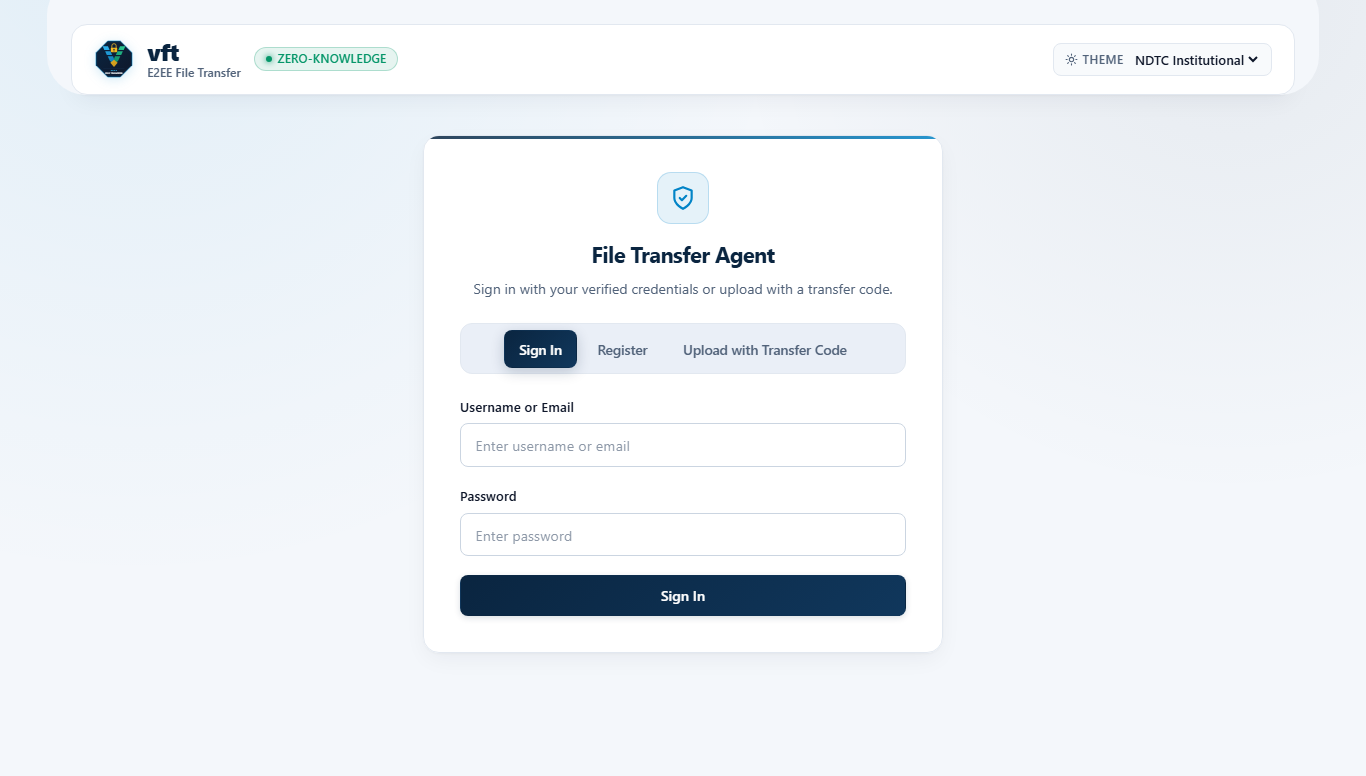
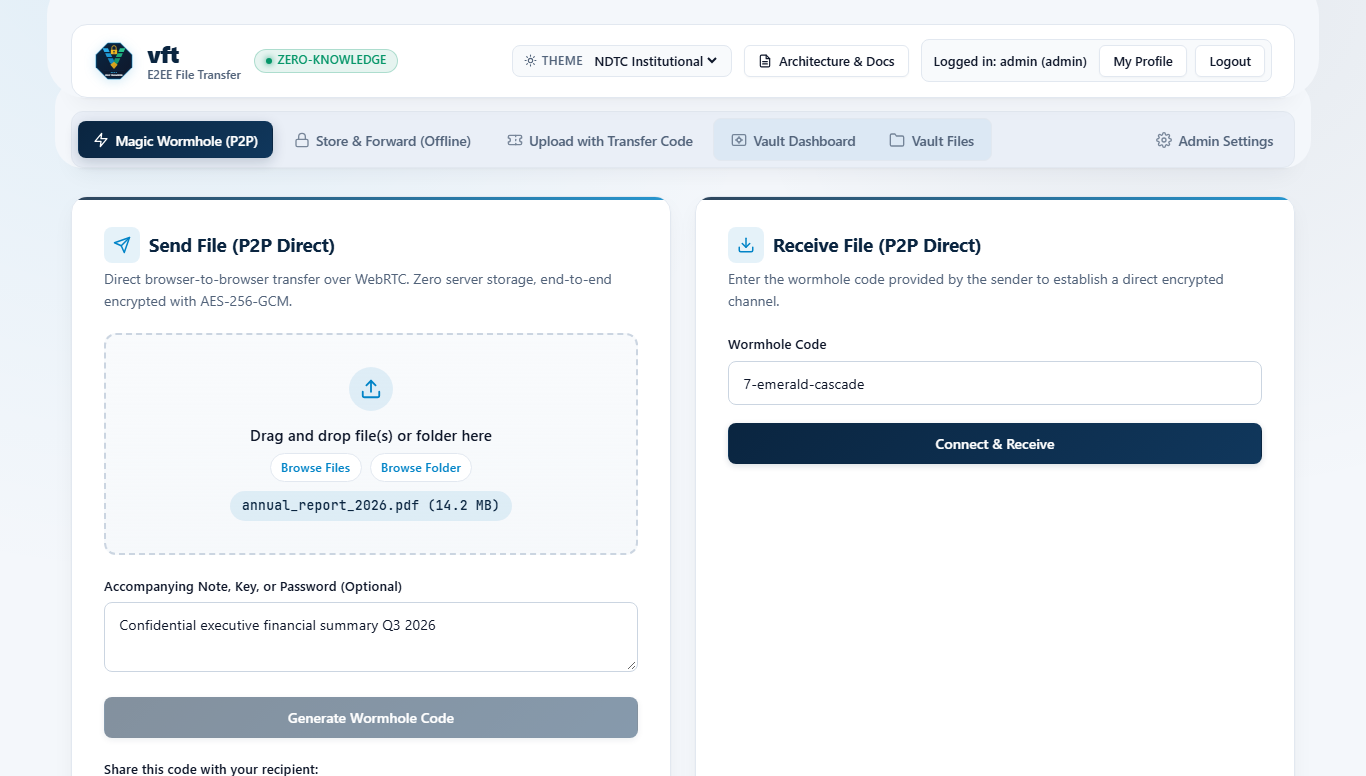
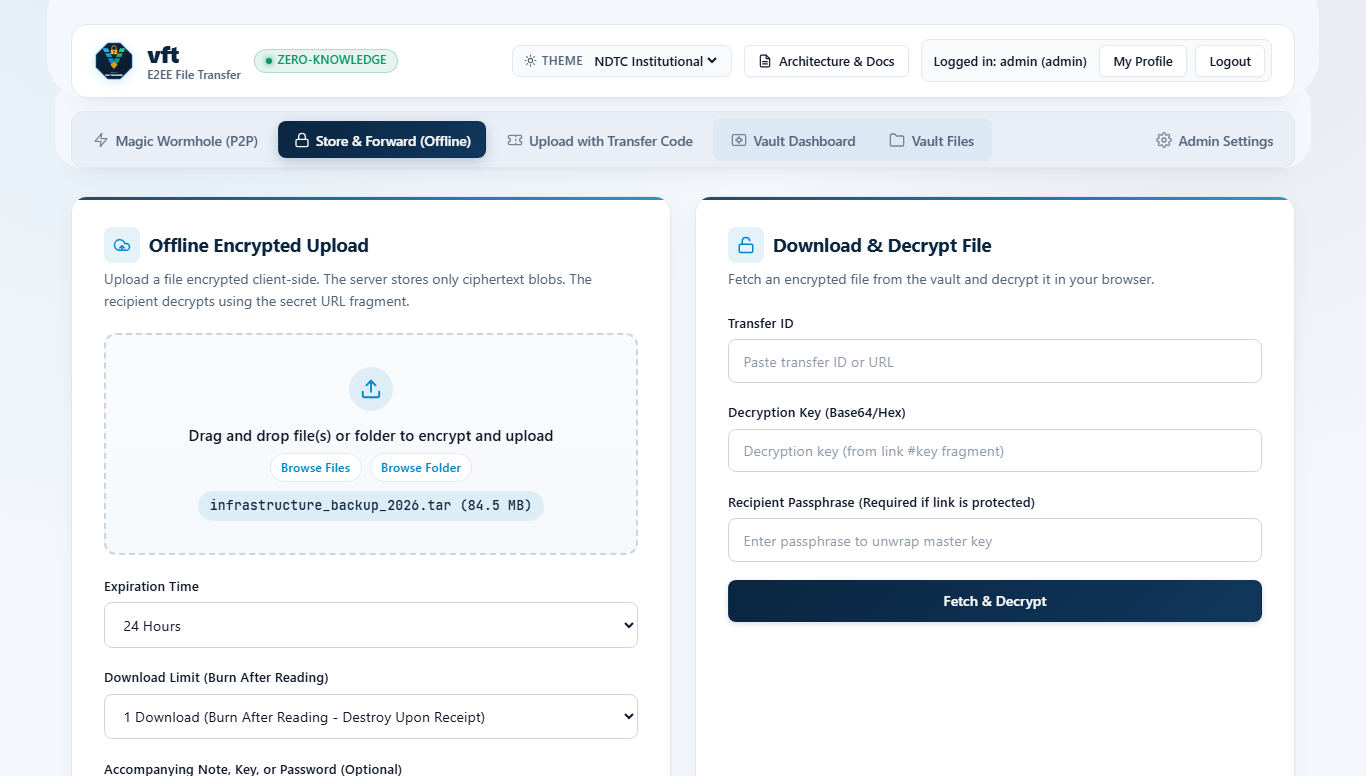
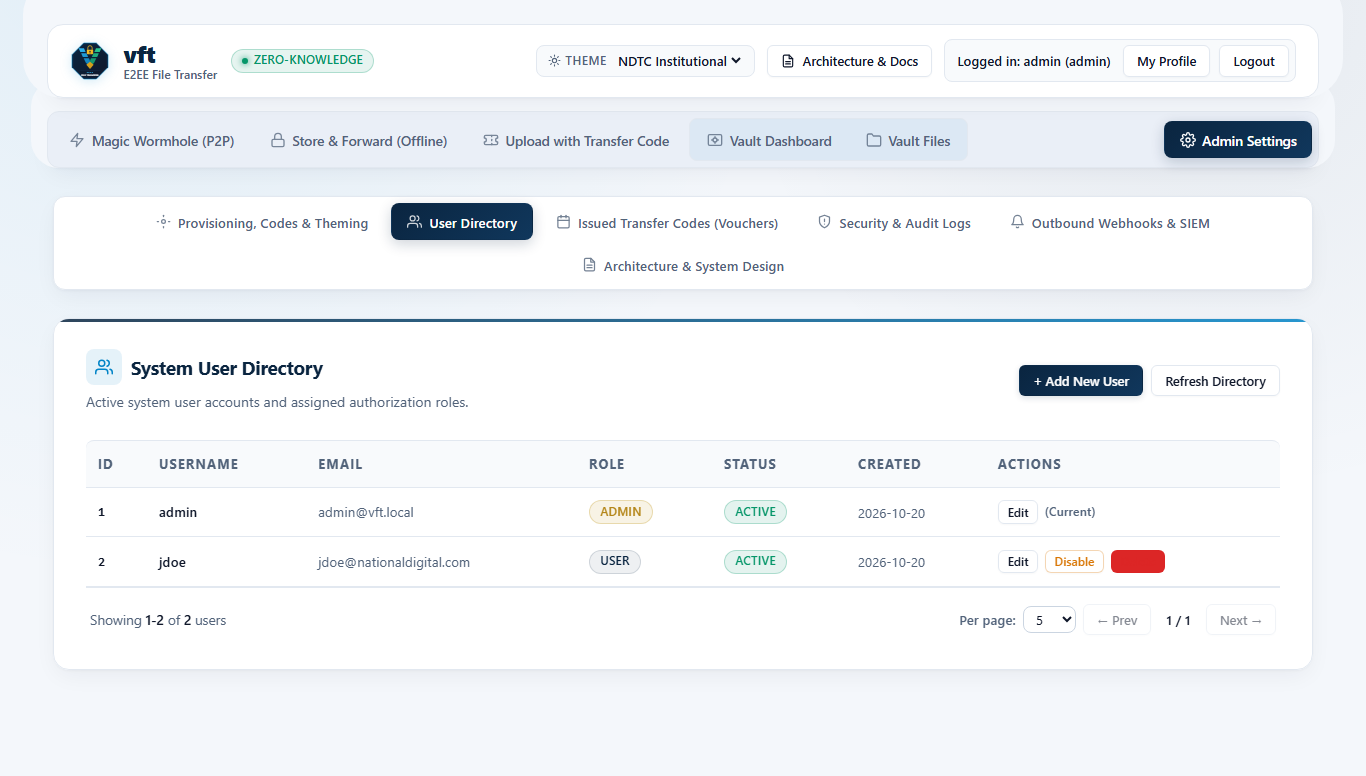
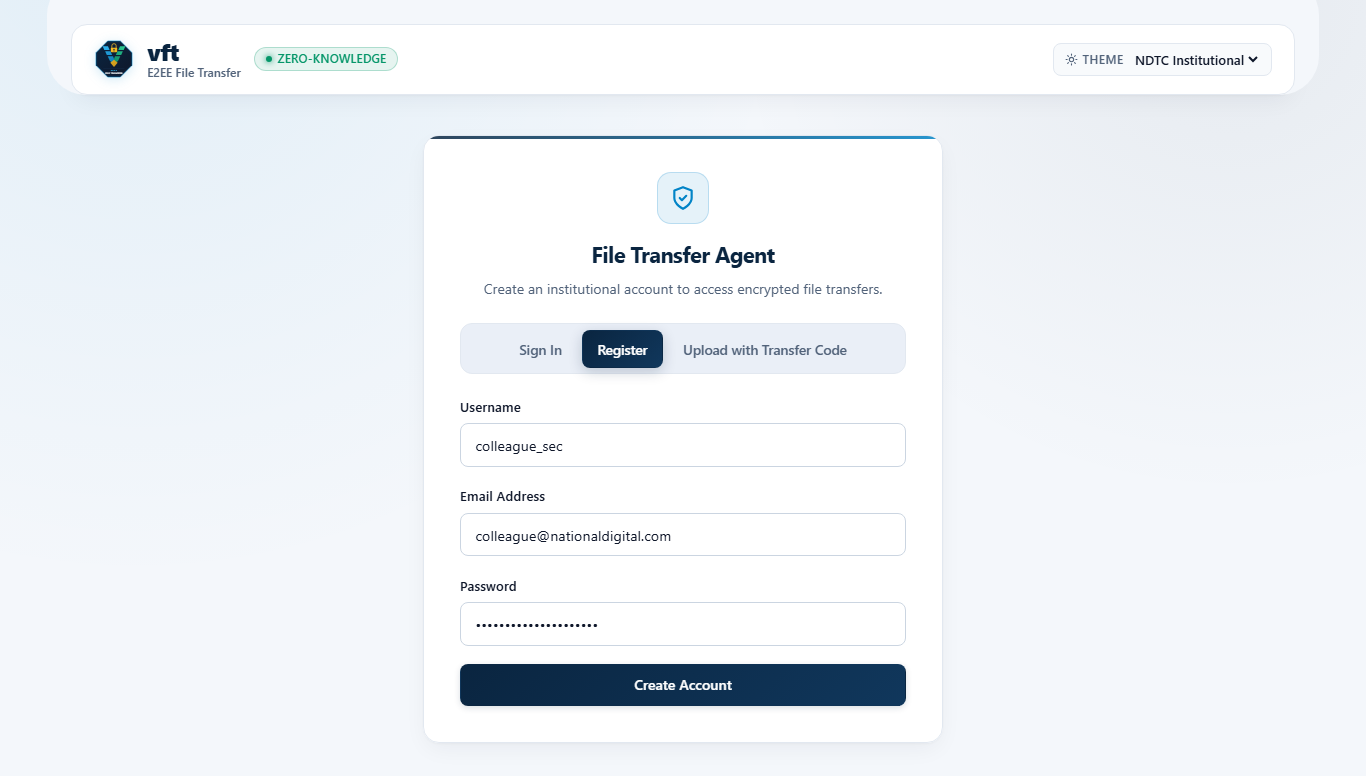
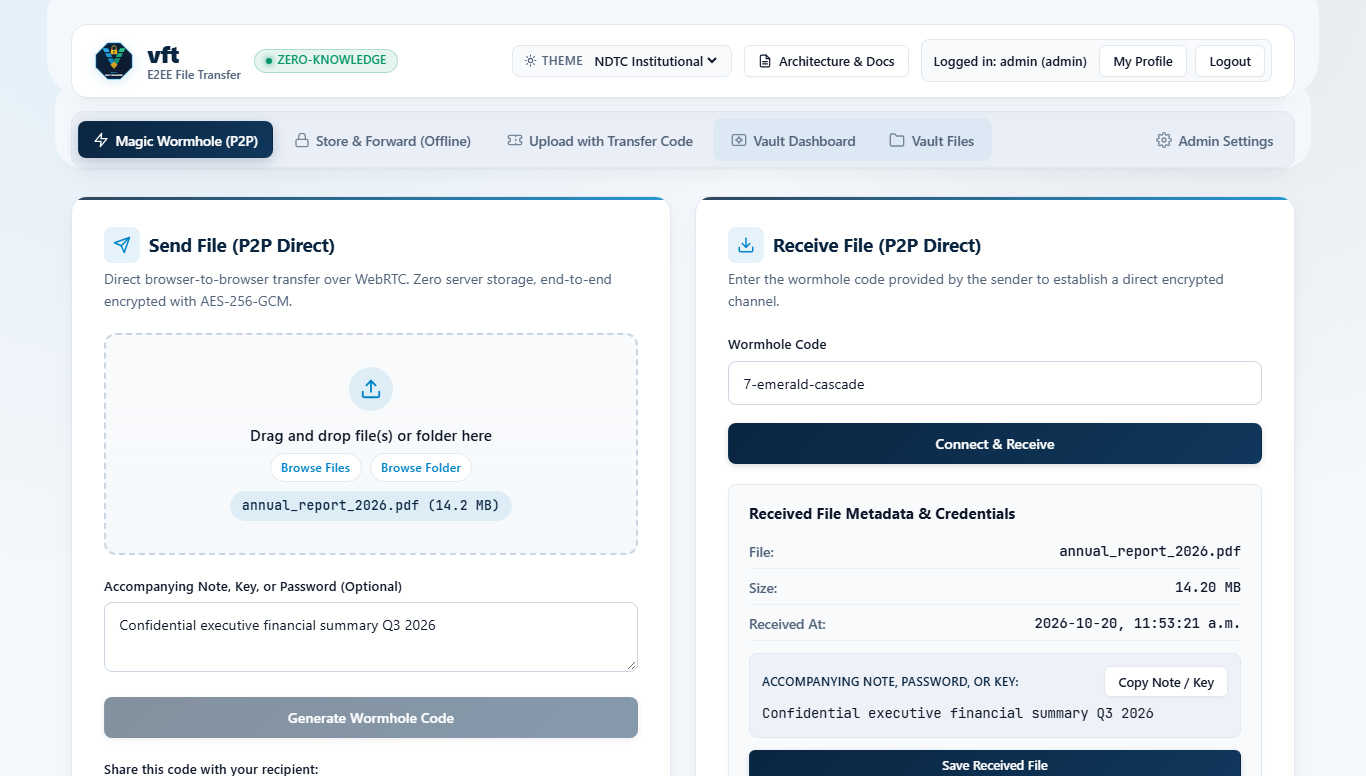
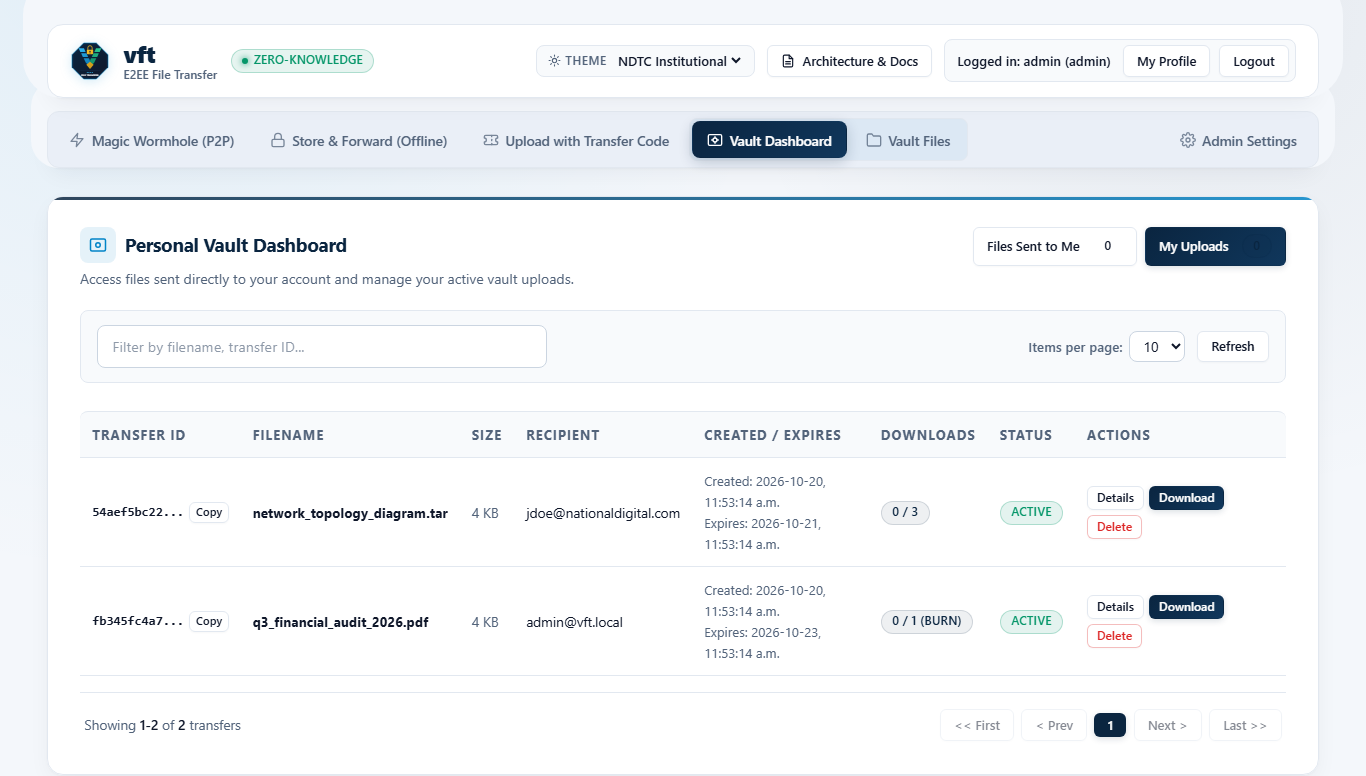
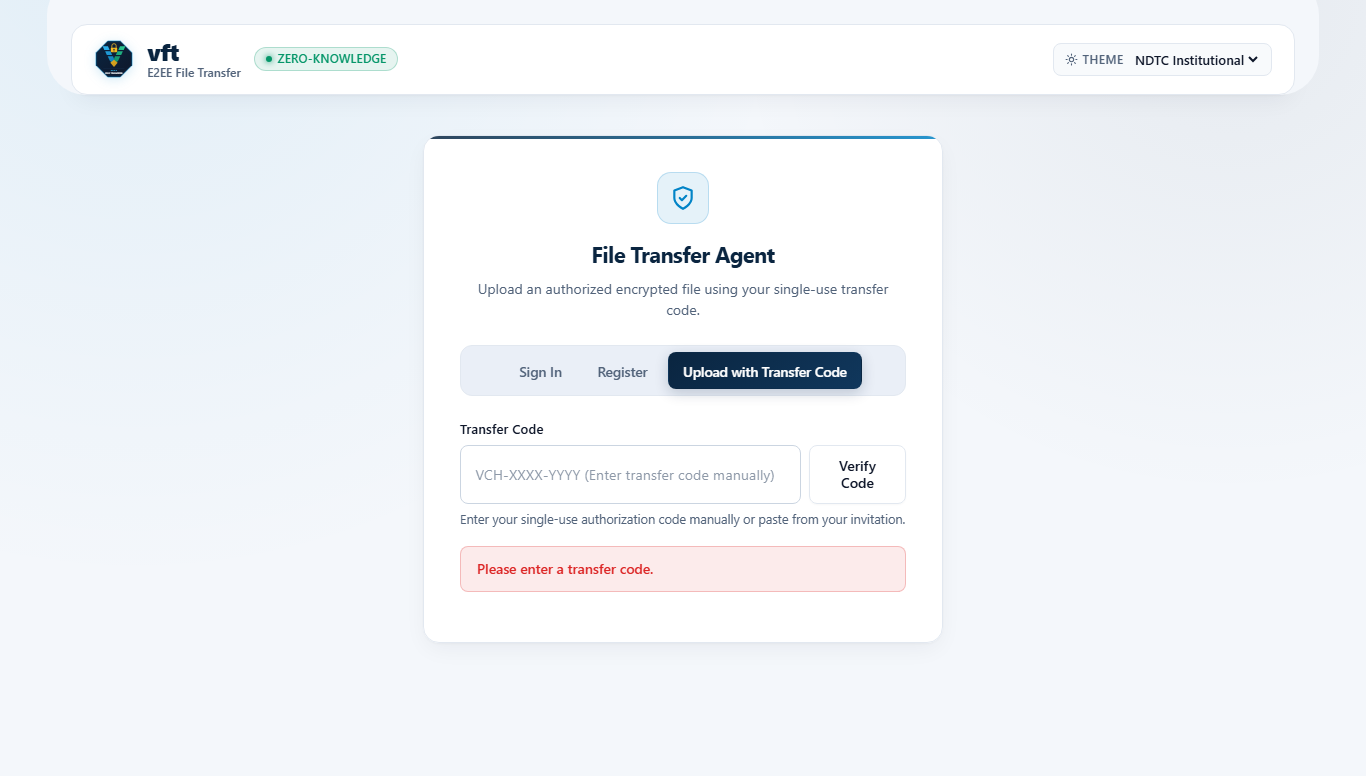
vft separates unauthenticated onboarding (/ui/auth), authenticated transfer workflows (/ui/portal), and tenant/platform governance (/ui/admin) into dedicated role-isolated web surfaces.
Master User Handbook - Consolidated single-volume edition combining all seven End-User and Administrator guides.
vft How-To Recipes & Task Workflows
This guide provides concise, task-oriented recipes for the most common vft deployment, end-user transfer, partner intake, and enterprise identity workflows.
Recipe 1: Deploy vft Behind TLS 1.3 with In-Process STUN/TURN
WebCrypto (window.crypto.subtle) and WebRTC require a Secure Context (https:// or http://localhost). For production deployments, terminate TLS 1.3 at vft directly or at a reverse proxy listed in trusted_proxies, and enable the built-in STUN/TURN server so peers behind symmetric corporate NATs connect without external coturn daemons.
Open TCP 8443 (HTTPS/WSS) and UDP/TCP 3478 (STUN/TURN) on your perimeter firewall.
Start the service (vft -config ./config/config.json) and confirm /api/v1/config advertises your iceServers list to authenticated clients.
Recipe 2: Register an Account & Enroll TOTP Multi-Factor Authentication
Navigate to https://transfer.example.org/ui/auth and select Create Account (when self-registration is enabled by your tenant administrator) or sign in via enterprise SSO.
After signing in to /ui/portal, open the Security & MFA tab.
Click Generate TOTP Secret to render an ISO 18004 QR code inside your browser, scan it with an RFC 6238 authenticator app (1Password, Ente Auth, Google Authenticator, or YubiKey Authenticator), and submit the 6-digit verification code.
Recipe 3: Stream a Live Peer-to-Peer File via Split-Key Wormhole
Use Wormhole when both sender and recipient are online and you want zero ciphertext written to server storage:
In /ui/portal, select the Wormhole (P2P) tab and drop one or more files (multi-file selections are automatically bundled into an in-browser USTAR TAR stream).
vft allocates an opaque room_id on the server while generating a 256-bit secret after # locally in your browser, displaying a shareable link formatted as:
Send the full link (or Wormhole code) to your recipient over chat or signal.
When the recipient opens the link, the browser negotiates a direct RTCDataChannel encrypted with both DTLS-SRTP and application-layer AES-256-GCM chunks.
Automatic 15-Second Fallback: If strict corporate proxies block both direct UDP and TURN port 3478, the 15-second ICE watchdog automatically transitions the transfer into a single-download Encrypted Vault stream using the exact same client-side key.
Recipe 4: Upload a Burn-After-Reading File with Passphrase Wrapping
Use the Encrypted Vault when the recipient is in another time zone or offline:
Open /ui/portal -> Encrypted Vault, select your file(s), set Expiration to 24 Hours, and set Max Downloads to 1 (Burn After Reading).
Optionally enter a Recipient Passphrase. Your browser derives a 256-bit Key Encryption Key via PBKDF2-HMAC-SHA256 (210,000 iterations) and wraps the random file key before streaming 5 MB VFT1 chunks to the server.
Share the generated URL via email and communicate the passphrase out-of-band. Immediately after the recipient completes their single verified download, vft atomically purges the ciphertext from disk or S3.
Recipe 5: Issue a Single-Use Voucher for External Partner Intake
Allow an external vendor, client, or auditor to send you an encrypted file without creating a corporate user account:
In /ui/portal (or /ui/admin -> Vouchers), click Generate Guest Voucher, choose an expiration window (for example 72h) and maximum upload size (for example 2 GB), and copy the invitation link:
When the guest opens the link, their browser redeems the voucher atomically upon upload, encrypts the file client-side wrapped to your enrolled ECDH P-256 public key, and deposits it directly into your Incoming Vault queue.
Recipe 6: Connect Okta or Microsoft Entra ID via SAML 2.0 & SCIM 2.0
Retrieve Service Provider metadata from https://transfer.example.org/api/v1/auth/saml/metadata.
In Okta or Microsoft Entra ID, configure the Assertion Consumer Service (ACS) URL as https://transfer.example.org/api/v1/auth/saml/acs and export the Identity Provider X.509 signing certificate PEM.
Configure your IdP SCIM 2.0 connector base URL to https://transfer.example.org/scim/v2 with the configured Bearer token. Deprovisioning a user in Okta or Entra ID (active: false) immediately revokes all active vft sessions for that user.
vft End-User Guide
This manual covers every workflow available to authenticated employees and external guests inside vft: signing in, streaming live Split-Key WebRTC P2P Wormhole transfers, storing asynchronous Zero-Knowledge Encrypted Vault packages, sending zero-link drops via ECDH P-256 Colleague Pickup, redeeming Guest Vouchers, and managing TOTP MFA and profile keys.
1. Signing In & Navigating the Portal
When you open a vft instance in a modern browser (Chromium, Firefox, Edge, or Safari), you arrive at the role-isolated authentication gate (/ui/auth).
1.1 Supported Sign-In Methods
Local Credentials + TOTP MFA: Enter your username/email and password. Accounts with Multi-Factor Authentication enabled prompt for a 6-digit RFC 6238 TOTP code before issuing an HttpOnly, SameSite=Strict session token.
Enterprise Single Sign-On (OIDC / SAML 2.0): Click Sign In with Enterprise SSO to authenticate through Okta, Microsoft Entra ID, Keycloak, Ping Identity, or vwarden.
Self-Registration (When Permitted by Tenant Policy): Organizations that enable self-service onboarding allow new teammates to register directly on /ui/auth.
Guest Voucher Redemption: External guests without corporate accounts click Have a Guest Voucher? (or follow a ?voucher=VCH-... invitation link) to unlock a single-use encrypted upload session.
2. Split-Key WebRTC Peer-to-Peer Wormhole
Magic Wormhole transfers stream encrypted data directly from the sender's browser to the receiver's browser over a WebRTC RTCDataChannel, bypassing server disk and cloud object storage completely.
2.1 How Split-Key Isolation Protects Live Transfers
Every Wormhole session mints a two-part coordinate:
TEXT
https://transfer.example.org/ui/portal?wormhole=rm_84a91c02f7b14e2d#k_7Qp9LmN4xV8zR2wT6yB1cF5hJ0sK3dG8aE4uW9iP2oY
                                                |---- Server ----| |----------- Browser Only (#fragment) -----------|
Public Routing Half (<room_id>): Sent to /api/v1/wormhole/* solely so the two peers can find each other's encrypted WebRTC SDP offers, answers, and ICE candidates.
Secret Cryptographic Half (#<key>): Kept strictly after the URL # fragment. Per RFC 3986, browsers never transmit URL fragments in HTTP requests or Referer headers. Both browsers use HKDF-SHA256 on #<key> to encrypt signaling messages and authenticate 64 KiB AES-256-GCM payload chunks inside the DataChannel.
2.2 Sending Files via Wormhole
Open /ui/portal and choose Wormhole (Live P2P).
Drag and drop a single large file or multiple files/directories (automatically streamed as an in-browser USTAR .tar bundle without buffering the full archive in memory).
Copy the generated Wormhole URL or QR/token and share it with your recipient. Keep your browser tab open while streaming completes.
2.3 Receiving Files via Wormhole & 15-Second Vault Fallback
Open the Wormhole link shared by the sender.
Your browser verifies the encrypted SDP handshake and streams verified chunks directly to your downloads folder.
Use the Encrypted Vault when recipients are offline, when distributing an artifact to multiple authorized downloaders, or when uploading from vft-cli in automated pipelines.
3.1 Uploading to the Vault
Select Encrypted Vault in /ui/portal and attach one or more files.
Configure retention and access controls:
Retention TTL: Choose how long ciphertext remains available (for example 1 Hour, 24 Hours, 7 Days, up to your tenant policy ceiling).
Download Burn Limit: Set Max Downloads = 1 for strict Burn-After-Reading destruction, or allow multiple downloads within the TTL window.
Optional Passphrase Protection: Add a human passphrase to wrap the random 256-bit Content Encryption Key using PBKDF2-HMAC-SHA256 (210,000 iterations).
Click Encrypt & Upload. Your browser slices the file into 5 MB plaintext frames, encrypts each frame with AES-256-GCM binding the sequence index and final-frame marker into Additional Authenticated Data (AAD), and uploads ciphertext with resumable chunk retries.
3.2 Managing Active Vault Transfers
The Active Vault Transfers table displays your uploaded items, remaining download quotas, expiration countdowns, and incoming colleague or guest drops. Because filenames are encrypted inside the VFT1 header, the server stores only opaque transfer UUIDs. You can revoke and permanently delete any active transfer with one click.
Sharing decryption links over email or Slack leaves URLs in chat history. Colleague Pickup eliminates out-of-band links altogether when sending files to registered coworkers:
One-Time Key Enrollment: In /ui/portal -> Profile, generate or unlock your ECDH P-256 identity keypair. Your public key is published to your tenant directory while your private key is encrypted client-side with your passphrase (AES-256-GCM via PBKDF2) before backup storage.
Sending to a Colleague: On the Encrypted Vault upload card, enter your colleague's username or corporate email in the Target Recipient field.
Ephemeral Key Agreement: Your browser fetches the recipient's enrolled P-256 public key, generates a single-use ephemeral P-256 keypair, derives a shared secret via ECDH + HKDF-SHA256 (ecdh-p256-v1), and wraps the transfer's 256-bit Content Encryption Key (X-Recipient-Wrapped-Key).
Recipient Pickup: The file appears automatically in the recipient's Incoming Drops queue. Unlocking their profile key unwraps the file key and streams verified plaintext locally.
5. External Guest Voucher Gate
When an external client, outside counsel, or partner needs to deliver sensitive records into your organization:
Generate a single-use voucher (VCH-XXXX-XXXX-XXXX-XXXX-XXXX) from /ui/portal or receive one from an administrator.
When the external guest opens /ui/auth?voucher=VCH-... (or enters the code on the Voucher Gate screen), they gain scoped permission to perform a single client-encrypted upload within the voucher's byte cap and expiration deadline.
Once redeemed, the voucher transitions atomically to redeemed and cannot be reused, replayed, or raced across concurrent connections.
6. User Profile, Key Backup & Multi-Factor Authentication
6.1 Profile & Cryptographic Key Custody
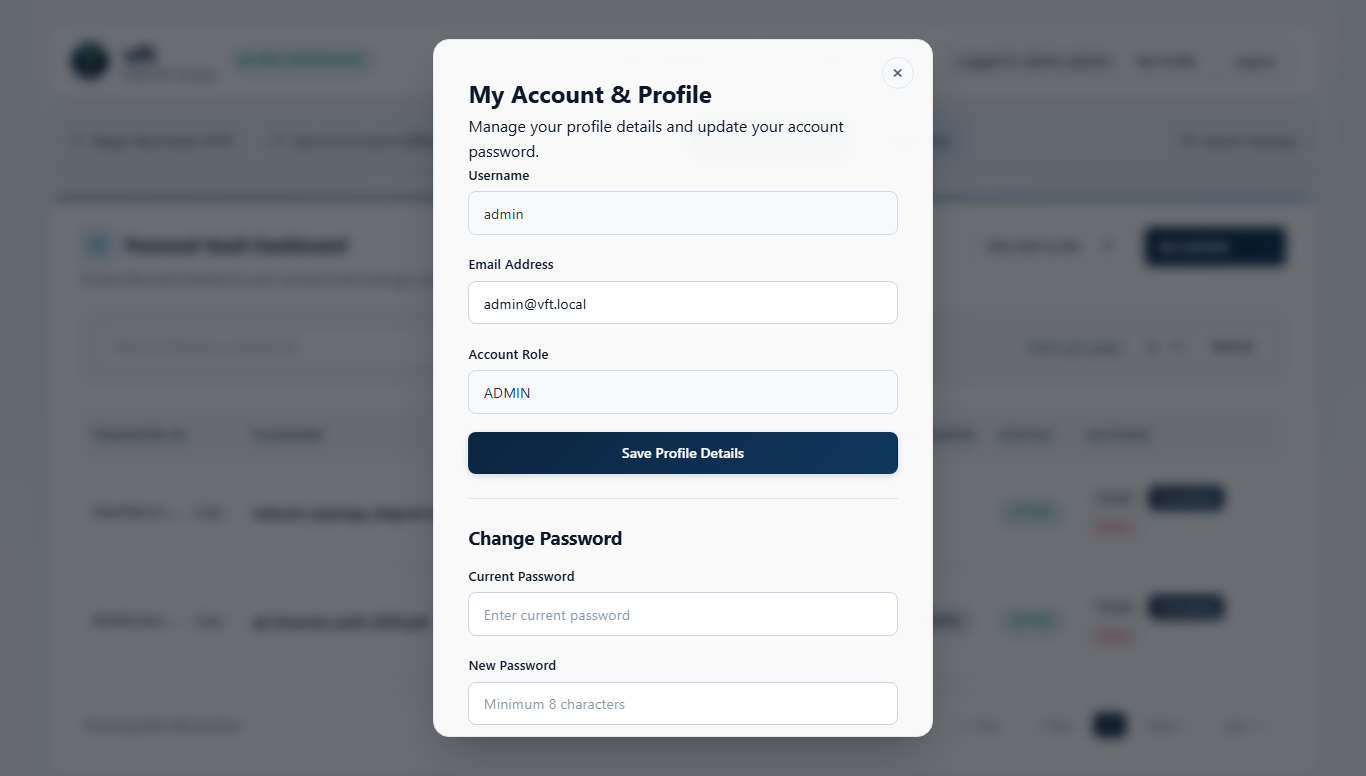
The User Profile view displays your tenant membership, role, storage consumption against quota, password rotation controls, and ECDH P-256 public key fingerprint.
6.2 TOTP Multi-Factor Authentication
Navigate to Security & MFA to enroll, verify, or rotate RFC 6238 Time-Based One-Time Passwords (SHA-1, 6 digits, 30-second step, +-1 window skew tolerance).
If your device is lost, contact a tenant administrator to verify your identity out-of-band and trigger an audited MFA reset.
vft Administrator Guide
This manual equips platform engineers, tenant administrators, and security operations teams to govern vft across multi-tenant organizations, user directories, voucher policies, federated OIDC / SAML 2.0 / SCIM 2.0 lifecycles, vault retention quotas, offline Ed25519 licensing, SIEM audit pipelines, and Prometheus observability.
vft supports strict multi-tenancy across both single-node SQLite WAL appliances and clustered PostgreSQL high-availability deployments. Every user, session, transfer, voucher, webhook, and audit event is bound to an integer tenant_id enforced at the query predicate layer.
1.1 Four-Tier Tenant Resolution Order
Incoming HTTP and API requests resolve their active tenant deterministically in the following order:
Authenticated Session Context: Bound to the signed-in user's tenant_id (Global Platform Admins can scope explicit management calls via X-Tenant-ID).
Explicit Header (X-Tenant-ID): Accepts numeric ID or normalized tenant slug for headless CLI and API integrations.
Subdomain Routing (https://{slug}.transfer.example.org): Maps custom vanity subdomains directly to tenant workspaces and branding palettes.
Query Parameter (?tenant={slug}): Supports IdP-initiated SSO links and guest voucher landing URLs, falling back to Default Tenant 1 when unset.
1.2 Managing Users, Roles & Account Status
Open /ui/admin -> Users to inspect directory members, create local accounts, assign roles (user, tenant_admin, admin), reset MFA enrollments, or suspend accounts. Suspending or disabling an account revokes all active browser and CLI sessions immediately.
2. Guest Voucher Governance & Abuse Policies
Administrators control external guest intake from /ui/admin -> Vouchers:
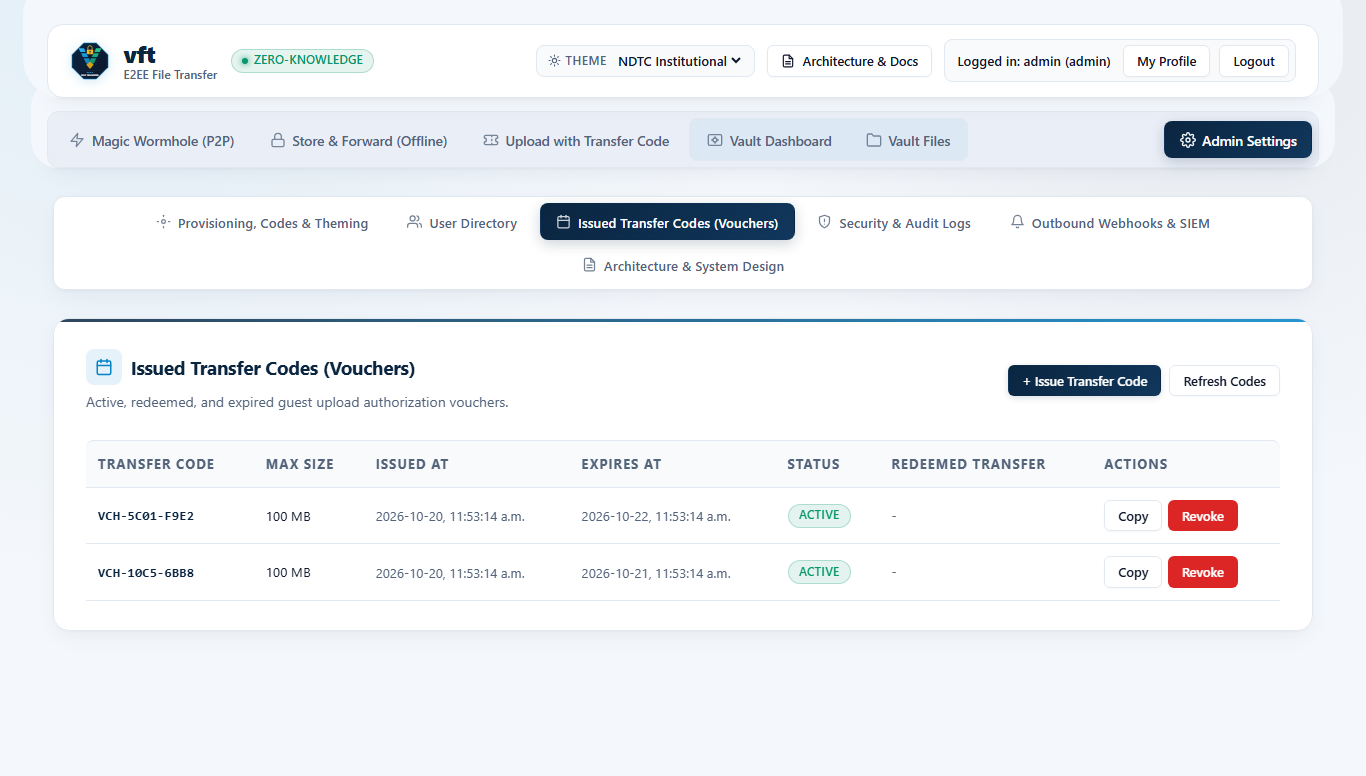
Batch & Targeted Issuance: Mint single-use 80-bit CSPRNG vouchers (VCH-XXXX-XXXX-XXXX-XXXX-XXXX) pinned to specific byte limits, TTLs, and optional target recipient inboxes.
Real-Time Status Tracking: Inspect active, redeemed, expired, and revoked vouchers along with redeemer IP addresses and resulting transfer IDs.
Instant Revocation: Revoke any unredeemed voucher immediately if an invitation link was sent to an unintended address.
Configure auth.oidc in config.json (issuer discovery URL, client_id, client_secret, redirect_uri, and group-to-role claim mappings) to delegate login to any OIDC-compliant Identity Provider with PKCE (S256) state protection.
3.2 Hardened SAML 2.0 Service Provider
vft includes a zero-dependency SAML 2.0 Service Provider (/api/v1/auth/saml/login, /api/v1/auth/saml/acs, /api/v1/auth/saml/metadata) engineered specifically against enterprise SSO pitfalls:
Strict X.509 RSA-SHA256 XML-DSig Verification: Validates assertion signatures directly against the pinned IdP certificate.
XML Signature Wrapping (XSW) Defense: Enforces canonical ID uniqueness and verifies that the signed element matches the exact assertion evaluated for identity claims.
Replay & Clock-Skew Enforcement: Validates InResponseTo, AudienceRestriction, NotBefore, and NotOnOrAfter windows, recording consumed assertion IDs so captured SAML responses cannot be replayed.
Just-In-Time (JIT) Provisioning: Automatically provisions or updates user attributes (email, display_name, role) within the mapped tenant on login.
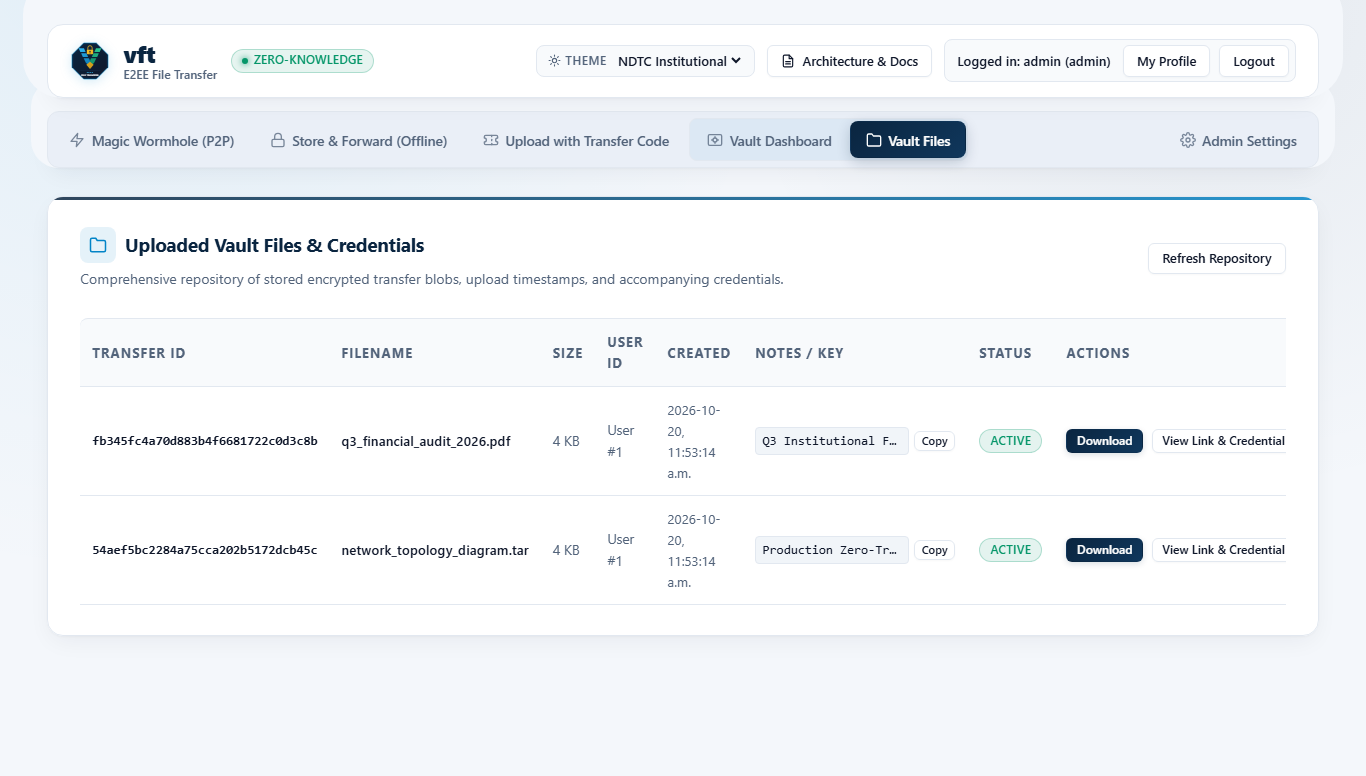
From /ui/admin -> Vault Repository, administrators inspect aggregate ciphertext storage consumption, active transfer counts, TTL distributions, and burn-after-reading queues without ever accessing plaintext filenames or file contents.
Quota Enforcement: Enforces per-file ceilings (max_file_size_bytes), per-user storage caps, and tenant-wide byte quotas (backed by license tier entitlements).
Storage Backends: Choose local POSIX/NTFS filesystems (storage.backend = "local") or AWS SigV4-authenticated object storage (storage.backend = "s3" compatible with AWS S3, MinIO, Ceph RGW, and Cloudian).
Background Garbage Collection: An automated reaper sweeps expired vault objects, abandoned multipart chunk uploads, and stale wormhole signaling rooms on a configurable interval.
Pro + Multi-Tenancy, SAML 2.0, SCIM 2.0, PostgreSQL HA, RFC 5424 SIEM Syslog, Custom Branding
Inspect active license health via GET /api/v1/admin/license or upload an updated vft.lic file without downtime. Expired licenses provide a configurable 30-day administrative grace banner before restricting new uploads.
Every authentication attempt, MFA verification, voucher creation/redemption, wormhole room allocation, vault upload/download/purge, SCIM lifecycle change, and admin action generates a structured audit record across three simultaneous sinks:
Tenant-Scoped Database Table (audit_logs): Searchable and filterable by action, actor, status, and date range in /ui/admin -> Audit Logs and GET /api/v1/admin/audit.
Rotating Local Audit Files: Size-rotated JSON Lines files on disk for local forensic retention.
Real-Time RFC 5424 Syslog & SIEM Collectors: Streams structured events over UDP/TCP to Splunk, Elastic, QRadar, Sentinel, or Datadog, alongside signed HMAC-SHA256 (X-VFT-Signature) outbound webhooks and Slack Block Kit notifications.
7. Prometheus & OpenMetrics Observability
Enable metrics.enabled = true to expose thread-safe OpenMetrics counters and gauges at GET /metrics (optionally gated by require_admin or internal scrape network ACLs):
vft_http_requests_total{status="..."} - HTTP status class distribution (2xx, 4xx, 5xx).
vft includes built-in SQLite WAL-safe online backups (VACUUM INTO), versioned schema_migrations (v1–v3), and safe database re-initialization via both /ui/admin and the vft db CLI:
Admin Console (/ui/admin): The Database Backups & Schema Migrations card displays current schema status (v3/3), database size, and recent .db backup archives, with one-click Run Migrations and Backup Database Now controls.
BASH
# Inspect schema version, pending migrations, and stored backups
vft db status --db ./data/vft.db

# Create an atomic online SQLite backup under ./data/backups/
vft db backup --db ./data/vft.db

# Apply pending schema migrations idempotently
vft db migrate --db ./data/vft.db

# Re-initialize a clean database (creates a safety backup first; --keep-admin preserves admin accounts)
vft db reinit --keep-admin --yes --db ./data/vft.db
vft Operations, Deployment Topologies & Enterprise Use Cases
This guide presents production deployment architectures (systemd, Docker Compose, and Kubernetes High Availability) alongside concrete operational playbooks for enterprise large-artifact transfers, regulated healthcare/financial intake, air-gapped sovereign networks, and automated CI/CD artifact delivery.
Security incident responders and hardware engineering teams routinely move 10 GB to 100 GB memory dumps, packet captures, and firmware images that exceed email, chat, and ticketing limits:
Live Peer-to-Peer Mode: Analysts open a Split-Key WebRTC Wormhole (<room_id>#<key>) to stream multi-gigabyte captures directly workstation-to-workstation at wire speed with zero server disk usage and zero cloud egress charges.
Resumable Store-and-Forward Mode: When transferring across continents asynchronously, vft-cli upload --chunked --burn streams 5 MB AES-256-GCM authenticated frames to S3 or local NVMe storage, allowing recipients to resume interrupted downloads via RFC 7233 HTTP Range requests.
Hospitals, M&A advisory practices, wealth managers, and outside legal counsel must receive Protected Health Information (PHI) or material non-public financial records from external clients without provisioning corporate directory accounts:
Staff issue a single-use 80-bit CSPRNG voucher (VCH-XXXX-XXXX-XXXX-XXXX-XXXX) pinned to their own ECDH P-256 recipient public key.
External clients open /ui/auth?voucher=VCH-... and drop diagnostic imaging or closing binders into the browser.
Encryption happens strictly inside the external client's browser using WebCrypto (VFT1 + ECDH P-256 key wrapping). Even if the DMZ reverse proxy or storage bucket were inspected, neither plaintext filenames nor PHI/PII bytes ever exist on the server.
Every voucher creation, redemption IP, and recipient pickup is recorded in the 3-tier RFC 5424 SIEM audit log.
1.3 Air-Gapped & Sovereign Lab Deployments
Defense laboratories and industrial control networks without internet egress run vft as a single static binary:
Zero External Runtime Dependencies: No Node, JVM, Python, PHP, or Redis daemons required.
Self-Contained Web Assets & STUN/TURN: All UI scripts, styles, icons, and the RFC 5389/5766 STUN/TURN server run inside the single vft process.
Offline Ed25519 Entitlements: Institutional licenses (vft.lic) are minted offline via vft-license-gen and verified locally with zero outbound network traffic.
Build pipelines encrypt release binaries, SBOMs, or customer-specific diagnostic bundles inside GitHub Actions, GitLab CI, or Jenkins and route them directly to a customer or release engineer:
BASH
# Run from the vft product root with bash
set -euo pipefail

export VFT_URL="https://transfer.example.org"
export VFT_TOKEN="${CI_VFT_SERVICE_TOKEN}"

# Encrypt artifact locally with VFT1 AEAD + recipient passphrase wrap and burn-after-reading
SHARE_URL="$(vft-cli upload ./dist/firmware-signed.bin \
  --ttl 48 \
  --burn \
  --chunked \
  --recipient release-ops@example.org \
  --passphrase "${RELEASE_WRAP_PASSPHRASE}" \
  --notes "Build ${CI_PIPELINE_ID}")"

echo "Encrypted artifact queued for release-ops@example.org"
2. Production Deployment Architectures
2.1 Hardened Single-Node Linux Appliance (systemd + SQLite WAL)
Create an unprivileged service account and isolated directories:
Because vft persists Wormhole signaling rooms, sessions, vouchers, and transfer metadata in PostgreSQL (db.provider = "postgres") and streams ciphertext blobs to S3/MinIO via pure AWS SigV4 Multipart Upload (storage.provider = "s3", bounded 8 MiB parts with automatic abort on failure), multiple vft replicas scale horizontally behind Kubernetes Ingress or any Layer-7 TLS load balancer without Redis clusters. The production Helm chart (v2.0.0) enables cookie-based sticky sessions (ingress.stickySessions.enabled: true) to keep multi-chunk uploads pinned to the initiating replica, and provides secrets.existingSecret (for GitOps/ExternalSecrets), startupProbe + readinessProbe (/api/v1/ready), PodDisruptionBudget, NetworkPolicy, strategy: Recreate for RWO volumes, and SIGTERM graceful draining (VFT_SHUTDOWN_DRAIN_SECONDS).
SQLite WAL Online Backup: Use sqlite3 ./data/vft.db ".backup './backups/vft-snapshot.db'" so WAL readers/writers are never corrupted by filesystem copy races.
Session Secret Rotation: Rotating VFT_SESSION_SECRET cleanly invalidates all active browser cookies without affecting any stored VFT1 ciphertext envelopes or ECDH P-256 user keys.
Health, Readiness & Graceful Drain: Point Kubernetes startupProbe and livenessProbe at GET /api/v1/health and readinessProbe at GET /api/v1/ready (executes a live database SELECT 1 ping and returns HTTP 503 during database outage or SIGTERM/SIGINT graceful shutdown draining).
vft Configuration, CLI & API Reference
This reference documents all config.json fields, VFT_* environment variable overrides, command-line interfaces (vft, vft-cli, and vft-license-gen), and REST / SCIM 2.0 / OpenAPI endpoints.
1. Configuration Resolution Order
vft loads configuration in the following precedence order (highest priority last, overriding earlier values):
JSON configuration file specified via --config <path> / -c <path>, VFT_CONFIG, or ./config.json. If an explicitly specified --config or VFT_CONFIG file is missing, unreadable, or invalid JSON, vft fails fast on startup.
The complete machine-readable OpenAPI 3.1.0 specification is served to authenticated administrators at GET /api/v1/openapi.json (and GET /openapi.json).
Method & Route
Auth Scope
Purpose
GET /api/v1/health
Public
Liveness probe ({"status":"ok"}).
GET /api/v1/ready
Public
Database connectivity readiness probe (200 vs 503).
GET /api/v1/config
Public / User
Public limits, SSO flags, STUN servers, and ephemeral TURN credentials.
GET /metrics
Configurable
Prometheus / OpenMetrics exposition (public, authenticated, or admin).
POST /api/v1/auth/login
Public
Local username/password (+ optional TOTP) authentication.
POST /api/v1/auth/mfa/setup & verify
User
RFC 6238 TOTP enrollment and activation.
GET /api/v1/auth/saml/metadata & POST /acs
Public
SAML 2.0 Service Provider metadata and Assertion Consumer Service.
POST /api/v1/upload & /api/v1/chunks/*
User / Voucher
Streaming VFT1 ciphertext upload and resumable multipart assembly.
GET /api/v1/download/:id
Authorized
Streaming ciphertext download supporting RFC 7233 Range (206 Partial Content).
POST /api/v1/vouchers & /redeem
User / Guest
Single-use 80-bit CSPRNG guest voucher issuance and atomic redemption.
POST /api/v1/wormhole/create & /:room/*
User / Voucher
Blind <room_id> allocation and AEAD-encrypted SDP/ICE signaling exchange.
GET / POST / PATCH / DELETE /scim/v2/Users*
SCIM Bearer
RFC 7643 / RFC 7644 automated user provisioning and instant session revocation.
GET /api/v1/admin/users, /vouchers, /audit
Admin
Tenant-isolated directory, voucher, vault, and security audit management.
GET /docs & GET /api/v1/openapi.json
Admin
Interactive HTML documentation and OpenAPI 3.1.0 specification.
vft is engineered around a strict O(1) bounded-memory streaming pipeline so a tiny single-core virtual machine or edge appliance can broker multi-gigabyte encrypted transfers across hundreds of concurrent connections without garbage-collection pauses or Out-Of-Memory (OOM) spikes.
1. Constant 64 KB Server RAM Streaming Profile
Traditional web frameworks buffer multipart file uploads or object-storage downloads in heap memory before flushing to disk, causing a single 10 GB upload to consume gigabytes of RAM. vft eliminates full-payload buffering at every stage:
Pipeline Stage
Buffer Geometry
Memory Complexity
Architectural Mechanism
Socket Ingress -> Local Vault
64 KiB (65,536 bytes)
O(1) per active stream
Reads socket frames into a reusable 64 KiB buffer and flushes sequentially to disk file descriptors.
Socket Ingress -> S3 / MinIO
64 KiB socket + streaming parts
O(1) bounded per stream
Signs chunks via pure AWS SigV4 streaming without materializing full files on local disk.
Local/S3 Vault -> HTTP Egress
64 KiB (65,536 bytes)
O(1) per active stream
Supports RFC 7233 Range: bytes=start-end (206 Partial Content / 416 Range Not Satisfiable) via fseek + bounded 64 KiB socket writes.
WebRTC Wormhole Signaling
< 8 KiB SDP/ICE envelope
O(1) per room
Server never touches file payload bytes during direct RTCDataChannel transfers.
Idle Process Resident Set (RSS)
~14 MB - 24 MB RSS
Static
Native compiled machine code with sub-50 ms cold startup time.
Both the browser WebCrypto engine and vft-cli segment arbitrarily large files into 5 MiB (5,242,880-byte) plaintext frames (VFT1), adding a 16-byte AES-256-GCM authentication tag per frame (0.0003% ciphertext overhead):
Hardware AES-NI / ARMv8 Crypto Acceleration: Modern x86_64 (AES-NI + PCLMULQDQ) and Apple Silicon / ARM64 cores sustain 1.4 GB/s to 3.2 GB/s single-core AES-256-GCM encryption/decryption in browser WebCrypto and native vft-cli pipelines.
Bounded Browser Tab Memory: Because each 5 MiB frame is encrypted, authenticated, transmitted, and released before reading the next Blob.slice() window, transferring a 50 GB archive in Chromium or Firefox keeps browser tab heap usage steady under 35 MB.
Early Fail-Fast Tag Verification: If any 5 MiB frame is corrupted in transit, the recipient detects the invalid 128-bit GCM tag within at most 5 MiB rather than waiting until a 50 GB download finishes.
3. P2P WebRTC DataChannel vs. Zero-Knowledge Vault Relay Benchmarks
Because the vft server performs zero payload encryption or decryption (all cryptography runs on client CPUs), server capacity scales primarily with network NIC bandwidth and storage IOPS:
Deployment Tier
Recommended Compute
Backing Database & Storage
Concurrent Active Streams
Typical Organizational Scale
Edge / Branch Appliance
1 vCPU, 512 MB RAM
SQLite WAL on SSD
50+ concurrent Vault / 250+ P2P rooms
Up to 50 seats
Mid-Market Enterprise
2 vCPU, 2 GB RAM
SQLite WAL or PostgreSQL + NVMe/S3
250+ concurrent Vault / 1,500+ P2P rooms
50 to 500 seats
High-Availability Cluster
2 - 4x nodes (4 vCPU, 4 GB RAM)
PostgreSQL 16 HA + AWS S3 / MinIO
1,500+ concurrent streams across pods
500 to 10,000+ seats
5. Production Telemetry & Tuning Checklist
Monitor saturation, active signaling rooms, and transfer throughput directly via GET /metrics in Prometheus and Grafana:
Linux File Descriptor Limits: Set LimitNOFILE=65536 in systemd so thousands of concurrent WebSocket/HTTP streams and TURN UDP/TCP sockets never exhaust process descriptors.
Reverse Proxy Buffering: When running Nginx or Envoy in front of vft, set proxy_request_buffering off; and proxy_buffering off; so the proxy preserves vft's end-to-end 64 KiB streaming memory profile without spooling multi-gigabyte uploads to proxy temp disks.
UDP Socket Buffers for TURN: For high-throughput TURN relaying on Linux, raise kernel UDP buffer ceilings (net.core.rmem_max=16777216, net.core.wmem_max=16777216).
Part I: vft - Zero-Knowledge End-to-End Encrypted File Transfer
vft (Verified File Transfer) is a sovereign, zero-knowledge, end-to-end encrypted file transfer platform packaged as three self-contained binaries (vft, vft-cli, and vft-license-gen). It unifies real-time Split-Key WebRTC Peer-to-Peer Wormhole streaming with an asynchronous VFT1 Encrypted Store-and-Forward Vault, ECDH P-256 Colleague Pickup, single-use Guest Voucher Gates, multi-tenant OIDC / SAML 2.0 / SCIM 2.0 enterprise identity, offline Ed25519 licensing, and three-tier RFC 5424 SIEM auditing.
1. Platform Capabilities at a Glance
Capability Domain
End-User & Operator Experience
Security & Operational Invariant
Split-Key WebRTC Wormhole
Direct browser-to-browser streaming of multi-gigabyte files and folders with zero server storage.
<room_id>#<key> split-key isolation ensures only the opaque room_id touches signaling endpoints; automatic 15-second fallback to the Encrypted Vault when strict firewalls block UDP/TURN.
Zero-Knowledge Encrypted Vault
Asynchronous Store-and-Forward uploads with configurable TTLs, max-download burn counters, and resumable transfers.
VFT1 5 MB chunked AES-256-GCM framing with Additional Authenticated Data (AAD) sequence numbers and EOF flags; constant 64 KB server socket RAM per stream.
ECDH P-256 Colleague Pickup
Select any enrolled colleague by username or email to deliver encrypted files directly to their personal inbox without exchanging links or passwords.
Issue VCH-XXXX-XXXX-XXXX-XXXX-XXXX intake codes so external counsel, auditors, or partners can upload encrypted files without directory accounts.
80-bit CSPRNG codes with atomic compare-and-swap database redemption and anti-user-enumeration HTTP responses.
Enterprise Identity & Multi-Tenancy
Local accounts with TOTP MFA alongside federated OIDC, SAML 2.0 SSO, and automated SCIM 2.0 provisioning.
Row-level tenant_id isolation across SQLite WAL and PostgreSQL HA clusters, instant session revocation on SCIM deprovisioning, and per-tenant quotas.
Interoperable Headless CLI
Automate CI/CD artifact delivery, server backups, and scripted downloads via vft-cli.
100% VFT1 cryptographic compatibility between vft-cli and the browser WebCrypto portal.
Observability, SIEM & Licensing
Real-time Prometheus /metrics, 3-tier audit logs, signed webhooks, and offline vft-license-gen entitlements.
Air-gapped Ed25519 license verification with zero external phone-home calls.
2. Visual Tour of the Portal & Admin Surfaces
vft separates unauthenticated onboarding (/ui/auth), authenticated transfer workflows (/ui/portal), and tenant/platform governance (/ui/admin) into dedicated role-isolated web surfaces.
Master User Handbook - Consolidated single-volume edition combining all seven End-User and Administrator guides.
Part II: vft How-To Recipes & Task Workflows
This guide provides concise, task-oriented recipes for the most common vft deployment, end-user transfer, partner intake, and enterprise identity workflows.
Recipe 1: Deploy vft Behind TLS 1.3 with In-Process STUN/TURN
WebCrypto (window.crypto.subtle) and WebRTC require a Secure Context (https:// or http://localhost). For production deployments, terminate TLS 1.3 at vft directly or at a reverse proxy listed in trusted_proxies, and enable the built-in STUN/TURN server so peers behind symmetric corporate NATs connect without external coturn daemons.
Open TCP 8443 (HTTPS/WSS) and UDP/TCP 3478 (STUN/TURN) on your perimeter firewall.
Start the service (vft -config ./config/config.json) and confirm /api/v1/config advertises your iceServers list to authenticated clients.
Recipe 2: Register an Account & Enroll TOTP Multi-Factor Authentication
Navigate to https://transfer.example.org/ui/auth and select Create Account (when self-registration is enabled by your tenant administrator) or sign in via enterprise SSO.
After signing in to /ui/portal, open the Security & MFA tab.
Click Generate TOTP Secret to render an ISO 18004 QR code inside your browser, scan it with an RFC 6238 authenticator app (1Password, Ente Auth, Google Authenticator, or YubiKey Authenticator), and submit the 6-digit verification code.
Recipe 3: Stream a Live Peer-to-Peer File via Split-Key Wormhole
Use Wormhole when both sender and recipient are online and you want zero ciphertext written to server storage:
In /ui/portal, select the Wormhole (P2P) tab and drop one or more files (multi-file selections are automatically bundled into an in-browser USTAR TAR stream).
vft allocates an opaque room_id on the server while generating a 256-bit secret after # locally in your browser, displaying a shareable link formatted as:
Send the full link (or Wormhole code) to your recipient over chat or signal.
When the recipient opens the link, the browser negotiates a direct RTCDataChannel encrypted with both DTLS-SRTP and application-layer AES-256-GCM chunks.
Automatic 15-Second Fallback: If strict corporate proxies block both direct UDP and TURN port 3478, the 15-second ICE watchdog automatically transitions the transfer into a single-download Encrypted Vault stream using the exact same client-side key.
Recipe 4: Upload a Burn-After-Reading File with Passphrase Wrapping
Use the Encrypted Vault when the recipient is in another time zone or offline:
Open /ui/portal -> Encrypted Vault, select your file(s), set Expiration to 24 Hours, and set Max Downloads to 1 (Burn After Reading).
Optionally enter a Recipient Passphrase. Your browser derives a 256-bit Key Encryption Key via PBKDF2-HMAC-SHA256 (210,000 iterations) and wraps the random file key before streaming 5 MB VFT1 chunks to the server.
Share the generated URL via email and communicate the passphrase out-of-band. Immediately after the recipient completes their single verified download, vft atomically purges the ciphertext from disk or S3.
Recipe 5: Issue a Single-Use Voucher for External Partner Intake
Allow an external vendor, client, or auditor to send you an encrypted file without creating a corporate user account:
In /ui/portal (or /ui/admin -> Vouchers), click Generate Guest Voucher, choose an expiration window (for example 72h) and maximum upload size (for example 2 GB), and copy the invitation link:
When the guest opens the link, their browser redeems the voucher atomically upon upload, encrypts the file client-side wrapped to your enrolled ECDH P-256 public key, and deposits it directly into your Incoming Vault queue.
Recipe 6: Connect Okta or Microsoft Entra ID via SAML 2.0 & SCIM 2.0
Retrieve Service Provider metadata from https://transfer.example.org/api/v1/auth/saml/metadata.
In Okta or Microsoft Entra ID, configure the Assertion Consumer Service (ACS) URL as https://transfer.example.org/api/v1/auth/saml/acs and export the Identity Provider X.509 signing certificate PEM.
Configure your IdP SCIM 2.0 connector base URL to https://transfer.example.org/scim/v2 with the configured Bearer token. Deprovisioning a user in Okta or Entra ID (active: false) immediately revokes all active vft sessions for that user.
Part III: vft End-User Guide
This manual covers every workflow available to authenticated employees and external guests inside vft: signing in, streaming live Split-Key WebRTC P2P Wormhole transfers, storing asynchronous Zero-Knowledge Encrypted Vault packages, sending zero-link drops via ECDH P-256 Colleague Pickup, redeeming Guest Vouchers, and managing TOTP MFA and profile keys.
1. Signing In & Navigating the Portal
When you open a vft instance in a modern browser (Chromium, Firefox, Edge, or Safari), you arrive at the role-isolated authentication gate (/ui/auth).
1.1 Supported Sign-In Methods
Local Credentials + TOTP MFA: Enter your username/email and password. Accounts with Multi-Factor Authentication enabled prompt for a 6-digit RFC 6238 TOTP code before issuing an HttpOnly, SameSite=Strict session token.
Enterprise Single Sign-On (OIDC / SAML 2.0): Click Sign In with Enterprise SSO to authenticate through Okta, Microsoft Entra ID, Keycloak, Ping Identity, or vwarden.
Self-Registration (When Permitted by Tenant Policy): Organizations that enable self-service onboarding allow new teammates to register directly on /ui/auth.
Guest Voucher Redemption: External guests without corporate accounts click Have a Guest Voucher? (or follow a ?voucher=VCH-... invitation link) to unlock a single-use encrypted upload session.
2. Split-Key WebRTC Peer-to-Peer Wormhole
Magic Wormhole transfers stream encrypted data directly from the sender's browser to the receiver's browser over a WebRTC RTCDataChannel, bypassing server disk and cloud object storage completely.
2.1 How Split-Key Isolation Protects Live Transfers
Every Wormhole session mints a two-part coordinate:
TEXT
https://transfer.example.org/ui/portal?wormhole=rm_84a91c02f7b14e2d#k_7Qp9LmN4xV8zR2wT6yB1cF5hJ0sK3dG8aE4uW9iP2oY
                                                |---- Server ----| |----------- Browser Only (#fragment) -----------|
Public Routing Half (<room_id>): Sent to /api/v1/wormhole/* solely so the two peers can find each other's encrypted WebRTC SDP offers, answers, and ICE candidates.
Secret Cryptographic Half (#<key>): Kept strictly after the URL # fragment. Per RFC 3986, browsers never transmit URL fragments in HTTP requests or Referer headers. Both browsers use HKDF-SHA256 on #<key> to encrypt signaling messages and authenticate 64 KiB AES-256-GCM payload chunks inside the DataChannel.
2.2 Sending Files via Wormhole
Open /ui/portal and choose Wormhole (Live P2P).
Drag and drop a single large file or multiple files/directories (automatically streamed as an in-browser USTAR .tar bundle without buffering the full archive in memory).
Copy the generated Wormhole URL or QR/token and share it with your recipient. Keep your browser tab open while streaming completes.
2.3 Receiving Files via Wormhole & 15-Second Vault Fallback
Open the Wormhole link shared by the sender.
Your browser verifies the encrypted SDP handshake and streams verified chunks directly to your downloads folder.
Use the Encrypted Vault when recipients are offline, when distributing an artifact to multiple authorized downloaders, or when uploading from vft-cli in automated pipelines.
3.1 Uploading to the Vault
Select Encrypted Vault in /ui/portal and attach one or more files.
Configure retention and access controls:
Retention TTL: Choose how long ciphertext remains available (for example 1 Hour, 24 Hours, 7 Days, up to your tenant policy ceiling).
Download Burn Limit: Set Max Downloads = 1 for strict Burn-After-Reading destruction, or allow multiple downloads within the TTL window.
Optional Passphrase Protection: Add a human passphrase to wrap the random 256-bit Content Encryption Key using PBKDF2-HMAC-SHA256 (210,000 iterations).
Click Encrypt & Upload. Your browser slices the file into 5 MB plaintext frames, encrypts each frame with AES-256-GCM binding the sequence index and final-frame marker into Additional Authenticated Data (AAD), and uploads ciphertext with resumable chunk retries.
3.2 Managing Active Vault Transfers
The Active Vault Transfers table displays your uploaded items, remaining download quotas, expiration countdowns, and incoming colleague or guest drops. Because filenames are encrypted inside the VFT1 header, the server stores only opaque transfer UUIDs. You can revoke and permanently delete any active transfer with one click.
Sharing decryption links over email or Slack leaves URLs in chat history. Colleague Pickup eliminates out-of-band links altogether when sending files to registered coworkers:
One-Time Key Enrollment: In /ui/portal -> Profile, generate or unlock your ECDH P-256 identity keypair. Your public key is published to your tenant directory while your private key is encrypted client-side with your passphrase (AES-256-GCM via PBKDF2) before backup storage.
Sending to a Colleague: On the Encrypted Vault upload card, enter your colleague's username or corporate email in the Target Recipient field.
Ephemeral Key Agreement: Your browser fetches the recipient's enrolled P-256 public key, generates a single-use ephemeral P-256 keypair, derives a shared secret via ECDH + HKDF-SHA256 (ecdh-p256-v1), and wraps the transfer's 256-bit Content Encryption Key (X-Recipient-Wrapped-Key).
Recipient Pickup: The file appears automatically in the recipient's Incoming Drops queue. Unlocking their profile key unwraps the file key and streams verified plaintext locally.
5. External Guest Voucher Gate
When an external client, outside counsel, or partner needs to deliver sensitive records into your organization:
Generate a single-use voucher (VCH-XXXX-XXXX-XXXX-XXXX-XXXX) from /ui/portal or receive one from an administrator.
When the external guest opens /ui/auth?voucher=VCH-... (or enters the code on the Voucher Gate screen), they gain scoped permission to perform a single client-encrypted upload within the voucher's byte cap and expiration deadline.
Once redeemed, the voucher transitions atomically to redeemed and cannot be reused, replayed, or raced across concurrent connections.
6. User Profile, Key Backup & Multi-Factor Authentication
6.1 Profile & Cryptographic Key Custody
The User Profile view displays your tenant membership, role, storage consumption against quota, password rotation controls, and ECDH P-256 public key fingerprint.
6.2 TOTP Multi-Factor Authentication
Navigate to Security & MFA to enroll, verify, or rotate RFC 6238 Time-Based One-Time Passwords (SHA-1, 6 digits, 30-second step, +-1 window skew tolerance).
If your device is lost, contact a tenant administrator to verify your identity out-of-band and trigger an audited MFA reset.
Part IV: vft Administrator Guide
This manual equips platform engineers, tenant administrators, and security operations teams to govern vft across multi-tenant organizations, user directories, voucher policies, federated OIDC / SAML 2.0 / SCIM 2.0 lifecycles, vault retention quotas, offline Ed25519 licensing, SIEM audit pipelines, and Prometheus observability.
vft supports strict multi-tenancy across both single-node SQLite WAL appliances and clustered PostgreSQL high-availability deployments. Every user, session, transfer, voucher, webhook, and audit event is bound to an integer tenant_id enforced at the query predicate layer.
1.1 Four-Tier Tenant Resolution Order
Incoming HTTP and API requests resolve their active tenant deterministically in the following order:
Authenticated Session Context: Bound to the signed-in user's tenant_id (Global Platform Admins can scope explicit management calls via X-Tenant-ID).
Explicit Header (X-Tenant-ID): Accepts numeric ID or normalized tenant slug for headless CLI and API integrations.
Subdomain Routing (https://{slug}.transfer.example.org): Maps custom vanity subdomains directly to tenant workspaces and branding palettes.
Query Parameter (?tenant={slug}): Supports IdP-initiated SSO links and guest voucher landing URLs, falling back to Default Tenant 1 when unset.
1.2 Managing Users, Roles & Account Status
Open /ui/admin -> Users to inspect directory members, create local accounts, assign roles (user, tenant_admin, admin), reset MFA enrollments, or suspend accounts. Suspending or disabling an account revokes all active browser and CLI sessions immediately.
2. Guest Voucher Governance & Abuse Policies
Administrators control external guest intake from /ui/admin -> Vouchers:
Batch & Targeted Issuance: Mint single-use 80-bit CSPRNG vouchers (VCH-XXXX-XXXX-XXXX-XXXX-XXXX) pinned to specific byte limits, TTLs, and optional target recipient inboxes.
Real-Time Status Tracking: Inspect active, redeemed, expired, and revoked vouchers along with redeemer IP addresses and resulting transfer IDs.
Instant Revocation: Revoke any unredeemed voucher immediately if an invitation link was sent to an unintended address.
Configure auth.oidc in config.json (issuer discovery URL, client_id, client_secret, redirect_uri, and group-to-role claim mappings) to delegate login to any OIDC-compliant Identity Provider with PKCE (S256) state protection.
3.2 Hardened SAML 2.0 Service Provider
vft includes a zero-dependency SAML 2.0 Service Provider (/api/v1/auth/saml/login, /api/v1/auth/saml/acs, /api/v1/auth/saml/metadata) engineered specifically against enterprise SSO pitfalls:
Strict X.509 RSA-SHA256 XML-DSig Verification: Validates assertion signatures directly against the pinned IdP certificate.
XML Signature Wrapping (XSW) Defense: Enforces canonical ID uniqueness and verifies that the signed element matches the exact assertion evaluated for identity claims.
Replay & Clock-Skew Enforcement: Validates InResponseTo, AudienceRestriction, NotBefore, and NotOnOrAfter windows, recording consumed assertion IDs so captured SAML responses cannot be replayed.
Just-In-Time (JIT) Provisioning: Automatically provisions or updates user attributes (email, display_name, role) within the mapped tenant on login.
From /ui/admin -> Vault Repository, administrators inspect aggregate ciphertext storage consumption, active transfer counts, TTL distributions, and burn-after-reading queues without ever accessing plaintext filenames or file contents.
Quota Enforcement: Enforces per-file ceilings (max_file_size_bytes), per-user storage caps, and tenant-wide byte quotas (backed by license tier entitlements).
Storage Backends: Choose local POSIX/NTFS filesystems (storage.backend = "local") or AWS SigV4-authenticated object storage (storage.backend = "s3" compatible with AWS S3, MinIO, Ceph RGW, and Cloudian).
Background Garbage Collection: An automated reaper sweeps expired vault objects, abandoned multipart chunk uploads, and stale wormhole signaling rooms on a configurable interval.
Pro + Multi-Tenancy, SAML 2.0, SCIM 2.0, PostgreSQL HA, RFC 5424 SIEM Syslog, Custom Branding
Inspect active license health via GET /api/v1/admin/license or upload an updated vft.lic file without downtime. Expired licenses provide a configurable 30-day administrative grace banner before restricting new uploads.
Every authentication attempt, MFA verification, voucher creation/redemption, wormhole room allocation, vault upload/download/purge, SCIM lifecycle change, and admin action generates a structured audit record across three simultaneous sinks:
Tenant-Scoped Database Table (audit_logs): Searchable and filterable by action, actor, status, and date range in /ui/admin -> Audit Logs and GET /api/v1/admin/audit.
Rotating Local Audit Files: Size-rotated JSON Lines files on disk for local forensic retention.
Real-Time RFC 5424 Syslog & SIEM Collectors: Streams structured events over UDP/TCP to Splunk, Elastic, QRadar, Sentinel, or Datadog, alongside signed HMAC-SHA256 (X-VFT-Signature) outbound webhooks and Slack Block Kit notifications.
7. Prometheus & OpenMetrics Observability
Enable metrics.enabled = true to expose thread-safe OpenMetrics counters and gauges at GET /metrics (optionally gated by require_admin or internal scrape network ACLs):
vft_http_requests_total{status="..."} - HTTP status class distribution (2xx, 4xx, 5xx).
vft includes built-in SQLite WAL-safe online backups (VACUUM INTO), versioned schema_migrations (v1–v3), and safe database re-initialization via both /ui/admin and the vft db CLI:
Admin Console (/ui/admin): The Database Backups & Schema Migrations card displays current schema status (v3/3), database size, and recent .db backup archives, with one-click Run Migrations and Backup Database Now controls.
BASH
# Inspect schema version, pending migrations, and stored backups
vft db status --db ./data/vft.db

# Create an atomic online SQLite backup under ./data/backups/
vft db backup --db ./data/vft.db

# Apply pending schema migrations idempotently
vft db migrate --db ./data/vft.db

# Re-initialize a clean database (creates a safety backup first; --keep-admin preserves admin accounts)
vft db reinit --keep-admin --yes --db ./data/vft.db
Part V: vft Operations, Deployment Topologies & Enterprise Use Cases
This guide presents production deployment architectures (systemd, Docker Compose, and Kubernetes High Availability) alongside concrete operational playbooks for enterprise large-artifact transfers, regulated healthcare/financial intake, air-gapped sovereign networks, and automated CI/CD artifact delivery.
Security incident responders and hardware engineering teams routinely move 10 GB to 100 GB memory dumps, packet captures, and firmware images that exceed email, chat, and ticketing limits:
Live Peer-to-Peer Mode: Analysts open a Split-Key WebRTC Wormhole (<room_id>#<key>) to stream multi-gigabyte captures directly workstation-to-workstation at wire speed with zero server disk usage and zero cloud egress charges.
Resumable Store-and-Forward Mode: When transferring across continents asynchronously, vft-cli upload --chunked --burn streams 5 MB AES-256-GCM authenticated frames to S3 or local NVMe storage, allowing recipients to resume interrupted downloads via RFC 7233 HTTP Range requests.
Hospitals, M&A advisory practices, wealth managers, and outside legal counsel must receive Protected Health Information (PHI) or material non-public financial records from external clients without provisioning corporate directory accounts:
Staff issue a single-use 80-bit CSPRNG voucher (VCH-XXXX-XXXX-XXXX-XXXX-XXXX) pinned to their own ECDH P-256 recipient public key.
External clients open /ui/auth?voucher=VCH-... and drop diagnostic imaging or closing binders into the browser.
Encryption happens strictly inside the external client's browser using WebCrypto (VFT1 + ECDH P-256 key wrapping). Even if the DMZ reverse proxy or storage bucket were inspected, neither plaintext filenames nor PHI/PII bytes ever exist on the server.
Every voucher creation, redemption IP, and recipient pickup is recorded in the 3-tier RFC 5424 SIEM audit log.
1.3 Air-Gapped & Sovereign Lab Deployments
Defense laboratories and industrial control networks without internet egress run vft as a single static binary:
Zero External Runtime Dependencies: No Node, JVM, Python, PHP, or Redis daemons required.
Self-Contained Web Assets & STUN/TURN: All UI scripts, styles, icons, and the RFC 5389/5766 STUN/TURN server run inside the single vft process.
Offline Ed25519 Entitlements: Institutional licenses (vft.lic) are minted offline via vft-license-gen and verified locally with zero outbound network traffic.
Build pipelines encrypt release binaries, SBOMs, or customer-specific diagnostic bundles inside GitHub Actions, GitLab CI, or Jenkins and route them directly to a customer or release engineer:
BASH
# Run from the vft product root with bash
set -euo pipefail

export VFT_URL="https://transfer.example.org"
export VFT_TOKEN="${CI_VFT_SERVICE_TOKEN}"

# Encrypt artifact locally with VFT1 AEAD + recipient passphrase wrap and burn-after-reading
SHARE_URL="$(vft-cli upload ./dist/firmware-signed.bin \
  --ttl 48 \
  --burn \
  --chunked \
  --recipient release-ops@example.org \
  --passphrase "${RELEASE_WRAP_PASSPHRASE}" \
  --notes "Build ${CI_PIPELINE_ID}")"

echo "Encrypted artifact queued for release-ops@example.org"
2. Production Deployment Architectures
2.1 Hardened Single-Node Linux Appliance (systemd + SQLite WAL)
Create an unprivileged service account and isolated directories:
Because vft persists Wormhole signaling rooms, sessions, vouchers, and transfer metadata in PostgreSQL (db.provider = "postgres") and streams ciphertext blobs to S3/MinIO via pure AWS SigV4 Multipart Upload (storage.provider = "s3", bounded 8 MiB parts with automatic abort on failure), multiple vft replicas scale horizontally behind Kubernetes Ingress or any Layer-7 TLS load balancer without Redis clusters. The production Helm chart (v2.0.0) enables cookie-based sticky sessions (ingress.stickySessions.enabled: true) to keep multi-chunk uploads pinned to the initiating replica, and provides secrets.existingSecret (for GitOps/ExternalSecrets), startupProbe + readinessProbe (/api/v1/ready), PodDisruptionBudget, NetworkPolicy, strategy: Recreate for RWO volumes, and SIGTERM graceful draining (VFT_SHUTDOWN_DRAIN_SECONDS).
SQLite WAL Online Backup: Use sqlite3 ./data/vft.db ".backup './backups/vft-snapshot.db'" so WAL readers/writers are never corrupted by filesystem copy races.
Session Secret Rotation: Rotating VFT_SESSION_SECRET cleanly invalidates all active browser cookies without affecting any stored VFT1 ciphertext envelopes or ECDH P-256 user keys.
Health, Readiness & Graceful Drain: Point Kubernetes startupProbe and livenessProbe at GET /api/v1/health and readinessProbe at GET /api/v1/ready (executes a live database SELECT 1 ping and returns HTTP 503 during database outage or SIGTERM/SIGINT graceful shutdown draining).
Part VI: vft Configuration, CLI & API Reference
This reference documents all config.json fields, VFT_* environment variable overrides, command-line interfaces (vft, vft-cli, and vft-license-gen), and REST / SCIM 2.0 / OpenAPI endpoints.
1. Configuration Resolution Order
vft loads configuration in the following precedence order (highest priority last, overriding earlier values):
JSON configuration file specified via --config <path> / -c <path>, VFT_CONFIG, or ./config.json. If an explicitly specified --config or VFT_CONFIG file is missing, unreadable, or invalid JSON, vft fails fast on startup.
The complete machine-readable OpenAPI 3.1.0 specification is served to authenticated administrators at GET /api/v1/openapi.json (and GET /openapi.json).
Method & Route
Auth Scope
Purpose
GET /api/v1/health
Public
Liveness probe ({"status":"ok"}).
GET /api/v1/ready
Public
Database connectivity readiness probe (200 vs 503).
GET /api/v1/config
Public / User
Public limits, SSO flags, STUN servers, and ephemeral TURN credentials.
GET /metrics
Configurable
Prometheus / OpenMetrics exposition (public, authenticated, or admin).
POST /api/v1/auth/login
Public
Local username/password (+ optional TOTP) authentication.
POST /api/v1/auth/mfa/setup & verify
User
RFC 6238 TOTP enrollment and activation.
GET /api/v1/auth/saml/metadata & POST /acs
Public
SAML 2.0 Service Provider metadata and Assertion Consumer Service.
POST /api/v1/upload & /api/v1/chunks/*
User / Voucher
Streaming VFT1 ciphertext upload and resumable multipart assembly.
GET /api/v1/download/:id
Authorized
Streaming ciphertext download supporting RFC 7233 Range (206 Partial Content).
POST /api/v1/vouchers & /redeem
User / Guest
Single-use 80-bit CSPRNG guest voucher issuance and atomic redemption.
POST /api/v1/wormhole/create & /:room/*
User / Voucher
Blind <room_id> allocation and AEAD-encrypted SDP/ICE signaling exchange.
GET / POST / PATCH / DELETE /scim/v2/Users*
SCIM Bearer
RFC 7643 / RFC 7644 automated user provisioning and instant session revocation.
GET /api/v1/admin/users, /vouchers, /audit
Admin
Tenant-isolated directory, voucher, vault, and security audit management.
GET /docs & GET /api/v1/openapi.json
Admin
Interactive HTML documentation and OpenAPI 3.1.0 specification.
Print JSON report with schema_version, latest_version, pending_migrations, db_size_human, and stored .db backups.
vft db backup
Checkpoint WAL and write an atomic VACUUM INTO snapshot under <db-dir>/backups/ (or --out <path>).
vft db migrate
Apply all pending schema_migrations entries (v1–v3) idempotently.
vft db reinit --yes
Take an automatic pre-reinit backup, recreate the SQLite database, and optionally preserve admin accounts (--keep-admin).
GET /api/v1/admin/db/status
Global Admin JSON endpoint returning current schema and backup inventory.
POST /api/v1/admin/db/backup
Global Admin endpoint triggering an immediate VACUUM INTO backup.
POST /api/v1/admin/db/migrate
Global Admin endpoint applying any pending schema migrations.
Part VII: vft Performance, Streaming Memory Profile & Sizing Guide
vft is engineered around a strict O(1) bounded-memory streaming pipeline so a tiny single-core virtual machine or edge appliance can broker multi-gigabyte encrypted transfers across hundreds of concurrent connections without garbage-collection pauses or Out-Of-Memory (OOM) spikes.
1. Constant 64 KB Server RAM Streaming Profile
Traditional web frameworks buffer multipart file uploads or object-storage downloads in heap memory before flushing to disk, causing a single 10 GB upload to consume gigabytes of RAM. vft eliminates full-payload buffering at every stage:
Pipeline Stage
Buffer Geometry
Memory Complexity
Architectural Mechanism
Socket Ingress -> Local Vault
64 KiB (65,536 bytes)
O(1) per active stream
Reads socket frames into a reusable 64 KiB buffer and flushes sequentially to disk file descriptors.
Socket Ingress -> S3 / MinIO
64 KiB socket + streaming parts
O(1) bounded per stream
Signs chunks via pure AWS SigV4 streaming without materializing full files on local disk.
Local/S3 Vault -> HTTP Egress
64 KiB (65,536 bytes)
O(1) per active stream
Supports RFC 7233 Range: bytes=start-end (206 Partial Content / 416 Range Not Satisfiable) via fseek + bounded 64 KiB socket writes.
WebRTC Wormhole Signaling
< 8 KiB SDP/ICE envelope
O(1) per room
Server never touches file payload bytes during direct RTCDataChannel transfers.
Idle Process Resident Set (RSS)
~14 MB - 24 MB RSS
Static
Native compiled machine code with sub-50 ms cold startup time.
Both the browser WebCrypto engine and vft-cli segment arbitrarily large files into 5 MiB (5,242,880-byte) plaintext frames (VFT1), adding a 16-byte AES-256-GCM authentication tag per frame (0.0003% ciphertext overhead):
Hardware AES-NI / ARMv8 Crypto Acceleration: Modern x86_64 (AES-NI + PCLMULQDQ) and Apple Silicon / ARM64 cores sustain 1.4 GB/s to 3.2 GB/s single-core AES-256-GCM encryption/decryption in browser WebCrypto and native vft-cli pipelines.
Bounded Browser Tab Memory: Because each 5 MiB frame is encrypted, authenticated, transmitted, and released before reading the next Blob.slice() window, transferring a 50 GB archive in Chromium or Firefox keeps browser tab heap usage steady under 35 MB.
Early Fail-Fast Tag Verification: If any 5 MiB frame is corrupted in transit, the recipient detects the invalid 128-bit GCM tag within at most 5 MiB rather than waiting until a 50 GB download finishes.
3. P2P WebRTC DataChannel vs. Zero-Knowledge Vault Relay Benchmarks
Because the vft server performs zero payload encryption or decryption (all cryptography runs on client CPUs), server capacity scales primarily with network NIC bandwidth and storage IOPS:
Deployment Tier
Recommended Compute
Backing Database & Storage
Concurrent Active Streams
Typical Organizational Scale
Edge / Branch Appliance
1 vCPU, 512 MB RAM
SQLite WAL on SSD
50+ concurrent Vault / 250+ P2P rooms
Up to 50 seats
Mid-Market Enterprise
2 vCPU, 2 GB RAM
SQLite WAL or PostgreSQL + NVMe/S3
250+ concurrent Vault / 1,500+ P2P rooms
50 to 500 seats
High-Availability Cluster
2 - 4x nodes (4 vCPU, 4 GB RAM)
PostgreSQL 16 HA + AWS S3 / MinIO
1,500+ concurrent streams across pods
500 to 10,000+ seats
5. Production Telemetry & Tuning Checklist
Monitor saturation, active signaling rooms, and transfer throughput directly via GET /metrics in Prometheus and Grafana:
Linux File Descriptor Limits: Set LimitNOFILE=65536 in systemd so thousands of concurrent WebSocket/HTTP streams and TURN UDP/TCP sockets never exhaust process descriptors.
Reverse Proxy Buffering: When running Nginx or Envoy in front of vft, set proxy_request_buffering off; and proxy_buffering off; so the proxy preserves vft's end-to-end 64 KiB streaming memory profile without spooling multi-gigabyte uploads to proxy temp disks.
UDP Socket Buffers for TURN: For high-throughput TURN relaying on Linux, raise kernel UDP buffer ceilings (net.core.rmem_max=16777216, net.core.wmem_max=16777216).