Modern distributed teams face two distinct connectivity challenges whenever services, databases, containers, and engineers span multiple networks:
North–South Public Ingress (vgate serve & vgate tunnel): Safely publishing web applications, SaaS customer portals, APIs, and webhook receivers over HTTPS—even when upstream backends run inside private VPCs, unprivileged containers, or NAT-isolated branch environments with zero inbound firewall ports.
East–West Private Mesh Networking (vgate up & vgate exec): Connecting application servers, databases, CI/CD runners, and developer workstations directly to one another with end-to-end authenticated encryption and per-port Zero Standing Privilege (ZSP) access controls—without requiring root, CAP_NET_ADMIN, or kernel tun drivers.
Instead of deploying and stitching together five separate infrastructure daemons (an HTTP reverse proxy, an OIDC login gatekeeper, a public tunnel relay, a kernel VPN, and an external STUN/TURN server), vgate consolidates the entire edge and mesh stack into one self-contained binary.
Key Architectural Differentiators
Capability Domain
What vgate Delivers Out of the Box
Operational Advantage
Zero-Root Execution
Runs 100% in user space (uid=1000, cap_drop: ALL) using 127.64.x.y loopback VIPs, --bind forwarders, .vgate Magic DNS, and an RFC 1928 SOCKS5h proxy (127.0.0.1:1080).
Works inside restricted Kubernetes pods, AWS Fargate, Docker containers, WSL2, and locked-down laptops with zero kernel drivers.
Isolates tenant security policies so tuning rules for one workspace never disrupts sibling customer environments.
OIDC Identity-Aware Gate & JIT PAM
Enforces OIDC Authorization Code + PKCE (S256) sign-in or signed vnet_tok_... credentials at the edge, plus time-bounded Just-In-Time (JIT) access grants with passive L7 SSH/PostgreSQL wire auditing.
Replaces standing VPN access and heavy bastion clusters with expiring, ticket-linked leases and tamper-evident SHA-256 audit chains.
STUN/TURN & 3-Tier VNet Mesh
Self-hosted RFC 5389 STUN and RFC 5766 TURN (4-byte ChannelData) relay paired with Ed25519-signed X25519 ECDHE and ChaCha20-Poly1305 AEAD (900s / 1.4 GB automatic key rotation).
Seamlessly selects Direct UDP (Tier 1), TURN UDP Relay (Tier 2), or Multiplexed TCP/TLS :443 (Tier 3) across any corporate firewall.
Live Webhook Inspector & Replay
Captures recent HTTP and webhook exchanges in a bounded ring buffer with automatic credential header redaction ([REDACTED]), HMAC verification, and 1-click editable replay.
Accelerates Stripe, GitHub, and Slack webhook debugging without exposing live Authorization or Cookie secrets.
Programmable Wasm 3.0 Edge Filters (vvm)
Executes tenant .wasm/.wat L7 edge filters in-process via vvm's B1+B3 Frame IR, deterministic --fuel budgets, and 4 KiB CoW memory reset per request, plus /_vgate/metrics & /metrics Prometheus export.
Enables sub-millisecond custom routing, header mutation, and rate-guard plugins with zero native crash risk and sidecar protection for vvm studio.
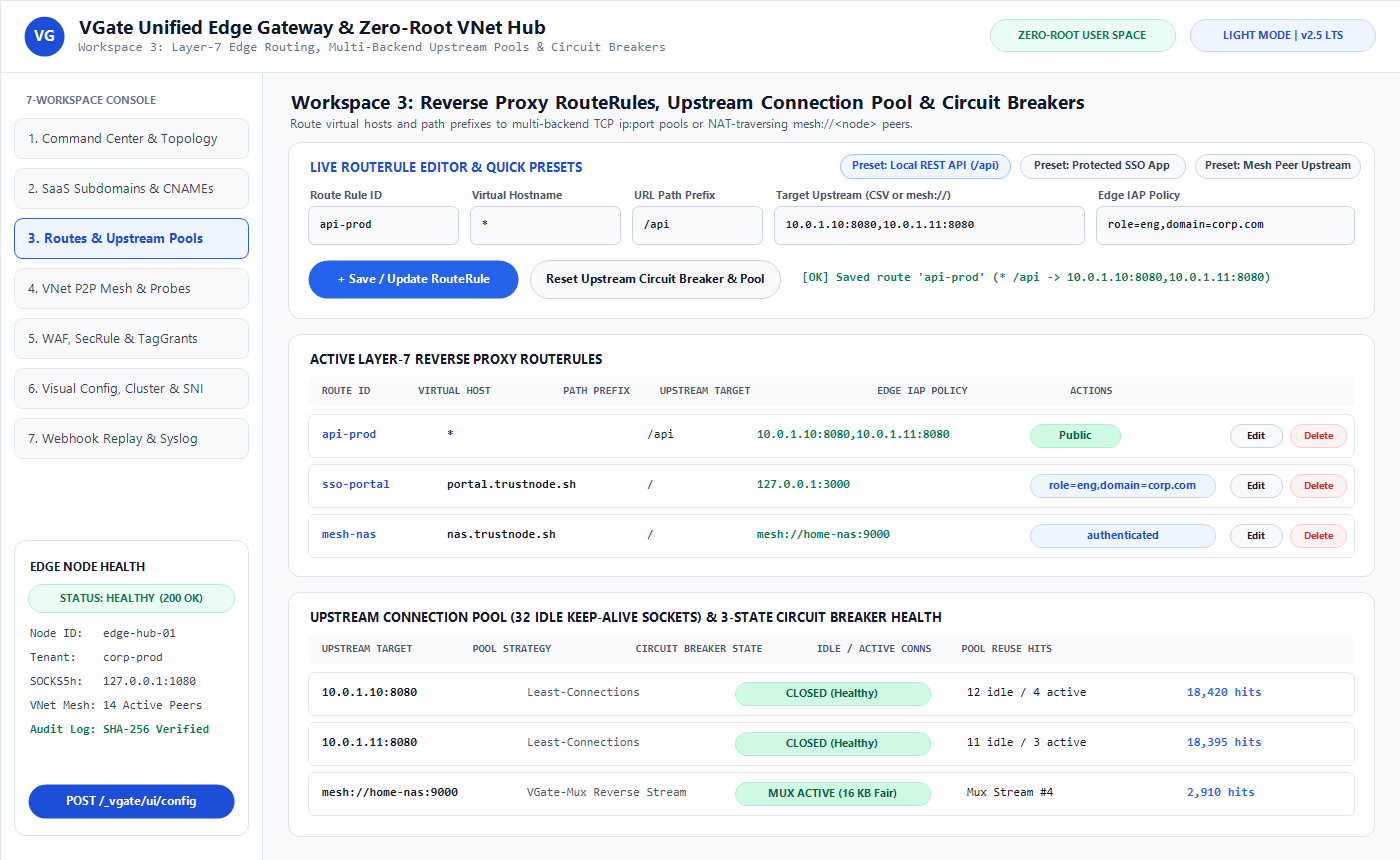
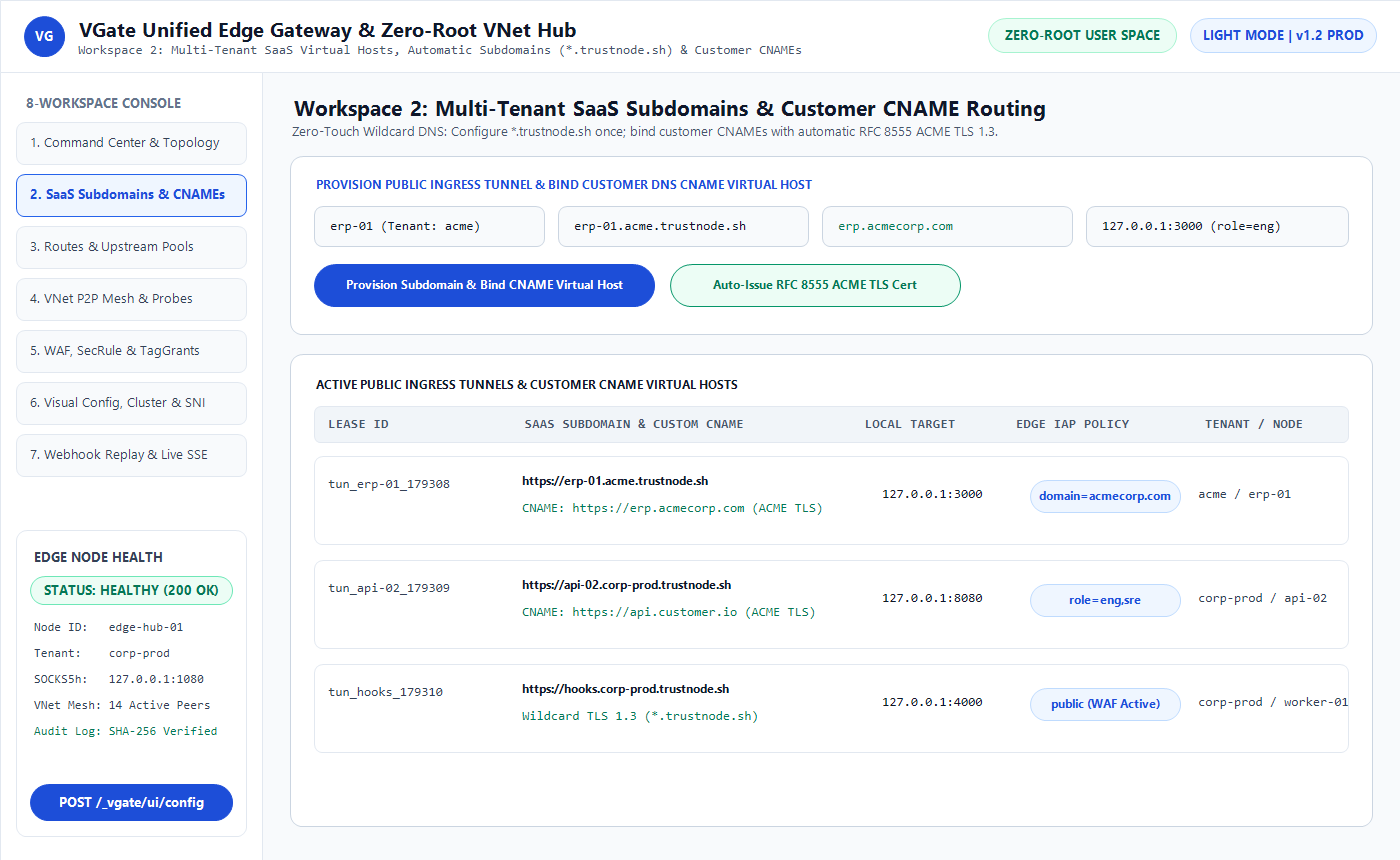
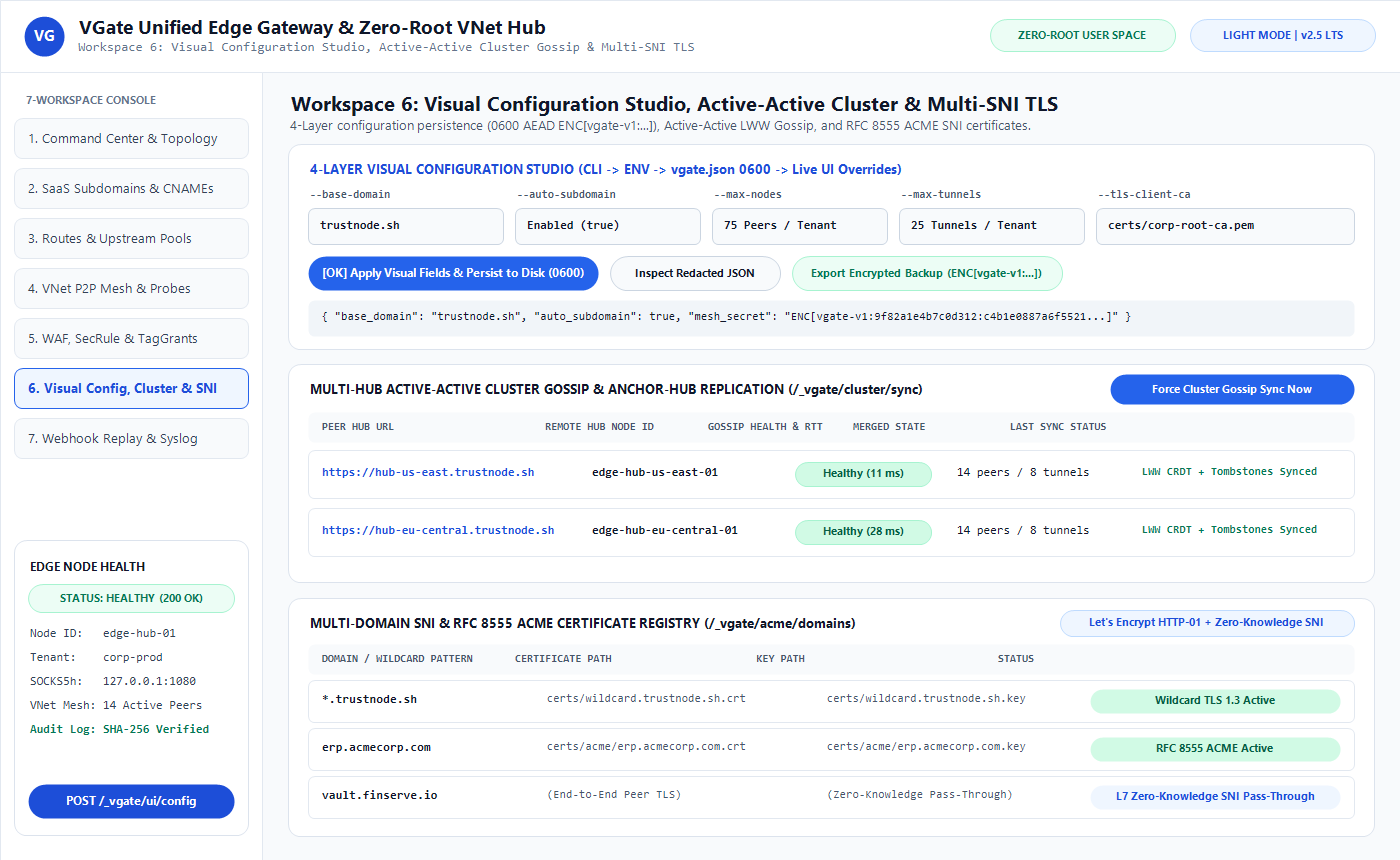
2. Visual Tour of the VGate Control Plane
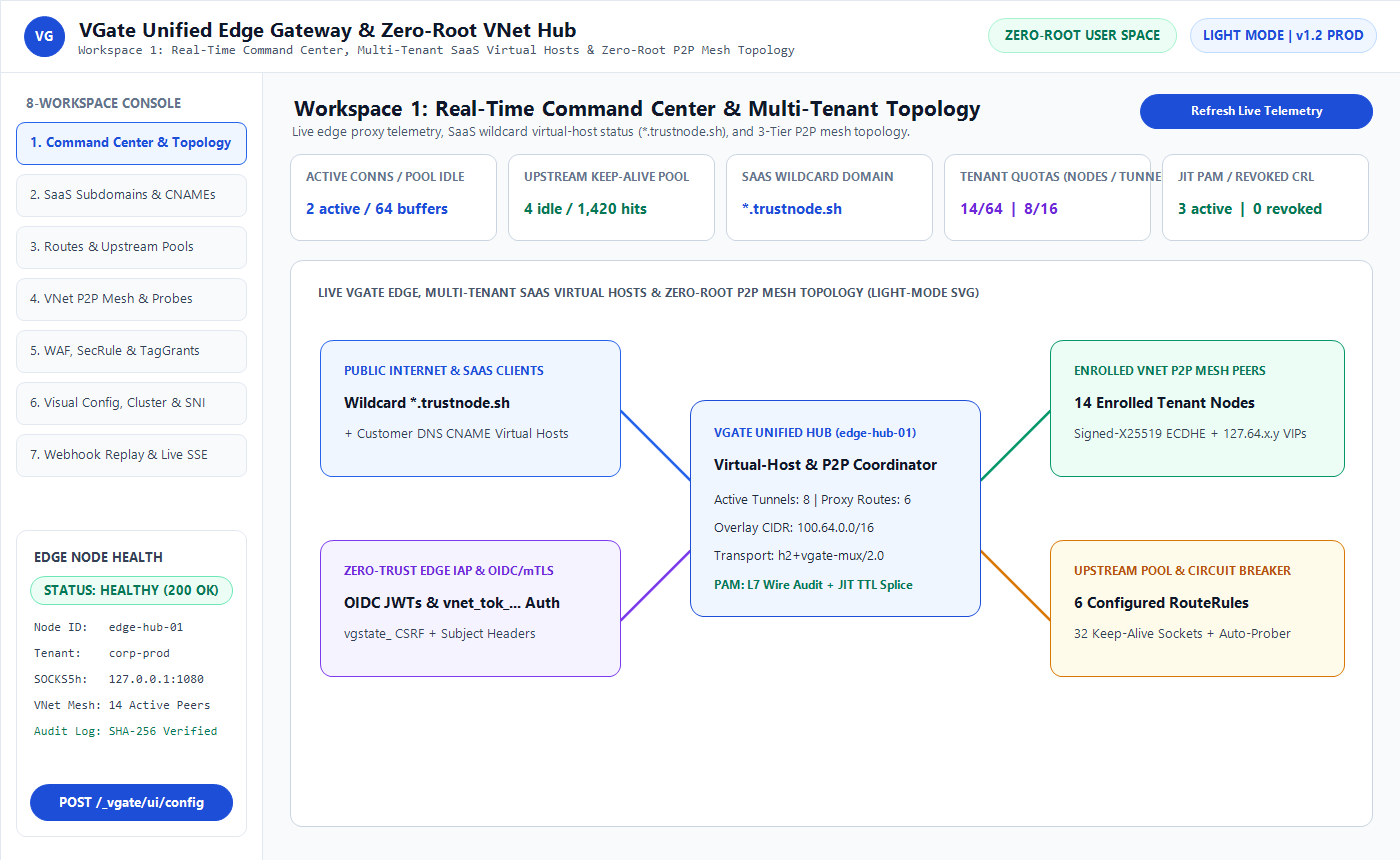
8-Workspace Web Console (/_vgate/ui) & Native Desktop Control Center (vgate gui)
Operators and tenant administrators can govern routes, upstream pools, SaaS subdomains, custom CNAME aliases, WAF rules, TagGrant ACLs, JIT access approvals, cluster synchronization, and webhook replays from either the browser-based Web Console or the chromeless Desktop Control Center.
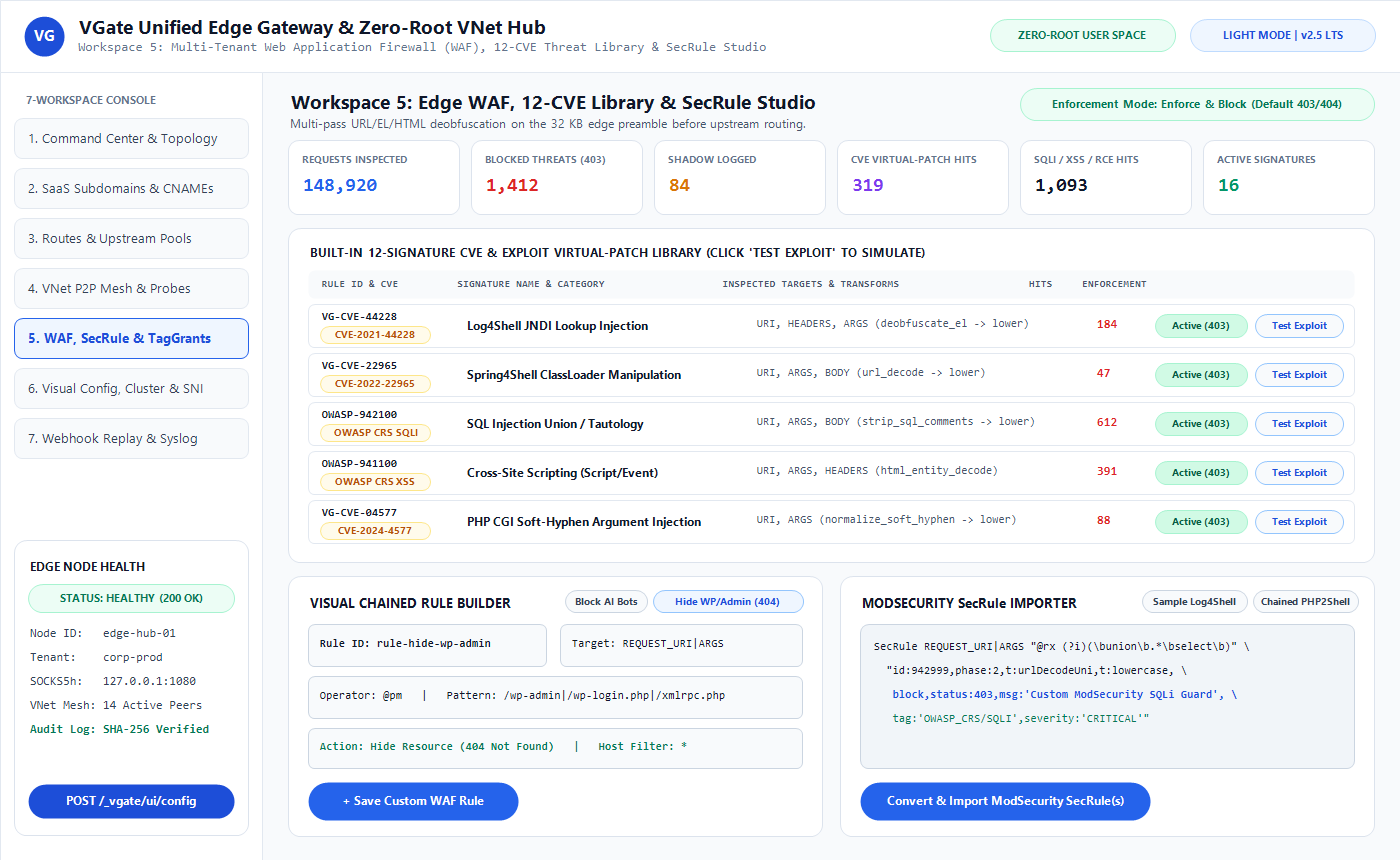
Edge Identity-Aware Proxy & Multi-Tenant WAF Studio
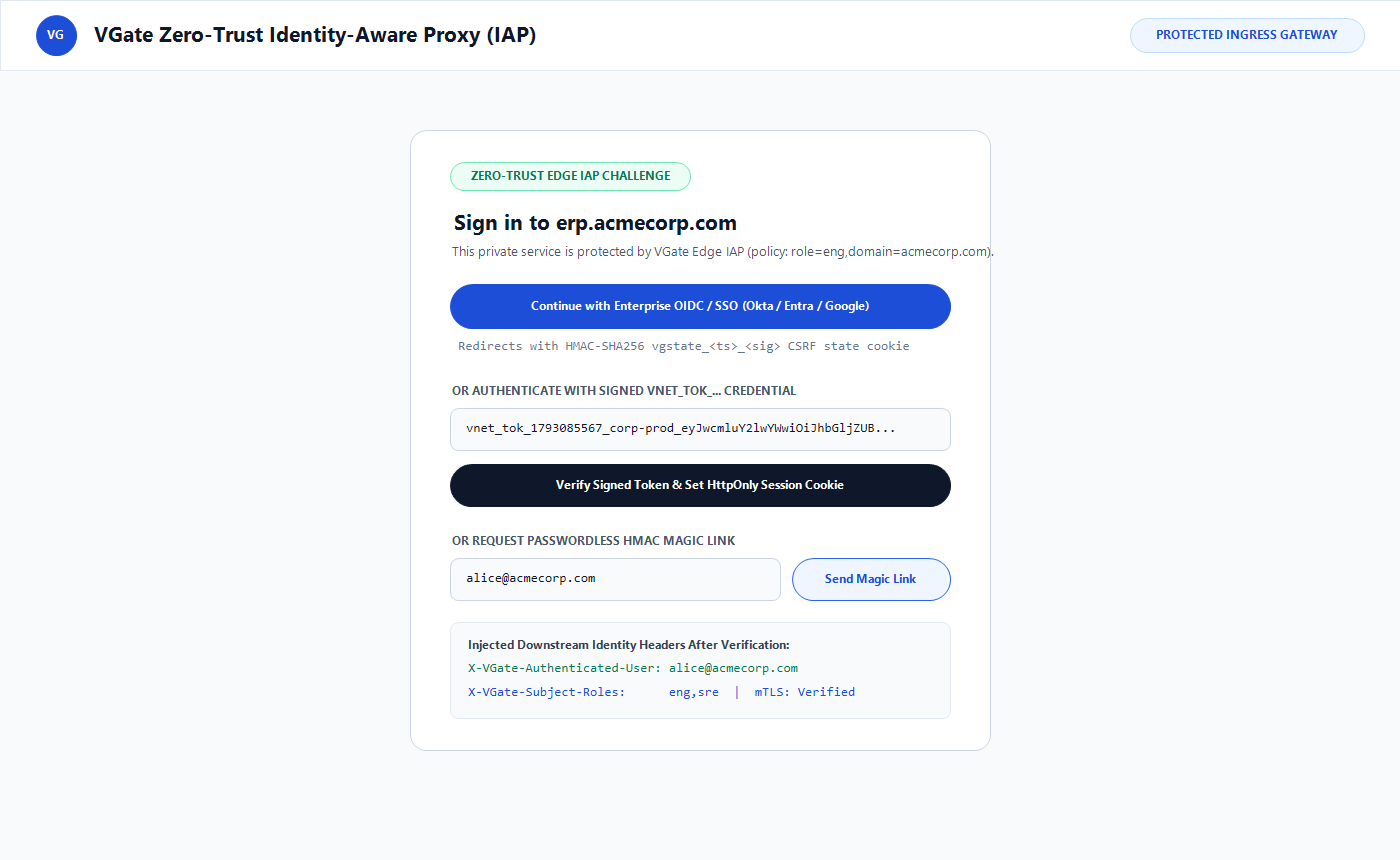
Public routes and reverse tunnels can enforce OIDC Single Sign-On (--require-auth) while inspecting inbound HTTP requests against built-in CVE virtual patches, custom SecRule definitions, and automated Penalty Box thresholds.
3. Five-Minute Quickstart
Step 1: Initialize Sealed Production Configuration
Generate cryptographically random secrets and write an owner-only (0600) vgate.json file protected by a 256-bit master key (data/vnet/config.master.key):
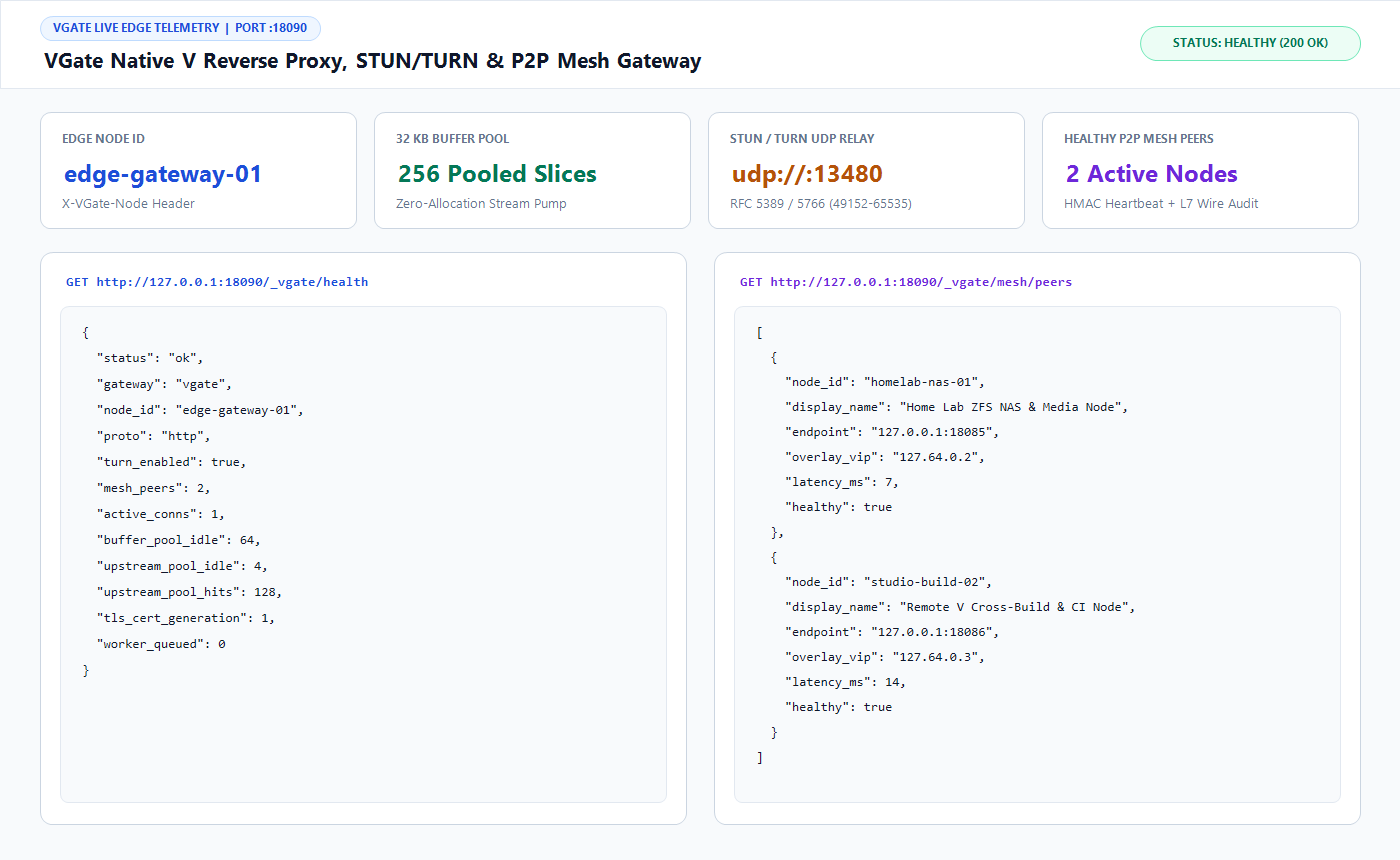
Verify gateway readiness via the unauthenticated health probe:
BASH
curl -sS http://127.0.0.1:8088/_vgate/health
Step 3: Mint a Scoped Enrollment Token & Connect a Private Node
Mint an HMAC-signed token pinned to a tenant network (corp-prod) and machine tag (tag:app), then enroll a remote server or workstation without root privileges:
BASH
# Mint a 24-hour enrollment token for node app-01
APP_TOKEN=$(vgate token mint \
  --config vgate.json \
  --principal "host:app-01" \
  --net corp-prod \
  --roles "node" \
  --scopes "vnet:enroll,tunnel:expose" \
  --tags "tag:app,tag:public-tunnel" \
  --ttl 86400)

# Expose a private service publicly with an OIDC/role policy and join the encrypted P2P mesh
vgate tunnel \
  --hub https://edge.example.com:8443 \
  --net corp-prod \
  --name app-01 \
  --token "$APP_TOKEN" \
  --expose "portal.edge.example.com=127.0.0.1:3000" \
  --require-auth "role=eng,domain=example.com"
Walkthroughs for the Web Dashboard, Desktop/TUI clients, 127.64.x.y loopback VIPs, SOCKS5h .vgate browsing, JIT access requests, and inspector workflows.
Request certificate issuance through the authenticated Admin API. vgate generates an ECDSA P-256 keypair, serves the /.well-known/acme-challenge/<token> response directly from memory, finalizes the order, and activates the PEM chain in the live SNI registry without dropping active sockets:
Recipe 2: Enable OIDC Single Sign-On & Time-Bounded PAM/JIT Grants
Protect internal dashboards, staging portals, and private SSH/PostgreSQL services with OpenID Connect (S256 PKCE) at the HTTP edge and Zero Standing Privilege (ZSP) Just-In-Time (JIT) grants on the VNet mesh.
1. Configure Upstream OIDC Provider Settings
Set your OIDC issuer (such as vwarden, Okta, Keycloak, Google Workspace, or Microsoft Entra ID) via environment variables or vgate.json, then seal the client secret at rest:
BASH
export VGATE_OIDC_ENABLED=true
export VGATE_OIDC_ISSUER="https://idp.example.com"
export VGATE_OIDC_CLIENT_ID="vgate-edge-gateway"
export VGATE_OIDC_CLIENT_SECRET="super-secret-oidc-client-key"
export VGATE_OIDC_REDIRECT_URL="https://edge.example.com/_vgate/auth/callback"

# Persist and encrypt OIDC_CLIENT_SECRET into vgate.json as ENC[vgate-v2:...]
vgate config seal --config vgate.json
2. Expose a Protected Application with --require-auth
Unauthenticated visitors are redirected to /_vgate/auth/login. Once authenticated, vgate sets an HttpOnly; SameSite=Lax HMAC-signed session cookie, strips spoofable client headers, and injects verified X-VGate-Principal, X-VGate-Roles, and X-VGate-Network headers upstream.
3. Request and Approve a 30-Minute JIT PAM Grant
Engineers start with zero standing access to tag:prod-db. During an incident, the engineer requests a 30-minute (1800s) lease for PostgreSQL port 5432, and SecOps approves it:
Recipe 4: Link Active-Active P2P Mesh Peers Without Root Privileges
vgate up connects machines across distinct clouds, NAT routers, or unprivileged containers over an encrypted VNet overlay (100.64.0.0/10) mapped onto user-space 127.64.x.y loopback VIPs.
1. Publish a Private Database on Host A (db-01)
BASH
# Bind PostgreSQL locally to 127.0.0.1:5432, then publish it onto corp-prod mesh
vgate up --daemon \
  --hub https://edge.example.com \
  --net corp-prod \
  --name db-01 \
  --token "$DB_NODE_TOKEN" \
  --publish "pg=127.0.0.1:5432"
3. Connect from Host B (app-01) via Loopback VIP or vgate exec
BASH
# Option A: Bind db-01 onto local loopback VIP 127.64.0.11:5432 (Linux & Windows without root)
vgate up --daemon \
  --hub https://edge.example.com \
  --net corp-prod \
  --name app-01 \
  --token "$APP_NODE_TOKEN" \
  --bind "127.64.0.11:5432=db-01:pg" \
  --socks-addr 127.0.0.1:1080

psql -h 127.64.0.11 -p 5432 -U app_user -d orders

# Option B: Zero-config process wrapper (injects PGHOST/PGPORT automatically; works on Linux, Windows & macOS)
vgate exec \
  --net corp-prod \
  --bind "127.0.0.1:15432=db-01:pg" \
  -- psql -U app_user -d orders -c "SELECT now();"
Recipe 5: Inspect, Verify & Replay Webhooks
When developing or triaging Stripe, GitHub, or Slack integrations, enable edge webhook HMAC verification and use 1-click editable replay to re-deliver captured payloads to local or staging targets.
2. Query Captured Exchanges & Replay with Optional Target Override
BASH
# List recent redacted HTTP/webhook captures for corp-prod
curl -sS -H "X-VGate-Admin-Token: $VGATE_ADMIN_TOKEN" \
  "https://edge.example.com/_vgate/ui/state?net=corp-prod"

# Replay captured exchange #42 to a local staging listener
curl -sS -X POST https://edge.example.com/_vgate/ui/replay \
  -H "X-VGate-Admin-Token: $VGATE_ADMIN_TOKEN" \
  -H "Content-Type: application/json" \
  -d '{
    "id": 42,
    "override_to": "http://127.0.0.1:3001/webhooks/stripe"
  }'
VGate — End-User & Developer Portal Guide
1. Signing In to Protected Applications (Edge Identity-Aware Proxy)
When an administrator protects a public tunnel or route with an access policy (--require-auth), opening the URL in your browser presents the VGate Zero-Trust Edge Sign-In Portal (/_vgate/auth/login).
Supported Sign-In Methods
Single Sign-On (OIDC / OAuth 2.1 PKCE):
Click Continue with Single Sign-On to authenticate with your organization's identity provider (vwarden, Okta, Google, Entra ID, or Keycloak).
Upon callback to /_vgate/auth/callback, vgate verifies the S256 PKCE verifier, evaluates your roles, scopes, and email domain against the route policy, and issues an HttpOnly; SameSite=Lax session cookie (vgate_iap_session).
Scoped Access Token (vnet_tok_...):
For CLI scripts, API automation, or temporary contractor access, paste a vnet_tok_... token directly into the login form or send it as an HTTP header:
The built-in Web Console at /_vgate/ui adapts automatically to your credential scope:
Tenant Self-Service Portal: When signing in with a tenant-scoped token (--net acme-app + role tenant-admin), you see only your own tenant's peers, public subdomains, custom CNAME aliases, WAF rules, JIT requests, and captured webhooks.
Global Super-Admin Studio: Hub operators see fleet-wide telemetry, multi-hub synchronization, SNI certificates, and cross-tenant governance across all 8 workspaces.
Overview of the 8 Interactive Workspaces
Workspace
Primary Day-to-Day Tasks
1. Command Center
Inspect live SVG network topology, active stream throughput, rate-limiter health, and SHA-256 log chain status.
Filter live captured HTTP/webhook requests, edit headers or payloads for 1-click replay, and query RFC 5424 logs.
3. Desktop Control Center (vgate gui) & Terminal Dashboard (vgate tui)
Developers working on laptops or headless SSH workstations can monitor and control local tunnels, port bindings, and mesh status without manually managing URLs or tokens.
Launching the Native Desktop Control Center
BASH
# Opens a chromeless local desktop window pre-authenticated over loopback (127.0.0.1)
vgate gui
Launching the Terminal UI Dashboard
BASH
# Displays live peer latency, active tunnels, mux stream windows, and audit status in the terminal
vgate tui --config vgate.json
4. Connecting Local Applications, Browsers & CLI Tools
Because vgate runs 100% in user space without installing kernel VPN drivers, you have four frictionless ways to reach private mesh services from your workstation:
In Firefox, open Settings -> Network Settings -> Manual proxy configuration, set SOCKS Host to 127.0.0.1, Port to 1080, select SOCKS v5, and check Proxy DNS when using SOCKS v5.
Open any authorized mesh service directly by its .vgate name, such as http://staging-web.corp-prod.vgate:8080.
5. Requesting Just-In-Time (JIT) Access Sessions
When Zero Standing Privilege policies are active, sensitive servers (tag:prod-ssh, tag:pci-db) are hidden from your peer map until a time-bounded JIT lease is approved.
Submit a Request: Open Workspace 5 (Security, ACLs & JIT) in /_vgate/ui (or call POST /_vgate/ui/jit), select the target tag (tag:prod-db), specify the required port (5432), choose a lease duration (such as 30m), and enter your incident or change ticket ID.
Automatic Activation: As soon as an authorized approver clicks Approve, the target service appears in your vgate status peer map and accepts end-to-end encrypted connections.
Automatic Expiration: When expires_at is reached, vgate revokes the temporary grant automatically—no manual cleanup required.
6. Using the Request Inspector & Editable Webhook Replay
During local development or production webhook troubleshooting, open Workspace 8 (Webhook Inspector & Syslog):
Inspect Redacted Traffic: Select any captured HTTP request to view status code, upstream latency, W3C traceparent ID, request/response headers (with Authorization, Cookie, and *-Token values masked as [REDACTED]), and body preview.
1-Click or Edited Replay: Click Replay to re-send the exact captured webhook to your tunnel target, or customize the target URL (override_to), HTTP method, headers, or JSON payload in the Replay Studio to test edge-case error handling.
vgate resolves runtime configuration deterministically across four layers (highest priority last) and fails closed if an explicit configuration file is missing or any encrypted field fails authentication:
Layer 1 — Built-In Hardened Defaults: Loopback-only listeners (127.0.0.1:8088, 127.0.0.1:8443, 127.0.0.1:3478), 32 KB header cap, 10 MB body cap, 10s header read deadline, and production secret enforcement (default ephemeral secrets are rejected unless --dev is explicitly passed).
Layer 2 — JSON Configuration (vgate.json): Comment-tolerant (# and //) Schema v2 JSON loaded via --config <path> or VGATE_CONFIG_FILE.
Layer 3 — Environment File & OS Environment (vgate.env / VGATE_*): Loaded via --env-file <path> (VGATE_ENV_FILE) and process environment variables.
Administrators never need to store cleartext passwords or shared keys in vgate.json or .env backups. Sensitive fields (mesh_secret, mesh_secret_prev, turn_password, oidc_client_secret, vnet_token, vnet_socks_auth, and webhook_secret) are encrypted into authenticated ENC[vgate-v2:...] envelopes bound to their specific field name (contextual AAD) using an owner-only (0600) 256-bit master key (data/vnet/config.master.key).
BASH
# 1. Generate CSPRNG secrets and write a sealed 0600 vgate.json + 0600 config.master.key
vgate init --config ./config/vgate.json

# 2. If you edit vgate.json to paste a new OIDC or webhook secret in plaintext, seal it in-place:
vgate config seal --config ./config/vgate.json

# 3. Validate syntax, port ranges, TLS paths, and secret decryption without starting listeners:
vgate config check --config ./config/vgate.json

# 4. Rotate the 256-bit master key atomically (archives .prev key and re-seals all ENC[...] fields):
vgate config rotate-key --config ./config/vgate.json
When operating vgate for multiple business units or external SaaS customers, each tenant (network_slug) is isolated on disk (0700 directories, 0600 files) and in memory:
Global Super-Admin: Authenticated on the primary control network with admin privileges; governs global listeners, upstream pools, cluster peers, and cross-tenant quotas.
Tenant Self-Service Admin: Authenticated with a token scoped to --net <tenant-slug> and role tenant-admin. Tenant admins cannot mint global superadmin tokens, cannot overwrite another tenant's node_id or WAF rules, cannot claim unowned ACME domains, and cannot view or replay another tenant's webhooks.
3. Active-Active Multi-Hub State Synchronization
Multiple vgate serve hubs deployed across availability zones or geographic regions synchronize enrolled peers, public tunnel leases, token revocations, and per-tenant policy shards (tenant.json, acl.json, waf.json) over authenticated HTTPS gossip (/_vgate/cluster/sync) without requiring external Redis, etcd, or PostgreSQL clusters.
Conflict Resolution: Last-Write-Wins (LWW) timestamps paired with explicit deletion tombstones ensure revoked tokens and deleted grants never resurrect across split-brain recoveries.
Zero-Downtime Cluster Secret Rotation: Populate mesh_secret_prev (VGATE_MESH_SECRET_PREV) during rolling secret upgrades so existing peers remain authenticated while transitioning to the new mesh_secret.
4. TLS Certificate Lifecycle & Mutual TLS (mTLS)
vgate supports four complementary TLS deployment patterns on --https-addr:
Polls certificate mtimes every cert_reload_check_secs (10s), verifies complete PEM markers to avoid half-written reloads, and swaps keys with zero downtime.
To protect both backend services and /_vgate/* control endpoints against volumetric floods and cascading upstream outages, vgate enforces independent per-IP token buckets and 3-state upstream circuit breakers:
Two-Tier Token Bucket: Public ingress defaults to 120 req/s (burst 240), while /_vgate/* control routes are strictly capped at 20 req/s (burst 40) with bounded IP table eviction (16,384 max IPs, 180s idle TTL).
Fast-Fail Circuit Breaker: After 3 consecutive dial failures to a backend target, the target enters Open state for 10s, failing over immediately (< 1 ms) to healthy pool members (round_robin, least_conn, or ip_hash) until a Half-Open probe succeeds.
Every operational event (logs/vgate.log) and security event (logs/vgate-security.log) is formatted as sanitized RFC 5424 structured syslog (stripping CR/LF injection characters) and linked into a rolling SHA-256 hash chain (chain = SHA256(prev_hash + entry)).
Streaming to External SIEM Collectors & Scraping Metrics
Use Case 1: Zero-Root Edge Ingress on Linux systemd, Docker & Kubernetes
Because vgate requires zero kernel modules (kernel tun device) and zero root privileges (uid=1000), it deploys cleanly under strict container security profiles (PodSecurityStandard: restricted, cap_drop: ["ALL"], no-new-privileges: true).
Generate OS Service, Compose & Kubernetes Manifests Automatically
BASH
# Generates hardened systemd unit (LimitSTACK=512K), compose.yaml, and Kubernetes StatefulSet manifests
vgate service install --config ./config/vgate.json
Hardened systemd Unit (deploy/systemd/vgate.service)
To bind privileged ports :80 and :443 on Linux while running strictly as an unprivileged vgate system user (UID 1000), grant CAP_NET_BIND_SERVICE only:
Use Case 2: NAT-Traversed Multi-Cloud Private Mesh via 3-Tier Adaptive Transport
When connecting application containers in AWS to a private PostgreSQL cluster in an on-premises data center behind symmetric NAT or UDP-blocking firewalls, vgate up negotiates end-to-end Ed25519-signed X25519 ECDHE + ChaCha20-Poly1305 AEAD across three automatic transport tiers:
Tier
Transport Mode
Wire Overhead
When Selected
Tier 1
direct_udp (STUN Hole-Punched P2P UDP)
36-byte AEAD header + tag
Lowest latency when peers achieve direct reflexive UDP reachability.
Tier 2
turn_channel (RFC 5766 ChannelData:3478/udp)
+4-byte channel frame (89% smaller than STUN)
Symmetric NAT environments where direct UDP hole-punching is blocked.
Tier 3
tls_mux (vgate-mux/1.0 over TCP/TLS :443)
12-byte stream mux + 64 KB flow window
Strict corporate networks that block all outbound UDP traffic.
Pure TCP :443 Mode (Zero Exposed UDP Ports)
If organizational firewall policy prohibits exposing UDP :3478, keep --turn-addr 127.0.0.1:3478 bound to loopback. All VNet peers and public tunnels operate seamlessly over outbound TCP/TLS :443 (tls_mux):
Use Case 3: Zero-Trust PAM/JIT Bastion Replacement (SSH & PostgreSQL)
Replace public SSH jump hosts (:22) and intrusive database MITM proxies with loopback-bound services, time-bounded JIT grants, and passive Layer-7 wire protocol auditing.
1. Lock Down SSH & PostgreSQL to Loopback on the Target Host
Bind sshd (ListenAddress 127.0.0.1) and PostgreSQL (listen_addresses = '127.0.0.1') strictly to loopback so VPC and internet port scans see zero open ports, then publish them onto VNet:
Without requiring custom PostgreSQL CA certificates or Hub TLS decryption, the local bridge inspects the initial PostgreSQL v3.0 StartupMessage (or SSH-2.0-... client banner on port 22) and records principal, jit_grant, db_user="readonly_sre", and db_name="ledger_prod" in the SHA-256 hash-chained security log.
Use Case 4: Bilateral Cross-Tenant Vendor / Partner Peering
Allow an external vendor in isolated tenant vendor-net temporary access to a single diagnostic port in corp-prod without creating accounts inside your corporate tenant:
4. Admin, Mesh & VNet REST API Reference (/_vgate/*)
All /_vgate/* endpoints (except /_vgate/health and /_vgate/auth/* login pages) are protected by the dedicated Control-Plane Rate Limiter (20 rps) and require either X-VGate-Admin-Token: <vnet_tok_...>, Authorization: Bearer <vnet_tok_...>, or cluster HMAC headers (X-VGate-Timestamp + X-VGate-Signature).
Method & Endpoint
Auth Scope
Purpose
GET /_vgate/health
Public
Liveness and readiness JSON check (status: "ok").
GET /_vgate/metrics(and GET /metrics when VGATE_METRICS_ALIAS_ROOT=true)
Admin / Local
Prometheus text-format metrics for connections, WAF blocks, Wasm edge filters (vgate_wasm_filter_*), TURN relays, and mux streams.
GET /_vgate/wasm/plugins
Admin
List active WebAssembly 3.0 edge filter plugins (vvmB1+B3 IR + 4 KiB CoW).
POST /_vgate/wasm/plugins
Admin
Register and atomically persist (0600) a .wat or .wasm edge filter plugin with max_fuel, max_memory_pages, pool_size (1..32), and route scope.
DELETE /_vgate/wasm/plugins?id=...
Admin
Unregister an active WebAssembly 3.0 edge filter plugin.
GET /_vgate/logs
Admin
Query structured RFC 5424 operational and SECURITY logs (?level=SECURITY&limit=100).
To sustain tens of thousands of simultaneous connections without GC spikes, head-of-line blocking, or thread exhaustion, vgate combines five architectural techniques:
Hybrid Pre-Warmed Worker Dispatcher:
Keeps 16 (VGATE_WORKER_THREADS) persistent worker threads warm for sub-millisecond HTTP request handling.
If all warm workers are occupied by long-lived WebSocket, Server-Sent Events (text/event-stream), or database streams, additional connections overflow onto lightweight dedicated threads up to VGATE_MAX_CONNS (4,096), preventing worker-pool starvation.
Kernel Readiness Polling Before Buffer Allocation (KernelReactor):
Uses native OS event readiness (epoll on Linux, kqueue on macOS/BSD, WSAPoll on Windows) requiring only ~64 bytes of slab state per tracked socket descriptor.
Idle keep-alive or Slowloris sockets consume 0 bytes of 32 KB buffer-pool RAM until the kernel signals readable bytes (POLLIN).
Single-Thread Bidirectional TCP Splicing:
Once HTTP headers are rewritten or a VNet local bridge stream opens, a single thread multiplexes bidirectional socket forwarding over 1 shared 32 KB buffer instead of spawning two pump threads with two 32 KB buffers—cutting active thread and buffer RAM usage by 50% while enforcing mid-stream JIT TTL expiration deadlines.
Reuses up to 32 (VGATE_POOL_MAX_IDLE) warm upstream TCP sockets per backend host and trips open in < 1 ms after 3 consecutive backend failures (10s cooldown).
Replaces 36-byte STUN headers with 4-byte ChannelData (0x4000..0x7FFF) frames on bound TURN relays (89% header reduction) and configures LimitSTACK=512K under Linux systemd (16x lower virtual stack reservation than the 8 MB OS default).
2. Empirical Subsystem Benchmarks (Debug vs. Production -prod)
The table below reports measured single-core rates from vgate's built-in Tier 5 benchmark suite comparing unoptimized debug builds against production -prod (-O3) builds:
The vnet module implements VGate's software-defined private overlay network entirely in user space—requiring no kernel tun/tap drivers, no CAP_NET_ADMIN, and no root privileges. Developers import vnet alongside vgconfig, vgvpn, and vgjson to build custom mesh coordinators, embedded service sidecars, automated token minters, or encrypted P2P transports.
All examples below use the vnet module directly and can be compiled inside a V project that has access to the vgate modules (v run .).
Example 1: Initialize a Coordinator, Mint Scoped Tokens & Enroll Peers
This example bootstraps an in-memory Coordinator, mints HMAC-signed subject tokens for two nodes (api-01 and db-01), generates their Ed25519 identities, and enrolls both into the corp-prod overlay namespace.
Example 2: Tag-Based ACLs (TagGrant) & Just-In-Time (JIT) Access
VNet enforces default-deny isolation between tags. You can grant standing tag-to-tag port access with upsert_tag_grant, or issue temporary, auto-expiring leases via the JIT workflow (request_jit_access -> approve_jit_access).
Example 3: Forward-Secret P2P Session (VNetDataPlane + X25519 VHP2)
VNetDataPlane automates the Ed25519-signed X25519 VHP2 ephemeral handshake, derives directional tx_key/rx_key subkeys via HKDF-SHA256, and seals vgvpn.MuxFrame payloads inside ChaCha20-Poly1305 VNetPackets.
V
module main

import time
import vgconfig
import vgvpn
import vnet

fn main() {
	cfg := vgconfig.Config{
		mesh_secret: 'replace-with-32-byte-hex-or-random-secret'
	}
	now := time.now().unix()

	ident_a := vnet.generate_node_identity('node-a') or { panic(err) }
	ident_b := vnet.generate_node_identity('node-b') or { panic(err) }

	peer_a := vnet.EnrolledPeer{
		node_id:        'node-a'
		network_slug:   'corp-prod'
		overlay_ip:     '100.64.0.10'
		public_key_hex: ident_a.public_key_hex
		transport_tier: 'direct_udp'
	}
	peer_b := vnet.EnrolledPeer{
		node_id:        'node-b'
		network_slug:   'corp-prod'
		overlay_ip:     '100.64.0.11'
		public_key_hex: ident_b.public_key_hex
		transport_tier: 'direct_udp'
	}

	mut dp_a := vnet.new_dataplane(cfg, ident_a, peer_a.overlay_ip)
	mut dp_b := vnet.new_dataplane(cfg, ident_b, peer_b.overlay_ip)

	// Execute bidirectional X25519 VHP2 handshake (or pass syn_wire/ack_wire over network)
	dp_a.establish_pfs_pair(mut dp_b, peer_a, peer_b, now) or { panic(err) }
	println('PFS established on A=${dp_a.has_pfs_session("node-b")}')

	// Seal a MuxFrame from node-a -> node-b
	outbound := vgvpn.MuxFrame{
		frame_type: vgvpn.frame_stream_data
		flags:      0
		stream_id:  42
		payload:    'SELECT 1;'.bytes()
	}
	tier, wire_bytes := dp_a.seal_peer_mux_frame(peer_b, outbound) or { panic(err) }
	println('Sealed ${wire_bytes.len} bytes for transport tier=${tier}')

	// Open and verify on node-b (enforces Poly1305 tag + 64-packet ReplayWindow)
	decoded := dp_b.open_peer_mux_frame(peer_a, wire_bytes) or { panic(err) }
	println('Decoded stream=${decoded.stream_id} payload="${decoded.payload.bytestr()}"')
}
Example 4: Low-Level Packet Sealing, Anti-Replay & 2D Key Ratchet
When building custom transports or testing epoch rotation directly, use seal_packet_chacha20, open_packet_chacha20, ReplayWindow, and SessionKeyRing.
V
module main

import time
import vgconfig
import vgvpn
import vnet

fn main() {
	cfg := vgconfig.Config{
		mesh_secret:         'replace-with-32-byte-hex-or-random-secret'
		rekey_interval_secs: 900
		rekey_max_bytes:     1_400_000_000
	}
	now := time.now().unix()

	// 1. Direct pairwise session key & ChaCha20-Poly1305 packet sealing
	skey := vnet.derive_pairwise_session_key(cfg.mesh_secret, 'pubA', 'pubB', 1)
	src_ip := vgvpn.parse_ipv4_u32('100.64.0.10') or { u32(0) }
	dst_ip := vgvpn.parse_ipv4_u32('100.64.0.11') or { u32(0) }

	pkt := vnet.VNetPacket{
		pkt_type:  vnet.vnet_pkt_data_chacha20
		key_epoch: 1
		src_ip:    src_ip
		dst_ip:    dst_ip
		seq:       1
		payload:   'heartbeat-ok'.bytes()
	}
	wire := vnet.seal_packet_chacha20(skey, pkt) or { panic(err) }

	mut rw := vnet.ReplayWindow{}
	opened := vnet.open_packet_chacha20(skey, wire, mut rw) or { panic(err) }
	println('Opened seq=${opened.seq} payload="${opened.payload.bytestr()}"')

	// Replaying the exact same wire packet is rejected by ReplayWindow
	if _ := vnet.open_packet_chacha20(skey, wire, mut rw) {
		panic('Replay should have been rejected')
	} else {
		println('Duplicate packet correctly rejected: ${err}')
	}

	// 2. Directional SessionKeyRing & X25519 epoch ratchet
	mut ring := vnet.new_directional_keyring(cfg, 'node-a', 'node-b', skey, now)
	mut kp_a := vnet.generate_x25519_keypair() or { panic(err) }
	kp_b := vnet.generate_x25519_keypair() or { panic(err) }

	// Ratchet to epoch 2 (retains epoch 1 for rekey_grace_secs=15s)
	vnet.ratchet_session_keyring_x25519(mut ring, mut kp_a, kp_b.public_point_hex, cfg.mesh_secret, 2, now + 901) or {
		panic(err)
	}
	println('Ratcheted keyring to epoch=${ring.current_epoch}, needs_rekey=${vnet.needs_rekey(ring, now + 901)}')
}
Example 5: Zero-Root Local Bridge, Magic DNS, Port Binds & L7 Inspection
LocalBridge translates user-space --publish, --bind, and .vgate Magic DNS lookups into vgvpn.StreamOpenRequest frames without touching OS routing tables.
V
module main

import vgconfig
import vnet

fn main() {
	cfg := vgconfig.Config{
		mesh_node_id:    'workstation-01'
		vnet_network:    'corp-prod'
		vnet_socks_addr: '127.0.0.1:1080'
		vnet_bind:       '127.64.0.11:5432=db-01:pg,udp://127.0.0.1:15353=dns-01:53'
	}

	// Parse published services and local port binds
	published := vnet.parse_published_services('pg=127.0.0.1:5432,metrics=127.0.0.1:9090')
	binds := vnet.parse_local_binds(cfg.vnet_bind)
	println('Parsed ${published.len} published services and ${binds.len} local binds')

	peers := [
		vnet.EnrolledPeer{
			node_id:            'db-01'
			network_slug:       'corp-prod'
			overlay_ip:         '100.64.0.11'
			loopback_vip:       '127.64.0.11'
			magic_dns:          'db-01.corp-prod.vgate'
			published_services: published
		},
	]

	// Resolve .vgate Magic DNS hostname or 127.64.x.y VIP
	if peer := vnet.resolve_magic_dns('db-01.corp-prod.vgate', peers) {
		println('Resolved ${peer.magic_dns} -> overlay=${peer.overlay_ip} vip=${peer.loopback_vip}')
	}

	// Resolve a LocalPortBind into a target peer + Mux StreamOpenRequest
	target_peer, open_req := vnet.resolve_bind_stream_open(binds[0], peers) or { panic(err) }
	println('Bind ${binds[0].bind_addr} -> ${target_peer.node_id} (${open_req.target_host}:${open_req.target_port})')

	// Passive L7 wire protocol detection (PostgreSQL, SSH, Redis, HTTP, TLS)
	ssh_banner := 'SSH-2.0-OpenSSH_9.6\r\n'.bytes()
	l7 := vnet.inspect_l7_wire_protocol(ssh_banner, 22)
	println('Detected L7 protocol=${l7.protocol} detail=${l7.summary}')
}
Example 6: Public Tunnel Leases, Atomic State Persistence & Deployment Bundles
You can register ngrok-style public ingress tunnels with OIDC/role policies, persist the Coordinator state atomically (0600), and generate Docker Compose, Kubernetes, systemd, Windows, and macOS service manifests.
V
module main

import vgconfig
import vnet

fn main() {
	cfg := vgconfig.Config{
		mesh_node_id:       'edge-hub-01'
		vnet_network:       'corp-prod'
		base_domain:        'edge.example.com'
		runtime_state_file: 'data/vnet/runtime_state.json'
	}

	mut coord := vnet.new_coordinator(cfg)

	// 1. Register a public reverse tunnel protected by Edge IAP policy
	lease := coord.register_public_tunnel_with_policy(
		'app-01',
		'portal.edge.example.com',
		'127.0.0.1:3000',
		'role=eng,domain=example.com',
	) or { panic(err) }
	println('Registered tunnel ${lease.public_host} -> ${lease.local_target} (auth=${lease.require_auth})')

	// 2. Persist Coordinator state atomically (0600) and reload
	coord.save_state() or { panic(err) }
	loaded_peers := coord.load_state() or { panic(err) }
	println('Reloaded coordinator state (${loaded_peers} peers)')

	// 3. Generate deployment manifests (compose.yaml + vgate-k8s.yaml + OS daemons)
	bundle := vnet.generate_service_bundle(cfg) or { panic(err) }
	println('Generated systemd unit: ${bundle.systemd_unit_path}')
	println('Generated compose file: ${bundle.compose_path}')
	println('Generated K8s manifest: ${bundle.k8s_manifest_path}')
}
4. HTTP Control-Plane & Mesh API Integration (/_vgate/*)
External services, CI/CD pipelines, and non-V clients can manage vnet over HTTPS/HTTP against a running vgate serve hub using a scoped vnet_tok_... bearer token (Authorization: Bearer <token> or X-VGate-Admin-Token: <token>).
BASH
# 1. Check hub readiness (unauthenticated)
curl -sS http://127.0.0.1:8088/_vgate/health

# 2. Enroll a peer or fetch the ACL-filtered peer map
curl -sS -X POST http://127.0.0.1:8088/_vgate/vnet/enroll \
  -H "Content-Type: application/json" \
  -H "Authorization: Bearer $VNET_TOKEN" \
  -d '{
    "node_id": "worker-01",
    "network_slug": "corp-prod",
    "token": "'"$VNET_TOKEN"'",
    "tags": ["tag:worker"],
    "published_services": [{"name": "metrics", "proto": "tcp", "local_addr": "127.0.0.1", "port": 9090}]
  }'

# 3. List enrolled peers visible to this tenant
curl -sS http://127.0.0.1:8088/_vgate/vnet/peers \
  -H "Authorization: Bearer $ADMIN_TOKEN"

# 4. Revoke a compromised token or node immediately
curl -sS -X POST http://127.0.0.1:8088/_vgate/vnet/tokens/revoke \
  -H "Content-Type: application/json" \
  -H "Authorization: Bearer $ADMIN_TOKEN" \
  -d '{"token": "'"$COMPROMISED_TOKEN"'"}'
5. Security & Operational Best Practices
Always Bind Loopback VIPs (127.64.x.y) in User Space: Use overlay_ip_to_loopback_vip when exposing remote mesh services locally so processes run as non-root (uid=1000, cap_drop: ALL) without kernel tun devices.
Enforce SOCKS5 Authentication on Non-Loopback Binds: requires_socks5_auth(cfg) automatically requires RFC 1929 username/password or vnet_tok_... authentication whenever --socks-addr binds outside 127.0.0.1 / ::1. Use mint_compact_subject_token when tokens must fit within the 255-byte RFC 1929 password limit.
Never Skip ReplayWindow or Reuse Nonces: Always pass a mutable ReplayWindow to open_packet_chacha20 / unwrap_mux_from_vnet_packet and use VNetDataPlane.next_sequence() for monotonic 64-bit sequence numbers.
Keep SessionKeyRing Rotation Enabled: Retain the default rekey_interval_secs = 900 and rekey_max_bytes = 1_400_000_000 with rekey_grace_secs = 15 so in-flight packets survive epoch transitions without dropping streams.
Seal Secrets at Rest: Store mesh_secret and vnet_token encrypted inside vgate.json (ENC[vgate-v2:...]) protected by data/vnet/config.master.key (0600), and rotate the master key periodically via vgate config rotate-key.
Modern distributed teams face two distinct connectivity challenges whenever services, databases, containers, and engineers span multiple networks:
North–South Public Ingress (vgate serve & vgate tunnel): Safely publishing web applications, SaaS customer portals, APIs, and webhook receivers over HTTPS—even when upstream backends run inside private VPCs, unprivileged containers, or NAT-isolated branch environments with zero inbound firewall ports.
East–West Private Mesh Networking (vgate up & vgate exec): Connecting application servers, databases, CI/CD runners, and developer workstations directly to one another with end-to-end authenticated encryption and per-port Zero Standing Privilege (ZSP) access controls—without requiring root, CAP_NET_ADMIN, or kernel tun drivers.
Instead of deploying and stitching together five separate infrastructure daemons (an HTTP reverse proxy, an OIDC login gatekeeper, a public tunnel relay, a kernel VPN, and an external STUN/TURN server), vgate consolidates the entire edge and mesh stack into one self-contained binary.
Key Architectural Differentiators
Capability Domain
What vgate Delivers Out of the Box
Operational Advantage
Zero-Root Execution
Runs 100% in user space (uid=1000, cap_drop: ALL) using 127.64.x.y loopback VIPs, --bind forwarders, .vgate Magic DNS, and an RFC 1928 SOCKS5h proxy (127.0.0.1:1080).
Works inside restricted Kubernetes pods, AWS Fargate, Docker containers, WSL2, and locked-down laptops with zero kernel drivers.
Isolates tenant security policies so tuning rules for one workspace never disrupts sibling customer environments.
OIDC Identity-Aware Gate & JIT PAM
Enforces OIDC Authorization Code + PKCE (S256) sign-in or signed vnet_tok_... credentials at the edge, plus time-bounded Just-In-Time (JIT) access grants with passive L7 SSH/PostgreSQL wire auditing.
Replaces standing VPN access and heavy bastion clusters with expiring, ticket-linked leases and tamper-evident SHA-256 audit chains.
STUN/TURN & 3-Tier VNet Mesh
Self-hosted RFC 5389 STUN and RFC 5766 TURN (4-byte ChannelData) relay paired with Ed25519-signed X25519 ECDHE and ChaCha20-Poly1305 AEAD (900s / 1.4 GB automatic key rotation).
Seamlessly selects Direct UDP (Tier 1), TURN UDP Relay (Tier 2), or Multiplexed TCP/TLS :443 (Tier 3) across any corporate firewall.
Live Webhook Inspector & Replay
Captures recent HTTP and webhook exchanges in a bounded ring buffer with automatic credential header redaction ([REDACTED]), HMAC verification, and 1-click editable replay.
Accelerates Stripe, GitHub, and Slack webhook debugging without exposing live Authorization or Cookie secrets.
Programmable Wasm 3.0 Edge Filters (vvm)
Executes tenant .wasm/.wat L7 edge filters in-process via vvm's B1+B3 Frame IR, deterministic --fuel budgets, and 4 KiB CoW memory reset per request, plus /_vgate/metrics & /metrics Prometheus export.
Enables sub-millisecond custom routing, header mutation, and rate-guard plugins with zero native crash risk and sidecar protection for vvm studio.
2. Visual Tour of the VGate Control Plane
8-Workspace Web Console (/_vgate/ui) & Native Desktop Control Center (vgate gui)
Operators and tenant administrators can govern routes, upstream pools, SaaS subdomains, custom CNAME aliases, WAF rules, TagGrant ACLs, JIT access approvals, cluster synchronization, and webhook replays from either the browser-based Web Console or the chromeless Desktop Control Center.
Edge Identity-Aware Proxy & Multi-Tenant WAF Studio
Public routes and reverse tunnels can enforce OIDC Single Sign-On (--require-auth) while inspecting inbound HTTP requests against built-in CVE virtual patches, custom SecRule definitions, and automated Penalty Box thresholds.
3. Five-Minute Quickstart
Step 1: Initialize Sealed Production Configuration
Generate cryptographically random secrets and write an owner-only (0600) vgate.json file protected by a 256-bit master key (data/vnet/config.master.key):
Verify gateway readiness via the unauthenticated health probe:
BASH
curl -sS http://127.0.0.1:8088/_vgate/health
Step 3: Mint a Scoped Enrollment Token & Connect a Private Node
Mint an HMAC-signed token pinned to a tenant network (corp-prod) and machine tag (tag:app), then enroll a remote server or workstation without root privileges:
BASH
# Mint a 24-hour enrollment token for node app-01
APP_TOKEN=$(vgate token mint \
  --config vgate.json \
  --principal "host:app-01" \
  --net corp-prod \
  --roles "node" \
  --scopes "vnet:enroll,tunnel:expose" \
  --tags "tag:app,tag:public-tunnel" \
  --ttl 86400)

# Expose a private service publicly with an OIDC/role policy and join the encrypted P2P mesh
vgate tunnel \
  --hub https://edge.example.com:8443 \
  --net corp-prod \
  --name app-01 \
  --token "$APP_TOKEN" \
  --expose "portal.edge.example.com=127.0.0.1:3000" \
  --require-auth "role=eng,domain=example.com"
Walkthroughs for the Web Dashboard, Desktop/TUI clients, 127.64.x.y loopback VIPs, SOCKS5h .vgate browsing, JIT access requests, and inspector workflows.
Request certificate issuance through the authenticated Admin API. vgate generates an ECDSA P-256 keypair, serves the /.well-known/acme-challenge/<token> response directly from memory, finalizes the order, and activates the PEM chain in the live SNI registry without dropping active sockets:
Recipe 2: Enable OIDC Single Sign-On & Time-Bounded PAM/JIT Grants
Protect internal dashboards, staging portals, and private SSH/PostgreSQL services with OpenID Connect (S256 PKCE) at the HTTP edge and Zero Standing Privilege (ZSP) Just-In-Time (JIT) grants on the VNet mesh.
1. Configure Upstream OIDC Provider Settings
Set your OIDC issuer (such as vwarden, Okta, Keycloak, Google Workspace, or Microsoft Entra ID) via environment variables or vgate.json, then seal the client secret at rest:
BASH
export VGATE_OIDC_ENABLED=true
export VGATE_OIDC_ISSUER="https://idp.example.com"
export VGATE_OIDC_CLIENT_ID="vgate-edge-gateway"
export VGATE_OIDC_CLIENT_SECRET="super-secret-oidc-client-key"
export VGATE_OIDC_REDIRECT_URL="https://edge.example.com/_vgate/auth/callback"

# Persist and encrypt OIDC_CLIENT_SECRET into vgate.json as ENC[vgate-v2:...]
vgate config seal --config vgate.json
2. Expose a Protected Application with --require-auth
Unauthenticated visitors are redirected to /_vgate/auth/login. Once authenticated, vgate sets an HttpOnly; SameSite=Lax HMAC-signed session cookie, strips spoofable client headers, and injects verified X-VGate-Principal, X-VGate-Roles, and X-VGate-Network headers upstream.
3. Request and Approve a 30-Minute JIT PAM Grant
Engineers start with zero standing access to tag:prod-db. During an incident, the engineer requests a 30-minute (1800s) lease for PostgreSQL port 5432, and SecOps approves it:
Recipe 4: Link Active-Active P2P Mesh Peers Without Root Privileges
vgate up connects machines across distinct clouds, NAT routers, or unprivileged containers over an encrypted VNet overlay (100.64.0.0/10) mapped onto user-space 127.64.x.y loopback VIPs.
1. Publish a Private Database on Host A (db-01)
BASH
# Bind PostgreSQL locally to 127.0.0.1:5432, then publish it onto corp-prod mesh
vgate up --daemon \
  --hub https://edge.example.com \
  --net corp-prod \
  --name db-01 \
  --token "$DB_NODE_TOKEN" \
  --publish "pg=127.0.0.1:5432"
3. Connect from Host B (app-01) via Loopback VIP or vgate exec
BASH
# Option A: Bind db-01 onto local loopback VIP 127.64.0.11:5432 (Linux & Windows without root)
vgate up --daemon \
  --hub https://edge.example.com \
  --net corp-prod \
  --name app-01 \
  --token "$APP_NODE_TOKEN" \
  --bind "127.64.0.11:5432=db-01:pg" \
  --socks-addr 127.0.0.1:1080

psql -h 127.64.0.11 -p 5432 -U app_user -d orders

# Option B: Zero-config process wrapper (injects PGHOST/PGPORT automatically; works on Linux, Windows & macOS)
vgate exec \
  --net corp-prod \
  --bind "127.0.0.1:15432=db-01:pg" \
  -- psql -U app_user -d orders -c "SELECT now();"
Recipe 5: Inspect, Verify & Replay Webhooks
When developing or triaging Stripe, GitHub, or Slack integrations, enable edge webhook HMAC verification and use 1-click editable replay to re-deliver captured payloads to local or staging targets.
2. Query Captured Exchanges & Replay with Optional Target Override
BASH
# List recent redacted HTTP/webhook captures for corp-prod
curl -sS -H "X-VGate-Admin-Token: $VGATE_ADMIN_TOKEN" \
  "https://edge.example.com/_vgate/ui/state?net=corp-prod"

# Replay captured exchange #42 to a local staging listener
curl -sS -X POST https://edge.example.com/_vgate/ui/replay \
  -H "X-VGate-Admin-Token: $VGATE_ADMIN_TOKEN" \
  -H "Content-Type: application/json" \
  -d '{
    "id": 42,
    "override_to": "http://127.0.0.1:3001/webhooks/stripe"
  }'
Part III: VGate — End-User & Developer Portal Guide
1. Signing In to Protected Applications (Edge Identity-Aware Proxy)
When an administrator protects a public tunnel or route with an access policy (--require-auth), opening the URL in your browser presents the VGate Zero-Trust Edge Sign-In Portal (/_vgate/auth/login).
Supported Sign-In Methods
Single Sign-On (OIDC / OAuth 2.1 PKCE):
Click Continue with Single Sign-On to authenticate with your organization's identity provider (vwarden, Okta, Google, Entra ID, or Keycloak).
Upon callback to /_vgate/auth/callback, vgate verifies the S256 PKCE verifier, evaluates your roles, scopes, and email domain against the route policy, and issues an HttpOnly; SameSite=Lax session cookie (vgate_iap_session).
Scoped Access Token (vnet_tok_...):
For CLI scripts, API automation, or temporary contractor access, paste a vnet_tok_... token directly into the login form or send it as an HTTP header:
The built-in Web Console at /_vgate/ui adapts automatically to your credential scope:
Tenant Self-Service Portal: When signing in with a tenant-scoped token (--net acme-app + role tenant-admin), you see only your own tenant's peers, public subdomains, custom CNAME aliases, WAF rules, JIT requests, and captured webhooks.
Global Super-Admin Studio: Hub operators see fleet-wide telemetry, multi-hub synchronization, SNI certificates, and cross-tenant governance across all 8 workspaces.
Overview of the 8 Interactive Workspaces
Workspace
Primary Day-to-Day Tasks
1. Command Center
Inspect live SVG network topology, active stream throughput, rate-limiter health, and SHA-256 log chain status.
Filter live captured HTTP/webhook requests, edit headers or payloads for 1-click replay, and query RFC 5424 logs.
3. Desktop Control Center (vgate gui) & Terminal Dashboard (vgate tui)
Developers working on laptops or headless SSH workstations can monitor and control local tunnels, port bindings, and mesh status without manually managing URLs or tokens.
Launching the Native Desktop Control Center
BASH
# Opens a chromeless local desktop window pre-authenticated over loopback (127.0.0.1)
vgate gui
Launching the Terminal UI Dashboard
BASH
# Displays live peer latency, active tunnels, mux stream windows, and audit status in the terminal
vgate tui --config vgate.json
4. Connecting Local Applications, Browsers & CLI Tools
Because vgate runs 100% in user space without installing kernel VPN drivers, you have four frictionless ways to reach private mesh services from your workstation:
In Firefox, open Settings -> Network Settings -> Manual proxy configuration, set SOCKS Host to 127.0.0.1, Port to 1080, select SOCKS v5, and check Proxy DNS when using SOCKS v5.
Open any authorized mesh service directly by its .vgate name, such as http://staging-web.corp-prod.vgate:8080.
5. Requesting Just-In-Time (JIT) Access Sessions
When Zero Standing Privilege policies are active, sensitive servers (tag:prod-ssh, tag:pci-db) are hidden from your peer map until a time-bounded JIT lease is approved.
Submit a Request: Open Workspace 5 (Security, ACLs & JIT) in /_vgate/ui (or call POST /_vgate/ui/jit), select the target tag (tag:prod-db), specify the required port (5432), choose a lease duration (such as 30m), and enter your incident or change ticket ID.
Automatic Activation: As soon as an authorized approver clicks Approve, the target service appears in your vgate status peer map and accepts end-to-end encrypted connections.
Automatic Expiration: When expires_at is reached, vgate revokes the temporary grant automatically—no manual cleanup required.
6. Using the Request Inspector & Editable Webhook Replay
During local development or production webhook troubleshooting, open Workspace 8 (Webhook Inspector & Syslog):
Inspect Redacted Traffic: Select any captured HTTP request to view status code, upstream latency, W3C traceparent ID, request/response headers (with Authorization, Cookie, and *-Token values masked as [REDACTED]), and body preview.
1-Click or Edited Replay: Click Replay to re-send the exact captured webhook to your tunnel target, or customize the target URL (override_to), HTTP method, headers, or JSON payload in the Replay Studio to test edge-case error handling.
Part IV: VGate — Gateway & Cluster Administrator Guide
vgate resolves runtime configuration deterministically across four layers (highest priority last) and fails closed if an explicit configuration file is missing or any encrypted field fails authentication:
Layer 1 — Built-In Hardened Defaults: Loopback-only listeners (127.0.0.1:8088, 127.0.0.1:8443, 127.0.0.1:3478), 32 KB header cap, 10 MB body cap, 10s header read deadline, and production secret enforcement (default ephemeral secrets are rejected unless --dev is explicitly passed).
Layer 2 — JSON Configuration (vgate.json): Comment-tolerant (# and //) Schema v2 JSON loaded via --config <path> or VGATE_CONFIG_FILE.
Layer 3 — Environment File & OS Environment (vgate.env / VGATE_*): Loaded via --env-file <path> (VGATE_ENV_FILE) and process environment variables.
Administrators never need to store cleartext passwords or shared keys in vgate.json or .env backups. Sensitive fields (mesh_secret, mesh_secret_prev, turn_password, oidc_client_secret, vnet_token, vnet_socks_auth, and webhook_secret) are encrypted into authenticated ENC[vgate-v2:...] envelopes bound to their specific field name (contextual AAD) using an owner-only (0600) 256-bit master key (data/vnet/config.master.key).
BASH
# 1. Generate CSPRNG secrets and write a sealed 0600 vgate.json + 0600 config.master.key
vgate init --config ./config/vgate.json

# 2. If you edit vgate.json to paste a new OIDC or webhook secret in plaintext, seal it in-place:
vgate config seal --config ./config/vgate.json

# 3. Validate syntax, port ranges, TLS paths, and secret decryption without starting listeners:
vgate config check --config ./config/vgate.json

# 4. Rotate the 256-bit master key atomically (archives .prev key and re-seals all ENC[...] fields):
vgate config rotate-key --config ./config/vgate.json
When operating vgate for multiple business units or external SaaS customers, each tenant (network_slug) is isolated on disk (0700 directories, 0600 files) and in memory:
Global Super-Admin: Authenticated on the primary control network with admin privileges; governs global listeners, upstream pools, cluster peers, and cross-tenant quotas.
Tenant Self-Service Admin: Authenticated with a token scoped to --net <tenant-slug> and role tenant-admin. Tenant admins cannot mint global superadmin tokens, cannot overwrite another tenant's node_id or WAF rules, cannot claim unowned ACME domains, and cannot view or replay another tenant's webhooks.
3. Active-Active Multi-Hub State Synchronization
Multiple vgate serve hubs deployed across availability zones or geographic regions synchronize enrolled peers, public tunnel leases, token revocations, and per-tenant policy shards (tenant.json, acl.json, waf.json) over authenticated HTTPS gossip (/_vgate/cluster/sync) without requiring external Redis, etcd, or PostgreSQL clusters.
Conflict Resolution: Last-Write-Wins (LWW) timestamps paired with explicit deletion tombstones ensure revoked tokens and deleted grants never resurrect across split-brain recoveries.
Zero-Downtime Cluster Secret Rotation: Populate mesh_secret_prev (VGATE_MESH_SECRET_PREV) during rolling secret upgrades so existing peers remain authenticated while transitioning to the new mesh_secret.
4. TLS Certificate Lifecycle & Mutual TLS (mTLS)
vgate supports four complementary TLS deployment patterns on --https-addr:
Polls certificate mtimes every cert_reload_check_secs (10s), verifies complete PEM markers to avoid half-written reloads, and swaps keys with zero downtime.
To protect both backend services and /_vgate/* control endpoints against volumetric floods and cascading upstream outages, vgate enforces independent per-IP token buckets and 3-state upstream circuit breakers:
Two-Tier Token Bucket: Public ingress defaults to 120 req/s (burst 240), while /_vgate/* control routes are strictly capped at 20 req/s (burst 40) with bounded IP table eviction (16,384 max IPs, 180s idle TTL).
Fast-Fail Circuit Breaker: After 3 consecutive dial failures to a backend target, the target enters Open state for 10s, failing over immediately (< 1 ms) to healthy pool members (round_robin, least_conn, or ip_hash) until a Half-Open probe succeeds.
Every operational event (logs/vgate.log) and security event (logs/vgate-security.log) is formatted as sanitized RFC 5424 structured syslog (stripping CR/LF injection characters) and linked into a rolling SHA-256 hash chain (chain = SHA256(prev_hash + entry)).
Streaming to External SIEM Collectors & Scraping Metrics
Part V: VGate — Production Operations & Use-Case Runbooks
Use Case 1: Zero-Root Edge Ingress on Linux systemd, Docker & Kubernetes
Because vgate requires zero kernel modules (kernel tun device) and zero root privileges (uid=1000), it deploys cleanly under strict container security profiles (PodSecurityStandard: restricted, cap_drop: ["ALL"], no-new-privileges: true).
Generate OS Service, Compose & Kubernetes Manifests Automatically
BASH
# Generates hardened systemd unit (LimitSTACK=512K), compose.yaml, and Kubernetes StatefulSet manifests
vgate service install --config ./config/vgate.json
Hardened systemd Unit (deploy/systemd/vgate.service)
To bind privileged ports :80 and :443 on Linux while running strictly as an unprivileged vgate system user (UID 1000), grant CAP_NET_BIND_SERVICE only:
Use Case 2: NAT-Traversed Multi-Cloud Private Mesh via 3-Tier Adaptive Transport
When connecting application containers in AWS to a private PostgreSQL cluster in an on-premises data center behind symmetric NAT or UDP-blocking firewalls, vgate up negotiates end-to-end Ed25519-signed X25519 ECDHE + ChaCha20-Poly1305 AEAD across three automatic transport tiers:
Tier
Transport Mode
Wire Overhead
When Selected
Tier 1
direct_udp (STUN Hole-Punched P2P UDP)
36-byte AEAD header + tag
Lowest latency when peers achieve direct reflexive UDP reachability.
Tier 2
turn_channel (RFC 5766 ChannelData:3478/udp)
+4-byte channel frame (89% smaller than STUN)
Symmetric NAT environments where direct UDP hole-punching is blocked.
Tier 3
tls_mux (vgate-mux/1.0 over TCP/TLS :443)
12-byte stream mux + 64 KB flow window
Strict corporate networks that block all outbound UDP traffic.
Pure TCP :443 Mode (Zero Exposed UDP Ports)
If organizational firewall policy prohibits exposing UDP :3478, keep --turn-addr 127.0.0.1:3478 bound to loopback. All VNet peers and public tunnels operate seamlessly over outbound TCP/TLS :443 (tls_mux):
Use Case 3: Zero-Trust PAM/JIT Bastion Replacement (SSH & PostgreSQL)
Replace public SSH jump hosts (:22) and intrusive database MITM proxies with loopback-bound services, time-bounded JIT grants, and passive Layer-7 wire protocol auditing.
1. Lock Down SSH & PostgreSQL to Loopback on the Target Host
Bind sshd (ListenAddress 127.0.0.1) and PostgreSQL (listen_addresses = '127.0.0.1') strictly to loopback so VPC and internet port scans see zero open ports, then publish them onto VNet:
Without requiring custom PostgreSQL CA certificates or Hub TLS decryption, the local bridge inspects the initial PostgreSQL v3.0 StartupMessage (or SSH-2.0-... client banner on port 22) and records principal, jit_grant, db_user="readonly_sre", and db_name="ledger_prod" in the SHA-256 hash-chained security log.
Use Case 4: Bilateral Cross-Tenant Vendor / Partner Peering
Allow an external vendor in isolated tenant vendor-net temporary access to a single diagnostic port in corp-prod without creating accounts inside your corporate tenant:
4. Admin, Mesh & VNet REST API Reference (/_vgate/*)
All /_vgate/* endpoints (except /_vgate/health and /_vgate/auth/* login pages) are protected by the dedicated Control-Plane Rate Limiter (20 rps) and require either X-VGate-Admin-Token: <vnet_tok_...>, Authorization: Bearer <vnet_tok_...>, or cluster HMAC headers (X-VGate-Timestamp + X-VGate-Signature).
Method & Endpoint
Auth Scope
Purpose
GET /_vgate/health
Public
Liveness and readiness JSON check (status: "ok").
GET /_vgate/metrics(and GET /metrics when VGATE_METRICS_ALIAS_ROOT=true)
Admin / Local
Prometheus text-format metrics for connections, WAF blocks, Wasm edge filters (vgate_wasm_filter_*), TURN relays, and mux streams.
GET /_vgate/wasm/plugins
Admin
List active WebAssembly 3.0 edge filter plugins (vvmB1+B3 IR + 4 KiB CoW).
POST /_vgate/wasm/plugins
Admin
Register and atomically persist (0600) a .wat or .wasm edge filter plugin with max_fuel, max_memory_pages, pool_size (1..32), and route scope.
DELETE /_vgate/wasm/plugins?id=...
Admin
Unregister an active WebAssembly 3.0 edge filter plugin.
GET /_vgate/logs
Admin
Query structured RFC 5424 operational and SECURITY logs (?level=SECURITY&limit=100).
To sustain tens of thousands of simultaneous connections without GC spikes, head-of-line blocking, or thread exhaustion, vgate combines five architectural techniques:
Hybrid Pre-Warmed Worker Dispatcher:
Keeps 16 (VGATE_WORKER_THREADS) persistent worker threads warm for sub-millisecond HTTP request handling.
If all warm workers are occupied by long-lived WebSocket, Server-Sent Events (text/event-stream), or database streams, additional connections overflow onto lightweight dedicated threads up to VGATE_MAX_CONNS (4,096), preventing worker-pool starvation.
Kernel Readiness Polling Before Buffer Allocation (KernelReactor):
Uses native OS event readiness (epoll on Linux, kqueue on macOS/BSD, WSAPoll on Windows) requiring only ~64 bytes of slab state per tracked socket descriptor.
Idle keep-alive or Slowloris sockets consume 0 bytes of 32 KB buffer-pool RAM until the kernel signals readable bytes (POLLIN).
Single-Thread Bidirectional TCP Splicing:
Once HTTP headers are rewritten or a VNet local bridge stream opens, a single thread multiplexes bidirectional socket forwarding over 1 shared 32 KB buffer instead of spawning two pump threads with two 32 KB buffers—cutting active thread and buffer RAM usage by 50% while enforcing mid-stream JIT TTL expiration deadlines.
Reuses up to 32 (VGATE_POOL_MAX_IDLE) warm upstream TCP sockets per backend host and trips open in < 1 ms after 3 consecutive backend failures (10s cooldown).
Replaces 36-byte STUN headers with 4-byte ChannelData (0x4000..0x7FFF) frames on bound TURN relays (89% header reduction) and configures LimitSTACK=512K under Linux systemd (16x lower virtual stack reservation than the 8 MB OS default).
2. Empirical Subsystem Benchmarks (Debug vs. Production -prod)
The table below reports measured single-core rates from vgate's built-in Tier 5 benchmark suite comparing unoptimized debug builds against production -prod (-O3) builds:
The vnet module implements VGate's software-defined private overlay network entirely in user space—requiring no kernel tun/tap drivers, no CAP_NET_ADMIN, and no root privileges. Developers import vnet alongside vgconfig, vgvpn, and vgjson to build custom mesh coordinators, embedded service sidecars, automated token minters, or encrypted P2P transports.
All examples below use the vnet module directly and can be compiled inside a V project that has access to the vgate modules (v run .).
Example 1: Initialize a Coordinator, Mint Scoped Tokens & Enroll Peers
This example bootstraps an in-memory Coordinator, mints HMAC-signed subject tokens for two nodes (api-01 and db-01), generates their Ed25519 identities, and enrolls both into the corp-prod overlay namespace.
Example 2: Tag-Based ACLs (TagGrant) & Just-In-Time (JIT) Access
VNet enforces default-deny isolation between tags. You can grant standing tag-to-tag port access with upsert_tag_grant, or issue temporary, auto-expiring leases via the JIT workflow (request_jit_access -> approve_jit_access).
Example 3: Forward-Secret P2P Session (VNetDataPlane + X25519 VHP2)
VNetDataPlane automates the Ed25519-signed X25519 VHP2 ephemeral handshake, derives directional tx_key/rx_key subkeys via HKDF-SHA256, and seals vgvpn.MuxFrame payloads inside ChaCha20-Poly1305 VNetPackets.
V
module main

import time
import vgconfig
import vgvpn
import vnet

fn main() {
	cfg := vgconfig.Config{
		mesh_secret: 'replace-with-32-byte-hex-or-random-secret'
	}
	now := time.now().unix()

	ident_a := vnet.generate_node_identity('node-a') or { panic(err) }
	ident_b := vnet.generate_node_identity('node-b') or { panic(err) }

	peer_a := vnet.EnrolledPeer{
		node_id:        'node-a'
		network_slug:   'corp-prod'
		overlay_ip:     '100.64.0.10'
		public_key_hex: ident_a.public_key_hex
		transport_tier: 'direct_udp'
	}
	peer_b := vnet.EnrolledPeer{
		node_id:        'node-b'
		network_slug:   'corp-prod'
		overlay_ip:     '100.64.0.11'
		public_key_hex: ident_b.public_key_hex
		transport_tier: 'direct_udp'
	}

	mut dp_a := vnet.new_dataplane(cfg, ident_a, peer_a.overlay_ip)
	mut dp_b := vnet.new_dataplane(cfg, ident_b, peer_b.overlay_ip)

	// Execute bidirectional X25519 VHP2 handshake (or pass syn_wire/ack_wire over network)
	dp_a.establish_pfs_pair(mut dp_b, peer_a, peer_b, now) or { panic(err) }
	println('PFS established on A=${dp_a.has_pfs_session("node-b")}')

	// Seal a MuxFrame from node-a -> node-b
	outbound := vgvpn.MuxFrame{
		frame_type: vgvpn.frame_stream_data
		flags:      0
		stream_id:  42
		payload:    'SELECT 1;'.bytes()
	}
	tier, wire_bytes := dp_a.seal_peer_mux_frame(peer_b, outbound) or { panic(err) }
	println('Sealed ${wire_bytes.len} bytes for transport tier=${tier}')

	// Open and verify on node-b (enforces Poly1305 tag + 64-packet ReplayWindow)
	decoded := dp_b.open_peer_mux_frame(peer_a, wire_bytes) or { panic(err) }
	println('Decoded stream=${decoded.stream_id} payload="${decoded.payload.bytestr()}"')
}
Example 4: Low-Level Packet Sealing, Anti-Replay & 2D Key Ratchet
When building custom transports or testing epoch rotation directly, use seal_packet_chacha20, open_packet_chacha20, ReplayWindow, and SessionKeyRing.
V
module main

import time
import vgconfig
import vgvpn
import vnet

fn main() {
	cfg := vgconfig.Config{
		mesh_secret:         'replace-with-32-byte-hex-or-random-secret'
		rekey_interval_secs: 900
		rekey_max_bytes:     1_400_000_000
	}
	now := time.now().unix()

	// 1. Direct pairwise session key & ChaCha20-Poly1305 packet sealing
	skey := vnet.derive_pairwise_session_key(cfg.mesh_secret, 'pubA', 'pubB', 1)
	src_ip := vgvpn.parse_ipv4_u32('100.64.0.10') or { u32(0) }
	dst_ip := vgvpn.parse_ipv4_u32('100.64.0.11') or { u32(0) }

	pkt := vnet.VNetPacket{
		pkt_type:  vnet.vnet_pkt_data_chacha20
		key_epoch: 1
		src_ip:    src_ip
		dst_ip:    dst_ip
		seq:       1
		payload:   'heartbeat-ok'.bytes()
	}
	wire := vnet.seal_packet_chacha20(skey, pkt) or { panic(err) }

	mut rw := vnet.ReplayWindow{}
	opened := vnet.open_packet_chacha20(skey, wire, mut rw) or { panic(err) }
	println('Opened seq=${opened.seq} payload="${opened.payload.bytestr()}"')

	// Replaying the exact same wire packet is rejected by ReplayWindow
	if _ := vnet.open_packet_chacha20(skey, wire, mut rw) {
		panic('Replay should have been rejected')
	} else {
		println('Duplicate packet correctly rejected: ${err}')
	}

	// 2. Directional SessionKeyRing & X25519 epoch ratchet
	mut ring := vnet.new_directional_keyring(cfg, 'node-a', 'node-b', skey, now)
	mut kp_a := vnet.generate_x25519_keypair() or { panic(err) }
	kp_b := vnet.generate_x25519_keypair() or { panic(err) }

	// Ratchet to epoch 2 (retains epoch 1 for rekey_grace_secs=15s)
	vnet.ratchet_session_keyring_x25519(mut ring, mut kp_a, kp_b.public_point_hex, cfg.mesh_secret, 2, now + 901) or {
		panic(err)
	}
	println('Ratcheted keyring to epoch=${ring.current_epoch}, needs_rekey=${vnet.needs_rekey(ring, now + 901)}')
}
Example 5: Zero-Root Local Bridge, Magic DNS, Port Binds & L7 Inspection
LocalBridge translates user-space --publish, --bind, and .vgate Magic DNS lookups into vgvpn.StreamOpenRequest frames without touching OS routing tables.
V
module main

import vgconfig
import vnet

fn main() {
	cfg := vgconfig.Config{
		mesh_node_id:    'workstation-01'
		vnet_network:    'corp-prod'
		vnet_socks_addr: '127.0.0.1:1080'
		vnet_bind:       '127.64.0.11:5432=db-01:pg,udp://127.0.0.1:15353=dns-01:53'
	}

	// Parse published services and local port binds
	published := vnet.parse_published_services('pg=127.0.0.1:5432,metrics=127.0.0.1:9090')
	binds := vnet.parse_local_binds(cfg.vnet_bind)
	println('Parsed ${published.len} published services and ${binds.len} local binds')

	peers := [
		vnet.EnrolledPeer{
			node_id:            'db-01'
			network_slug:       'corp-prod'
			overlay_ip:         '100.64.0.11'
			loopback_vip:       '127.64.0.11'
			magic_dns:          'db-01.corp-prod.vgate'
			published_services: published
		},
	]

	// Resolve .vgate Magic DNS hostname or 127.64.x.y VIP
	if peer := vnet.resolve_magic_dns('db-01.corp-prod.vgate', peers) {
		println('Resolved ${peer.magic_dns} -> overlay=${peer.overlay_ip} vip=${peer.loopback_vip}')
	}

	// Resolve a LocalPortBind into a target peer + Mux StreamOpenRequest
	target_peer, open_req := vnet.resolve_bind_stream_open(binds[0], peers) or { panic(err) }
	println('Bind ${binds[0].bind_addr} -> ${target_peer.node_id} (${open_req.target_host}:${open_req.target_port})')

	// Passive L7 wire protocol detection (PostgreSQL, SSH, Redis, HTTP, TLS)
	ssh_banner := 'SSH-2.0-OpenSSH_9.6\r\n'.bytes()
	l7 := vnet.inspect_l7_wire_protocol(ssh_banner, 22)
	println('Detected L7 protocol=${l7.protocol} detail=${l7.summary}')
}
Example 6: Public Tunnel Leases, Atomic State Persistence & Deployment Bundles
You can register ngrok-style public ingress tunnels with OIDC/role policies, persist the Coordinator state atomically (0600), and generate Docker Compose, Kubernetes, systemd, Windows, and macOS service manifests.
V
module main

import vgconfig
import vnet

fn main() {
	cfg := vgconfig.Config{
		mesh_node_id:       'edge-hub-01'
		vnet_network:       'corp-prod'
		base_domain:        'edge.example.com'
		runtime_state_file: 'data/vnet/runtime_state.json'
	}

	mut coord := vnet.new_coordinator(cfg)

	// 1. Register a public reverse tunnel protected by Edge IAP policy
	lease := coord.register_public_tunnel_with_policy(
		'app-01',
		'portal.edge.example.com',
		'127.0.0.1:3000',
		'role=eng,domain=example.com',
	) or { panic(err) }
	println('Registered tunnel ${lease.public_host} -> ${lease.local_target} (auth=${lease.require_auth})')

	// 2. Persist Coordinator state atomically (0600) and reload
	coord.save_state() or { panic(err) }
	loaded_peers := coord.load_state() or { panic(err) }
	println('Reloaded coordinator state (${loaded_peers} peers)')

	// 3. Generate deployment manifests (compose.yaml + vgate-k8s.yaml + OS daemons)
	bundle := vnet.generate_service_bundle(cfg) or { panic(err) }
	println('Generated systemd unit: ${bundle.systemd_unit_path}')
	println('Generated compose file: ${bundle.compose_path}')
	println('Generated K8s manifest: ${bundle.k8s_manifest_path}')
}
4. HTTP Control-Plane & Mesh API Integration (/_vgate/*)
External services, CI/CD pipelines, and non-V clients can manage vnet over HTTPS/HTTP against a running vgate serve hub using a scoped vnet_tok_... bearer token (Authorization: Bearer <token> or X-VGate-Admin-Token: <token>).
BASH
# 1. Check hub readiness (unauthenticated)
curl -sS http://127.0.0.1:8088/_vgate/health

# 2. Enroll a peer or fetch the ACL-filtered peer map
curl -sS -X POST http://127.0.0.1:8088/_vgate/vnet/enroll \
  -H "Content-Type: application/json" \
  -H "Authorization: Bearer $VNET_TOKEN" \
  -d '{
    "node_id": "worker-01",
    "network_slug": "corp-prod",
    "token": "'"$VNET_TOKEN"'",
    "tags": ["tag:worker"],
    "published_services": [{"name": "metrics", "proto": "tcp", "local_addr": "127.0.0.1", "port": 9090}]
  }'

# 3. List enrolled peers visible to this tenant
curl -sS http://127.0.0.1:8088/_vgate/vnet/peers \
  -H "Authorization: Bearer $ADMIN_TOKEN"

# 4. Revoke a compromised token or node immediately
curl -sS -X POST http://127.0.0.1:8088/_vgate/vnet/tokens/revoke \
  -H "Content-Type: application/json" \
  -H "Authorization: Bearer $ADMIN_TOKEN" \
  -d '{"token": "'"$COMPROMISED_TOKEN"'"}'
5. Security & Operational Best Practices
Always Bind Loopback VIPs (127.64.x.y) in User Space: Use overlay_ip_to_loopback_vip when exposing remote mesh services locally so processes run as non-root (uid=1000, cap_drop: ALL) without kernel tun devices.
Enforce SOCKS5 Authentication on Non-Loopback Binds: requires_socks5_auth(cfg) automatically requires RFC 1929 username/password or vnet_tok_... authentication whenever --socks-addr binds outside 127.0.0.1 / ::1. Use mint_compact_subject_token when tokens must fit within the 255-byte RFC 1929 password limit.
Never Skip ReplayWindow or Reuse Nonces: Always pass a mutable ReplayWindow to open_packet_chacha20 / unwrap_mux_from_vnet_packet and use VNetDataPlane.next_sequence() for monotonic 64-bit sequence numbers.
Keep SessionKeyRing Rotation Enabled: Retain the default rekey_interval_secs = 900 and rekey_max_bytes = 1_400_000_000 with rekey_grace_secs = 15 so in-flight packets survive epoch transitions without dropping streams.
Seal Secrets at Rest: Store mesh_secret and vnet_token encrypted inside vgate.json (ENC[vgate-v2:...]) protected by data/vnet/config.master.key (0600), and rotate the master key periodically via vgate config rotate-key.