vllm is a zero-dependency, single-binary Dense and Sparse Mixture-of-Experts (MoE) Large Language Model Inference Engine and OpenAI-Compatible Serving Runtime. Distributed as a self-contained native executable for Windows, Linux, and macOS, vllm maps multi-gigabyte GGUF v2/v3 model files directly into virtual memory in milliseconds and executes quantized inference across multi-threaded x86_64 AVX2/FMA/F16C, ARM64 NEON, and Vulkan 1.3 Unified Memory Architecture (UMA) compute shaders.
Click any component node to inspect how client requests traverse tokenization, KV-cached transformer execution, sampling, and UTF-8 streaming.
Interactive SVG • Click any node (7 components)
Components:
API Clients
OpenAI SDKs & Agents
External OpenAI Client Boundary
Component 1 of 7
Architectural Role & Purpose
External applications, IDE assistants, Python/JS OpenAI SDKs, and curl clients consuming local LLM endpoints.
Contextual Description & System Interaction
Connects over loopback (127.0.0.1 by default) or an authenticated API gateway without external cloud dependencies.
Core Functionality & Execution Mechanics
Submits synchronous JSON or Server-Sent Events (stream=true) chat requests
Queries GET /v1/models and GET /health for readiness and model discovery
Sends plain string messages or multimodal OpenAI content-part arrays
Operator CLI
CLI Subcommands
Command-Line Control Surface
Component 2 of 7
Architectural Role & Purpose
Direct terminal workflow entrypoints for single-turn generation, multi-turn REPL chat, GGUF inspection, and GPU probing.
Contextual Description & System Interaction
Shares the exact same zero-allocation inference and tokenizer pipeline used by the HTTP serving daemon.
Core Functionality & Execution Mechanics
Executes interactive multi-turn sessions with /reset and /exit commands
Runs deterministic prefill/decode throughput benchmarks via bench
Automatically fetches missing GGUF artifacts over HTTPS TLS 1.2+ staging
Protocol Core
OpenAI HTTP/SSE Server
OpenAI HTTP & SSE Gateway
Component 3 of 7
Architectural Role & Purpose
Parses bounded HTTP/1.1 requests with a recursive-descent JSON parser and streams incremental SSE chunks.
Contextual Description & System Interaction
Eliminates dynamic reflection overhead while maintaining wire compatibility with OpenAI chat completion schemas.
Core Functionality & Execution Mechanics
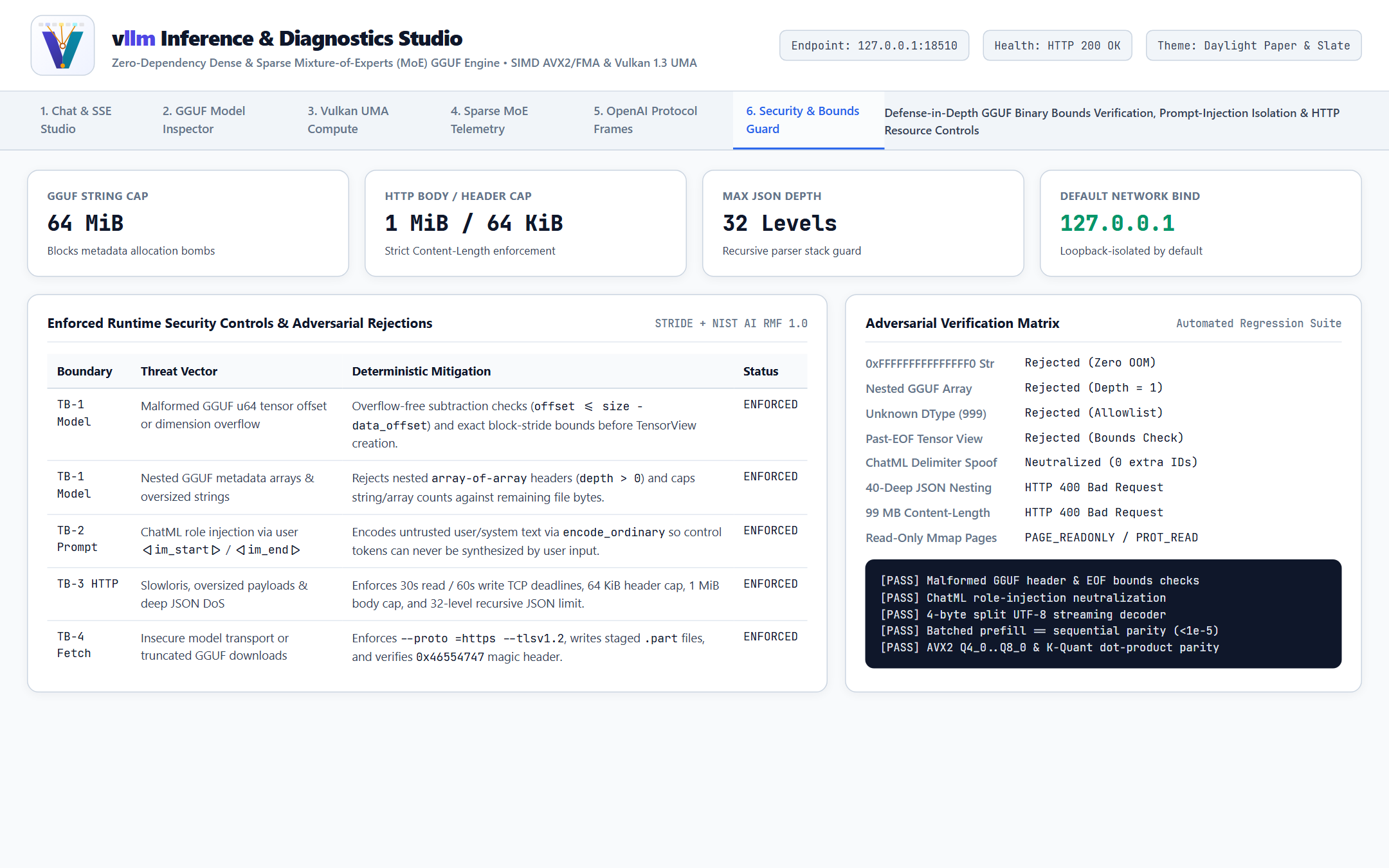
Enforces 30s read / 60s write socket timeouts, 64 KiB header cap, and 1 MiB body limit
Limits JSON nesting depth to 32 levels to prevent stack exhaustion
Flushes data: {...} SSE delta frames on every decoded token boundary
Tokenization
ChatML & BPE Tokenizer
ChatML & BPE Tokenizer Subsystem
Component 4 of 7
Architectural Role & Purpose
Formats system/user/assistant turns with injection-safe ChatML markers and encodes text into integer token IDs.
Contextual Description & System Interaction
Guarantees structural separation between trusted conversation framing and untrusted user prompt content.
Core Functionality & Execution Mechanics
Encodes untrusted user text via ordinary BPE so control tokens cannot be spoofed
Supports GPT-2 256-byte unicode tables (Qwen2/OLMoE) and SentencePiece styles
Applies priority-ranked BPE merge pairs directly from GGUF vocabulary arrays
Compute Core
Transformer Runtime
Stateful Transformer Inference Runtime
Component 5 of 7
Architectural Role & Purpose
Executes dense (LLaMA/Qwen2/Mistral/Gemma) and sparse MoE (OLMoE) transformer layers over pre-allocated arenas.
Contextual Description & System Interaction
Coordinates quantized weight views, GQA attention, sparse expert routing, CPU SIMD workers, and Vulkan UMA.
Core Functionality & Execution Mechanics
Matches longest shared token prefix in KV cache to skip redundant prefill work
Dispatches batched prefill across prompt deltas and single-token autoregressive decode
Executes with zero heap allocations per generated token across all layers
Sampling
Logit Sampler Chain
Non-Mutating Logit Sampler Pipeline
Component 6 of 7
Architectural Role & Purpose
Selects the next token ID deterministically (greedy) or stochastically from vocabulary logits without mutating model state.
Contextual Description & System Interaction
Prevents subtle logit-aliasing bugs across multi-turn steps while supporting creative and deterministic decoding.
Core Functionality & Execution Mechanics
Copies logits into a private scratch buffer before applying repetition penalties
Chains temperature scaling, partial-sort Top-K, nucleus Top-P, and Min-P filtering
Drives reproducible sampling via seeded xoshiro PRNG state
Output Stream
UTF-8 Stream Decoder
Incremental UTF-8 Stream Decoder
Component 7 of 7
Architectural Role & Purpose
Reassembles byte-level BPE pieces across token boundaries so partial UTF-8 sequences never corrupt client output.
Contextual Description & System Interaction
Ensures CJK characters, mathematical symbols, and multi-byte sequences stream cleanly over CLI stdout and HTTP SSE.
Core Functionality & Execution Mechanics
Buffers incomplete 2-byte, 3-byte, and 4-byte UTF-8 lead/continuation bytes
Emits clean UTF-8 strings immediately once codepoints complete
Validates EOS and ChatML stop tokens (<|im_end|>, <|endoftext|>) per step
Core Capabilities
Audience
Capability
Operational Value
Application Developers
Drop-In OpenAI REST & SSE Server (serve)
Point official OpenAI Python/Node.js SDKs, IDE coding assistants, local RAG pipelines, and curl clients at http://127.0.0.1:8080/v1/chat/completions for synchronous JSON or real-time text/event-stream SSE token streaming.
AI & ML Practitioners
Dense + Sparse MoE GGUF Execution (run, chat)
Run compact dense GQA models (Qwen2.5, LLaMA 3, Mistral, Gemma, Phi) and sparse 64 -> Top-8 Mixture-of-Experts models (OLMoE-1B-7B) directly from quantized GGUF files (Q4_K_M, Q5_0, Q6_K, Q8_0, BF16, F16, F32) with zero Python or CUDA runtime dependencies.
Multi-Turn Chat Users
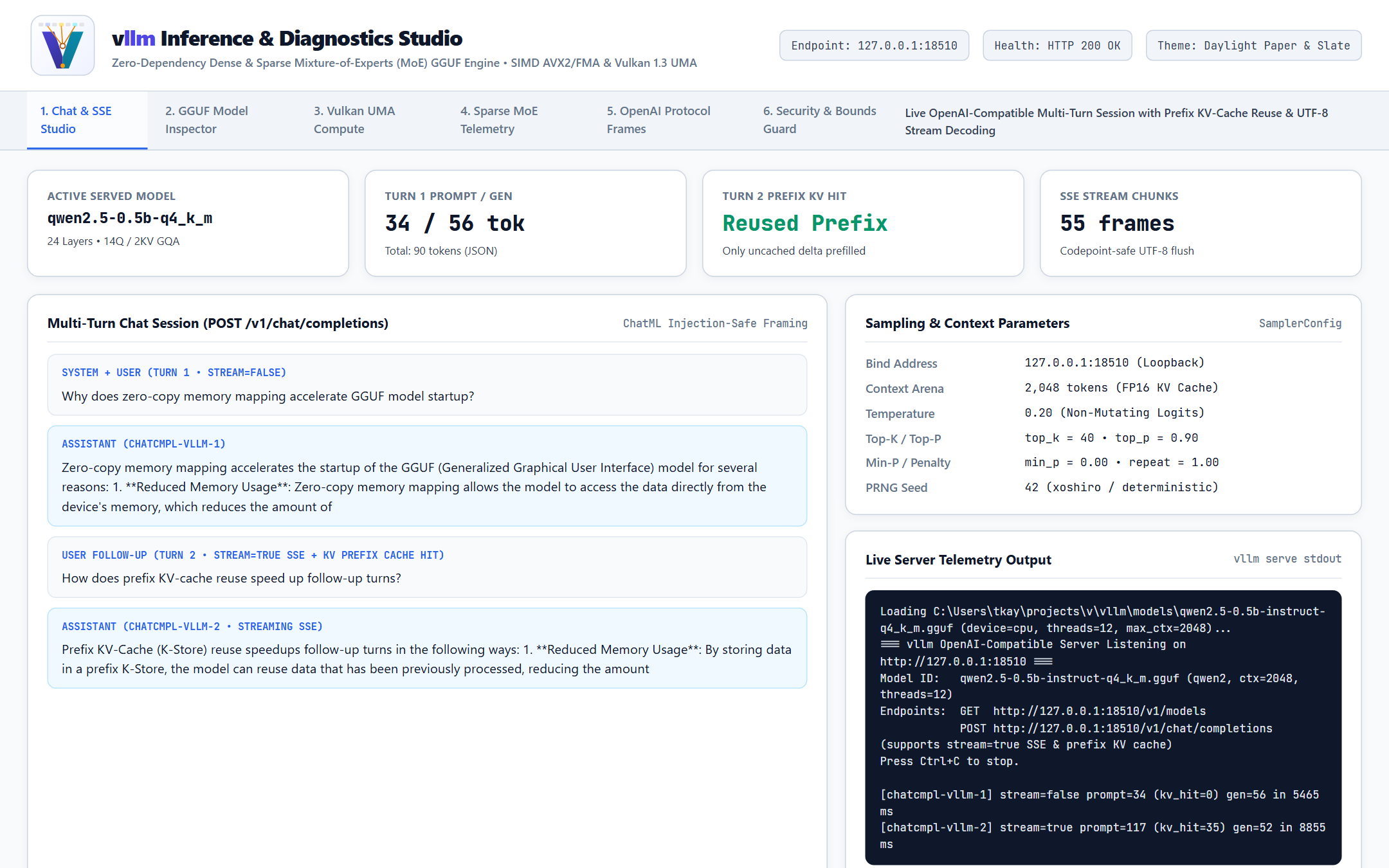
Automatic Prefix KV-Cache Reuse
Consecutive chat turns automatically reuse the longest matching token prefix stored in the compact FP16 KV Cache, prefilling only newly appended user messages for snappy follow-up responses.
Platform & Edge Operators
Zero-Copy Virtual Memory + Vulkan 1.3 UMA
Cold-start a 4.0 GB MoE model in ~28 ms via read-only OS memory mapping (CreateFileMappingW / mmap) and accelerate large matrix projections on integrated APUs or discrete GPUs without installing a Vulkan SDK.
End-User Guide — Prompting workflows, multi-turn ChatML sessions, sampling controls (--temp, --top-k, --top-p, --min-p, --repeat-penalty), and choosing between Dense and Sparse MoE models.
Administrator Guide — Production installation, memory & KV-cache sizing, reverse-proxy TLS and Bearer token authentication, service management, and air-gapped model staging.
Operations, Use Cases & Examples — Real-world deployment topologies and runnable curl, Python OpenAI SDK, and JavaScript/TypeScript streaming client examples.
Configuration & CLI Reference — Complete reference for all CLI subcommands, runtime flags, GGUF metadata keys, and HTTP/SSE wire schemas.
Performance & Capacity Guide — Measured SIMD (AVX2/FMA/NEON) and Vulkan Wave64 UMA throughput, Q4_K/Q8_0/BF16 memory sizing formulas, and GQA KV-cache prefix reuse benchmarks.
Consolidated User Handbook — Single-volume master compendium combining all End-User, How-To, Administrator, Operations, Configuration, and Performance guides.
Quickstart
Launch vllm using the prebuilt binary for your platform (dist/bin/windows/vllm.exe, dist/bin/linux/vllm, or dist/bin/macos/vllm):
BASH
# 1. Probe Vulkan 1.3 GPU / APU unified memory heaps and Wave64 SPIR-V shader latency
./vllm gpu

# 2. Inspect GGUF v2/v3 architecture hyperparameters and quantized tensor distribution
./vllm inspect models/olmoe-1b-7b-0924-instruct-q4_k_m.gguf

# 3. Generate a single-turn instruction response using ChatML formatting
./vllm run models/qwen2.5-0.5b-instruct-q4_k_m.gguf --chat -p "Explain zero-copy memory mapping in two sentences." -n 96

# 4. Launch an interactive multi-turn terminal chat session
./vllm chat models/olmoe-1b-7b-0924-instruct-q4_k_m.gguf --system "You are a concise systems architect."

# 5. Start the OpenAI-compatible HTTP & SSE server on loopback port 8080
./vllm serve models/qwen2.5-0.5b-instruct-q4_k_m.gguf --host 127.0.0.1 --port 8080 --ctx 4096
vllm — Step-by-Step How-To Guide
Overview
This guide provides task-oriented recipes for End Users, Application Developers, and System Administrators operating vllm across local workstations, integrated APU systems, and private inference servers.
Recipe 1: Inspect a GGUF Model Before Deployment
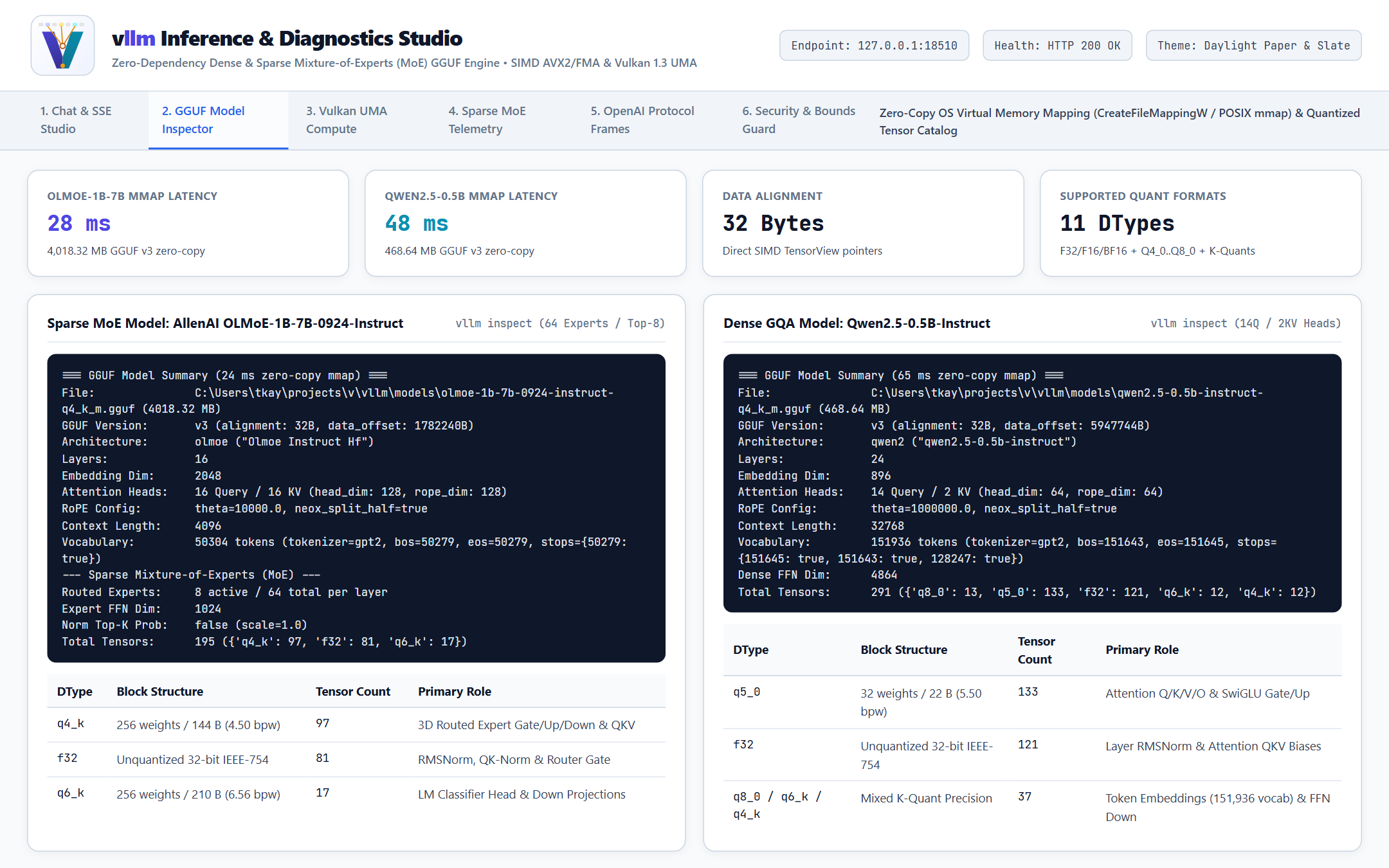
Before loading an unfamiliar GGUF file into production memory, inspect its architecture metadata, context ceiling, attention head layout, expert routing configuration, and quantization distribution.
Run the inspect subcommand against any .gguf v2 or v3 artifact:
Review the structured summary emitted in milliseconds via zero-copy OS memory mapping:
TEXT
Mapped 4018.32 MB in 28 ms (GGUF v3, 195 tensors, 35 metadata KV pairs)
=== Model Summary ===
  Architecture : olmoe (AllenAI OLMoE 1B 7B 0924 Instruct)
  Layers       : 16
  Hidden Dim   : 2048
  Attn Heads   : 16 Q / 16 KV (head_dim=128, rope_theta=10000.0)
  Context Len  : 4096
  Vocab Size   : 50304
  MoE Experts  : 8 active / 64 total (moe_inter_dim=1024, shared=0)
  Data Offset  : 0x5c3720 (alignment=32 bytes)
  Tensor Types : {'q4_k': 97, 'f32': 81, 'q6_k': 17}
Verify that Context Len, Attn Heads, and Tensor Types match your host RAM budget (see the Performance & Capacity Guide for exact sizing formulas).
Recipe 2: Run Deterministic vs Creative Single-Turn Prompts
Use vllm run for scripted CLI pipelines, automated evaluations, and shell one-liners.
Deterministic Greedy Decoding (--temp 0) — ideal for code generation, structured extraction, and regression testing:
BASH
./vllm run models/qwen2.5-0.5b-instruct-q4_k_m.gguf \
  --chat \
  --system "Reply with valid JSON only." \
  -p "List three advantages of FP16 KV caching as a JSON array of strings." \
  --temp 0 \
  -n 128
Reproducible Stochastic Sampling (--seed + --top-k + --top-p + --min-p) — ideal for natural prose while maintaining exact reproducibility across runs:
Use vllm chat to hold stateful multi-turn conversations in your terminal with incremental KV-cache reuse across turns.
Start an interactive session with a custom system prompt and context window:
BASH
./vllm chat models/qwen2.5-0.5b-instruct-q4_k_m.gguf \
  --ctx 4096 \
  --temp 0.4 \
  --system "You are a concise Linux and network engineering assistant."
Enter questions at the >>> prompt. Notice that follow-up turns prefill only the newly added user message because prior conversation tokens remain resident in the FP16 KV cache.
Use built-in session commands at any time:
Type /reset to clear conversation history and reset KV cache position to 0.
Type /exit or /quit (or press Ctrl+D) to close the session cleanly.
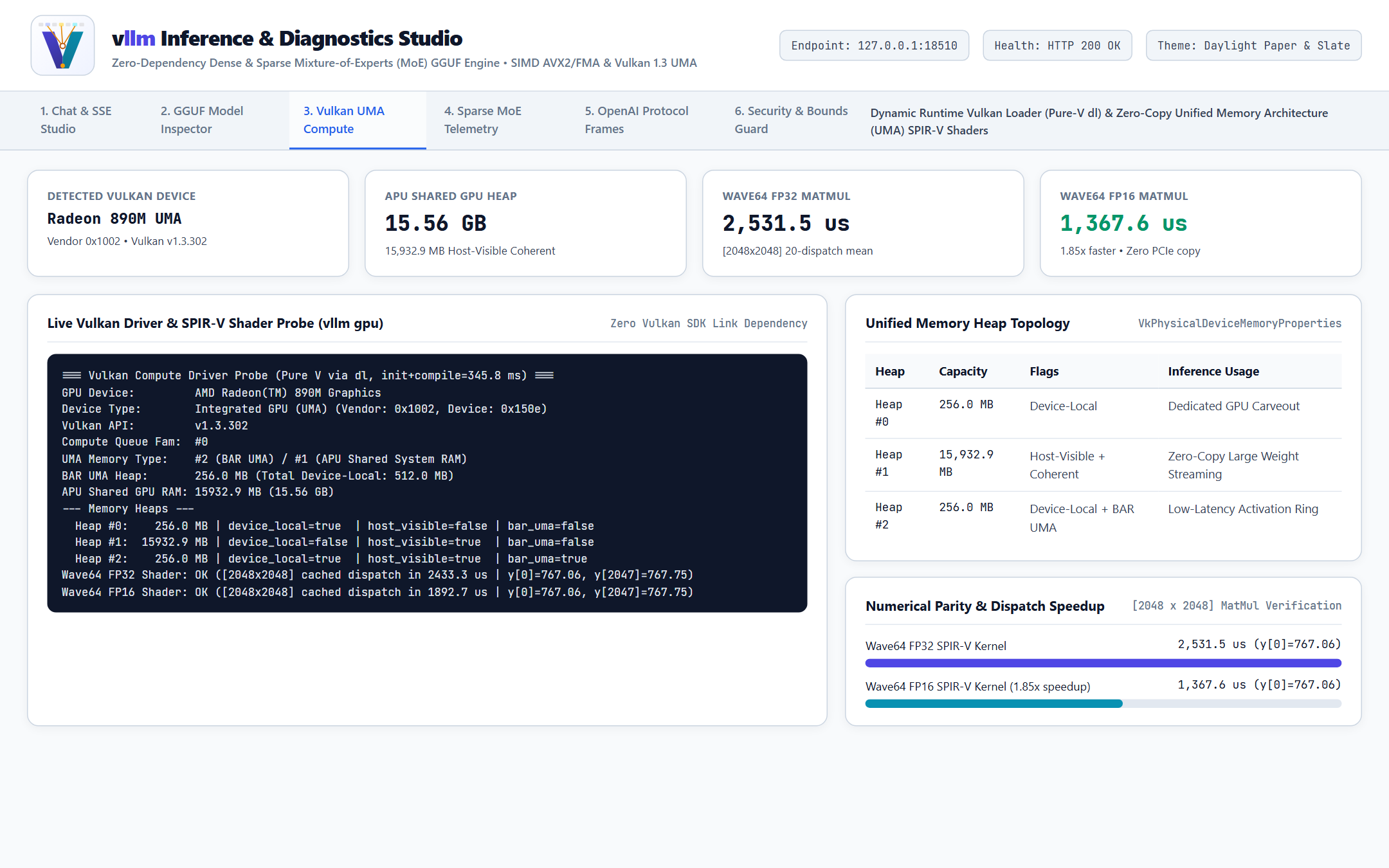
On laptops, mini-PCs with integrated APUs (such as AMD Radeon 890M / Ryzen AI), or discrete Vulkan GPUs, verify driver readiness before enabling --device gpu.
Run the built-in Vulkan compute probe:
BASH
./vllm gpu
Confirm that vllm detects your Vulkan 1.2/1.3 device, lists available memory heaps, and passes the [2048 x 2048] Wave64 FP32 and FP16 matrix-vector verification benchmark (y[0]=767.06).
Enable GPU acceleration on run, chat, bench, or serve with --device gpu:
BASH
./vllm run models/qwen2.5-0.5b-instruct-q4_k_m.gguf \
  --device gpu \
  --chat \
  -p "Explain unified memory architecture on modern APUs." \
  -n 128
Recipe 5: Serve OpenAI-Compatible Endpoints for Local SDKs & IDE Tools
Expose any local GGUF model over the standard OpenAI /v1/chat/completions HTTP and Server-Sent Events (SSE) protocol.
Start the server bound to loopback (127.0.0.1) on port 18510:
Compare CPU thread counts (--threads 4, --threads 8, --threads 12) against your CPU's physical core count; memory-bandwidth-bound quantized inference typically peaks at the number of physical performance cores rather than hyperthreaded logical threads.
vllm — End-User Guide
1. Welcome to Local Private Inference
vllm lets you run modern instruction-tuned and base Large Language Models completely offline on your desktop, laptop, or private workstation. Prompts, documents, source code, and generated responses never leave your machine.
Whether you interact through the terminal (vllm run and vllm chat) or connect your favorite OpenAI-compatible desktop chat client, IDE extension, or local automation script to vllm serve, this guide explains how to choose models, shape prompts, and tune generation behavior.
2. Choosing Between Dense and Sparse MoE Models
vllm supports both Dense Transformer families and Sparse Mixture-of-Experts (MoE) architectures out of the box:
Model Family
Example GGUF Artifact
Disk / RAM Size
Best Suited For
Compact Dense GQA (Qwen2.5-0.5B .. 3B)
qwen2.5-0.5b-instruct-q4_k_m.gguf
~469 MB (< 800 MB RSS)
Instantaneous coding completions, classification, JSON formatting, edge devices, and rapid multi-turn drafting at 20–30+ tok/s on CPU.
Deep reasoning, long-context summarization, multilingual translation, and complex multi-step analysis on 8–16 GB systems.
Sparse Mixture-of-Experts (OLMoE-1B-7B)
olmoe-1b-7b-0924-instruct-q4_k_m.gguf
~4.0 GB (~4.5 GB RSS)
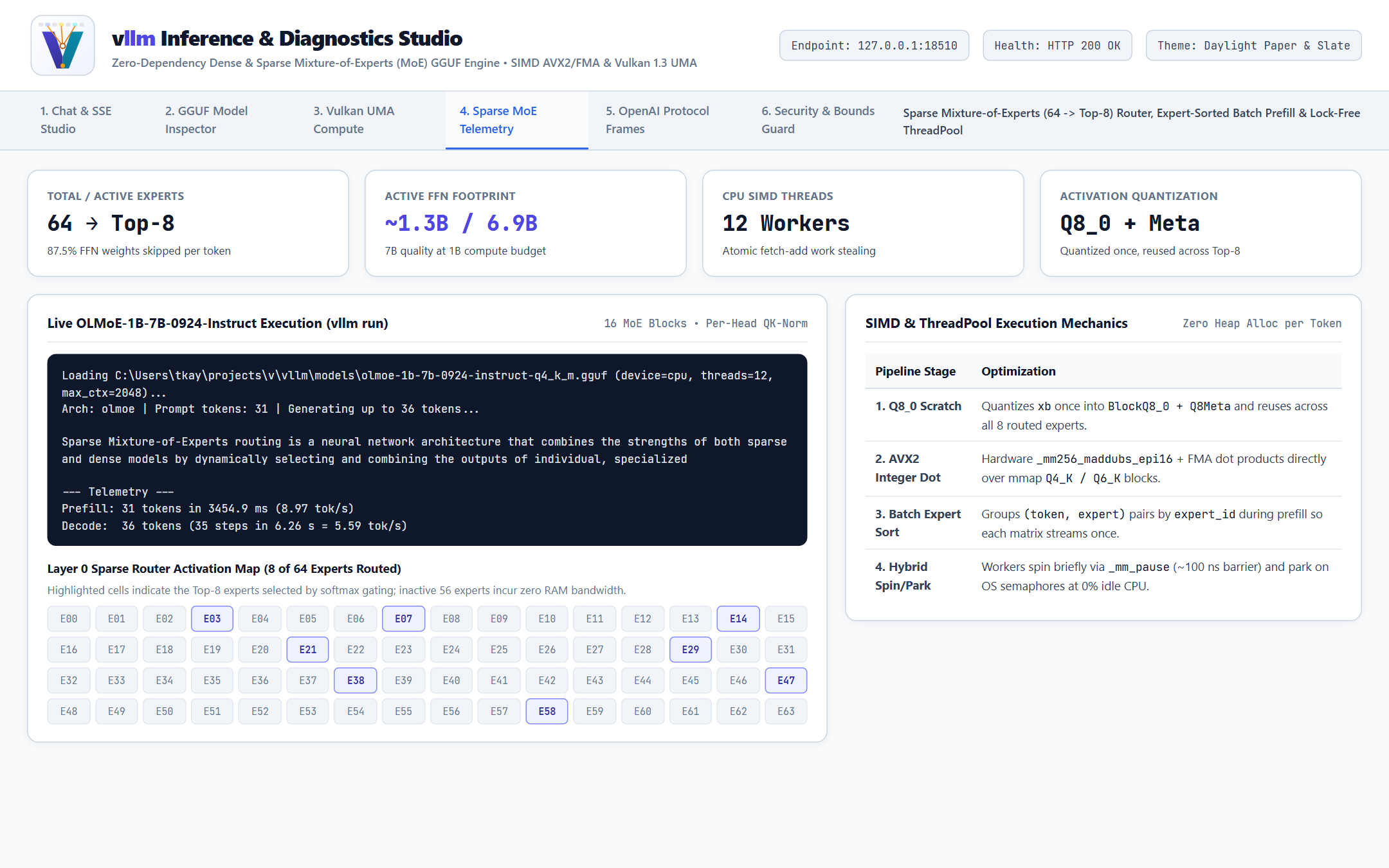
7B-class knowledge capacity at ~1.3B active compute per token — routes each token through only 8 of 64 experts, cutting CPU/RAM bandwidth by 87.5% relative to a dense 7B FFN.
3. Working with Interactive Chat (vllm chat)
Interactive mode wraps every exchange in clean multi-turn conversation framing and keeps your conversation context hot in memory:
First Turn: vllm encodes the system instruction and your first user message, prefills those tokens in a parallel batch, and streams the assistant's reply word by word.
Follow-Up Turns: When you ask a follow-up question, vllm detects that the earlier turns are already stored in its FP16 KV Cache and computes only the new user message before streaming the next reply.
Starting Fresh (/reset): When switching topics, type /reset at the >>> prompt to clear the conversation buffer and reclaim the full --ctx window without restarting or re-mapping the model file.
Exiting (/exit or /quit): Ends the session cleanly and releases memory mappings.
4. Understanding Sampling Controls
Tuning sampling flags changes how vllm chooses each token from the model's probability distribution:
Parameter
CLI Flag / JSON Field
Recommended Range
Effect on Output
Temperature
--temp / temperature
0.0 – 1.2 (default 0.7)
0.0 selects the single most probable token at every step (deterministic greedy). 0.2–0.4 favors factual, focused answers; 0.7–0.9 encourages varied phrasing and brainstorming.
Top-K
--top-k / top_k
1 – 100 (default 40)
Restricts sampling to the K highest-probability candidate tokens, preventing low-probability tail noise. Set 0 to disable.
Top-P (Nucleus)
--top-p / top_p
0.50 – 1.00 (default 0.90)
Dynamically keeps the smallest set of top tokens whose cumulative probability reaches P, adapting candidate breadth to model confidence.
Min-P
--min-p / min_p
0.00 – 0.20 (default 0.05 CLI)
Filters out any candidate token whose probability is less than min_p * max_prob, maintaining coherence even at higher temperatures.
Repetition Penalty
--repeat-penalty / repetition_penalty
1.00 – 1.20 (default 1.10 CLI)
Gently down-weights tokens that have already appeared in the conversation (1.0 disables the penalty).
Random Seed
--seed / seed
Any 64-bit integer (0 = time seed)
Setting a fixed non-zero seed (for example --seed 42) produces bit-for-bit repeatable generations for identical prompts and flags.
API Key: local-vllm (any non-empty placeholder string accepted by your client when connecting directly over loopback)
Model Name: qwen2.5-0.5b-instruct-q4_k_m.gguf (or query http://127.0.0.1:8080/v1/models to auto-populate)
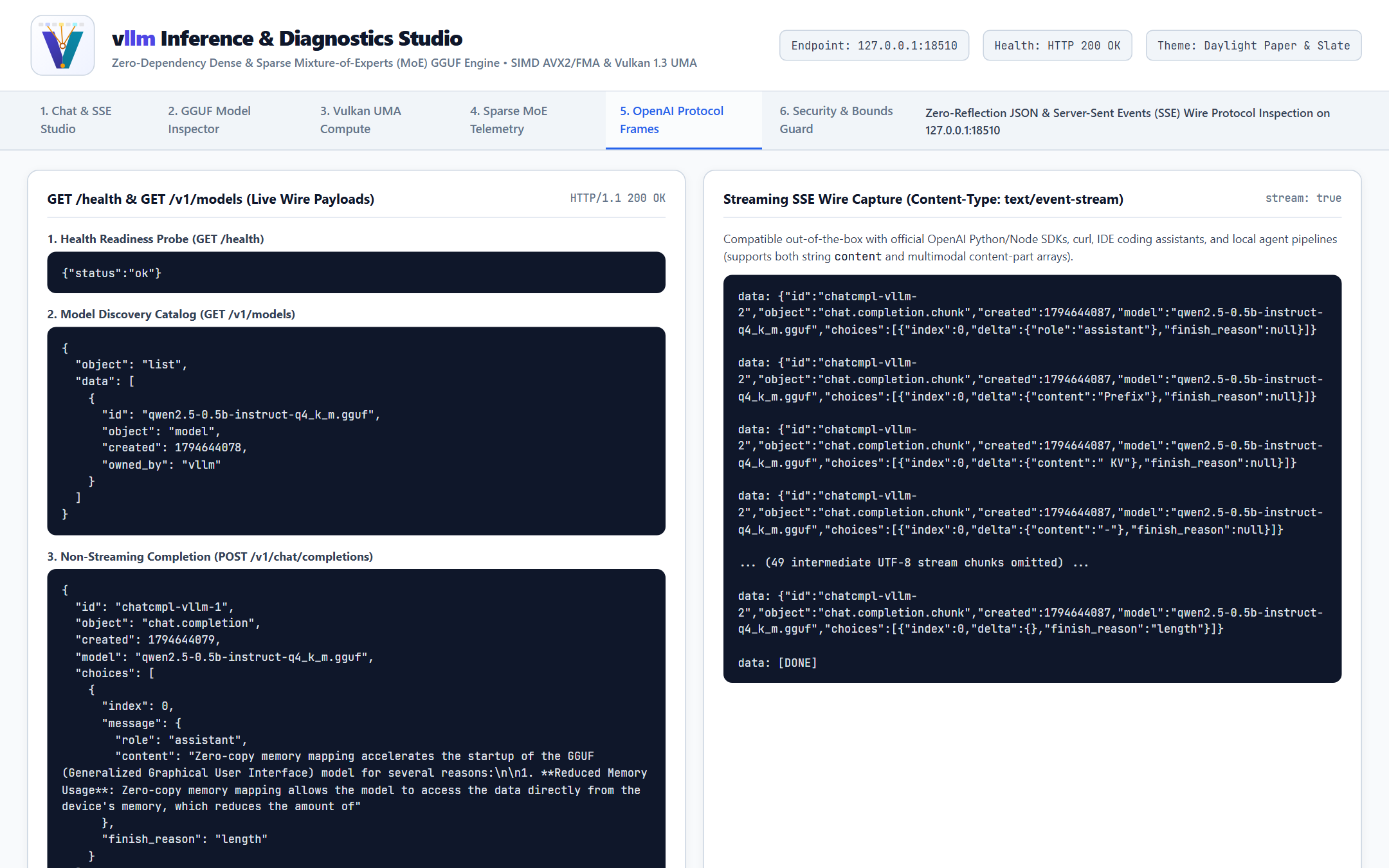
Both standard single-string messages ("content": "Hello") and modern OpenAI array-of-parts messages ("content": [{"type": "text", "text": "Hello"}]) sent by newer agent frameworks and IDE plugins are supported transparently.
vllm — System Administrator & Deployment Guide
1. Deployment Architecture Overview
vllm is engineered for zero-runtime-dependency operations:
Single Static/Native Binary: No Python virtual environments, PyTorch wheels, CUDA toolkit installations, or C++ shared-library version conflicts.
Read-Only Memory-Mapped Weights: Model .gguf files are opened strictly read-only (PAGE_READONLY on Windows, PROT_READ + MAP_PRIVATE on Linux/macOS). Multiple processes can map the same physical RAM pages safely, and power loss can never corrupt model weights.
Deterministic Arena Memory: All activation buffers, quantized scratchpads, and FP16 KV caches are pre-allocated at startup for --ctx <N>. During steady-state token generation, vllm performs zero per-token heap allocations, eliminating out-of-memory spikes mid-request.
Loopback-First Network Security: vllm serve binds 127.0.0.1 by default so workstation deployments never inadvertently expose an unauthenticated port on Wi-Fi or corporate LAN interfaces.
2. Platform Installation
Windows x64
Extract vllm-windows-x64.zip into an installation directory such as ./vllm/ (your extracted product root directory).
In regulated or air-gapped environments, administrators should pre-stage verified GGUF artifacts rather than relying on on-demand internet downloads:
Download the approved .gguf artifact on a staging bastion over HTTPS (TLS 1.2+).
Record and verify its SHA-256 digest against your internal model registry manifest.
Run ./vllm inspect <path-to-model.gguf> on the staging host to verify header integrity, tensor bounds, and expected quantization layout before copying the file into ./models/.
Mount ./models read-only (ro,nosuid,nodev,noexec) inside containers or systemd units.
4. Hardened Linux systemd Service Configuration
Run vllm serve on loopback under strict systemd sandboxing:
5. Reverse-Proxy TLS Termination & API Bearer Authentication
vllm serve intentionally keeps its HTTP parser minimal and binds 127.0.0.1 by default. When exposing vllm across a network segment or team VLAN, place an identity-aware gateway (vgate) or TLS reverse proxy (Caddy / NGINX) in front of 127.0.0.1:18510 to enforce TLS 1.3, Bearer API Key / OIDC JWT authentication, and SSE flush-through (proxy_buffering off).
6. Health Monitoring, Capacity Controls & Troubleshooting
Symptom / Check
Diagnostic Command / Cause
Resolution
Readiness Probe
curl -fsS http://127.0.0.1:18510/health
Expect HTTP 200 with {"status":"ok","model":"...","ready":true} (lock-free; never blocked by active inference). Wire this into load balancer or systemd watchdogs.
Prometheus Metrics
curl -fsS http://127.0.0.1:18510/metrics
Exposes vllm_requests_total, vllm_requests_active, vllm_errors_total, vllm_tokens_generated_total, vllm_kv_prefix_hits_total, and vllm_inference_duration_ms_sum.
HTTP 413 Payload Too Large / HTTP 431
Request body exceeds 1 MiB or headers exceed 64 KiB
Trim oversized RAG document chunks before sending to /v1/chat/completions; vllm enforces strict 1 MiB body and 64 KiB header bounds.
Lower-Than-Expected CPU tok/s
--threads set equal to logical hyperthreads instead of physical cores
Set --threads equal to physical performance cores (e.g. 8 or 12) to prevent L3 cache and DRAM bus contention.
No Vulkan-capable GPU detected
Headless VM or missing vendor ICD (vulkan-1.dll / libvulkan.so.1)
Install the host GPU driver's Vulkan runtime or omit --device gpu to run on the AVX2/NEON CPU thread pool.
Long Multi-Turn Context Truncation
Conversation exceeds --ctx (default 2048 if overridden below model limit)
Increase --ctx 4096 or --ctx 8192 at server startup and verify host RAM headroom for the expanded FP16 KV arena.
vllm — Operations, Use Cases & Client Examples
1. Operational Deployment Patterns
vllm fits four common enterprise and developer deployment patterns without requiring dedicated datacenter GPU clusters:
Topology
Target Hardware
Model Selection
Operational Pattern
1. Developer Loopback Assistant
Laptop / Workstation (16–32 GB RAM, AVX2 or Apple Silicon NEON)
qwen2.5-0.5b-instruct-q4_k_m.gguf or olmoe-1b-7b-0924-instruct-q4_k_m.gguf
vllm serve bound to 127.0.0.1:8080 backing IDE autocomplete, commit message drafting, and local CLI scripts.
2. Integrated APU Unified-Memory Node
Mini-PC / Edge Workstation with Vulkan 1.3 UMA APU (16–64 GB shared RAM)
Q4_K_M / Q6_K Dense or Sparse MoE models
--device gpu uploads resident projections into host-visible coherent UMA memory with zero PCIe transfer overhead.
3. Local RAG & Knowledge Synthesis Sidecar
Co-located Linux service alongside vkbm / vstore
Instruction-tuned Q4_K_M or Q8_0 GGUF
Synthesizes grounded answers over retrieved knowledge chunks strictly over loopback HTTP (127.0.0.1:18510) with zero external data egress.
4. Team Gateway Behind vgate / NGINX
8–16 physical core server (32–64 GB RAM)
OLMoE-1B-7B (Q4_K_M) or 7B–8B Dense GQA
Reverse proxy terminates TLS 1.3 and validates OIDC / Bearer tokens before forwarding /v1/chat/completions over loopback.
2. Runnable Integration Examples
Start a local vllm serve instance before running the client examples below:
curl -N http://127.0.0.1:18510/v1/chat/completions \
  -H "Content-Type: application/json" \
  -d '{
    "model": "qwen2.5-0.5b-instruct-q4_k_m.gguf",
    "messages": [
      {"role": "system", "content": "You are a concise systems engineering assistant."},
      {"role": "user", "content": "Explain grouped-query attention in three bullet points."}
    ],
    "max_tokens": 128,
    "temperature": 0.3,
    "stream": true
  }'
Example B: Official Python openai SDK (Multi-Turn Prefix Reuse)
Because vllm implements the standard /v1/chat/completions and /v1/models wire contracts, the official openai Python client works with zero code changes beyond setting base_url:
PYTHON
from openai import OpenAI

client = OpenAI(
    base_url="http://127.0.0.1:18510/v1",
    api_key="local-vllm",
)

messages = [
    {"role": "system", "content": "You are a concise infrastructure reliability engineer."},
    {"role": "user", "content": "What are two benefits of read-only memory-mapped model weights?"},
]

# Turn 1: Synchronous JSON response
turn1 = client.chat.completions.create(
    model="qwen2.5-0.5b-instruct-q4_k_m.gguf",
    messages=messages,
    temperature=0.2,
    max_tokens=96,
)
reply1 = turn1.choices[0].message.content
print("Turn 1:", reply1)

# Turn 2: Append history and stream SSE deltas (automatically hits vllm's prefix KV cache!)
messages.append({"role": "assistant", "content": reply1})
messages.append({"role": "user", "content": "How does FP16 KV caching complement that?"})

stream = client.chat.completions.create(
    model="qwen2.5-0.5b-instruct-q4_k_m.gguf",
    messages=messages,
    temperature=0.2,
    max_tokens=96,
    stream=True,
)

print("Turn 2: ", end="", flush=True)
for chunk in stream:
    delta = chunk.choices[0].delta.content
    if delta:
        print(delta, end="", flush=True)
print()
Example C: Node.js / TypeScript Zero-Dependency fetch SSE Reader
Modern Node.js (v20+) and browser runtimes can consume vllm's text/event-stream responses directly using native fetch:
JAVASCRIPT
async function streamChatCompletion() {
  const response = await fetch("http://127.0.0.1:18510/v1/chat/completions", {
    method: "POST",
    headers: { "Content-Type": "application/json" },
    body: JSON.stringify({
      model: "qwen2.5-0.5b-instruct-q4_k_m.gguf",
      messages: [
        { role: "system", content: "Answer in plain, direct engineering prose." },
        { role: "user", content: "Summarize Sparse Mixture-of-Experts routing." },
      ],
      temperature: 0.3,
      max_tokens: 100,
      stream: true,
    }),
  });

  if (!response.ok) {
    throw new Error(`HTTP ${response.status}: ${await response.text()}`);
  }

  const decoder = new TextDecoder();
  let buffer = "";
  for await (const chunk of response.body) {
    buffer += decoder.decode(chunk, { stream: true });
    const events = buffer.split("\n\n");
    buffer = events.pop() || "";
    for (const evt of events) {
      const line = evt.trim();
      if (!line.startsWith("data: ") || line === "data: [DONE]") continue;
      const payload = JSON.parse(line.slice(6));
      const tokenText = payload.choices?.[0]?.delta?.content ?? "";
      process.stdout.write(tokenText);
    }
  }
  process.stdout.write("\n");
}

streamChatCompletion();
Example D: Air-Gapped Log Triage & Batch CLI Pipeline
For offline batch classification or security log summarization where no network daemon is needed, invoke vllm run directly inside shell pipelines:
BASH
./vllm run models/olmoe-1b-7b-0924-instruct-q4_k_m.gguf \
  --chat \
  --system "Classify the severity (INFO, WARN, CRITICAL) and summarize root cause in one line." \
  -p "2026-11-14T07:12:04Z kernel: nvme0n1: I/O error, dev nvme0n1, sector 8841920 op 0x0:(READ)" \
  --temp 0 \
  -n 64
3. Operational Runbook Checklist
Pre-Flight Verification:
Run ./vllm inspect <model.gguf> to confirm GGUF v2/v3 header validity and expected tensor count.
Run ./vllm gpu if deploying with --device gpu to verify Vulkan driver initialization and numerical parity.
Steady-State Operations:
Monitor GET /health (HTTP 200 OK), GET /metrics (Prometheus counters), and structured JSON request logs on stdout (ts, req_id, status, prompt_tokens, kv_hit, completion_tokens, duration_ms).
High kv_hit counts on multi-turn agent workloads confirm that clients are preserving deterministic system prompts at the start of messages, maximizing prefix KV-cache reuse.
Graceful Upgrade:
Stage the new vllm binary alongside the existing release, verify SHA256SUMS.txt, drain active HTTP connections at the reverse proxy, and restart the service; read-only .gguf files require zero migration or conversion across binary upgrades.
vllm — Configuration & CLI Reference
1. Command-Line Synopsis
TEXT
vllm <command> [model.gguf] [options]
If [model.gguf] is omitted on inspect, run, chat, serve, or bench, vllm defaults to models/olmoe-1b-7b-0924-instruct-q4_k_m.gguf and automatically downloads it over HTTPS (TLS 1.2+) if not already present on disk.
2. Subcommands
Subcommand
Arguments
Description
download
<preset-id> [--sha256 <hex>]
Downloads an official OLMoE or Qwen GGUF preset over HTTPS (TLS 1.2+) into ./models/, validates GGUF header/tensor bounds and optional SHA-256 digest before atomic rename.
inspect
<model.gguf>
Memory-maps the GGUF v2/v3 file read-only, validates all metadata and tensor bounds, and prints architecture hyperparameters, expert counts, data alignment, and per-DType tensor counts.
gpu
(none)
Dynamically probes the system's Vulkan 1.2/1.3 driver, prints GPU/APU memory heaps, verifies numerical parity (y[0]=767.06), and benchmarks [2048 x 2048] Wave64 FP32 and FP16 SPIR-V matrix-vector dispatches.
run
<model.gguf> [options]
Executes a single prompt prefill + autoregressive token generation pass and prints prefill/decode throughput (tok/s) upon completion.
chat
<model.gguf> [options]
Launches an interactive multi-turn ChatML REPL session with automatic prefix KV-cache reuse and /clear, /exit, /quit session commands.
serve
<model.gguf> [options]
Starts the concurrent OpenAI-compatible HTTP/1.1 & Server-Sent Events (SSE) server exposing /health, /metrics, /v1/models, and /v1/chat/completions with graceful SIGINT/SIGTERM shutdown.
help
[-h | --help | -v | --version]
Prints command usage syntax, supported model presets, or version metadata (vllm 0.1.0).
3. Complete Runtime Flags Reference
Flag
Alias
Value Type
Default
Applicable Commands
Description
--prompt
-p
string
"Hello"
run
Input prompt text to complete (or initial user message when combined with --chat).
--chat
—
(boolean)
false (run), true (chat)
run
Wraps --system and --prompt in injection-safe ChatML <|im_start|> / <|im_end|> conversation framing.
--system
-s
string
""
run --chat, chat
System instruction placed at the head of the ChatML conversation context.
--max-tokens
-n
int (>= 1)
128
run, chat, serve
Maximum number of completion tokens generated per turn or request.
--ctx
-c
int (>= 16)
2048 (clamped to <= model.context_length)
run, chat, serve
Maximum KV-cache sequence length pre-allocated at startup.
--threads
—
int (1..256)
Auto-detected physical core count
run, chat, serve
Number of persistent worker threads in the lock-free SIMD work-stealing thread pool.
--device
—
cpu | gpu
cpu
run, chat, serve
Selects multi-threaded CPU SIMD execution (cpu) or Vulkan UMA/VRAM GPU offload (gpu) with automatic CPU fallback.
--gpu-index
—
int (>= 0)
Auto (prefers hardware GPU)
run, chat, serve
Explicit Vulkan physical device index (also configurable via VLLM_GPU_INDEX).
--temp
-t
f32 (>= 0.0)
0.7
run, chat, serve
Sampling temperature (0.0 switches to deterministic argmax greedy decoding).
--top-k
—
int (>= 0)
40
run, chat, serve
Top-K candidate cutoff before nucleus filtering (0 disables Top-K).
--top-p
—
f32 ((0.0, 1.0])
0.90
run, chat, serve
Nucleus cumulative probability threshold (1.0 disables Top-P).
--min-p
—
f32 ([0.0, 1.0])
0.0
run, chat, serve
Minimum candidate probability relative to the top token probability (0.0 disables Min-P).
--repeat-penalty
—
f32 (> 0.0)
1.0
run, chat, serve
Multiplicative penalty applied to tokens already present in the last 64 tokens (1.0 disables).
--seed
—
u64
0 (wall-clock seed)
run, chat, serve
PRNG seed for deterministic stochastic sampling when non-zero.
--host
—
string
"127.0.0.1"
serve
IPv4 bind address for the OpenAI HTTP server. Defaults to loopback 127.0.0.1 for local isolation.
--port
—
int (1..65535)
8080
serve
TCP port for the OpenAI HTTP & SSE server.
--api-key
—
string
"" (or VLLM_API_KEY env)
serve
Optional constant-time Bearer API key required for /v1/* and /metrics endpoints.
--cors-origin
—
string
"" (disabled)
serve
Opt-in Access-Control-Allow-Origin header value. Disabled by default to prevent localhost CSRF.
--no-prefix-cache
—
(boolean)
false
serve
Disables cross-request KV prefix cache reuse for multi-tenant isolation.
--max-connections
—
int (1..4096)
64
serve
Maximum concurrent TCP connections accepted by serve (excess connections receive HTTP 503).
--sha256
—
string (64 hex)
""
download
Verifies cryptographic SHA-256 digest of the downloaded .gguf artifact before atomic rename.
4. OpenAI HTTP & SSE API Reference (vllm serve)
4.1 Endpoints Summary
Method
Path
Response Content-Type
Description
GET
/health
application/json
Lock-free liveness and readiness probe ({"status":"ok","model":"<id>","ready":true} or HTTP 503 during graceful shutdown).
Rejects oversized header blocks with HTTP 431 Request Header Fields Too Large.
Max HTTP Request Body
1 MiB (1,048,576 bytes)
Rejects oversized Content-Length or chunked streams with HTTP 413 Payload Too Large.
HTTP Smuggling Guard
RFC 9112 §6.3
Rejects conflicting duplicate Content-Length or simultaneous Content-Length + Transfer-Encoding with HTTP 400.
Max Concurrent Connections
64 (configurable via --max-connections)
Rejects excess connections cleanly with HTTP 503 Service Unavailable.
Max JSON Nesting Depth
32 levels
Aborts recursive JSON parsing cleanly with HTTP 400 to prevent stack exhaustion.
5. Self-Describing GGUF Metadata Keys
vllm requires zero external configuration files because all model hyperparameters are resolved directly from standardized GGUF v2/v3 metadata keys at load time:
Autoregressive LLM token decoding is fundamentally memory-bandwidth bound: every generated token must stream active layer weights from DRAM or Unified Memory into vector registers. vllm maximizes throughput and minimizes memory footprint across four hardware-sympathetic layers:
Zero-Copy OS Virtual Memory Mapping (mmap / CreateFileMappingW): Multi-gigabyte GGUF v2/v3 files map directly into virtual memory in tens of milliseconds (28 ms for 4.02 GB OLMoE-1B-7B) with zero heap duplication.
Hardware Integer & FMA SIMD Kernels (AVX2/FMA/F16C & ARM64 NEON): Input activations are quantized once per projection into Q8_0 + Q8Meta sub-sums so quantized weights (Q4_0..Q8_0, Q4_K, Q5_K, Q6_K) execute directly via 256-bit AVX2 integer multiply-accumulate (_mm256_maddubs_epi16) and FMA lanes without full-matrix FP32 dequantization.
Sparse Mixture-of-Experts (64 -> Top-8) & Expert-Sorted Batch Prefill: Sparse MoE models activate only 8 of 64 routed experts per token (skipping 87.5% of FFN bytes), while batched prefill groups (token, expert) pairs by expert_id so each active expert streams through CPU L3 cache once across an entire prompt batch.
Dynamic Vulkan 1.3 UMA SPIR-V Compute (Wave64 FP16/FP32): On integrated APUs and Vulkan GPUs, embedded 64-lane subgroup reduction shaders execute matrix-vector projections directly over host-visible coherent Unified Memory (1.85x speedup in FP16 over FP32 at [2048 x 2048]).
2. Measured Hardware Benchmarks
Representative live measurements captured on an AMD Ryzen AI / Radeon(TM) 890M Unified Memory (15.56 GB shared UMA heap, 12 threads, Windows x64) workstation:
2.1 Zero-Copy Startup & Model Inference Throughput
1,367.6 us per dispatch (1.85x faster than FP32, zero PCIe copy)
2.2 Multi-Turn GQA Prefix KV-Cache Reuse
In multi-turn vllm chat and vllm serve (POST /v1/chat/completions) workloads, vllm stores past Key and Value vectors in FP16 and compares incoming prompt token arrays against its cached prefix:
Session Turn (vllm serve on 127.0.0.1:18510)
Total Prompt Tokens
Cached Prefix Hit (kv_hit)
Newly Prefilled Tokens
Prefill Compute Saved
Turn 1 (Initial System + User Question)
34 tokens
0 tokens
34 tokens (100%)
Baseline initial prefill
Turn 2 (Follow-Up Question + Assistant History)
117 tokens
35 tokens (System + Turn 1 User prefix)
82 tokens (70.1%)
29.9% prefill skipped
Long System Prompt / RAG Context (1,500 tok prefix + 40 tok query)
1,540 tokens
1,500 tokens
40 tokens (2.6%)
97.4% prefill skipped
3. Quantization Formats & Memory Sizing Reference
vllm supports 11 native tensor formats directly over memory-mapped blocks without heap unpacking:
Typically 32 MB – 160 MB (pre-allocated once for single-token state, batch prefill buffers, RoPE cos/sin tables, and Q8_0 scratch).
Concrete Capacity Planning Table (--ctx 4096)
Model Class
Params (Active / Total)
Q4_K_M Weights
Q8_0 Weights
BF16 Weights
FP16 KV Cache (@ 4096 ctx)
Recommended Host RAM (Q4_K_M)
Qwen2.5-0.5B (24L, 2 KV, d_h=64)
0.5B / 0.5B
~0.46 GB
~0.53 GB
~0.99 GB
24.0 MB (7:1 GQA + FP16)
2 GB RAM
Qwen2.5-3B (36L, 2 KV, d_h=128)
3.1B / 3.1B
~1.93 GB
~3.29 GB
~6.18 GB
72.0 MB (8:1 GQA + FP16)
4 GB RAM
OLMoE-1B-7B (16L, 16 KV, d_h=128)
1.3B / 6.9B
~4.02 GB
~7.33 GB
~13.80 GB
512.0 MB (16 KV heads, FP16)
8 GB RAM (16 GB for UMA GPU)
LLaMA-3.1-8B (32L, 8 KV, d_h=128)
8.0B / 8.0B
~4.68 GB
~8.50 GB
~16.05 GB
512.0 MB (4:1 GQA + FP16)
8–16 GB RAM
5. Production Tuning Checklist
Match --threads to Physical Cores: On an 8-core / 16-thread or 12-core processor, test --threads 8 vs --threads 12 using ./vllm bench. Excess hyperthreads competing for the same L2/L3 cache and DDR5 memory channels can slightly reduce decode tok/s.
Right-Size --ctx to Actual Workload: Allocating --ctx 32768 when your application sends <= 2048-token prompts reserves 8x more FP16 KV cache than needed; set --ctx 2048 or --ctx 4096 for chat microservices to keep the KV arena inside fast CPU caches.
Prefer Q4_K_M or Q5_K_M for Decode Speed: Because token generation is DRAM-bandwidth bound, Q4_K_M (4.50 bpw) typically decodes 2.8x – 3.4x faster than BF16/F16 (16.0 bpw) on CPUs and integrated APUs while retaining > 99% downstream task quality.
vllm is a zero-dependency, single-binary Dense and Sparse Mixture-of-Experts (MoE) Large Language Model Inference Engine and OpenAI-Compatible Serving Runtime. Distributed as a self-contained native executable for Windows, Linux, and macOS, vllm maps multi-gigabyte GGUF v2/v3 model files directly into virtual memory in milliseconds and executes quantized inference across multi-threaded x86_64 AVX2/FMA/F16C, ARM64 NEON, and Vulkan 1.3 Unified Memory Architecture (UMA) compute shaders.
Click any component node to inspect how client requests traverse tokenization, KV-cached transformer execution, sampling, and UTF-8 streaming.
Interactive SVG • Click any node (7 components)
Components:
API Clients
OpenAI SDKs & Agents
External OpenAI Client Boundary
Component 1 of 7
Architectural Role & Purpose
External applications, IDE assistants, Python/JS OpenAI SDKs, and curl clients consuming local LLM endpoints.
Contextual Description & System Interaction
Connects over loopback (127.0.0.1 by default) or an authenticated API gateway without external cloud dependencies.
Core Functionality & Execution Mechanics
Submits synchronous JSON or Server-Sent Events (stream=true) chat requests
Queries GET /v1/models and GET /health for readiness and model discovery
Sends plain string messages or multimodal OpenAI content-part arrays
Operator CLI
CLI Subcommands
Command-Line Control Surface
Component 2 of 7
Architectural Role & Purpose
Direct terminal workflow entrypoints for single-turn generation, multi-turn REPL chat, GGUF inspection, and GPU probing.
Contextual Description & System Interaction
Shares the exact same zero-allocation inference and tokenizer pipeline used by the HTTP serving daemon.
Core Functionality & Execution Mechanics
Executes interactive multi-turn sessions with /reset and /exit commands
Runs deterministic prefill/decode throughput benchmarks via bench
Automatically fetches missing GGUF artifacts over HTTPS TLS 1.2+ staging
Protocol Core
OpenAI HTTP/SSE Server
OpenAI HTTP & SSE Gateway
Component 3 of 7
Architectural Role & Purpose
Parses bounded HTTP/1.1 requests with a recursive-descent JSON parser and streams incremental SSE chunks.
Contextual Description & System Interaction
Eliminates dynamic reflection overhead while maintaining wire compatibility with OpenAI chat completion schemas.
Core Functionality & Execution Mechanics
Enforces 30s read / 60s write socket timeouts, 64 KiB header cap, and 1 MiB body limit
Limits JSON nesting depth to 32 levels to prevent stack exhaustion
Flushes data: {...} SSE delta frames on every decoded token boundary
Tokenization
ChatML & BPE Tokenizer
ChatML & BPE Tokenizer Subsystem
Component 4 of 7
Architectural Role & Purpose
Formats system/user/assistant turns with injection-safe ChatML markers and encodes text into integer token IDs.
Contextual Description & System Interaction
Guarantees structural separation between trusted conversation framing and untrusted user prompt content.
Core Functionality & Execution Mechanics
Encodes untrusted user text via ordinary BPE so control tokens cannot be spoofed
Supports GPT-2 256-byte unicode tables (Qwen2/OLMoE) and SentencePiece styles
Applies priority-ranked BPE merge pairs directly from GGUF vocabulary arrays
Compute Core
Transformer Runtime
Stateful Transformer Inference Runtime
Component 5 of 7
Architectural Role & Purpose
Executes dense (LLaMA/Qwen2/Mistral/Gemma) and sparse MoE (OLMoE) transformer layers over pre-allocated arenas.
Contextual Description & System Interaction
Coordinates quantized weight views, GQA attention, sparse expert routing, CPU SIMD workers, and Vulkan UMA.
Core Functionality & Execution Mechanics
Matches longest shared token prefix in KV cache to skip redundant prefill work
Dispatches batched prefill across prompt deltas and single-token autoregressive decode
Executes with zero heap allocations per generated token across all layers
Sampling
Logit Sampler Chain
Non-Mutating Logit Sampler Pipeline
Component 6 of 7
Architectural Role & Purpose
Selects the next token ID deterministically (greedy) or stochastically from vocabulary logits without mutating model state.
Contextual Description & System Interaction
Prevents subtle logit-aliasing bugs across multi-turn steps while supporting creative and deterministic decoding.
Core Functionality & Execution Mechanics
Copies logits into a private scratch buffer before applying repetition penalties
Chains temperature scaling, partial-sort Top-K, nucleus Top-P, and Min-P filtering
Drives reproducible sampling via seeded xoshiro PRNG state
Output Stream
UTF-8 Stream Decoder
Incremental UTF-8 Stream Decoder
Component 7 of 7
Architectural Role & Purpose
Reassembles byte-level BPE pieces across token boundaries so partial UTF-8 sequences never corrupt client output.
Contextual Description & System Interaction
Ensures CJK characters, mathematical symbols, and multi-byte sequences stream cleanly over CLI stdout and HTTP SSE.
Core Functionality & Execution Mechanics
Buffers incomplete 2-byte, 3-byte, and 4-byte UTF-8 lead/continuation bytes
Emits clean UTF-8 strings immediately once codepoints complete
Validates EOS and ChatML stop tokens (<|im_end|>, <|endoftext|>) per step
Core Capabilities
Audience
Capability
Operational Value
Application Developers
Drop-In OpenAI REST & SSE Server (serve)
Point official OpenAI Python/Node.js SDKs, IDE coding assistants, local RAG pipelines, and curl clients at http://127.0.0.1:8080/v1/chat/completions for synchronous JSON or real-time text/event-stream SSE token streaming.
AI & ML Practitioners
Dense + Sparse MoE GGUF Execution (run, chat)
Run compact dense GQA models (Qwen2.5, LLaMA 3, Mistral, Gemma, Phi) and sparse 64 -> Top-8 Mixture-of-Experts models (OLMoE-1B-7B) directly from quantized GGUF files (Q4_K_M, Q5_0, Q6_K, Q8_0, BF16, F16, F32) with zero Python or CUDA runtime dependencies.
Multi-Turn Chat Users
Automatic Prefix KV-Cache Reuse
Consecutive chat turns automatically reuse the longest matching token prefix stored in the compact FP16 KV Cache, prefilling only newly appended user messages for snappy follow-up responses.
Platform & Edge Operators
Zero-Copy Virtual Memory + Vulkan 1.3 UMA
Cold-start a 4.0 GB MoE model in ~28 ms via read-only OS memory mapping (CreateFileMappingW / mmap) and accelerate large matrix projections on integrated APUs or discrete GPUs without installing a Vulkan SDK.
End-User Guide — Prompting workflows, multi-turn ChatML sessions, sampling controls (--temp, --top-k, --top-p, --min-p, --repeat-penalty), and choosing between Dense and Sparse MoE models.
Administrator Guide — Production installation, memory & KV-cache sizing, reverse-proxy TLS and Bearer token authentication, service management, and air-gapped model staging.
Operations, Use Cases & Examples — Real-world deployment topologies and runnable curl, Python OpenAI SDK, and JavaScript/TypeScript streaming client examples.
Configuration & CLI Reference — Complete reference for all CLI subcommands, runtime flags, GGUF metadata keys, and HTTP/SSE wire schemas.
Performance & Capacity Guide — Measured SIMD (AVX2/FMA/NEON) and Vulkan Wave64 UMA throughput, Q4_K/Q8_0/BF16 memory sizing formulas, and GQA KV-cache prefix reuse benchmarks.
Consolidated User Handbook — Single-volume master compendium combining all End-User, How-To, Administrator, Operations, Configuration, and Performance guides.
Quickstart
Launch vllm using the prebuilt binary for your platform (dist/bin/windows/vllm.exe, dist/bin/linux/vllm, or dist/bin/macos/vllm):
BASH
# 1. Probe Vulkan 1.3 GPU / APU unified memory heaps and Wave64 SPIR-V shader latency
./vllm gpu

# 2. Inspect GGUF v2/v3 architecture hyperparameters and quantized tensor distribution
./vllm inspect models/olmoe-1b-7b-0924-instruct-q4_k_m.gguf

# 3. Generate a single-turn instruction response using ChatML formatting
./vllm run models/qwen2.5-0.5b-instruct-q4_k_m.gguf --chat -p "Explain zero-copy memory mapping in two sentences." -n 96

# 4. Launch an interactive multi-turn terminal chat session
./vllm chat models/olmoe-1b-7b-0924-instruct-q4_k_m.gguf --system "You are a concise systems architect."

# 5. Start the OpenAI-compatible HTTP & SSE server on loopback port 8080
./vllm serve models/qwen2.5-0.5b-instruct-q4_k_m.gguf --host 127.0.0.1 --port 8080 --ctx 4096
Part II: vllm — Step-by-Step How-To Guide
Overview
This guide provides task-oriented recipes for End Users, Application Developers, and System Administrators operating vllm across local workstations, integrated APU systems, and private inference servers.
Recipe 1: Inspect a GGUF Model Before Deployment
Before loading an unfamiliar GGUF file into production memory, inspect its architecture metadata, context ceiling, attention head layout, expert routing configuration, and quantization distribution.
Run the inspect subcommand against any .gguf v2 or v3 artifact:
Review the structured summary emitted in milliseconds via zero-copy OS memory mapping:
TEXT
Mapped 4018.32 MB in 28 ms (GGUF v3, 195 tensors, 35 metadata KV pairs)
=== Model Summary ===
  Architecture : olmoe (AllenAI OLMoE 1B 7B 0924 Instruct)
  Layers       : 16
  Hidden Dim   : 2048
  Attn Heads   : 16 Q / 16 KV (head_dim=128, rope_theta=10000.0)
  Context Len  : 4096
  Vocab Size   : 50304
  MoE Experts  : 8 active / 64 total (moe_inter_dim=1024, shared=0)
  Data Offset  : 0x5c3720 (alignment=32 bytes)
  Tensor Types : {'q4_k': 97, 'f32': 81, 'q6_k': 17}
Verify that Context Len, Attn Heads, and Tensor Types match your host RAM budget (see the Performance & Capacity Guide for exact sizing formulas).
Recipe 2: Run Deterministic vs Creative Single-Turn Prompts
Use vllm run for scripted CLI pipelines, automated evaluations, and shell one-liners.
Deterministic Greedy Decoding (--temp 0) — ideal for code generation, structured extraction, and regression testing:
BASH
./vllm run models/qwen2.5-0.5b-instruct-q4_k_m.gguf \
  --chat \
  --system "Reply with valid JSON only." \
  -p "List three advantages of FP16 KV caching as a JSON array of strings." \
  --temp 0 \
  -n 128
Reproducible Stochastic Sampling (--seed + --top-k + --top-p + --min-p) — ideal for natural prose while maintaining exact reproducibility across runs:
Use vllm chat to hold stateful multi-turn conversations in your terminal with incremental KV-cache reuse across turns.
Start an interactive session with a custom system prompt and context window:
BASH
./vllm chat models/qwen2.5-0.5b-instruct-q4_k_m.gguf \
  --ctx 4096 \
  --temp 0.4 \
  --system "You are a concise Linux and network engineering assistant."
Enter questions at the >>> prompt. Notice that follow-up turns prefill only the newly added user message because prior conversation tokens remain resident in the FP16 KV cache.
Use built-in session commands at any time:
Type /reset to clear conversation history and reset KV cache position to 0.
Type /exit or /quit (or press Ctrl+D) to close the session cleanly.
On laptops, mini-PCs with integrated APUs (such as AMD Radeon 890M / Ryzen AI), or discrete Vulkan GPUs, verify driver readiness before enabling --device gpu.
Run the built-in Vulkan compute probe:
BASH
./vllm gpu
Confirm that vllm detects your Vulkan 1.2/1.3 device, lists available memory heaps, and passes the [2048 x 2048] Wave64 FP32 and FP16 matrix-vector verification benchmark (y[0]=767.06).
Enable GPU acceleration on run, chat, bench, or serve with --device gpu:
BASH
./vllm run models/qwen2.5-0.5b-instruct-q4_k_m.gguf \
  --device gpu \
  --chat \
  -p "Explain unified memory architecture on modern APUs." \
  -n 128
Recipe 5: Serve OpenAI-Compatible Endpoints for Local SDKs & IDE Tools
Expose any local GGUF model over the standard OpenAI /v1/chat/completions HTTP and Server-Sent Events (SSE) protocol.
Start the server bound to loopback (127.0.0.1) on port 18510:
Compare CPU thread counts (--threads 4, --threads 8, --threads 12) against your CPU's physical core count; memory-bandwidth-bound quantized inference typically peaks at the number of physical performance cores rather than hyperthreaded logical threads.
Part III: vllm — End-User Guide
1. Welcome to Local Private Inference
vllm lets you run modern instruction-tuned and base Large Language Models completely offline on your desktop, laptop, or private workstation. Prompts, documents, source code, and generated responses never leave your machine.
Whether you interact through the terminal (vllm run and vllm chat) or connect your favorite OpenAI-compatible desktop chat client, IDE extension, or local automation script to vllm serve, this guide explains how to choose models, shape prompts, and tune generation behavior.
2. Choosing Between Dense and Sparse MoE Models
vllm supports both Dense Transformer families and Sparse Mixture-of-Experts (MoE) architectures out of the box:
Model Family
Example GGUF Artifact
Disk / RAM Size
Best Suited For
Compact Dense GQA (Qwen2.5-0.5B .. 3B)
qwen2.5-0.5b-instruct-q4_k_m.gguf
~469 MB (< 800 MB RSS)
Instantaneous coding completions, classification, JSON formatting, edge devices, and rapid multi-turn drafting at 20–30+ tok/s on CPU.
Deep reasoning, long-context summarization, multilingual translation, and complex multi-step analysis on 8–16 GB systems.
Sparse Mixture-of-Experts (OLMoE-1B-7B)
olmoe-1b-7b-0924-instruct-q4_k_m.gguf
~4.0 GB (~4.5 GB RSS)
7B-class knowledge capacity at ~1.3B active compute per token — routes each token through only 8 of 64 experts, cutting CPU/RAM bandwidth by 87.5% relative to a dense 7B FFN.
3. Working with Interactive Chat (vllm chat)
Interactive mode wraps every exchange in clean multi-turn conversation framing and keeps your conversation context hot in memory:
First Turn: vllm encodes the system instruction and your first user message, prefills those tokens in a parallel batch, and streams the assistant's reply word by word.
Follow-Up Turns: When you ask a follow-up question, vllm detects that the earlier turns are already stored in its FP16 KV Cache and computes only the new user message before streaming the next reply.
Starting Fresh (/reset): When switching topics, type /reset at the >>> prompt to clear the conversation buffer and reclaim the full --ctx window without restarting or re-mapping the model file.
Exiting (/exit or /quit): Ends the session cleanly and releases memory mappings.
4. Understanding Sampling Controls
Tuning sampling flags changes how vllm chooses each token from the model's probability distribution:
Parameter
CLI Flag / JSON Field
Recommended Range
Effect on Output
Temperature
--temp / temperature
0.0 – 1.2 (default 0.7)
0.0 selects the single most probable token at every step (deterministic greedy). 0.2–0.4 favors factual, focused answers; 0.7–0.9 encourages varied phrasing and brainstorming.
Top-K
--top-k / top_k
1 – 100 (default 40)
Restricts sampling to the K highest-probability candidate tokens, preventing low-probability tail noise. Set 0 to disable.
Top-P (Nucleus)
--top-p / top_p
0.50 – 1.00 (default 0.90)
Dynamically keeps the smallest set of top tokens whose cumulative probability reaches P, adapting candidate breadth to model confidence.
Min-P
--min-p / min_p
0.00 – 0.20 (default 0.05 CLI)
Filters out any candidate token whose probability is less than min_p * max_prob, maintaining coherence even at higher temperatures.
Repetition Penalty
--repeat-penalty / repetition_penalty
1.00 – 1.20 (default 1.10 CLI)
Gently down-weights tokens that have already appeared in the conversation (1.0 disables the penalty).
Random Seed
--seed / seed
Any 64-bit integer (0 = time seed)
Setting a fixed non-zero seed (for example --seed 42) produces bit-for-bit repeatable generations for identical prompts and flags.
API Key: local-vllm (any non-empty placeholder string accepted by your client when connecting directly over loopback)
Model Name: qwen2.5-0.5b-instruct-q4_k_m.gguf (or query http://127.0.0.1:8080/v1/models to auto-populate)
Both standard single-string messages ("content": "Hello") and modern OpenAI array-of-parts messages ("content": [{"type": "text", "text": "Hello"}]) sent by newer agent frameworks and IDE plugins are supported transparently.
Part IV: vllm — System Administrator & Deployment Guide
1. Deployment Architecture Overview
vllm is engineered for zero-runtime-dependency operations:
Single Static/Native Binary: No Python virtual environments, PyTorch wheels, CUDA toolkit installations, or C++ shared-library version conflicts.
Read-Only Memory-Mapped Weights: Model .gguf files are opened strictly read-only (PAGE_READONLY on Windows, PROT_READ + MAP_PRIVATE on Linux/macOS). Multiple processes can map the same physical RAM pages safely, and power loss can never corrupt model weights.
Deterministic Arena Memory: All activation buffers, quantized scratchpads, and FP16 KV caches are pre-allocated at startup for --ctx <N>. During steady-state token generation, vllm performs zero per-token heap allocations, eliminating out-of-memory spikes mid-request.
Loopback-First Network Security: vllm serve binds 127.0.0.1 by default so workstation deployments never inadvertently expose an unauthenticated port on Wi-Fi or corporate LAN interfaces.
2. Platform Installation
Windows x64
Extract vllm-windows-x64.zip into an installation directory such as ./vllm/ (your extracted product root directory).
In regulated or air-gapped environments, administrators should pre-stage verified GGUF artifacts rather than relying on on-demand internet downloads:
Download the approved .gguf artifact on a staging bastion over HTTPS (TLS 1.2+).
Record and verify its SHA-256 digest against your internal model registry manifest.
Run ./vllm inspect <path-to-model.gguf> on the staging host to verify header integrity, tensor bounds, and expected quantization layout before copying the file into ./models/.
Mount ./models read-only (ro,nosuid,nodev,noexec) inside containers or systemd units.
4. Hardened Linux systemd Service Configuration
Run vllm serve on loopback under strict systemd sandboxing:
5. Reverse-Proxy TLS Termination & API Bearer Authentication
vllm serve intentionally keeps its HTTP parser minimal and binds 127.0.0.1 by default. When exposing vllm across a network segment or team VLAN, place an identity-aware gateway (vgate) or TLS reverse proxy (Caddy / NGINX) in front of 127.0.0.1:18510 to enforce TLS 1.3, Bearer API Key / OIDC JWT authentication, and SSE flush-through (proxy_buffering off).
6. Health Monitoring, Capacity Controls & Troubleshooting
Symptom / Check
Diagnostic Command / Cause
Resolution
Readiness Probe
curl -fsS http://127.0.0.1:18510/health
Expect HTTP 200 with {"status":"ok","model":"...","ready":true} (lock-free; never blocked by active inference). Wire this into load balancer or systemd watchdogs.
Prometheus Metrics
curl -fsS http://127.0.0.1:18510/metrics
Exposes vllm_requests_total, vllm_requests_active, vllm_errors_total, vllm_tokens_generated_total, vllm_kv_prefix_hits_total, and vllm_inference_duration_ms_sum.
HTTP 413 Payload Too Large / HTTP 431
Request body exceeds 1 MiB or headers exceed 64 KiB
Trim oversized RAG document chunks before sending to /v1/chat/completions; vllm enforces strict 1 MiB body and 64 KiB header bounds.
Lower-Than-Expected CPU tok/s
--threads set equal to logical hyperthreads instead of physical cores
Set --threads equal to physical performance cores (e.g. 8 or 12) to prevent L3 cache and DRAM bus contention.
No Vulkan-capable GPU detected
Headless VM or missing vendor ICD (vulkan-1.dll / libvulkan.so.1)
Install the host GPU driver's Vulkan runtime or omit --device gpu to run on the AVX2/NEON CPU thread pool.
Long Multi-Turn Context Truncation
Conversation exceeds --ctx (default 2048 if overridden below model limit)
Increase --ctx 4096 or --ctx 8192 at server startup and verify host RAM headroom for the expanded FP16 KV arena.
Part V: vllm — Operations, Use Cases & Client Examples
1. Operational Deployment Patterns
vllm fits four common enterprise and developer deployment patterns without requiring dedicated datacenter GPU clusters:
Topology
Target Hardware
Model Selection
Operational Pattern
1. Developer Loopback Assistant
Laptop / Workstation (16–32 GB RAM, AVX2 or Apple Silicon NEON)
qwen2.5-0.5b-instruct-q4_k_m.gguf or olmoe-1b-7b-0924-instruct-q4_k_m.gguf
vllm serve bound to 127.0.0.1:8080 backing IDE autocomplete, commit message drafting, and local CLI scripts.
2. Integrated APU Unified-Memory Node
Mini-PC / Edge Workstation with Vulkan 1.3 UMA APU (16–64 GB shared RAM)
Q4_K_M / Q6_K Dense or Sparse MoE models
--device gpu uploads resident projections into host-visible coherent UMA memory with zero PCIe transfer overhead.
3. Local RAG & Knowledge Synthesis Sidecar
Co-located Linux service alongside vkbm / vstore
Instruction-tuned Q4_K_M or Q8_0 GGUF
Synthesizes grounded answers over retrieved knowledge chunks strictly over loopback HTTP (127.0.0.1:18510) with zero external data egress.
4. Team Gateway Behind vgate / NGINX
8–16 physical core server (32–64 GB RAM)
OLMoE-1B-7B (Q4_K_M) or 7B–8B Dense GQA
Reverse proxy terminates TLS 1.3 and validates OIDC / Bearer tokens before forwarding /v1/chat/completions over loopback.
2. Runnable Integration Examples
Start a local vllm serve instance before running the client examples below:
curl -N http://127.0.0.1:18510/v1/chat/completions \
  -H "Content-Type: application/json" \
  -d '{
    "model": "qwen2.5-0.5b-instruct-q4_k_m.gguf",
    "messages": [
      {"role": "system", "content": "You are a concise systems engineering assistant."},
      {"role": "user", "content": "Explain grouped-query attention in three bullet points."}
    ],
    "max_tokens": 128,
    "temperature": 0.3,
    "stream": true
  }'
Example B: Official Python openai SDK (Multi-Turn Prefix Reuse)
Because vllm implements the standard /v1/chat/completions and /v1/models wire contracts, the official openai Python client works with zero code changes beyond setting base_url:
PYTHON
from openai import OpenAI

client = OpenAI(
    base_url="http://127.0.0.1:18510/v1",
    api_key="local-vllm",
)

messages = [
    {"role": "system", "content": "You are a concise infrastructure reliability engineer."},
    {"role": "user", "content": "What are two benefits of read-only memory-mapped model weights?"},
]

# Turn 1: Synchronous JSON response
turn1 = client.chat.completions.create(
    model="qwen2.5-0.5b-instruct-q4_k_m.gguf",
    messages=messages,
    temperature=0.2,
    max_tokens=96,
)
reply1 = turn1.choices[0].message.content
print("Turn 1:", reply1)

# Turn 2: Append history and stream SSE deltas (automatically hits vllm's prefix KV cache!)
messages.append({"role": "assistant", "content": reply1})
messages.append({"role": "user", "content": "How does FP16 KV caching complement that?"})

stream = client.chat.completions.create(
    model="qwen2.5-0.5b-instruct-q4_k_m.gguf",
    messages=messages,
    temperature=0.2,
    max_tokens=96,
    stream=True,
)

print("Turn 2: ", end="", flush=True)
for chunk in stream:
    delta = chunk.choices[0].delta.content
    if delta:
        print(delta, end="", flush=True)
print()
Example C: Node.js / TypeScript Zero-Dependency fetch SSE Reader
Modern Node.js (v20+) and browser runtimes can consume vllm's text/event-stream responses directly using native fetch:
JAVASCRIPT
async function streamChatCompletion() {
  const response = await fetch("http://127.0.0.1:18510/v1/chat/completions", {
    method: "POST",
    headers: { "Content-Type": "application/json" },
    body: JSON.stringify({
      model: "qwen2.5-0.5b-instruct-q4_k_m.gguf",
      messages: [
        { role: "system", content: "Answer in plain, direct engineering prose." },
        { role: "user", content: "Summarize Sparse Mixture-of-Experts routing." },
      ],
      temperature: 0.3,
      max_tokens: 100,
      stream: true,
    }),
  });

  if (!response.ok) {
    throw new Error(`HTTP ${response.status}: ${await response.text()}`);
  }

  const decoder = new TextDecoder();
  let buffer = "";
  for await (const chunk of response.body) {
    buffer += decoder.decode(chunk, { stream: true });
    const events = buffer.split("\n\n");
    buffer = events.pop() || "";
    for (const evt of events) {
      const line = evt.trim();
      if (!line.startsWith("data: ") || line === "data: [DONE]") continue;
      const payload = JSON.parse(line.slice(6));
      const tokenText = payload.choices?.[0]?.delta?.content ?? "";
      process.stdout.write(tokenText);
    }
  }
  process.stdout.write("\n");
}

streamChatCompletion();
Example D: Air-Gapped Log Triage & Batch CLI Pipeline
For offline batch classification or security log summarization where no network daemon is needed, invoke vllm run directly inside shell pipelines:
BASH
./vllm run models/olmoe-1b-7b-0924-instruct-q4_k_m.gguf \
  --chat \
  --system "Classify the severity (INFO, WARN, CRITICAL) and summarize root cause in one line." \
  -p "2026-11-14T07:12:04Z kernel: nvme0n1: I/O error, dev nvme0n1, sector 8841920 op 0x0:(READ)" \
  --temp 0 \
  -n 64
3. Operational Runbook Checklist
Pre-Flight Verification:
Run ./vllm inspect <model.gguf> to confirm GGUF v2/v3 header validity and expected tensor count.
Run ./vllm gpu if deploying with --device gpu to verify Vulkan driver initialization and numerical parity.
Steady-State Operations:
Monitor GET /health (HTTP 200 OK), GET /metrics (Prometheus counters), and structured JSON request logs on stdout (ts, req_id, status, prompt_tokens, kv_hit, completion_tokens, duration_ms).
High kv_hit counts on multi-turn agent workloads confirm that clients are preserving deterministic system prompts at the start of messages, maximizing prefix KV-cache reuse.
Graceful Upgrade:
Stage the new vllm binary alongside the existing release, verify SHA256SUMS.txt, drain active HTTP connections at the reverse proxy, and restart the service; read-only .gguf files require zero migration or conversion across binary upgrades.
Part VI: vllm — Configuration & CLI Reference
1. Command-Line Synopsis
TEXT
vllm <command> [model.gguf] [options]
If [model.gguf] is omitted on inspect, run, chat, serve, or bench, vllm defaults to models/olmoe-1b-7b-0924-instruct-q4_k_m.gguf and automatically downloads it over HTTPS (TLS 1.2+) if not already present on disk.
2. Subcommands
Subcommand
Arguments
Description
download
<preset-id> [--sha256 <hex>]
Downloads an official OLMoE or Qwen GGUF preset over HTTPS (TLS 1.2+) into ./models/, validates GGUF header/tensor bounds and optional SHA-256 digest before atomic rename.
inspect
<model.gguf>
Memory-maps the GGUF v2/v3 file read-only, validates all metadata and tensor bounds, and prints architecture hyperparameters, expert counts, data alignment, and per-DType tensor counts.
gpu
(none)
Dynamically probes the system's Vulkan 1.2/1.3 driver, prints GPU/APU memory heaps, verifies numerical parity (y[0]=767.06), and benchmarks [2048 x 2048] Wave64 FP32 and FP16 SPIR-V matrix-vector dispatches.
run
<model.gguf> [options]
Executes a single prompt prefill + autoregressive token generation pass and prints prefill/decode throughput (tok/s) upon completion.
chat
<model.gguf> [options]
Launches an interactive multi-turn ChatML REPL session with automatic prefix KV-cache reuse and /clear, /exit, /quit session commands.
serve
<model.gguf> [options]
Starts the concurrent OpenAI-compatible HTTP/1.1 & Server-Sent Events (SSE) server exposing /health, /metrics, /v1/models, and /v1/chat/completions with graceful SIGINT/SIGTERM shutdown.
help
[-h | --help | -v | --version]
Prints command usage syntax, supported model presets, or version metadata (vllm 0.1.0).
3. Complete Runtime Flags Reference
Flag
Alias
Value Type
Default
Applicable Commands
Description
--prompt
-p
string
"Hello"
run
Input prompt text to complete (or initial user message when combined with --chat).
--chat
—
(boolean)
false (run), true (chat)
run
Wraps --system and --prompt in injection-safe ChatML <|im_start|> / <|im_end|> conversation framing.
--system
-s
string
""
run --chat, chat
System instruction placed at the head of the ChatML conversation context.
--max-tokens
-n
int (>= 1)
128
run, chat, serve
Maximum number of completion tokens generated per turn or request.
--ctx
-c
int (>= 16)
2048 (clamped to <= model.context_length)
run, chat, serve
Maximum KV-cache sequence length pre-allocated at startup.
--threads
—
int (1..256)
Auto-detected physical core count
run, chat, serve
Number of persistent worker threads in the lock-free SIMD work-stealing thread pool.
--device
—
cpu | gpu
cpu
run, chat, serve
Selects multi-threaded CPU SIMD execution (cpu) or Vulkan UMA/VRAM GPU offload (gpu) with automatic CPU fallback.
--gpu-index
—
int (>= 0)
Auto (prefers hardware GPU)
run, chat, serve
Explicit Vulkan physical device index (also configurable via VLLM_GPU_INDEX).
--temp
-t
f32 (>= 0.0)
0.7
run, chat, serve
Sampling temperature (0.0 switches to deterministic argmax greedy decoding).
--top-k
—
int (>= 0)
40
run, chat, serve
Top-K candidate cutoff before nucleus filtering (0 disables Top-K).
--top-p
—
f32 ((0.0, 1.0])
0.90
run, chat, serve
Nucleus cumulative probability threshold (1.0 disables Top-P).
--min-p
—
f32 ([0.0, 1.0])
0.0
run, chat, serve
Minimum candidate probability relative to the top token probability (0.0 disables Min-P).
--repeat-penalty
—
f32 (> 0.0)
1.0
run, chat, serve
Multiplicative penalty applied to tokens already present in the last 64 tokens (1.0 disables).
--seed
—
u64
0 (wall-clock seed)
run, chat, serve
PRNG seed for deterministic stochastic sampling when non-zero.
--host
—
string
"127.0.0.1"
serve
IPv4 bind address for the OpenAI HTTP server. Defaults to loopback 127.0.0.1 for local isolation.
--port
—
int (1..65535)
8080
serve
TCP port for the OpenAI HTTP & SSE server.
--api-key
—
string
"" (or VLLM_API_KEY env)
serve
Optional constant-time Bearer API key required for /v1/* and /metrics endpoints.
--cors-origin
—
string
"" (disabled)
serve
Opt-in Access-Control-Allow-Origin header value. Disabled by default to prevent localhost CSRF.
--no-prefix-cache
—
(boolean)
false
serve
Disables cross-request KV prefix cache reuse for multi-tenant isolation.
--max-connections
—
int (1..4096)
64
serve
Maximum concurrent TCP connections accepted by serve (excess connections receive HTTP 503).
--sha256
—
string (64 hex)
""
download
Verifies cryptographic SHA-256 digest of the downloaded .gguf artifact before atomic rename.
4. OpenAI HTTP & SSE API Reference (vllm serve)
4.1 Endpoints Summary
Method
Path
Response Content-Type
Description
GET
/health
application/json
Lock-free liveness and readiness probe ({"status":"ok","model":"<id>","ready":true} or HTTP 503 during graceful shutdown).
Rejects oversized header blocks with HTTP 431 Request Header Fields Too Large.
Max HTTP Request Body
1 MiB (1,048,576 bytes)
Rejects oversized Content-Length or chunked streams with HTTP 413 Payload Too Large.
HTTP Smuggling Guard
RFC 9112 §6.3
Rejects conflicting duplicate Content-Length or simultaneous Content-Length + Transfer-Encoding with HTTP 400.
Max Concurrent Connections
64 (configurable via --max-connections)
Rejects excess connections cleanly with HTTP 503 Service Unavailable.
Max JSON Nesting Depth
32 levels
Aborts recursive JSON parsing cleanly with HTTP 400 to prevent stack exhaustion.
5. Self-Describing GGUF Metadata Keys
vllm requires zero external configuration files because all model hyperparameters are resolved directly from standardized GGUF v2/v3 metadata keys at load time:
Vocabulary style (gpt2 byte-level or llama SentencePiece), token strings, BPE merge priorities, and BOS/EOS control IDs.
Part VII: vllm — Performance, Quantization & Capacity Sizing Guide
1. Performance Design Architecture
Autoregressive LLM token decoding is fundamentally memory-bandwidth bound: every generated token must stream active layer weights from DRAM or Unified Memory into vector registers. vllm maximizes throughput and minimizes memory footprint across four hardware-sympathetic layers:
Zero-Copy OS Virtual Memory Mapping (mmap / CreateFileMappingW): Multi-gigabyte GGUF v2/v3 files map directly into virtual memory in tens of milliseconds (28 ms for 4.02 GB OLMoE-1B-7B) with zero heap duplication.
Hardware Integer & FMA SIMD Kernels (AVX2/FMA/F16C & ARM64 NEON): Input activations are quantized once per projection into Q8_0 + Q8Meta sub-sums so quantized weights (Q4_0..Q8_0, Q4_K, Q5_K, Q6_K) execute directly via 256-bit AVX2 integer multiply-accumulate (_mm256_maddubs_epi16) and FMA lanes without full-matrix FP32 dequantization.
Sparse Mixture-of-Experts (64 -> Top-8) & Expert-Sorted Batch Prefill: Sparse MoE models activate only 8 of 64 routed experts per token (skipping 87.5% of FFN bytes), while batched prefill groups (token, expert) pairs by expert_id so each active expert streams through CPU L3 cache once across an entire prompt batch.
Dynamic Vulkan 1.3 UMA SPIR-V Compute (Wave64 FP16/FP32): On integrated APUs and Vulkan GPUs, embedded 64-lane subgroup reduction shaders execute matrix-vector projections directly over host-visible coherent Unified Memory (1.85x speedup in FP16 over FP32 at [2048 x 2048]).
2. Measured Hardware Benchmarks
Representative live measurements captured on an AMD Ryzen AI / Radeon(TM) 890M Unified Memory (15.56 GB shared UMA heap, 12 threads, Windows x64) workstation:
2.1 Zero-Copy Startup & Model Inference Throughput
1,367.6 us per dispatch (1.85x faster than FP32, zero PCIe copy)
2.2 Multi-Turn GQA Prefix KV-Cache Reuse
In multi-turn vllm chat and vllm serve (POST /v1/chat/completions) workloads, vllm stores past Key and Value vectors in FP16 and compares incoming prompt token arrays against its cached prefix:
Session Turn (vllm serve on 127.0.0.1:18510)
Total Prompt Tokens
Cached Prefix Hit (kv_hit)
Newly Prefilled Tokens
Prefill Compute Saved
Turn 1 (Initial System + User Question)
34 tokens
0 tokens
34 tokens (100%)
Baseline initial prefill
Turn 2 (Follow-Up Question + Assistant History)
117 tokens
35 tokens (System + Turn 1 User prefix)
82 tokens (70.1%)
29.9% prefill skipped
Long System Prompt / RAG Context (1,500 tok prefix + 40 tok query)
1,540 tokens
1,500 tokens
40 tokens (2.6%)
97.4% prefill skipped
3. Quantization Formats & Memory Sizing Reference
vllm supports 11 native tensor formats directly over memory-mapped blocks without heap unpacking:
Typically 32 MB – 160 MB (pre-allocated once for single-token state, batch prefill buffers, RoPE cos/sin tables, and Q8_0 scratch).
Concrete Capacity Planning Table (--ctx 4096)
Model Class
Params (Active / Total)
Q4_K_M Weights
Q8_0 Weights
BF16 Weights
FP16 KV Cache (@ 4096 ctx)
Recommended Host RAM (Q4_K_M)
Qwen2.5-0.5B (24L, 2 KV, d_h=64)
0.5B / 0.5B
~0.46 GB
~0.53 GB
~0.99 GB
24.0 MB (7:1 GQA + FP16)
2 GB RAM
Qwen2.5-3B (36L, 2 KV, d_h=128)
3.1B / 3.1B
~1.93 GB
~3.29 GB
~6.18 GB
72.0 MB (8:1 GQA + FP16)
4 GB RAM
OLMoE-1B-7B (16L, 16 KV, d_h=128)
1.3B / 6.9B
~4.02 GB
~7.33 GB
~13.80 GB
512.0 MB (16 KV heads, FP16)
8 GB RAM (16 GB for UMA GPU)
LLaMA-3.1-8B (32L, 8 KV, d_h=128)
8.0B / 8.0B
~4.68 GB
~8.50 GB
~16.05 GB
512.0 MB (4:1 GQA + FP16)
8–16 GB RAM
5. Production Tuning Checklist
Match --threads to Physical Cores: On an 8-core / 16-thread or 12-core processor, test --threads 8 vs --threads 12 using ./vllm bench. Excess hyperthreads competing for the same L2/L3 cache and DDR5 memory channels can slightly reduce decode tok/s.
Right-Size --ctx to Actual Workload: Allocating --ctx 32768 when your application sends <= 2048-token prompts reserves 8x more FP16 KV cache than needed; set --ctx 2048 or --ctx 4096 for chat microservices to keep the KV arena inside fast CPU caches.
Prefer Q4_K_M or Q5_K_M for Decode Speed: Because token generation is DRAM-bandwidth bound, Q4_K_M (4.50 bpw) typically decodes 2.8x – 3.4x faster than BF16/F16 (16.0 bpw) on CPUs and integrated APUs while retaining > 99% downstream task quality.