Sovereign Publishing, Knowledge Base, Social Hubs & Real-Time Collaboration Platform
vsite - Sovereign Publishing, Knowledge Base, Social Hubs & Collaboration Platform
vsite is a self-contained, single-binary personal and team platform that unifies zero-database static blog publishing (Chronicle), a 3-Pane GitHub-Flavored Markdown Studio, a multi-book Wiki, a strictly private eBook Library with hybrid semantic search, an RSS 2.0 / Atom 1.0 Newsreader, a Photo & Video Gallery, Browser WebRTC Audio/Video Calls, RFC 6455 WebSocket Chat & File Transfer, RFC 8030 VAPID Web Push, Family & Work Social Hubs, and Cookie-Free Analytics under granular multi-role access control.
1. Platform Capabilities Across Personas
Capability Domain
Public Visitor (visitor)
Entitled Member (family, work, friend, guest)
Editor & Administrator (editor, admin)
Chronicle & Studio
Instant static HTML articles, series navigation, RSS 2.0 feed, Sitemap XML, moderated comments
Authenticated reader comments and full-text search
Self-service profile, password, TOTP 2FA QR enrollment, Web Push toggles, per-device session revocation
User & custom role CRUD, VGate IAP / vwarden OIDC SSO, tracker-free analytics, RFC 5424 SIEM log, 1-click .zip backup & live restore
2. Visual Tour of Key Workspaces
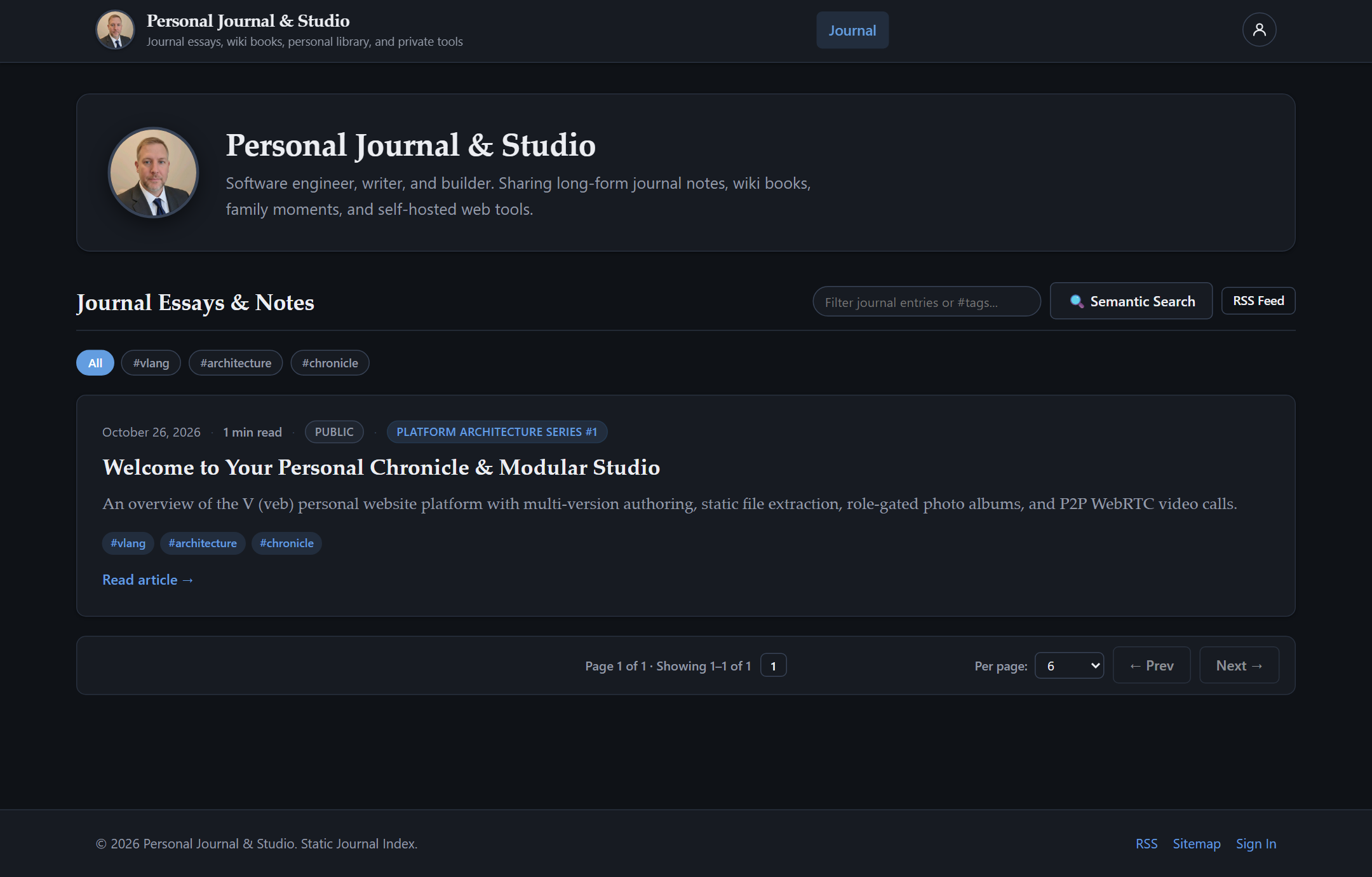
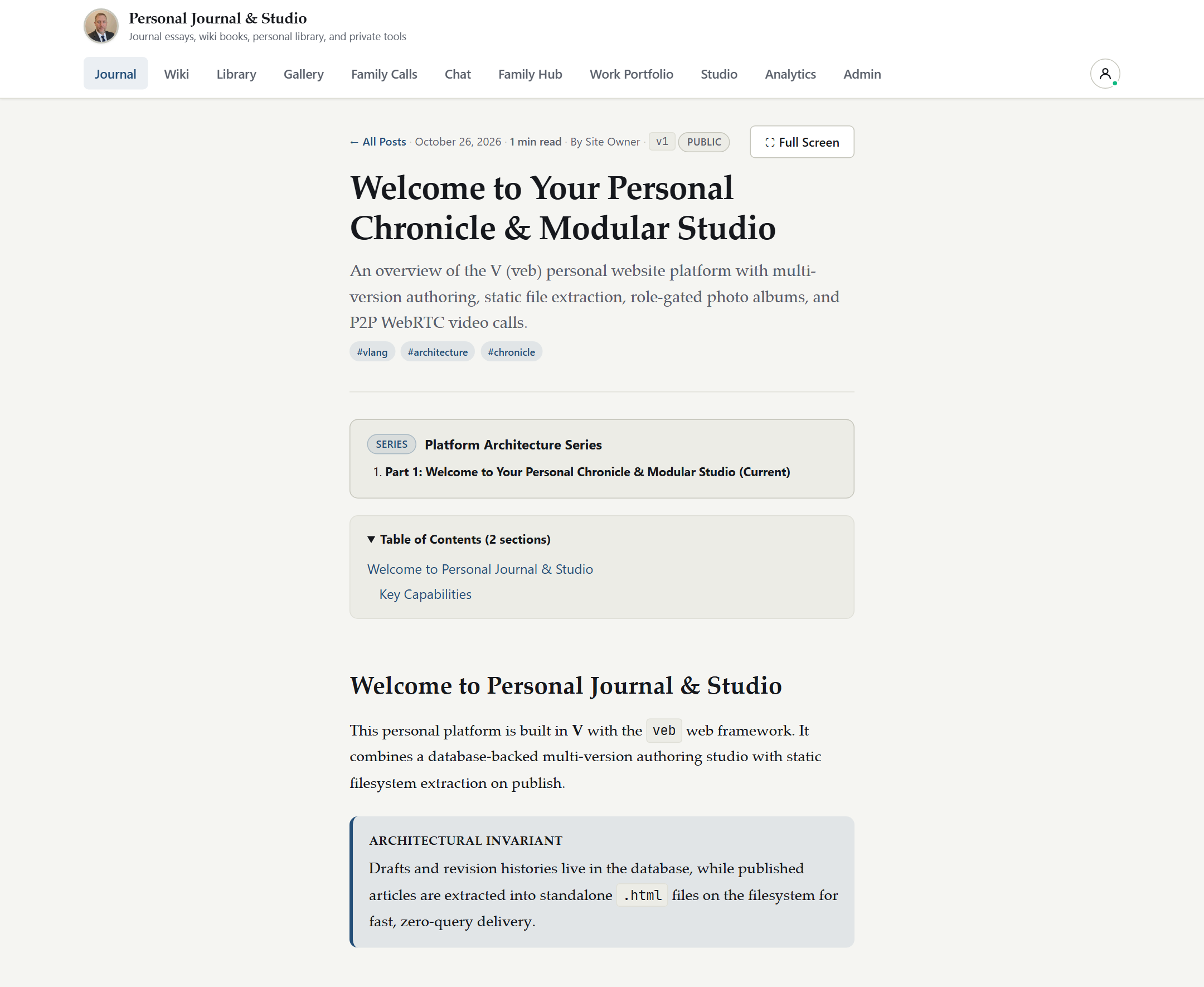
2.1 Public Chronicle in Light & Late Mode
Unauthenticated visitors experience fast, distraction-free typography with one-click Light and Dark (Late Mode) theme switching, series banners, estimated reading times, and tag filtering.
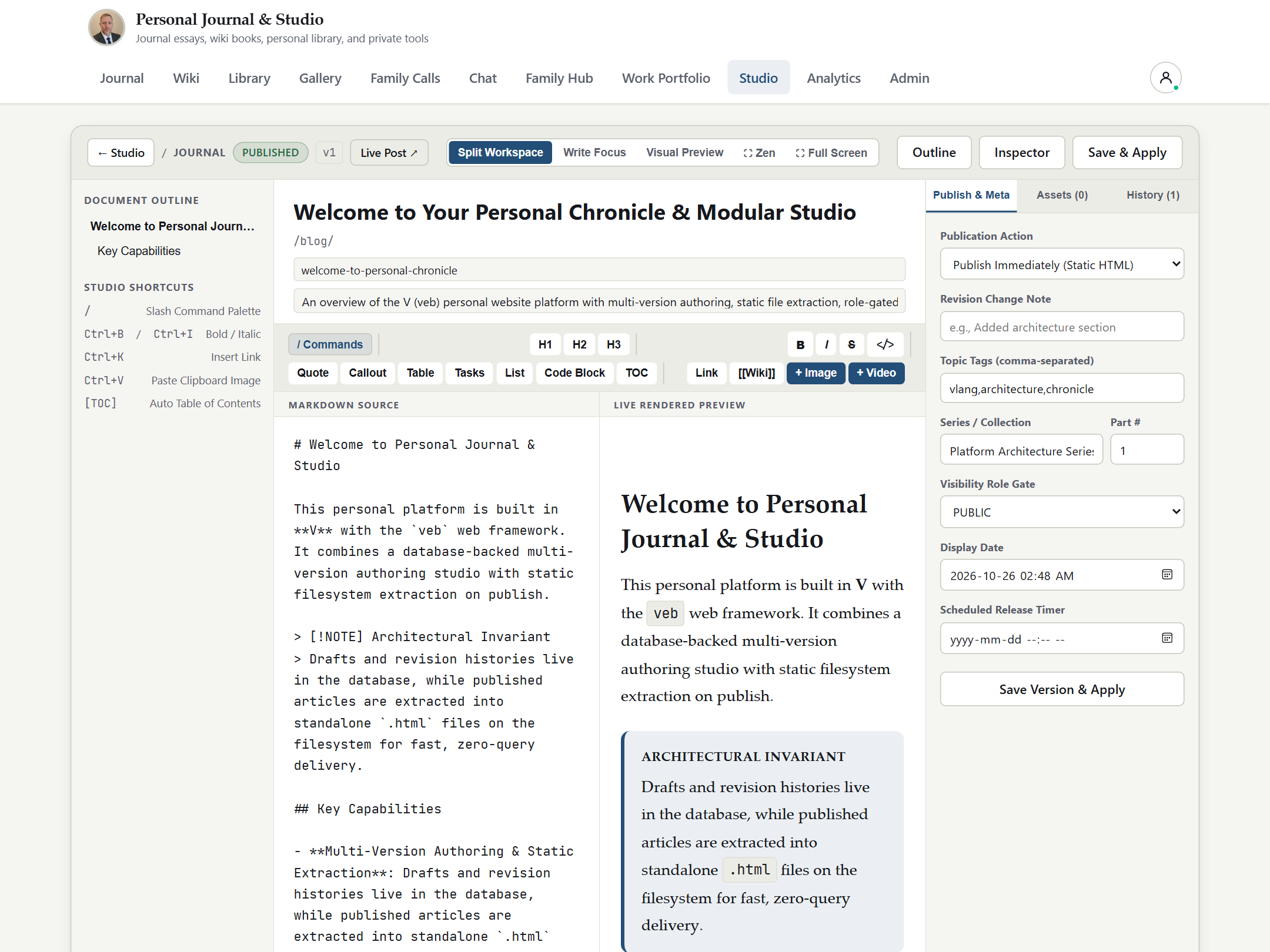
2.2 Split-Screen 3-Pane GFM Authoring Studio
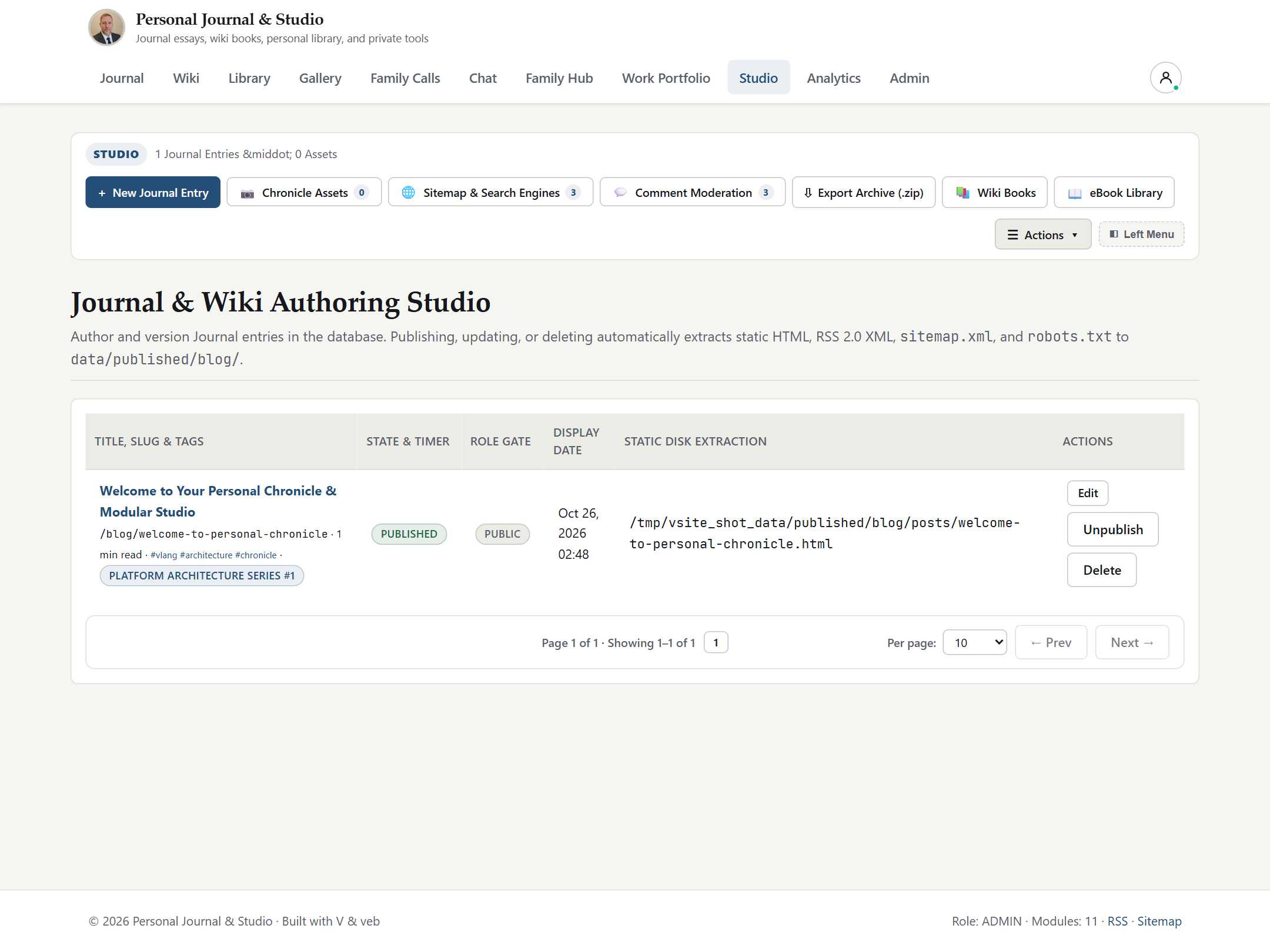
Authors compose articles in a synchronized split-screen Markdown editor featuring formatting toolbars, drag-and-drop Chronicle asset uploads, version history snapshots, and atomic static HTML + RSS + Sitemap publishing.
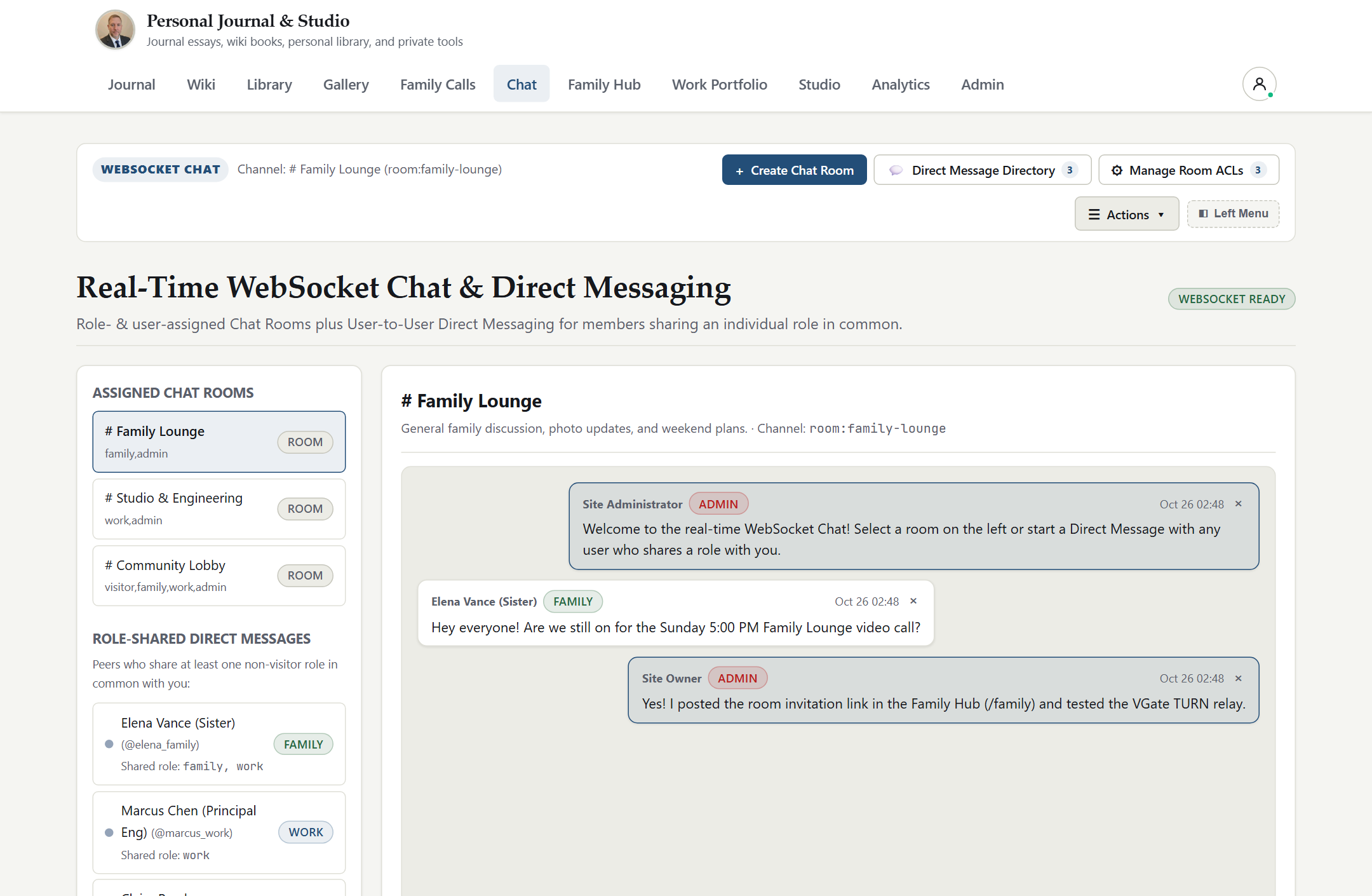
2.3 Real-Time WebSocket Chat, Role-Shared DMs & File Transfer
Authenticated members collaborate in persistent multi-user rooms and private role-shared direct messages (dm:<uid_a>:<uid_b>) with live online presence indicators, 25 MB file attachments, and instant Web Push wakeups.
3. Quickstart
3.1 Launch Locally from Pre-Built Binary
Run the compiled vsite binary directly on Linux, macOS, or Windows. On first startup, vsite automatically creates its data/ directory tree, initializes SQLite in WAL mode, generates VAPID Web Push keys, seeds the initial administrator account, and bakes static Chronicle files.
End-User Guide -- Complete walkthrough of every reader and member feature across Chronicle, Wiki, Library, Newsreader, Gallery, Calls, Chat, Social Hubs, and Account Settings.
Administrator Guide -- User provisioning, multi-role RBAC, custom roles, Federated SSO (vgate IAP & vwarden OIDC), comment moderation, analytics, RFC 5424 security logs, and live .zip restore.
Operations & Use Cases -- Production Linux systemd deployment behind vgate, SQLite WAL vs PostgreSQL operations, LAN WebRTC setups, disaster recovery, and API examples.
Configuration & CLI Reference -- Exhaustive reference for CLI flags, environment variables, runtime directory layout, and HTTP / JSON / WebSocket / Web Push endpoints.
Master User Handbook -- Single-volume consolidated edition of all seven guides above.
vsite - Step-by-Step How-To Guide
This guide provides concise, task-oriented operational recipes for publishing content, curating knowledge bases and feeds, running real-time calls and chat, securing accounts, and backing up a vsite instance.
1. Start vsite for Local, LAN, or Reverse-Proxy Use
Recipe 1.1: Localhost Loopback Behind a TLS Reverse Proxy (Recommended)
When running behind vgate (or Caddy / Nginx) on the same host, bind vsite strictly to 127.0.0.1 and declare your canonical HTTPS origin:
2. Author, Version, and Publish in the Chronicle Studio
Recipe 2.1: Compose and Publish a Multi-Part Article Series
Sign in with an admin or editor account and navigate to Chronicle -> Studio (/blog/manage).
Click New Post (or open /blog/editor directly) to launch the 3-pane GitHub-Flavored Markdown Studio.
Fill in the Title, URL Slug, Summary, comma-separated Tags (for example architecture, systems), optional Series Name (for example Sovereign Infrastructure), and Series Order (1, 2, 3).
Author your post in the left editor pane while verifying live GFM tables, task lists, callouts, footnotes, and code blocks in the right preview pane.
Click Upload Asset in the studio toolbar to upload an inline diagram or photo into data/assets/chronicle/ and insert its Markdown image tag at the cursor.
Set status to Published and click Save & Publish.
When you click Save & Publish, vsite atomically:
Saves a timestamped revision snapshot for instant rollback.
Re-bakes data/published/index.html, /blog/:slug/index.html, /blog/rss.xml, and /sitemap.xml.
Dispatches an asynchronous IndexNow ping when VSITE_INDEXNOW_ENABLED=true.
Recipe 2.2: Roll Back an Article Revision or Moderate Comments
Open Studio (/blog/manage) and click History next to any post to inspect prior snapshots and click Restore Revision.
Scroll to the Reader Comment Moderation panel in /blog/manage to Approve, Reject, or Delete incoming reader comments. Approval immediately re-bakes that article's static HTML page so anonymous readers see the approved discussion.
3. Organize Multi-Book Wikis and the Private eBook Library
Recipe 3.1: Create a Role-Gated Wiki Book and Chapter Tree
Navigate to Wiki (/wiki) and click New Wiki Book.
Assign a book title, slug, summary, and Allowed Roles (for example admin,editor,work for engineering runbooks, or include visitor for public documentation).
Inside the book, click Add Page / Chapter, set its display order, compose Markdown content, and save. Every save records a full page revision in the Wiki history log.
Recipe 3.2: Upload eBooks and Search with Hybrid Semantic Ranking
Navigate to Library (/library) (strictly non-public; anonymous visitors are always redirected to /login).
Click Upload Book, choose an .epub, .pdf, .md, .html, or .txt file, set metadata and Allowed Roles (for example admin,family), and submit.
Open any book to read inside the isolated sandboxed reader, toggle your personal Shelf status (Want to Read, Reading, Completed), add Bookmarks with personal notes, and run Hybrid Semantic + Keyword Search across every chapter of the book.
4. Curate RSS / Atom Feeds and Share Selected Articles
Recipe 4.1: Import OPML Subscriptions and Organize Feed Lists
Navigate to Feeds (/feeds) to open the 3-pane Newsreader workspace.
Click Import OPML to bulk-import an .opml / .xml subscription file from another newsreader, or click Add Feed Source to subscribe to an individual RSS 2.0 or Atom 1.0 URL with a custom polling TTL.
Group sources into Curated Feed Lists (for example Systems Engineering, Security Advisories, or Family Cooking) and choose whether each list is private to specific roles or visible in the read-only Public Newsfeed Directory.
Inside any article view, click Extract Full Article to run server-side Readability extraction on summary-only feeds, or click Share Article to generate an unguessable /feeds/shared/:token link.
5. Host Browser WebRTC Calls, Invite Guests, and Record with Consent
Recipe 5.1: Create a Call Room, Invite Participants, and Share Your Screen
Navigate to Calls (/calls) and click Create Room (for example architecture-review restricted to admin,work).
To invite an external guest without creating a full account, click Copy Invite Link on the room card to generate a scoped /calls/join/:token URL, or click Ring Room to send an immediate Web Push alert to entitled members.
Click Join Call, verify camera and microphone selection, and use the call control bar for Mute Audio, Stop Video, Share Screen, In-Call Chat, and P2P File Transfer (streamed directly peer-to-peer in 64 KB chunks).
To record a session, click Record Call. All participants immediately see a prominent REC indicator and consent banner; completed WebM recordings are stored in the role-gated Recordings Vault.
6. Enable TOTP 2FA, Web Push Notifications, and 1-Click Backups
Recipe 6.1: Enroll an Authenticator App (RFC 6238 TOTP)
Navigate to Settings (/settings) and open Two-Factor Authentication (TOTP).
Scan the inline offline-generated SVG QR code using any RFC 6238 authenticator app (such as Aegis, Raivo, Ente Auth, 1Password, or Google Authenticator).
Enter the current 6-digit verification code and click Enable 2FA. Subsequent logins enforce a two-step password + TOTP challenge with replay protection.
Recipe 6.2: Enable Desktop & Mobile Web Push Alerts
In Settings (/settings) (or via the top header Notification Bell), click Enable Push Notifications on This Device and grant browser notification permission.
Choose which events wake your device: Chat @Mentions, Direct Messages, and Incoming Call Ringing, then click Send Test Push to confirm end-to-end RFC 8030 VAPID delivery.
Recipe 6.3: Download or Restore a Full Platform .zip Snapshot
Sign in as admin and open Admin (/admin).
Click Download Full Backup (.zip) (/admin/backup.zip). vsite checkpoints SQLite WAL pages (PRAGMA wal_checkpoint(PASSIVE)) and streams a self-contained PKZIP archive containing backup_manifest.json, vsite.db, published static assets, uploaded media, and feed configurations.
To restore, open Restore Full Backup in /admin, either select one of the automatic 7-day rolling snapshots (vsite-auto-YYYY-MM-DD.zip) from data/backups/ or upload a .zip archive, and confirm. vsite validates archive safety, restores state, and automatically re-bakes static Chronicle pages.
vsite - End-User Guide
This guide walks through every workspace available to public readers and authenticated members in vsite, explaining navigation, role visibility, authoring tools, private reading shelves, media galleries, real-time collaboration, social hubs, and self-service security controls.
1. Personas, Navigation, and Theme Modes
vsite tailors its top navigation bar and accessible modules dynamically according to who is viewing the site:
Anonymous Visitors (visitor): See only public destinations (Chronicle, public Wiki books if any exist, and the read-only Public Newsfeed Directory). Private modules (/library, /gallery, /calls, /chat, /family, /work, /analytics, /admin, /settings) are completely omitted from public HTML and redirect unauthenticated requests to /login.
Authenticated Members (family, work, friend, guest, editor, admin, or custom roles): Automatically unlock every workspace matching the union of their Primary Role and Extra Roles.
Light & Late Mode: Every page includes a persistent theme toggle in the header bar that switches instantly between crisp daylight typography and high-contrast dark Late Mode without page reloads.
2. Chronicle Blog, Series, Search, and Comments
The Chronicle (/ and /blog) is vsite's long-form publishing engine:
Article Series & Reading Metadata: Posts belonging to a multi-part series display an ordered series banner linking every installment, estimated reading time in minutes, publication timestamps, and clickable topic tags (/blog?tag=...).
Hybrid Search: Readers can search across published Chronicle articles via the search bar (/api/blog/search), combining exact keyword matching with local 64-dimensional semantic relevance.
RSS 2.0 Syndication: Readers can subscribe in any feed reader using /blog/rss.xml.
Moderated Reader Comments: Visitors and signed-in members can submit comments at the bottom of articles. New comments enter a moderation queue (Pending) so spam or off-topic submissions never appear publicly until approved by an editor or administrator.
3. Multi-Book Wiki (/wiki)
The Wiki organizes living documentation, household handbooks, and engineering runbooks into structured books:
Book & Chapter Hierarchy: Each Wiki book has its own URL slug (/wiki/:book_slug), ordered chapter sidebar (/wiki/:book_slug/:page_slug), table of contents, and role-entitlement badge.
Cross-Wiki Search: Typing in the Wiki search input (/api/wiki/search) searches only the books and chapters your current account roles are entitled to view.
Revision Safety: Editors can inspect page change histories and restore earlier revisions without losing structural ordering.
4. Private eBook Library (/library)
Unlike public blogs or public wiki books, the eBook Library is strictly private -- unauthenticated visitors can never browse or download items under /library or /media/library/*.
Supported Formats: Upload and read .epub, .pdf, .md, .html, and .txt volumes.
Sandboxed Browser Reader: EPUB, HTML, Markdown, and text chapters render inside a hardened, script-disabled browser iframe (sandbox="allow-popups") with adjustable font sizing and theme styling, ensuring untrusted book files cannot run scripts in your session.
Personal Reading Shelf: Track every book on your personal shelf as Want to Read, Currently Reading (with automatic last-read chapter resume), or Completed.
Bookmarks & Notes: Pin chapter bookmarks with custom study notes and jump directly back to any saved passage.
In-Book Hybrid Semantic Search: Search across all chapters of the open book (/api/library/read/:slug/search?q=...&semantic=1) to surface conceptually related sections even when exact phrasing differs.
5. RSS 2.0 & Atom 1.0 Newsreader (/feeds)
The Newsreader (/feeds) provides a sovereign, tracker-free alternative to cloud RSS aggregators:
Curated Feed Lists & Sources: Browse pageable curated lists or individual RSS 2.0 / Atom 1.0 sources, filter by unread or starred items, and import/export standard OPML 2.0 files.
Distraction-Free Reader & Readability Mode: Read syndicated articles in a clean 3-pane layout, expand full-screen ([Full Screen]), print clean copies, or fetch sanitized full-article content from summary-only feeds.
Selective Public Share Links: Share an individual syndicated article with external colleagues via a revocable /feeds/shared/:token URL without exposing your private feed lists.
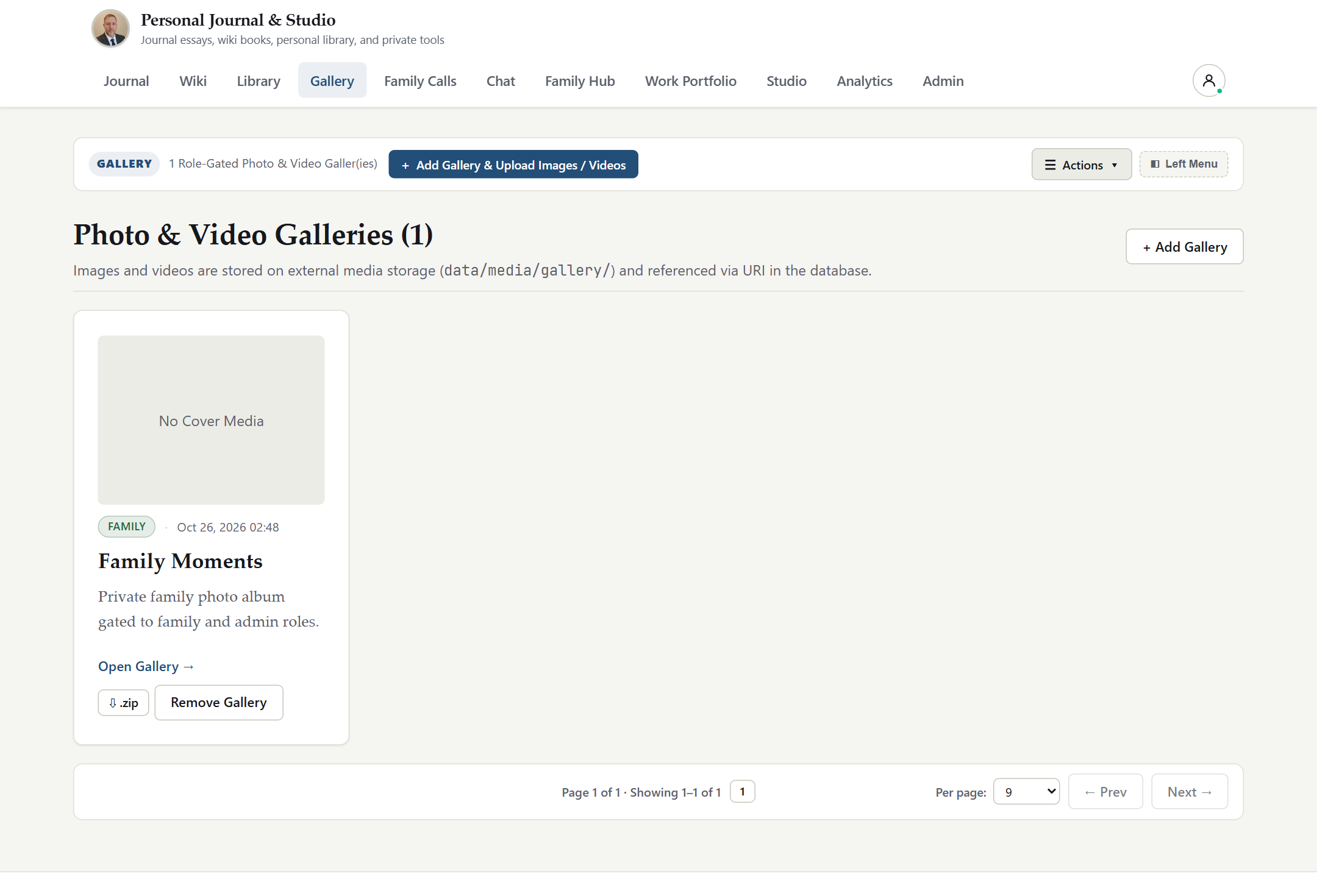
6. Photo & Video Gallery (/gallery)
The Gallery hosts high-resolution photography and video collections organized into role-gated albums:
Albums & Lightbox Viewer: Each album defines its own allowed roles (for example family for family vacations or work for product media). Clicking any thumbnail opens a keyboard-navigable full-resolution lightbox supporting JPEG, PNG, WebP, GIF, MP4, and WebM media.
One-Click Album .zip Download: Entitled members can download an entire album at original resolution as a single streamed .zip archive (/gallery/:slug/download.zip).
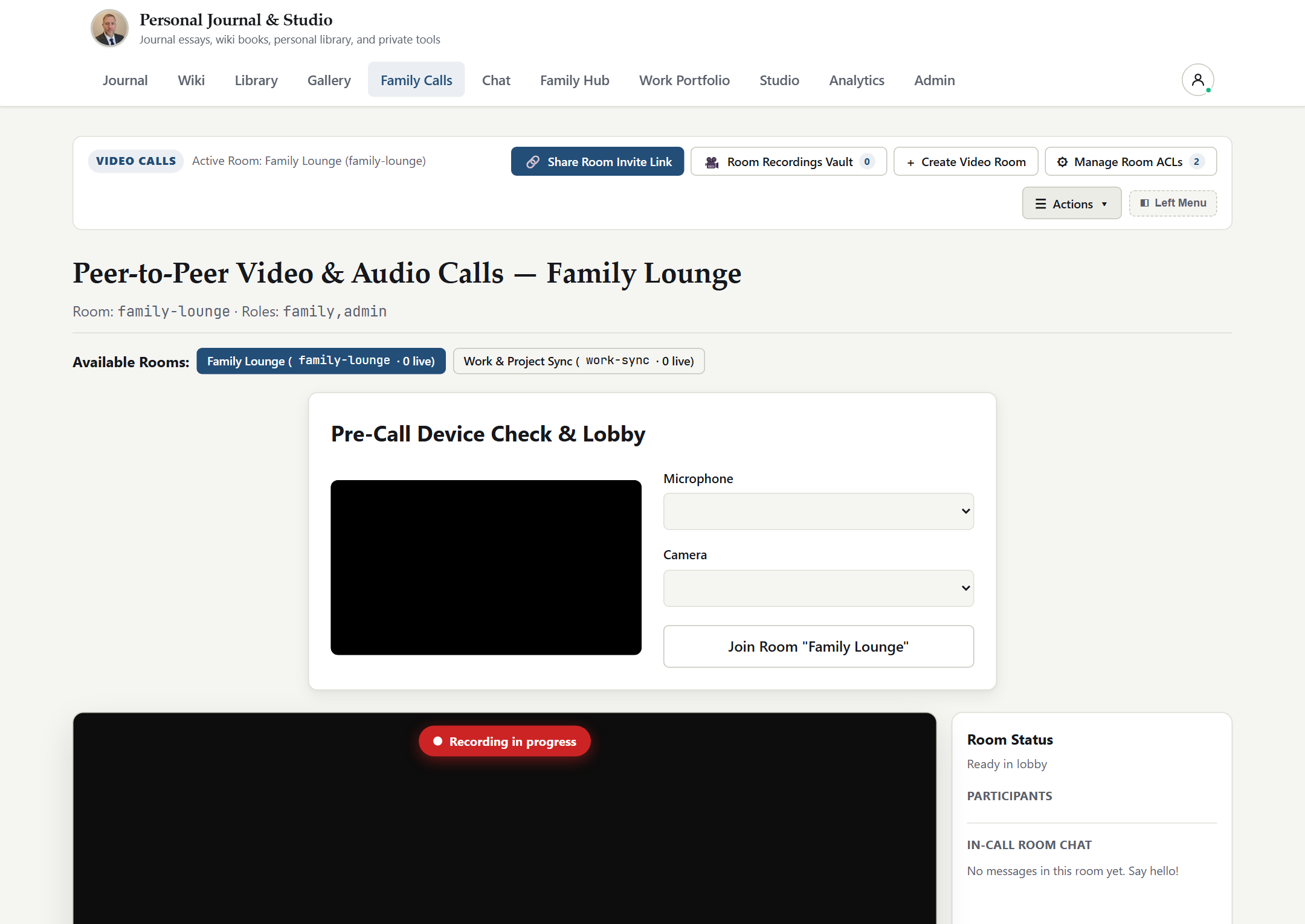
7. Browser WebRTC Audio/Video Calls (/calls)
vsite includes built-in multi-party browser audio, video, and screen-sharing rooms powered by WebRTC DTLS-SRTP and vgate STUN/TURN NAT traversal:
Role-Gated Rooms & Guest Invite Links: Join persistent rooms such as family-lounge or project rooms, or admit external guests to a single room via a revocable invite URL (/calls/join/:token).
Ring Room Wakeups: Click Ring Room to send instant Web Push incoming-call notifications to entitled room members whose browsers are backgrounded.
Screen Sharing, In-Call Chat & P2P File Transfer: Share windows or displays, exchange side-panel text messages, and stream files directly peer-to-peer over encrypted RTCDataChannel chunks.
Transparent Consent-Based Recording: Starting a call recording displays a live REC badge and consent notification to every participant; saved recordings are cataloged in the room's Recordings Vault.
8. Real-Time WebSocket Chat & File Transfer (/chat)
The Chat workspace (/chat) provides low-latency messaging over native RFC 6455 WebSockets (/ws/chat):
Persistent Rooms & Role-Shared Direct Messages: Switch seamlessly between multi-user channels (room:<slug>) and 1-to-1 direct messages (dm:<min_uid>:<max_uid>). Direct messages are automatically permitted only between accounts that share at least one entitled role (or with an administrator).
Live Presence & Unread Badges: View real-time online indicators for fellow members and receive unread counters and Web Push notifications on @username mentions or offline DMs.
Channel File Vault: Click the paperclip Attach button to upload documents, archives, or images (up to 25 MB per file) directly into a room or DM and browse all shared files in the Channel Files drawer.
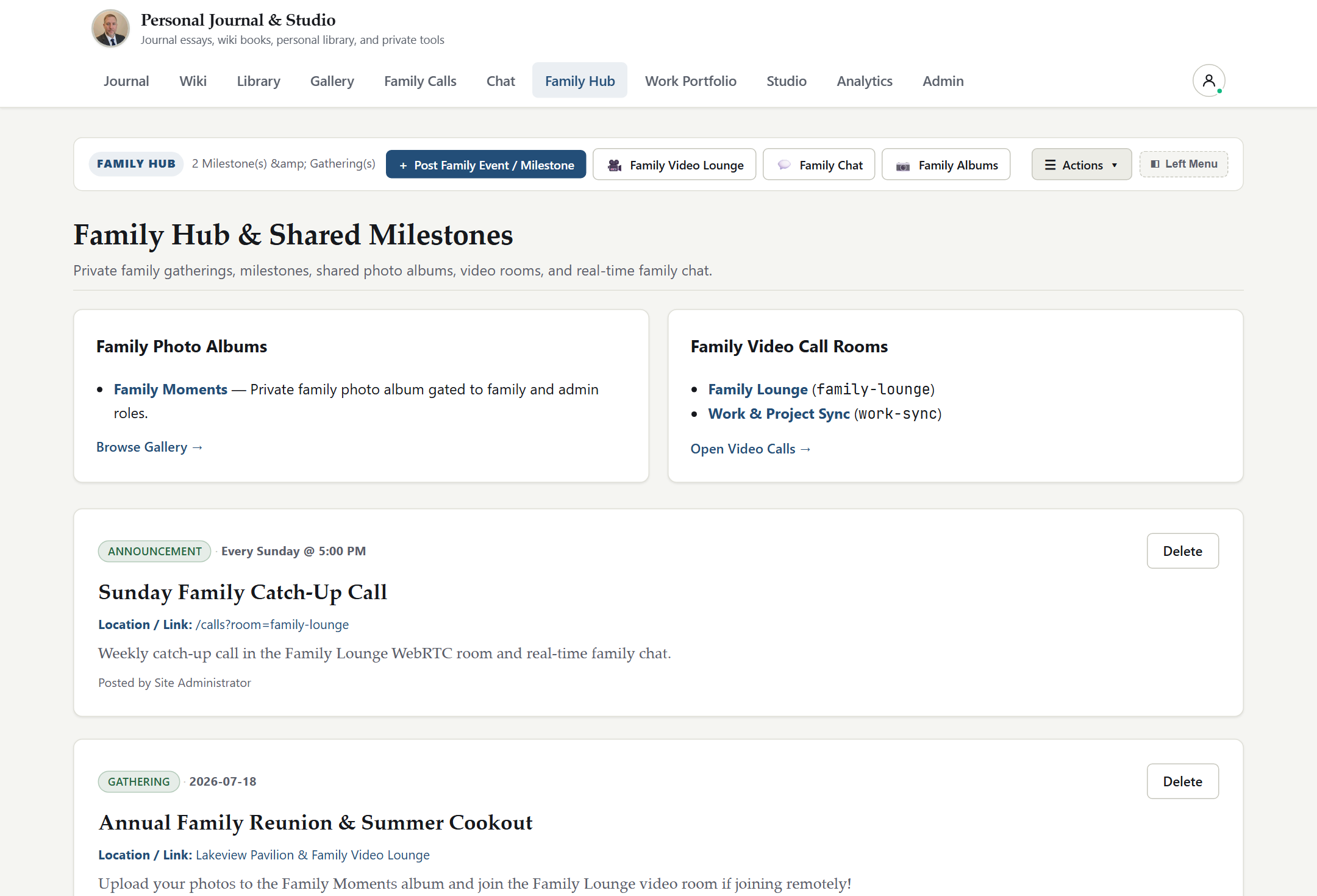
9. Family Hub (/family) & Work Portfolio (/work)
vsite provides dedicated social and professional spaces so personal family life and public/professional engineering work coexist cleanly on one server:
Family Hub (/family): Visible to family and admin roles. Features shared family announcements, upcoming milestone/event calendars, quick links to family photo albums, and one-click jump into the Family Lounge call/chat rooms.
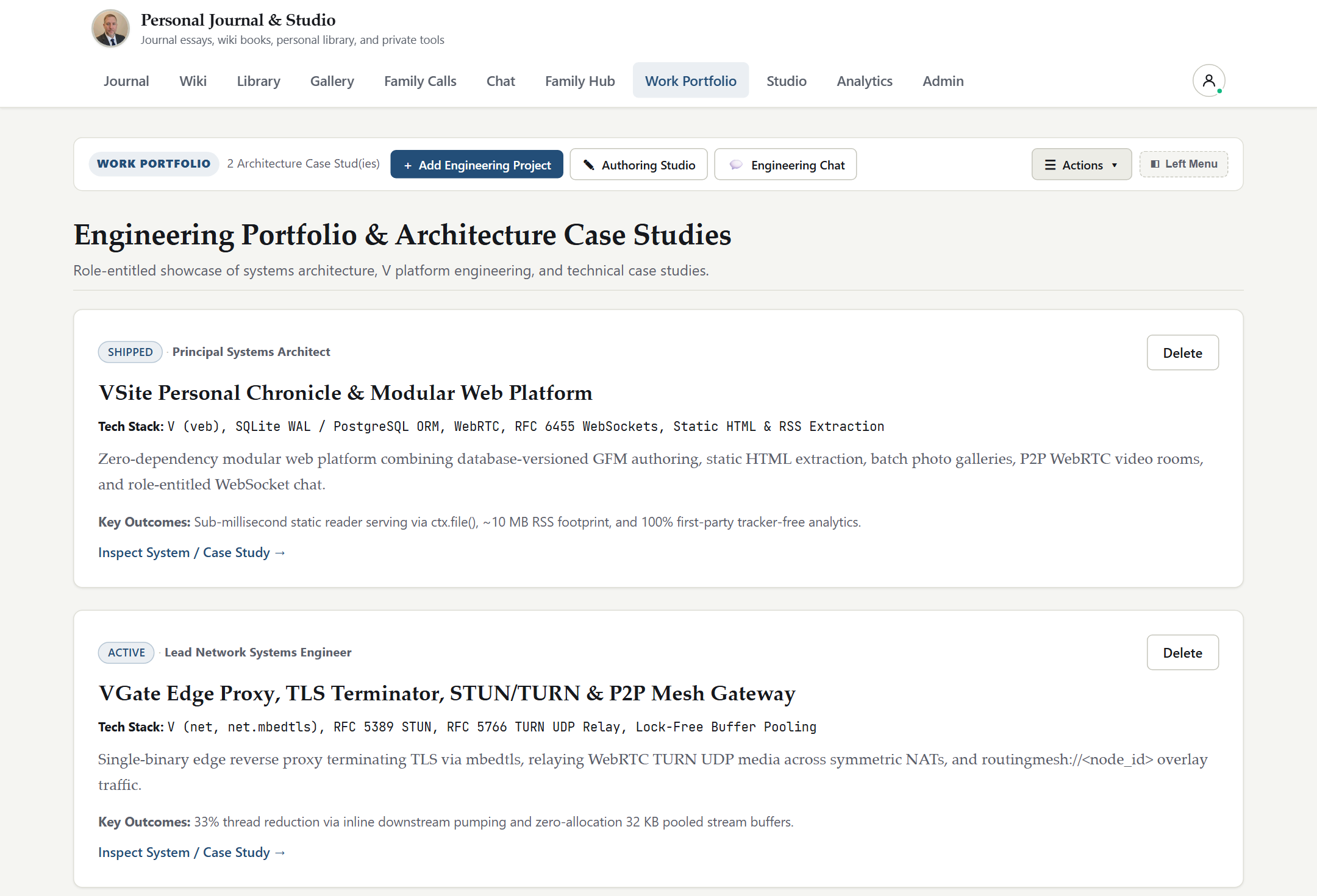
Work Portfolio (/work): Visible to work, editor, and admin roles. Showcases engineering projects, architectural case studies, technical milestones, and downloadable portfolio artifacts for colleagues, clients, or recruiters.
10. Account Settings, 2FA, Web Push & Session Manager (/settings)
Every authenticated user has full self-service control over their credentials, notifications, and active devices in Settings (/settings):
Profile & Password Rotation: Update your display name, biography, email address, and password (changing your password automatically invalidates other sessions).
Authenticator 2FA (TOTP): Enroll or rotate RFC 6238 Two-Factor Authentication using an offline SVG QR code.
Web Push Preferences: Manage subscribed browsers/phones, toggle notification categories (Chat Mentions, Direct Messages, Incoming Calls), and trigger a live test push.
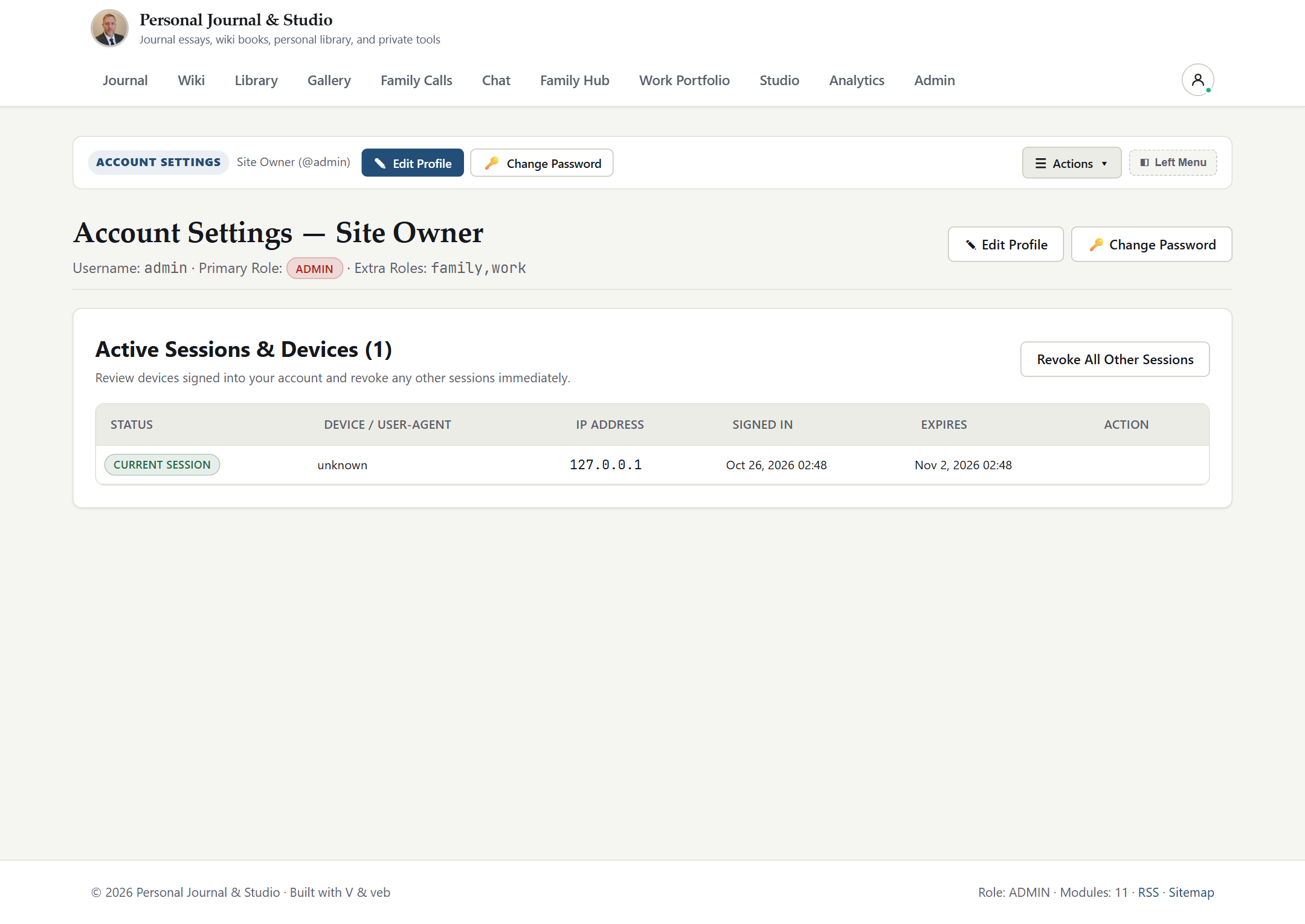
Active Device Session Manager: Inspect every active login session (IP address, User-Agent, creation time, last activity, and Current Session badge) and click Revoke on individual devices or Revoke All Other Sessions immediately if a laptop or phone is lost.
vsite - Administrator Guide
This guide covers day-to-day governance of a vsite deployment for admin and editor operators: first-run hardening, multi-role RBAC user management, custom role creation, Federated Single Sign-On (vgate IAP and vwarden OIDC), content moderation, privacy-preserving analytics, tamper-evident RFC 5424 security logs, and live .zip backup/restore operations.
When vsite initializes an empty database, it provisions an initial administrator account (admin / admin123! by default, or the credentials supplied via VSITE_ADMIN_USER and VSITE_ADMIN_PASSWORD).
Security Posture Banner: Until the default bootstrap password (admin123!) is rotated, vsite renders a prominent SECURITY POSTURE warning banner across /admin and /settings.
Immediate Hardening Steps:
Sign in and rotate the administrator password in Settings (/settings) to a high-entropy passphrase (minimum 12+ characters recommended).
Enroll RFC 6238 TOTP Two-Factor Authentication on all admin and editor accounts.
Verify VSITE_SITE_URL is set to your canonical https:// origin so session cookies enforce the Secure flag and static Sitemaps/RSS emit HTTPS links.
2. User Provisioning & Multi-Role RBAC (/admin)
Open Admin (/admin) to create, inspect, update, lock/unlock, or remove user accounts.
2.1 Built-In Role Hierarchy
Each account has one Primary Role plus optional comma-separated Extra Roles (for example Primary: family, Extra: work,friend). Entitlement checks evaluate the union of all assigned roles:
Role
Intended Audience
Default Capabilities
admin
Site Owner / Operator
Unrestricted access to all modules, Studio, User/Role CRUD, Security Audit Log, Analytics, and Full .zip Backup/Restore.
editor
Co-Authors & Curators
Access to Chronicle 3-Pane Studio (/blog/manage), comment moderation, Wiki authoring, Feeds curation, and Work spaces.
family
Household & Relatives
Access to Family Hub (/family), family-scoped Gallery albums, Library books, Chat rooms/DMs, and WebRTC Call rooms.
work
Colleagues, Clients & Recruiters
Access to Work Portfolio (/work), work-scoped Wiki runbooks, Library volumes, Chat channels/DMs, and Call rooms.
friend
Personal Friends
Access to friend-scoped Gallery albums, Library shelves, Chat channels/DMs, and Call rooms.
guest
Temporary Invitees
Minimal authenticated access limited strictly to resources explicitly listing guest or the user's username.
2.2 Defining Custom Roles
When your community needs compartments beyond the six built-in roles (for example board-advisors, book-club, or research-lab):
In Admin (/admin), locate the Custom Roles panel and click Create Custom Role.
Provide a lowercase slug (for example book-club), display label, and description.
Assign book-club in any user's Primary Role or Extra Roles, and tag specific Wiki books, Library eBooks, Gallery albums, Feed lists, Chat channels, or Call rooms with book-club. Only admin and book-club members will see or access those items.
2.3 Per-Room Explicit User Allowlists & Invite Rotation
In addition to role tags, Call Rooms and Chat Rooms support explicit comma-separated allowed_users lists (for example alice,bob) for confidential 1-off project rooms. Administrators can also generate or rotate 192-bit room invite tokens at any time to immediately invalidate previously shared guest links.
3. Federated Single Sign-On (VGate IAP & vwarden OIDC)
By default, VSITE_FEDERATED_SSO_ENABLED=false (fail-closed local authentication only). Administrators can enable two sovereign SSO modes:
When vgate terminates TLS on 127.0.0.1 in front of vsite, vgate can authenticate users at the edge and pass signed identity headers (X-VGate-Auth-User, X-VGate-Auth-Roles, X-VGate-Auth-Email, X-VGate-Auth-Timestamp, X-VGate-Auth-Signature):
Enable with VSITE_FEDERATED_SSO_ENABLED=true and a shared 32+ byte secret in VSITE_VGATE_SSO_SECRET.
Security Guarantees:vsite trusts IAP headers only when the raw TCP peer IP is loopback (127.0.0.1 / ::1), verifies the HMAC-SHA256 signature in constant time, enforces a 60-second replay window (VSITE_VGATE_SSO_MAX_SKEW), and prevents non-admin federated assertions from hijacking existing local admin accounts (provisioning non-admin collisions under fed_<username>).
Editors and administrators govern public publishing from Chronicle Studio (/blog/manage):
Draft vs. Published Lifecycle: Draft articles remain stored strictly in the database and never write files into data/published/ or /sitemap.xml until explicitly published.
Comment Moderation Queue: Review pending reader comments alongside author name, timestamp, and target article; approve legitimate feedback or delete spam in one click.
Portable Chronicle Archive: Download /blog/export.zip at any time to obtain a clean Markdown + static HTML archive of all Chronicle posts.
5. Privacy-Preserving Analytics (/analytics)
Navigate to Analytics (/analytics) to inspect first-party operational and readership telemetry:
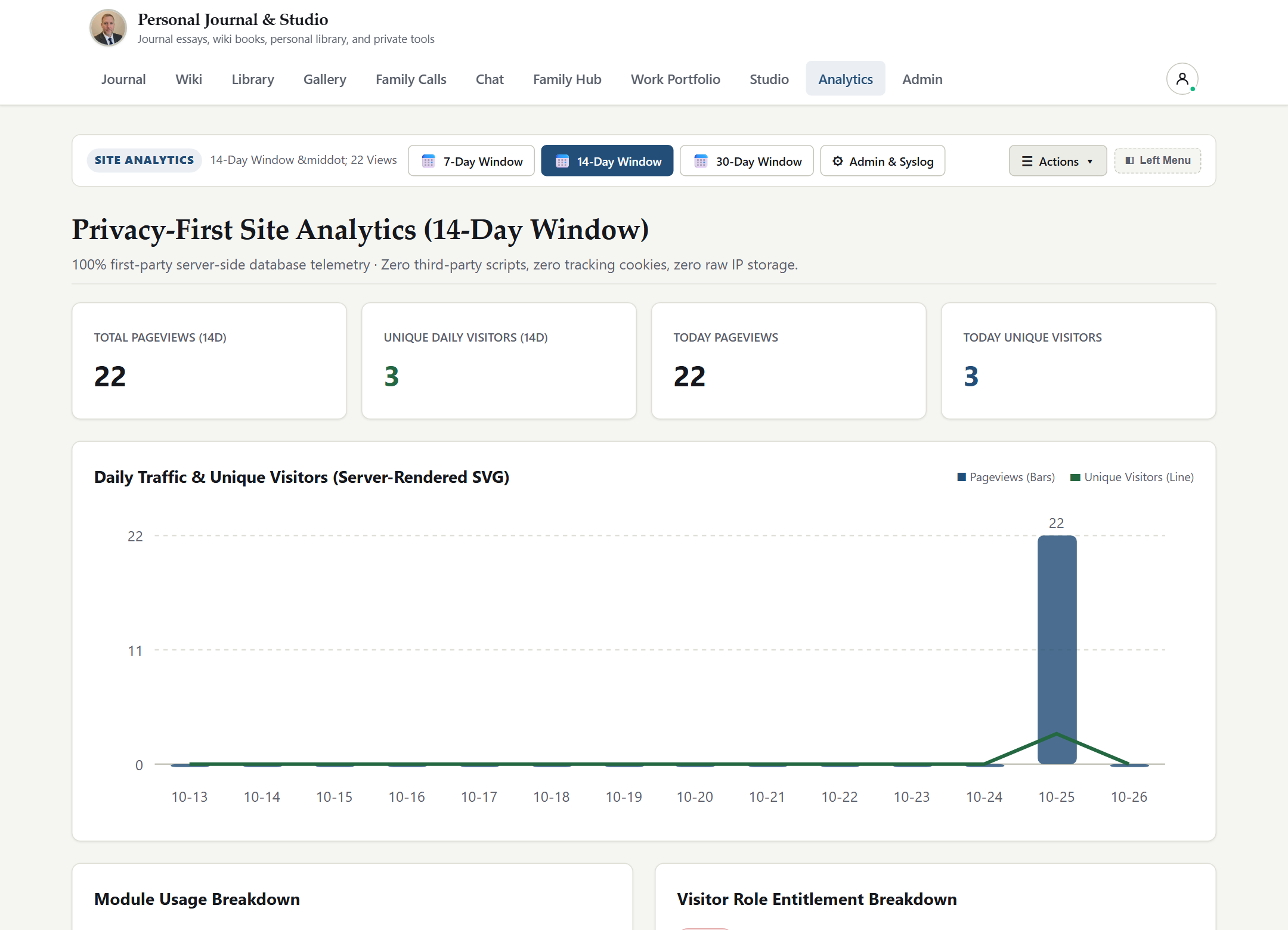
Zero Cookies & Zero Third-Party Trackers:vsite never loads external analytics scripts, tracking pixels, or persistent visitor cookies.
Actionable Metrics: View total pageviews, unique daily visitor hashes, HTTP status distributions, average response latencies, top Chronicle articles, and top referrer sources.
vsite writes every authentication, authorization, administrative, and recovery action to data/logs/security.log in structured RFC 5424 syslog format and displays the live feed inside Admin (/admin):
Cryptographic Tamper Evidence: Every syslog entry includes [vsite@32473 event="..." actor="..." ip="..." prev_hash="<64-hex>" hash="<64-hex>"], chaining each line via SHA-256 to its predecessor starting from GENESIS. Any deleted or altered line breaks the hash chain immediately during forensic verification.
7. Full Platform Backup & Live Disaster Recovery
vsite includes built-in, zero-downtime backup and recovery directly in /admin:
On-Demand PKZIP Backup (GET /admin/backup.zip): Runs a passive SQLite WAL checkpoint and streams a complete .zip archive containing backup_manifest.json, vsite.db, published static pages, Chronicle inline assets, Gallery albums, Library books, Call recordings, Chat files, and Feed lists.
Automatic 7-Day Rolling Snapshots: Maintains daily vsite-auto-YYYY-MM-DD.zip snapshots inside data/backups/, pruning archives older than 7 days automatically.
1-Click Live Restore (POST /admin/restore): Select a local rolling snapshot from the /admin modal or upload an external .zip backup. vsite verifies archive structure, rejects path-traversal or oversized entries, restores relational and media state, and triggers an immediate static Chronicle re-bake.
vsite includes built-in SQLite WAL-safe online backups (VACUUM INTO), versioned schema_migrations (v1–v3), and safe database re-initialization via both the Admin Console and CLI:
Admin Console (/admin -> System Health & Backups): Inspect current schema version (v3/3), database size, and stored .db backups, or trigger Run Migrations and Backup Database Now with one click.
Automated Upgrade Safety: deploy/install.sh automatically executes vsite db backup before replacing the binary and runs vsite db migrate after installation.
BASH
# Inspect schema version, pending migrations, and stored backups
vsite db status --data-dir ./data

# Create an atomic online SQLite backup under ./data/backups/
vsite db backup --data-dir ./data

# Apply pending schema migrations idempotently
vsite db migrate --data-dir ./data

# Re-initialize a clean database (creates a safety backup first; --keep-admin preserves admin accounts)
vsite db reinit --keep-admin --yes --data-dir ./data
vsite - Operations & Use Cases
This guide documents production deployment architectures, Linux systemd hardening, vgate TLS + STUN/TURN edge integration, SQLite WAL vs PostgreSQL operations, real-world multi-persona use cases, disaster recovery runbooks, and external HTTP/JSON/RSS automation examples.
1. Reference Production Topology (vgate + vsite)
In production, vsite runs as an unprivileged systemd service bound strictly to 127.0.0.1:8080 behind vgate:
HTTPS & WebSocket Ingress (:443):vgate terminates TLS 1.2/1.3 (Let's Encrypt ACME), sets X-Forwarded-Proto: https and X-Forwarded-For, and proxies HTTP and RFC 6455 WebSocket (/ws/chat) traffic over loopback to 127.0.0.1:8080.
STUN/TURN Media Relay (:3478 UDP/TCP):vgate runs an integrated COTURN-compatible STUN/TURN server sharing TURN_SECRET with vsite so browser WebRTC calls traverse symmetric NATs and corporate firewalls seamlessly.
Binary-Only Host Hygiene: Production servers receive only the pre-built release package (bin/vsite, static/, config/, and docs/user/) -- zero compiler toolchains or application source files are deployed on the server.
1.1 Hardened systemd Unit (./deploy/vsite.service)
2. Database Operations: SQLite WAL vs. PostgreSQL / AWS RDS
2.1 Default Single-Node Mode: SQLite WAL
Out of the box (DB_DRIVER=sqlite), vsite stores relational metadata in data/vsite.db using Write-Ahead Logging (PRAGMA journal_mode=WAL). Because binary media (photos, videos, eBooks, call recordings, chat attachments) and syndicated feed articles live on structured filesystem paths rather than SQL BLOB columns, the SQLite file stays compact (typically tens of megabytes even after years of publishing) and supports one-click .zip snapshots.
Use Case 3.1: Sovereign Public Technical Blog + Work Portfolio
An engineer or founder publishes public essays on / and /blog (served with zero database queries from pre-baked static HTML, RSS 2.0, and Sitemap XML), while granting prospective clients or hiring managers a work role account (or vwarden SSO login) to explore private architectural case studies in Work Portfolio (/work) and engineering runbooks in Wiki (/wiki).
Use Case 3.2: Private Multi-Generational Family Hub & Vault
A household runs vsite on a home server or VPS behind vgate. Relatives receive accounts with the family role, unlocking:
Family Hub (/family) for shared announcements, birthdays, and family events.
Gallery (/gallery) for full-resolution family photo/video albums with .zip downloads and zero social-media ad tracking.
Calls (/calls) & Chat (/chat) for private family video calls (family-lounge), persistent group chat, and mobile/desktop Web Push ringing.
Library (/library) for shared family eBooks and recipes.
Use Case 3.3: Research Team Knowledge Base & Intelligence Aggregator
A small security or research team creates custom roles (threat-intel, lab-ops) in /admin, aggregates 100+ upstream advisories and blogs inside Feeds (/feeds) via OPML import, extracts clean Readability copies, shares selected external briefs via /feeds/shared/:token, and cross-searches internal Wiki pages and Library PDFs/EPUBs using vsite's local 64-D hybrid semantic search.
4. Automation & External API Examples
4.1 Deep Health & Subsystem Readiness Probe (Monitoring / Load Balancers)
# Run from the vsite product root with bash
set -euo pipefail

STAMP="$(date -u +%Y%m%dT%H%M%SZ)"
COOKIE_JAR="$(mktemp)"
trap 'rm -f "${COOKIE_JAR}"' EXIT

curl -fsS -c "${COOKIE_JAR}" \
  -d "username=${VSITE_BACKUP_ADMIN}&password=${VSITE_BACKUP_PASS}&next=/" \
  https://chronicle.example.com/login -o ./logs/login-check.out

curl -fsS -b "${COOKIE_JAR}" \
  -o "./backups/vsite-${STAMP}.zip" \
  https://chronicle.example.com/admin/backup.zip
5. Operational Troubleshooting Matrix
Symptom
Root Cause
Resolution
Session cookie not marked Secure or HSTS header missing
Reverse proxy not sending X-Forwarded-Proto: https from loopback, or VSITE_SITE_URL uses http://
Configure vgate on 127.0.0.1 to forward X-Forwarded-Proto: https and set VSITE_SITE_URL=https://....
WebRTC video call connects on LAN but stalls across remote mobile networks
UDP/TCP port 3478 blocked at firewall or TURN_SECRET mismatch between vgate and vsite
Open 3478/udp and 3478/tcp on edge firewall and verify /api/calls/rtc-config returns matching turn: URIs.
Browser Web Push button disabled
Page accessed over plain http:// on a non-localhost hostname
Access vsite via https:// (W3C Service Worker & Push API requirement).
Security Posture warning banner stays visible in /admin
Initial bootstrap password has not yet been rotated
Sign in and change the admin password in Settings (/settings).
Public / shows outdated domain in Sitemap or RSS after domain migration
Static files baked under previous VSITE_SITE_URL
Update VSITE_SITE_URL, restart vsite, and publish/save any post in /blog/manage (or delete data/published/blog/index.html before restart to force a clean full static re-bake).
vsite - Configuration & CLI Reference
This reference documents every command-line flag, environment variable, runtime filesystem directory, and HTTP / JSON / WebSocket / Web Push endpoint exposed by vsite.
1. Command-Line Interface (vsite)
vsite is distributed as a single native executable (vsite on Linux and macOS, vsite.exe on Windows). Command-line flags take precedence over environment variables, which in turn override built-in defaults.
TEXT
Usage:
  vsite [options]

Options:
  --host <ip>          Bind IP address (default: 127.0.0.1, or VSITE_HOST)
  --port <port>        HTTP/WebSocket TCP listen port (default: 8080, or VSITE_PORT)
  --site-url <url>     Canonical public base URL (default: http://127.0.0.1:8080, or VSITE_SITE_URL)
  --data-dir <path>    Runtime state & media directory (default: ./data, or VSITE_DATA_DIR)
  -h, --help           Print CLI usage help and exit
  -v, --version        Print vsite release version and exit
Listener bind address (127.0.0.1 behind reverse proxy; 0.0.0.0 for direct LAN).
VSITE_PORT
8080
Listener TCP port for HTTP, SSE, and RFC 6455 WebSockets.
VSITE_SITE_URL
http://127.0.0.1:8080
Canonical external URL used in RSS 2.0, Sitemap XML, IndexNow, Web Push VAPID sub, and Secure cookie detection.
VSITE_DATA_DIR
./data
Root directory for SQLite database, static published files, media vaults, feeds, backups, and security logs.
VSITE_SITE_TITLE
Personal Chronicle
Public masthead title rendered on Chronicle, RSS 2.0, and OpenGraph tags.
VSITE_SITE_SUBTITLE
Essays, Systems & Notes
Subtitle displayed beneath the Chronicle masthead.
VSITE_AUTHOR_NAME
Site Author
Default author attribution for Chronicle articles and RSS metadata.
VSITE_AUTHOR_BIO
...
Short biography rendered on the public Chronicle header card.
VSITE_ENV
(empty)
Set to production (or VSITE_STRICT_PROD=true) to fail startup closed if default credentials, insecure HTTPS cookie settings, or missing SSO/DB secrets are detected.
Print JSON report with schema_version, latest_version, pending_migrations, db_size_human, and stored .db backups.
vsite db backup
Checkpoint WAL and write an atomic VACUUM INTO snapshot under <data-dir>/backups/ (or --out <path>).
vsite db migrate
Initialize service tables and apply all pending schema_migrations entries idempotently.
vsite db reinit --yes
Take an automatic pre-reinit backup, recreate the SQLite database, and optionally preserve admin accounts (--keep-admin).
GET /api/admin/db/status
Admin JSON endpoint returning current schema and backup inventory.
POST /api/admin/db/backup
Admin CSRF-protected endpoint triggering an immediate VACUUM INTO backup.
POST /api/admin/db/migrate
Admin CSRF-protected endpoint applying any pending schema migrations.
vsite - Performance, Concurrency & Sizing Guide
vsite is engineered as a compiled native binary with deterministic memory usage, zero garbage-collected framework bloat, zero-database static serving for public readers, non-blocking SQLite WAL concurrency, and peer-to-peer media offloading.
1. Zero-DB Public Chronicle Latency Profile
Traditional CMS platforms execute multiple SQL queries, template parses, and plugin hooks on every anonymous pageview -- causing small VPS instances to collapse during social-news traffic spikes.
vsite eliminates the database from the anonymous reader path altogether:
Publish-Time Static Projection: Whenever an author publishes or updates a post in the 3-Pane GFM Studio (or approves a comment), vsite atomically writes pre-rendered HTML5 documents (data/published/blog/index.html and data/published/blog/posts/<slug>.html), /blog/rss.xml, and /sitemap.xml.
Read-Time Zero-Query Delivery: When an unauthenticated visitor requests / or /blog/:slug (no vsite_session cookie), vsite streams the pre-baked HTML directly from the OS page cache (data-static-baked="true").
Throughput Headroom: Even a 1 vCPU / 512 MB RAM Linux instance sustains thousands of concurrent anonymous Chronicle requests per second with sub-millisecond application latency (< 0.5 ms p50 loopback response time) and zero SQLite lock contention.
2. SQLite WAL Concurrency & Connection Tuning
For authenticated SSR workspaces (/wiki, /library, /feeds, /gallery, /family, /work, /analytics, /admin), vsite configures SQLite at connection startup with production concurrency pragmas:
SQLite Setting
Configured Value
Performance & Reliability Impact
PRAGMA journal_mode
WAL
Concurrent readers never block writers, and a writer never blocks concurrent readers.
PRAGMA synchronous
NORMAL
Safe against OS process crashes in WAL mode while avoiding redundant fsync stalls on every transaction.
PRAGMA temp_store
MEMORY
Keeps temporary B-trees, ORDER BY sorts, and group aggregations strictly in RAM.
PRAGMA cache_size
-8000 (~8 MiB)
Reserves an 8 MiB hot page cache per connection, holding virtually the entire metadata index in memory.
busy_timeout
5000 ms
Serializes burst concurrent writes gracefully over a 5-second queue window rather than returning SQLITE_BUSY.
Binary Storage Rule
URI-Only (Zero BLOBs)
All images, videos, eBooks, call recordings, and chat files live on disk under data/media/, preventing B-tree page fragmentation and keeping WAL checkpoints instantaneous.
3. Authenticated SSR & Local 64-D Semantic Search Latency
Server-Side Rendered Views (< 2 ms - 6 ms p95): All HTML views compile directly into native machine code inside the vsite binary -- there are no runtime template interpreters, virtual DOM diffing passes, or external microservice hops.
Local 64-D Hybrid Vector + BM25 Search (< 5 ms typical): Chronicle posts, Wiki chapters, Library eBook chapters, and Newsreader articles are indexed into compact 64-dimensional f32 L2-normalized vectors (256 bytes per indexed document/chapter) using deterministic hashed word unigrams, bigrams, and character 4-grams. Cosine similarity and BM25 lexical scoring run purely in native CPU registers with zero network latency to external AI APIs.
4. Real-Time WebSocket Chat & WebRTC Media Fan-Out
4.1 RFC 6455 WebSocket Chat (/ws/chat)
Persistent Socket Footprint: Each connected chat tab maintains a lightweight native TCP socket with compact binary RFC 6455 frame parsing (no JSON-over-HTTP polling loops).
Targeted Channel Fan-Out: Room messages (room:<slug>) and direct messages (dm:<uid_a>:<uid_b>) broadcast only to active subscribers of that channel while persisting once to SQLite WAL.
Asynchronous Web Push Dispatch: When a message mentions @username or targets an offline DM recipient, RFC 8030 VAPID ES256 signing and HTTPS push delivery execute asynchronously so live chat latency remains unaffected.
Zero Media Transcoding on vsite: The vsite process handles lightweight SDP/ICE signaling over authenticated Server-Sent Events (SSE) and mints HMAC-SHA1 TURN credentials (/api/calls/rtc-config). Live audio, video, and screen-share streams flow directly between peer browsers over DTLS-SRTP (or through vgate's UDP/TCP :3478 TURN relay when peers sit behind symmetric NATs).
Bounded 64 KB P2P File Streaming: In-call P2P file transfers slice files into 64 KB (65,536 byte) chunks over RTCDataChannel with buffered-amount backpressure control, preventing browser memory spikes even on large attachments.
5. Feed Aggregator & Media Gallery Streaming Profile
Modular Feed Storage (data/feeds/): Syndicated RSS 2.0 and Atom 1.0 payloads are partitioned on disk under data/feeds/lists/ and data/feeds/sources/ with configurable per-feed ttl_minutes polling intervals and pageable UI grids (curated-feed-lists-grid), keeping /feeds snappy across hundreds of subscribed feeds.
Media Gallery & ZIP Downloads: High-resolution photos and MP4/WebM videos in /gallery use loading="lazy" thumbnails, immutable browser cache headers (Cache-Control + ETag), and on-demand album .zip generation (/gallery/album/:slug/download) so visitors and family members browse large albums smoothly on mobile connections.
6. Hardware Sizing Recommendations
Deployment Tier
Audience & Workload
Recommended CPU / RAM
Storage & Database Guidance
Personal & Family Node
Public Chronicle + up to 15 family/friend users, 5-party WebRTC calls
Part I: vsite - Sovereign Publishing, Knowledge Base, Social Hubs & Collaboration Platform
vsite is a self-contained, single-binary personal and team platform that unifies zero-database static blog publishing (Chronicle), a 3-Pane GitHub-Flavored Markdown Studio, a multi-book Wiki, a strictly private eBook Library with hybrid semantic search, an RSS 2.0 / Atom 1.0 Newsreader, a Photo & Video Gallery, Browser WebRTC Audio/Video Calls, RFC 6455 WebSocket Chat & File Transfer, RFC 8030 VAPID Web Push, Family & Work Social Hubs, and Cookie-Free Analytics under granular multi-role access control.
1. Platform Capabilities Across Personas
Capability Domain
Public Visitor (visitor)
Entitled Member (family, work, friend, guest)
Editor & Administrator (editor, admin)
Chronicle & Studio
Instant static HTML articles, series navigation, RSS 2.0 feed, Sitemap XML, moderated comments
Authenticated reader comments and full-text search
Self-service profile, password, TOTP 2FA QR enrollment, Web Push toggles, per-device session revocation
User & custom role CRUD, VGate IAP / vwarden OIDC SSO, tracker-free analytics, RFC 5424 SIEM log, 1-click .zip backup & live restore
2. Visual Tour of Key Workspaces
2.1 Public Chronicle in Light & Late Mode
Unauthenticated visitors experience fast, distraction-free typography with one-click Light and Dark (Late Mode) theme switching, series banners, estimated reading times, and tag filtering.
2.2 Split-Screen 3-Pane GFM Authoring Studio
Authors compose articles in a synchronized split-screen Markdown editor featuring formatting toolbars, drag-and-drop Chronicle asset uploads, version history snapshots, and atomic static HTML + RSS + Sitemap publishing.
2.3 Real-Time WebSocket Chat, Role-Shared DMs & File Transfer
Authenticated members collaborate in persistent multi-user rooms and private role-shared direct messages (dm:<uid_a>:<uid_b>) with live online presence indicators, 25 MB file attachments, and instant Web Push wakeups.
3. Quickstart
3.1 Launch Locally from Pre-Built Binary
Run the compiled vsite binary directly on Linux, macOS, or Windows. On first startup, vsite automatically creates its data/ directory tree, initializes SQLite in WAL mode, generates VAPID Web Push keys, seeds the initial administrator account, and bakes static Chronicle files.
End-User Guide -- Complete walkthrough of every reader and member feature across Chronicle, Wiki, Library, Newsreader, Gallery, Calls, Chat, Social Hubs, and Account Settings.
Administrator Guide -- User provisioning, multi-role RBAC, custom roles, Federated SSO (vgate IAP & vwarden OIDC), comment moderation, analytics, RFC 5424 security logs, and live .zip restore.
Operations & Use Cases -- Production Linux systemd deployment behind vgate, SQLite WAL vs PostgreSQL operations, LAN WebRTC setups, disaster recovery, and API examples.
Configuration & CLI Reference -- Exhaustive reference for CLI flags, environment variables, runtime directory layout, and HTTP / JSON / WebSocket / Web Push endpoints.
Master User Handbook -- Single-volume consolidated edition of all seven guides above.
Part II: vsite - Step-by-Step How-To Guide
This guide provides concise, task-oriented operational recipes for publishing content, curating knowledge bases and feeds, running real-time calls and chat, securing accounts, and backing up a vsite instance.
1. Start vsite for Local, LAN, or Reverse-Proxy Use
Recipe 1.1: Localhost Loopback Behind a TLS Reverse Proxy (Recommended)
When running behind vgate (or Caddy / Nginx) on the same host, bind vsite strictly to 127.0.0.1 and declare your canonical HTTPS origin:
2. Author, Version, and Publish in the Chronicle Studio
Recipe 2.1: Compose and Publish a Multi-Part Article Series
Sign in with an admin or editor account and navigate to Chronicle -> Studio (/blog/manage).
Click New Post (or open /blog/editor directly) to launch the 3-pane GitHub-Flavored Markdown Studio.
Fill in the Title, URL Slug, Summary, comma-separated Tags (for example architecture, systems), optional Series Name (for example Sovereign Infrastructure), and Series Order (1, 2, 3).
Author your post in the left editor pane while verifying live GFM tables, task lists, callouts, footnotes, and code blocks in the right preview pane.
Click Upload Asset in the studio toolbar to upload an inline diagram or photo into data/assets/chronicle/ and insert its Markdown image tag at the cursor.
Set status to Published and click Save & Publish.
When you click Save & Publish, vsite atomically:
Saves a timestamped revision snapshot for instant rollback.
Re-bakes data/published/index.html, /blog/:slug/index.html, /blog/rss.xml, and /sitemap.xml.
Dispatches an asynchronous IndexNow ping when VSITE_INDEXNOW_ENABLED=true.
Recipe 2.2: Roll Back an Article Revision or Moderate Comments
Open Studio (/blog/manage) and click History next to any post to inspect prior snapshots and click Restore Revision.
Scroll to the Reader Comment Moderation panel in /blog/manage to Approve, Reject, or Delete incoming reader comments. Approval immediately re-bakes that article's static HTML page so anonymous readers see the approved discussion.
3. Organize Multi-Book Wikis and the Private eBook Library
Recipe 3.1: Create a Role-Gated Wiki Book and Chapter Tree
Navigate to Wiki (/wiki) and click New Wiki Book.
Assign a book title, slug, summary, and Allowed Roles (for example admin,editor,work for engineering runbooks, or include visitor for public documentation).
Inside the book, click Add Page / Chapter, set its display order, compose Markdown content, and save. Every save records a full page revision in the Wiki history log.
Recipe 3.2: Upload eBooks and Search with Hybrid Semantic Ranking
Navigate to Library (/library) (strictly non-public; anonymous visitors are always redirected to /login).
Click Upload Book, choose an .epub, .pdf, .md, .html, or .txt file, set metadata and Allowed Roles (for example admin,family), and submit.
Open any book to read inside the isolated sandboxed reader, toggle your personal Shelf status (Want to Read, Reading, Completed), add Bookmarks with personal notes, and run Hybrid Semantic + Keyword Search across every chapter of the book.
4. Curate RSS / Atom Feeds and Share Selected Articles
Recipe 4.1: Import OPML Subscriptions and Organize Feed Lists
Navigate to Feeds (/feeds) to open the 3-pane Newsreader workspace.
Click Import OPML to bulk-import an .opml / .xml subscription file from another newsreader, or click Add Feed Source to subscribe to an individual RSS 2.0 or Atom 1.0 URL with a custom polling TTL.
Group sources into Curated Feed Lists (for example Systems Engineering, Security Advisories, or Family Cooking) and choose whether each list is private to specific roles or visible in the read-only Public Newsfeed Directory.
Inside any article view, click Extract Full Article to run server-side Readability extraction on summary-only feeds, or click Share Article to generate an unguessable /feeds/shared/:token link.
5. Host Browser WebRTC Calls, Invite Guests, and Record with Consent
Recipe 5.1: Create a Call Room, Invite Participants, and Share Your Screen
Navigate to Calls (/calls) and click Create Room (for example architecture-review restricted to admin,work).
To invite an external guest without creating a full account, click Copy Invite Link on the room card to generate a scoped /calls/join/:token URL, or click Ring Room to send an immediate Web Push alert to entitled members.
Click Join Call, verify camera and microphone selection, and use the call control bar for Mute Audio, Stop Video, Share Screen, In-Call Chat, and P2P File Transfer (streamed directly peer-to-peer in 64 KB chunks).
To record a session, click Record Call. All participants immediately see a prominent REC indicator and consent banner; completed WebM recordings are stored in the role-gated Recordings Vault.
6. Enable TOTP 2FA, Web Push Notifications, and 1-Click Backups
Recipe 6.1: Enroll an Authenticator App (RFC 6238 TOTP)
Navigate to Settings (/settings) and open Two-Factor Authentication (TOTP).
Scan the inline offline-generated SVG QR code using any RFC 6238 authenticator app (such as Aegis, Raivo, Ente Auth, 1Password, or Google Authenticator).
Enter the current 6-digit verification code and click Enable 2FA. Subsequent logins enforce a two-step password + TOTP challenge with replay protection.
Recipe 6.2: Enable Desktop & Mobile Web Push Alerts
In Settings (/settings) (or via the top header Notification Bell), click Enable Push Notifications on This Device and grant browser notification permission.
Choose which events wake your device: Chat @Mentions, Direct Messages, and Incoming Call Ringing, then click Send Test Push to confirm end-to-end RFC 8030 VAPID delivery.
Recipe 6.3: Download or Restore a Full Platform .zip Snapshot
Sign in as admin and open Admin (/admin).
Click Download Full Backup (.zip) (/admin/backup.zip). vsite checkpoints SQLite WAL pages (PRAGMA wal_checkpoint(PASSIVE)) and streams a self-contained PKZIP archive containing backup_manifest.json, vsite.db, published static assets, uploaded media, and feed configurations.
To restore, open Restore Full Backup in /admin, either select one of the automatic 7-day rolling snapshots (vsite-auto-YYYY-MM-DD.zip) from data/backups/ or upload a .zip archive, and confirm. vsite validates archive safety, restores state, and automatically re-bakes static Chronicle pages.
Part III: vsite - End-User Guide
This guide walks through every workspace available to public readers and authenticated members in vsite, explaining navigation, role visibility, authoring tools, private reading shelves, media galleries, real-time collaboration, social hubs, and self-service security controls.
1. Personas, Navigation, and Theme Modes
vsite tailors its top navigation bar and accessible modules dynamically according to who is viewing the site:
Anonymous Visitors (visitor): See only public destinations (Chronicle, public Wiki books if any exist, and the read-only Public Newsfeed Directory). Private modules (/library, /gallery, /calls, /chat, /family, /work, /analytics, /admin, /settings) are completely omitted from public HTML and redirect unauthenticated requests to /login.
Authenticated Members (family, work, friend, guest, editor, admin, or custom roles): Automatically unlock every workspace matching the union of their Primary Role and Extra Roles.
Light & Late Mode: Every page includes a persistent theme toggle in the header bar that switches instantly between crisp daylight typography and high-contrast dark Late Mode without page reloads.
2. Chronicle Blog, Series, Search, and Comments
The Chronicle (/ and /blog) is vsite's long-form publishing engine:
Article Series & Reading Metadata: Posts belonging to a multi-part series display an ordered series banner linking every installment, estimated reading time in minutes, publication timestamps, and clickable topic tags (/blog?tag=...).
Hybrid Search: Readers can search across published Chronicle articles via the search bar (/api/blog/search), combining exact keyword matching with local 64-dimensional semantic relevance.
RSS 2.0 Syndication: Readers can subscribe in any feed reader using /blog/rss.xml.
Moderated Reader Comments: Visitors and signed-in members can submit comments at the bottom of articles. New comments enter a moderation queue (Pending) so spam or off-topic submissions never appear publicly until approved by an editor or administrator.
3. Multi-Book Wiki (/wiki)
The Wiki organizes living documentation, household handbooks, and engineering runbooks into structured books:
Book & Chapter Hierarchy: Each Wiki book has its own URL slug (/wiki/:book_slug), ordered chapter sidebar (/wiki/:book_slug/:page_slug), table of contents, and role-entitlement badge.
Cross-Wiki Search: Typing in the Wiki search input (/api/wiki/search) searches only the books and chapters your current account roles are entitled to view.
Revision Safety: Editors can inspect page change histories and restore earlier revisions without losing structural ordering.
4. Private eBook Library (/library)
Unlike public blogs or public wiki books, the eBook Library is strictly private -- unauthenticated visitors can never browse or download items under /library or /media/library/*.
Supported Formats: Upload and read .epub, .pdf, .md, .html, and .txt volumes.
Sandboxed Browser Reader: EPUB, HTML, Markdown, and text chapters render inside a hardened, script-disabled browser iframe (sandbox="allow-popups") with adjustable font sizing and theme styling, ensuring untrusted book files cannot run scripts in your session.
Personal Reading Shelf: Track every book on your personal shelf as Want to Read, Currently Reading (with automatic last-read chapter resume), or Completed.
Bookmarks & Notes: Pin chapter bookmarks with custom study notes and jump directly back to any saved passage.
In-Book Hybrid Semantic Search: Search across all chapters of the open book (/api/library/read/:slug/search?q=...&semantic=1) to surface conceptually related sections even when exact phrasing differs.
5. RSS 2.0 & Atom 1.0 Newsreader (/feeds)
The Newsreader (/feeds) provides a sovereign, tracker-free alternative to cloud RSS aggregators:
Curated Feed Lists & Sources: Browse pageable curated lists or individual RSS 2.0 / Atom 1.0 sources, filter by unread or starred items, and import/export standard OPML 2.0 files.
Distraction-Free Reader & Readability Mode: Read syndicated articles in a clean 3-pane layout, expand full-screen ([Full Screen]), print clean copies, or fetch sanitized full-article content from summary-only feeds.
Selective Public Share Links: Share an individual syndicated article with external colleagues via a revocable /feeds/shared/:token URL without exposing your private feed lists.
6. Photo & Video Gallery (/gallery)
The Gallery hosts high-resolution photography and video collections organized into role-gated albums:
Albums & Lightbox Viewer: Each album defines its own allowed roles (for example family for family vacations or work for product media). Clicking any thumbnail opens a keyboard-navigable full-resolution lightbox supporting JPEG, PNG, WebP, GIF, MP4, and WebM media.
One-Click Album .zip Download: Entitled members can download an entire album at original resolution as a single streamed .zip archive (/gallery/:slug/download.zip).
7. Browser WebRTC Audio/Video Calls (/calls)
vsite includes built-in multi-party browser audio, video, and screen-sharing rooms powered by WebRTC DTLS-SRTP and vgate STUN/TURN NAT traversal:
Role-Gated Rooms & Guest Invite Links: Join persistent rooms such as family-lounge or project rooms, or admit external guests to a single room via a revocable invite URL (/calls/join/:token).
Ring Room Wakeups: Click Ring Room to send instant Web Push incoming-call notifications to entitled room members whose browsers are backgrounded.
Screen Sharing, In-Call Chat & P2P File Transfer: Share windows or displays, exchange side-panel text messages, and stream files directly peer-to-peer over encrypted RTCDataChannel chunks.
Transparent Consent-Based Recording: Starting a call recording displays a live REC badge and consent notification to every participant; saved recordings are cataloged in the room's Recordings Vault.
8. Real-Time WebSocket Chat & File Transfer (/chat)
The Chat workspace (/chat) provides low-latency messaging over native RFC 6455 WebSockets (/ws/chat):
Persistent Rooms & Role-Shared Direct Messages: Switch seamlessly between multi-user channels (room:<slug>) and 1-to-1 direct messages (dm:<min_uid>:<max_uid>). Direct messages are automatically permitted only between accounts that share at least one entitled role (or with an administrator).
Live Presence & Unread Badges: View real-time online indicators for fellow members and receive unread counters and Web Push notifications on @username mentions or offline DMs.
Channel File Vault: Click the paperclip Attach button to upload documents, archives, or images (up to 25 MB per file) directly into a room or DM and browse all shared files in the Channel Files drawer.
9. Family Hub (/family) & Work Portfolio (/work)
vsite provides dedicated social and professional spaces so personal family life and public/professional engineering work coexist cleanly on one server:
Family Hub (/family): Visible to family and admin roles. Features shared family announcements, upcoming milestone/event calendars, quick links to family photo albums, and one-click jump into the Family Lounge call/chat rooms.
Work Portfolio (/work): Visible to work, editor, and admin roles. Showcases engineering projects, architectural case studies, technical milestones, and downloadable portfolio artifacts for colleagues, clients, or recruiters.
10. Account Settings, 2FA, Web Push & Session Manager (/settings)
Every authenticated user has full self-service control over their credentials, notifications, and active devices in Settings (/settings):
Profile & Password Rotation: Update your display name, biography, email address, and password (changing your password automatically invalidates other sessions).
Authenticator 2FA (TOTP): Enroll or rotate RFC 6238 Two-Factor Authentication using an offline SVG QR code.
Web Push Preferences: Manage subscribed browsers/phones, toggle notification categories (Chat Mentions, Direct Messages, Incoming Calls), and trigger a live test push.
Active Device Session Manager: Inspect every active login session (IP address, User-Agent, creation time, last activity, and Current Session badge) and click Revoke on individual devices or Revoke All Other Sessions immediately if a laptop or phone is lost.
Part IV: vsite - Administrator Guide
This guide covers day-to-day governance of a vsite deployment for admin and editor operators: first-run hardening, multi-role RBAC user management, custom role creation, Federated Single Sign-On (vgate IAP and vwarden OIDC), content moderation, privacy-preserving analytics, tamper-evident RFC 5424 security logs, and live .zip backup/restore operations.
When vsite initializes an empty database, it provisions an initial administrator account (admin / admin123! by default, or the credentials supplied via VSITE_ADMIN_USER and VSITE_ADMIN_PASSWORD).
Security Posture Banner: Until the default bootstrap password (admin123!) is rotated, vsite renders a prominent SECURITY POSTURE warning banner across /admin and /settings.
Immediate Hardening Steps:
Sign in and rotate the administrator password in Settings (/settings) to a high-entropy passphrase (minimum 12+ characters recommended).
Enroll RFC 6238 TOTP Two-Factor Authentication on all admin and editor accounts.
Verify VSITE_SITE_URL is set to your canonical https:// origin so session cookies enforce the Secure flag and static Sitemaps/RSS emit HTTPS links.
2. User Provisioning & Multi-Role RBAC (/admin)
Open Admin (/admin) to create, inspect, update, lock/unlock, or remove user accounts.
2.1 Built-In Role Hierarchy
Each account has one Primary Role plus optional comma-separated Extra Roles (for example Primary: family, Extra: work,friend). Entitlement checks evaluate the union of all assigned roles:
Role
Intended Audience
Default Capabilities
admin
Site Owner / Operator
Unrestricted access to all modules, Studio, User/Role CRUD, Security Audit Log, Analytics, and Full .zip Backup/Restore.
editor
Co-Authors & Curators
Access to Chronicle 3-Pane Studio (/blog/manage), comment moderation, Wiki authoring, Feeds curation, and Work spaces.
family
Household & Relatives
Access to Family Hub (/family), family-scoped Gallery albums, Library books, Chat rooms/DMs, and WebRTC Call rooms.
work
Colleagues, Clients & Recruiters
Access to Work Portfolio (/work), work-scoped Wiki runbooks, Library volumes, Chat channels/DMs, and Call rooms.
friend
Personal Friends
Access to friend-scoped Gallery albums, Library shelves, Chat channels/DMs, and Call rooms.
guest
Temporary Invitees
Minimal authenticated access limited strictly to resources explicitly listing guest or the user's username.
2.2 Defining Custom Roles
When your community needs compartments beyond the six built-in roles (for example board-advisors, book-club, or research-lab):
In Admin (/admin), locate the Custom Roles panel and click Create Custom Role.
Provide a lowercase slug (for example book-club), display label, and description.
Assign book-club in any user's Primary Role or Extra Roles, and tag specific Wiki books, Library eBooks, Gallery albums, Feed lists, Chat channels, or Call rooms with book-club. Only admin and book-club members will see or access those items.
2.3 Per-Room Explicit User Allowlists & Invite Rotation
In addition to role tags, Call Rooms and Chat Rooms support explicit comma-separated allowed_users lists (for example alice,bob) for confidential 1-off project rooms. Administrators can also generate or rotate 192-bit room invite tokens at any time to immediately invalidate previously shared guest links.
3. Federated Single Sign-On (VGate IAP & vwarden OIDC)
By default, VSITE_FEDERATED_SSO_ENABLED=false (fail-closed local authentication only). Administrators can enable two sovereign SSO modes:
When vgate terminates TLS on 127.0.0.1 in front of vsite, vgate can authenticate users at the edge and pass signed identity headers (X-VGate-Auth-User, X-VGate-Auth-Roles, X-VGate-Auth-Email, X-VGate-Auth-Timestamp, X-VGate-Auth-Signature):
Enable with VSITE_FEDERATED_SSO_ENABLED=true and a shared 32+ byte secret in VSITE_VGATE_SSO_SECRET.
Security Guarantees:vsite trusts IAP headers only when the raw TCP peer IP is loopback (127.0.0.1 / ::1), verifies the HMAC-SHA256 signature in constant time, enforces a 60-second replay window (VSITE_VGATE_SSO_MAX_SKEW), and prevents non-admin federated assertions from hijacking existing local admin accounts (provisioning non-admin collisions under fed_<username>).
Editors and administrators govern public publishing from Chronicle Studio (/blog/manage):
Draft vs. Published Lifecycle: Draft articles remain stored strictly in the database and never write files into data/published/ or /sitemap.xml until explicitly published.
Comment Moderation Queue: Review pending reader comments alongside author name, timestamp, and target article; approve legitimate feedback or delete spam in one click.
Portable Chronicle Archive: Download /blog/export.zip at any time to obtain a clean Markdown + static HTML archive of all Chronicle posts.
5. Privacy-Preserving Analytics (/analytics)
Navigate to Analytics (/analytics) to inspect first-party operational and readership telemetry:
Zero Cookies & Zero Third-Party Trackers:vsite never loads external analytics scripts, tracking pixels, or persistent visitor cookies.
Actionable Metrics: View total pageviews, unique daily visitor hashes, HTTP status distributions, average response latencies, top Chronicle articles, and top referrer sources.
vsite writes every authentication, authorization, administrative, and recovery action to data/logs/security.log in structured RFC 5424 syslog format and displays the live feed inside Admin (/admin):
Cryptographic Tamper Evidence: Every syslog entry includes [vsite@32473 event="..." actor="..." ip="..." prev_hash="<64-hex>" hash="<64-hex>"], chaining each line via SHA-256 to its predecessor starting from GENESIS. Any deleted or altered line breaks the hash chain immediately during forensic verification.
7. Full Platform Backup & Live Disaster Recovery
vsite includes built-in, zero-downtime backup and recovery directly in /admin:
On-Demand PKZIP Backup (GET /admin/backup.zip): Runs a passive SQLite WAL checkpoint and streams a complete .zip archive containing backup_manifest.json, vsite.db, published static pages, Chronicle inline assets, Gallery albums, Library books, Call recordings, Chat files, and Feed lists.
Automatic 7-Day Rolling Snapshots: Maintains daily vsite-auto-YYYY-MM-DD.zip snapshots inside data/backups/, pruning archives older than 7 days automatically.
1-Click Live Restore (POST /admin/restore): Select a local rolling snapshot from the /admin modal or upload an external .zip backup. vsite verifies archive structure, rejects path-traversal or oversized entries, restores relational and media state, and triggers an immediate static Chronicle re-bake.
vsite includes built-in SQLite WAL-safe online backups (VACUUM INTO), versioned schema_migrations (v1–v3), and safe database re-initialization via both the Admin Console and CLI:
Admin Console (/admin -> System Health & Backups): Inspect current schema version (v3/3), database size, and stored .db backups, or trigger Run Migrations and Backup Database Now with one click.
Automated Upgrade Safety: deploy/install.sh automatically executes vsite db backup before replacing the binary and runs vsite db migrate after installation.
BASH
# Inspect schema version, pending migrations, and stored backups
vsite db status --data-dir ./data

# Create an atomic online SQLite backup under ./data/backups/
vsite db backup --data-dir ./data

# Apply pending schema migrations idempotently
vsite db migrate --data-dir ./data

# Re-initialize a clean database (creates a safety backup first; --keep-admin preserves admin accounts)
vsite db reinit --keep-admin --yes --data-dir ./data
Part V: vsite - Operations & Use Cases
This guide documents production deployment architectures, Linux systemd hardening, vgate TLS + STUN/TURN edge integration, SQLite WAL vs PostgreSQL operations, real-world multi-persona use cases, disaster recovery runbooks, and external HTTP/JSON/RSS automation examples.
1. Reference Production Topology (vgate + vsite)
In production, vsite runs as an unprivileged systemd service bound strictly to 127.0.0.1:8080 behind vgate:
HTTPS & WebSocket Ingress (:443):vgate terminates TLS 1.2/1.3 (Let's Encrypt ACME), sets X-Forwarded-Proto: https and X-Forwarded-For, and proxies HTTP and RFC 6455 WebSocket (/ws/chat) traffic over loopback to 127.0.0.1:8080.
STUN/TURN Media Relay (:3478 UDP/TCP):vgate runs an integrated COTURN-compatible STUN/TURN server sharing TURN_SECRET with vsite so browser WebRTC calls traverse symmetric NATs and corporate firewalls seamlessly.
Binary-Only Host Hygiene: Production servers receive only the pre-built release package (bin/vsite, static/, config/, and docs/user/) -- zero compiler toolchains or application source files are deployed on the server.
1.1 Hardened systemd Unit (./deploy/vsite.service)
2. Database Operations: SQLite WAL vs. PostgreSQL / AWS RDS
2.1 Default Single-Node Mode: SQLite WAL
Out of the box (DB_DRIVER=sqlite), vsite stores relational metadata in data/vsite.db using Write-Ahead Logging (PRAGMA journal_mode=WAL). Because binary media (photos, videos, eBooks, call recordings, chat attachments) and syndicated feed articles live on structured filesystem paths rather than SQL BLOB columns, the SQLite file stays compact (typically tens of megabytes even after years of publishing) and supports one-click .zip snapshots.
Use Case 3.1: Sovereign Public Technical Blog + Work Portfolio
An engineer or founder publishes public essays on / and /blog (served with zero database queries from pre-baked static HTML, RSS 2.0, and Sitemap XML), while granting prospective clients or hiring managers a work role account (or vwarden SSO login) to explore private architectural case studies in Work Portfolio (/work) and engineering runbooks in Wiki (/wiki).
Use Case 3.2: Private Multi-Generational Family Hub & Vault
A household runs vsite on a home server or VPS behind vgate. Relatives receive accounts with the family role, unlocking:
Family Hub (/family) for shared announcements, birthdays, and family events.
Gallery (/gallery) for full-resolution family photo/video albums with .zip downloads and zero social-media ad tracking.
Calls (/calls) & Chat (/chat) for private family video calls (family-lounge), persistent group chat, and mobile/desktop Web Push ringing.
Library (/library) for shared family eBooks and recipes.
Use Case 3.3: Research Team Knowledge Base & Intelligence Aggregator
A small security or research team creates custom roles (threat-intel, lab-ops) in /admin, aggregates 100+ upstream advisories and blogs inside Feeds (/feeds) via OPML import, extracts clean Readability copies, shares selected external briefs via /feeds/shared/:token, and cross-searches internal Wiki pages and Library PDFs/EPUBs using vsite's local 64-D hybrid semantic search.
4. Automation & External API Examples
4.1 Deep Health & Subsystem Readiness Probe (Monitoring / Load Balancers)
# Run from the vsite product root with bash
set -euo pipefail

STAMP="$(date -u +%Y%m%dT%H%M%SZ)"
COOKIE_JAR="$(mktemp)"
trap 'rm -f "${COOKIE_JAR}"' EXIT

curl -fsS -c "${COOKIE_JAR}" \
  -d "username=${VSITE_BACKUP_ADMIN}&password=${VSITE_BACKUP_PASS}&next=/" \
  https://chronicle.example.com/login -o ./logs/login-check.out

curl -fsS -b "${COOKIE_JAR}" \
  -o "./backups/vsite-${STAMP}.zip" \
  https://chronicle.example.com/admin/backup.zip
5. Operational Troubleshooting Matrix
Symptom
Root Cause
Resolution
Session cookie not marked Secure or HSTS header missing
Reverse proxy not sending X-Forwarded-Proto: https from loopback, or VSITE_SITE_URL uses http://
Configure vgate on 127.0.0.1 to forward X-Forwarded-Proto: https and set VSITE_SITE_URL=https://....
WebRTC video call connects on LAN but stalls across remote mobile networks
UDP/TCP port 3478 blocked at firewall or TURN_SECRET mismatch between vgate and vsite
Open 3478/udp and 3478/tcp on edge firewall and verify /api/calls/rtc-config returns matching turn: URIs.
Browser Web Push button disabled
Page accessed over plain http:// on a non-localhost hostname
Access vsite via https:// (W3C Service Worker & Push API requirement).
Security Posture warning banner stays visible in /admin
Initial bootstrap password has not yet been rotated
Sign in and change the admin password in Settings (/settings).
Public / shows outdated domain in Sitemap or RSS after domain migration
Static files baked under previous VSITE_SITE_URL
Update VSITE_SITE_URL, restart vsite, and publish/save any post in /blog/manage (or delete data/published/blog/index.html before restart to force a clean full static re-bake).
Part VI: vsite - Configuration & CLI Reference
This reference documents every command-line flag, environment variable, runtime filesystem directory, and HTTP / JSON / WebSocket / Web Push endpoint exposed by vsite.
1. Command-Line Interface (vsite)
vsite is distributed as a single native executable (vsite on Linux and macOS, vsite.exe on Windows). Command-line flags take precedence over environment variables, which in turn override built-in defaults.
TEXT
Usage:
  vsite [options]

Options:
  --host <ip>          Bind IP address (default: 127.0.0.1, or VSITE_HOST)
  --port <port>        HTTP/WebSocket TCP listen port (default: 8080, or VSITE_PORT)
  --site-url <url>     Canonical public base URL (default: http://127.0.0.1:8080, or VSITE_SITE_URL)
  --data-dir <path>    Runtime state & media directory (default: ./data, or VSITE_DATA_DIR)
  -h, --help           Print CLI usage help and exit
  -v, --version        Print vsite release version and exit
Listener bind address (127.0.0.1 behind reverse proxy; 0.0.0.0 for direct LAN).
VSITE_PORT
8080
Listener TCP port for HTTP, SSE, and RFC 6455 WebSockets.
VSITE_SITE_URL
http://127.0.0.1:8080
Canonical external URL used in RSS 2.0, Sitemap XML, IndexNow, Web Push VAPID sub, and Secure cookie detection.
VSITE_DATA_DIR
./data
Root directory for SQLite database, static published files, media vaults, feeds, backups, and security logs.
VSITE_SITE_TITLE
Personal Chronicle
Public masthead title rendered on Chronicle, RSS 2.0, and OpenGraph tags.
VSITE_SITE_SUBTITLE
Essays, Systems & Notes
Subtitle displayed beneath the Chronicle masthead.
VSITE_AUTHOR_NAME
Site Author
Default author attribution for Chronicle articles and RSS metadata.
VSITE_AUTHOR_BIO
...
Short biography rendered on the public Chronicle header card.
VSITE_ENV
(empty)
Set to production (or VSITE_STRICT_PROD=true) to fail startup closed if default credentials, insecure HTTPS cookie settings, or missing SSO/DB secrets are detected.
Print JSON report with schema_version, latest_version, pending_migrations, db_size_human, and stored .db backups.
vsite db backup
Checkpoint WAL and write an atomic VACUUM INTO snapshot under <data-dir>/backups/ (or --out <path>).
vsite db migrate
Initialize service tables and apply all pending schema_migrations entries idempotently.
vsite db reinit --yes
Take an automatic pre-reinit backup, recreate the SQLite database, and optionally preserve admin accounts (--keep-admin).
GET /api/admin/db/status
Admin JSON endpoint returning current schema and backup inventory.
POST /api/admin/db/backup
Admin CSRF-protected endpoint triggering an immediate VACUUM INTO backup.
POST /api/admin/db/migrate
Admin CSRF-protected endpoint applying any pending schema migrations.
Part VII: vsite - Performance, Concurrency & Sizing Guide
vsite is engineered as a compiled native binary with deterministic memory usage, zero garbage-collected framework bloat, zero-database static serving for public readers, non-blocking SQLite WAL concurrency, and peer-to-peer media offloading.
1. Zero-DB Public Chronicle Latency Profile
Traditional CMS platforms execute multiple SQL queries, template parses, and plugin hooks on every anonymous pageview -- causing small VPS instances to collapse during social-news traffic spikes.
vsite eliminates the database from the anonymous reader path altogether:
Publish-Time Static Projection: Whenever an author publishes or updates a post in the 3-Pane GFM Studio (or approves a comment), vsite atomically writes pre-rendered HTML5 documents (data/published/blog/index.html and data/published/blog/posts/<slug>.html), /blog/rss.xml, and /sitemap.xml.
Read-Time Zero-Query Delivery: When an unauthenticated visitor requests / or /blog/:slug (no vsite_session cookie), vsite streams the pre-baked HTML directly from the OS page cache (data-static-baked="true").
Throughput Headroom: Even a 1 vCPU / 512 MB RAM Linux instance sustains thousands of concurrent anonymous Chronicle requests per second with sub-millisecond application latency (< 0.5 ms p50 loopback response time) and zero SQLite lock contention.
2. SQLite WAL Concurrency & Connection Tuning
For authenticated SSR workspaces (/wiki, /library, /feeds, /gallery, /family, /work, /analytics, /admin), vsite configures SQLite at connection startup with production concurrency pragmas:
SQLite Setting
Configured Value
Performance & Reliability Impact
PRAGMA journal_mode
WAL
Concurrent readers never block writers, and a writer never blocks concurrent readers.
PRAGMA synchronous
NORMAL
Safe against OS process crashes in WAL mode while avoiding redundant fsync stalls on every transaction.
PRAGMA temp_store
MEMORY
Keeps temporary B-trees, ORDER BY sorts, and group aggregations strictly in RAM.
PRAGMA cache_size
-8000 (~8 MiB)
Reserves an 8 MiB hot page cache per connection, holding virtually the entire metadata index in memory.
busy_timeout
5000 ms
Serializes burst concurrent writes gracefully over a 5-second queue window rather than returning SQLITE_BUSY.
Binary Storage Rule
URI-Only (Zero BLOBs)
All images, videos, eBooks, call recordings, and chat files live on disk under data/media/, preventing B-tree page fragmentation and keeping WAL checkpoints instantaneous.
3. Authenticated SSR & Local 64-D Semantic Search Latency
Server-Side Rendered Views (< 2 ms - 6 ms p95): All HTML views compile directly into native machine code inside the vsite binary -- there are no runtime template interpreters, virtual DOM diffing passes, or external microservice hops.
Local 64-D Hybrid Vector + BM25 Search (< 5 ms typical): Chronicle posts, Wiki chapters, Library eBook chapters, and Newsreader articles are indexed into compact 64-dimensional f32 L2-normalized vectors (256 bytes per indexed document/chapter) using deterministic hashed word unigrams, bigrams, and character 4-grams. Cosine similarity and BM25 lexical scoring run purely in native CPU registers with zero network latency to external AI APIs.
4. Real-Time WebSocket Chat & WebRTC Media Fan-Out
4.1 RFC 6455 WebSocket Chat (/ws/chat)
Persistent Socket Footprint: Each connected chat tab maintains a lightweight native TCP socket with compact binary RFC 6455 frame parsing (no JSON-over-HTTP polling loops).
Targeted Channel Fan-Out: Room messages (room:<slug>) and direct messages (dm:<uid_a>:<uid_b>) broadcast only to active subscribers of that channel while persisting once to SQLite WAL.
Asynchronous Web Push Dispatch: When a message mentions @username or targets an offline DM recipient, RFC 8030 VAPID ES256 signing and HTTPS push delivery execute asynchronously so live chat latency remains unaffected.
Zero Media Transcoding on vsite: The vsite process handles lightweight SDP/ICE signaling over authenticated Server-Sent Events (SSE) and mints HMAC-SHA1 TURN credentials (/api/calls/rtc-config). Live audio, video, and screen-share streams flow directly between peer browsers over DTLS-SRTP (or through vgate's UDP/TCP :3478 TURN relay when peers sit behind symmetric NATs).
Bounded 64 KB P2P File Streaming: In-call P2P file transfers slice files into 64 KB (65,536 byte) chunks over RTCDataChannel with buffered-amount backpressure control, preventing browser memory spikes even on large attachments.
5. Feed Aggregator & Media Gallery Streaming Profile
Modular Feed Storage (data/feeds/): Syndicated RSS 2.0 and Atom 1.0 payloads are partitioned on disk under data/feeds/lists/ and data/feeds/sources/ with configurable per-feed ttl_minutes polling intervals and pageable UI grids (curated-feed-lists-grid), keeping /feeds snappy across hundreds of subscribed feeds.
Media Gallery & ZIP Downloads: High-resolution photos and MP4/WebM videos in /gallery use loading="lazy" thumbnails, immutable browser cache headers (Cache-Control + ETag), and on-demand album .zip generation (/gallery/album/:slug/download) so visitors and family members browse large albums smoothly on mobile connections.
6. Hardware Sizing Recommendations
Deployment Tier
Audience & Workload
Recommended CPU / RAM
Storage & Database Guidance
Personal & Family Node
Public Chronicle + up to 15 family/friend users, 5-party WebRTC calls