Merkle DVCS, Parallel Change Sets, Verifiable CI & Zero-Knowledge Vault
vstore - Zero-Knowledge Content-Addressed Version Control, CI & Web Studio
Overview
vstore is a self-contained, zero-external-dependency Content-Addressed Distributed Version Control System (DVCS) paired with vstore-ci (a deterministic topological build pipeline runner with linked artifact provenance) and vstore-web (an embedded Repository Studio, REST API, and client-side WebCrypto Zero-Knowledge Vault). Distributed as native single-file executables for Windows, Linux, and macOS, vstore protects source code, release provenance, and build artifacts across untrusted infrastructure without sacrificing developer speed.
ARCHITECTURE DIAGRAM
vstore Architecture Flow #1
Click any component node to view contextual details.
Interactive SVG • Click any node (5 components)
Components:
Component
Developer CLI & Web Studio
Core DVCS Architecture
Component 1 of 5
Architectural Role & Purpose
Architectural component "Developer CLI & Web Studio" (CliWeb) in the vstore pipeline.
Contextual Description & System Interaction
Interactive diagram component parsed from Markdown specification.
Core Functionality & Security Mechanics
Participates in the CliWeb execution stage
Maintains cryptographic integrity and zero-knowledge boundaries
Component
Browser WebCrypto ZK Vault (/zk)
Core DVCS Architecture
Component 2 of 5
Architectural Role & Purpose
Architectural component "Browser WebCrypto ZK Vault (/zk)" (BrowserZk) in the vstore pipeline.
Contextual Description & System Interaction
Interactive diagram component parsed from Markdown specification.
Core Functionality & Security Mechanics
Participates in the BrowserZk execution stage
Maintains cryptographic integrity and zero-knowledge boundaries
Component
Ed25519 Quorums & Merkle Log
Core DVCS Architecture
Component 3 of 5
Architectural Role & Purpose
Architectural component "Ed25519 Quorums & Merkle Log" (TrustEngine) in the vstore pipeline.
Contextual Description & System Interaction
Interactive diagram component parsed from Markdown specification.
Core Functionality & Security Mechanics
Participates in the TrustEngine execution stage
Maintains cryptographic integrity and zero-knowledge boundaries
Component
SHA-256 CAS, Gear-CDC & Packfiles
Core DVCS Architecture
Component 4 of 5
Architectural Role & Purpose
Architectural component "SHA-256 CAS, Gear-CDC & Packfiles" (CasStore) in the vstore pipeline.
Contextual Description & System Interaction
Interactive diagram component parsed from Markdown specification.
Core Functionality & Security Mechanics
Participates in the CasStore execution stage
Maintains cryptographic integrity and zero-knowledge boundaries
Component
Blind VSRP Sync & CI Runner
Core DVCS Architecture
Component 5 of 5
Architectural Role & Purpose
Architectural component "Blind VSRP Sync & CI Runner" (SyncPipeline) in the vstore pipeline.
Contextual Description & System Interaction
Interactive diagram component parsed from Markdown specification.
Core Functionality & Security Mechanics
Participates in the SyncPipeline execution stage
Maintains cryptographic integrity and zero-knowledge boundaries
Core Capabilities
Audience
Capability
Operational Value
Software Developers
Parallel Change Sets (vstore cs) & Clean Linear Merges
Develop multiple independent features and hotfixes concurrently inside a single working directory without branch-switching churn or stash collisions, then land changes as clean single-parent commits carrying full checkpoint provenance.
Software Developers
Repository Web Studio (vstore-web) & Split Diffs
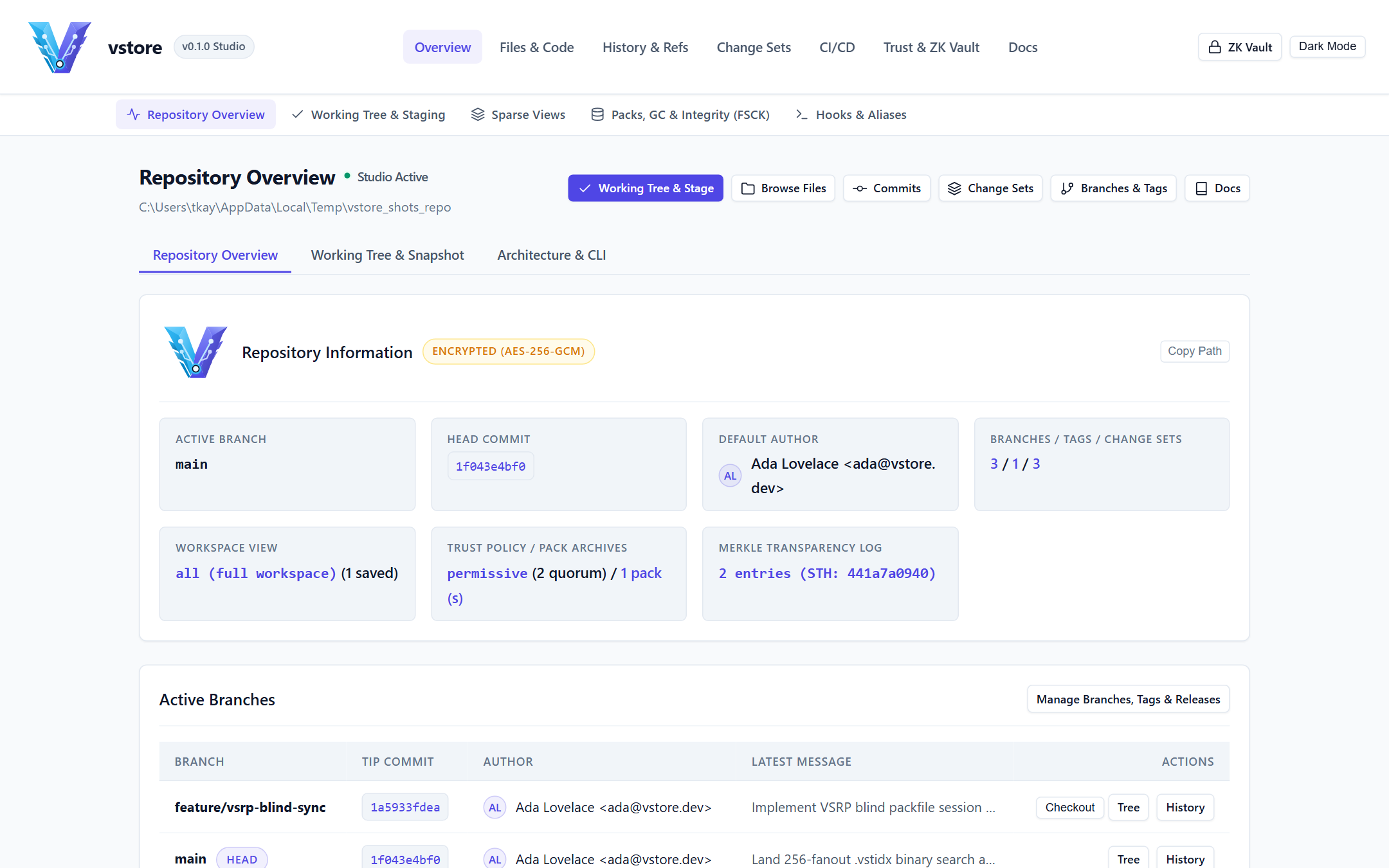
Browse commit graphs, side-by-side split diffs, line-level blame, sparse workspace views, and interactive staging/branching workflows locally at http://127.0.0.1:8080.
Security-Conscious Teams
Zero-Knowledge Encryption & Ref Obfuscation
Seal every blob, tree, commit, tag, chunk, changeset, sparse view, and CI artifact on the client using Argon2id (64 MiB) + AES-256-GCM (VSTOREN1), and scramble branch/tag names via HMAC-SHA256 (--obfuscate-refs).
Remote Reviewers
Browser WebCrypto Zero-Knowledge Vault (/zk)
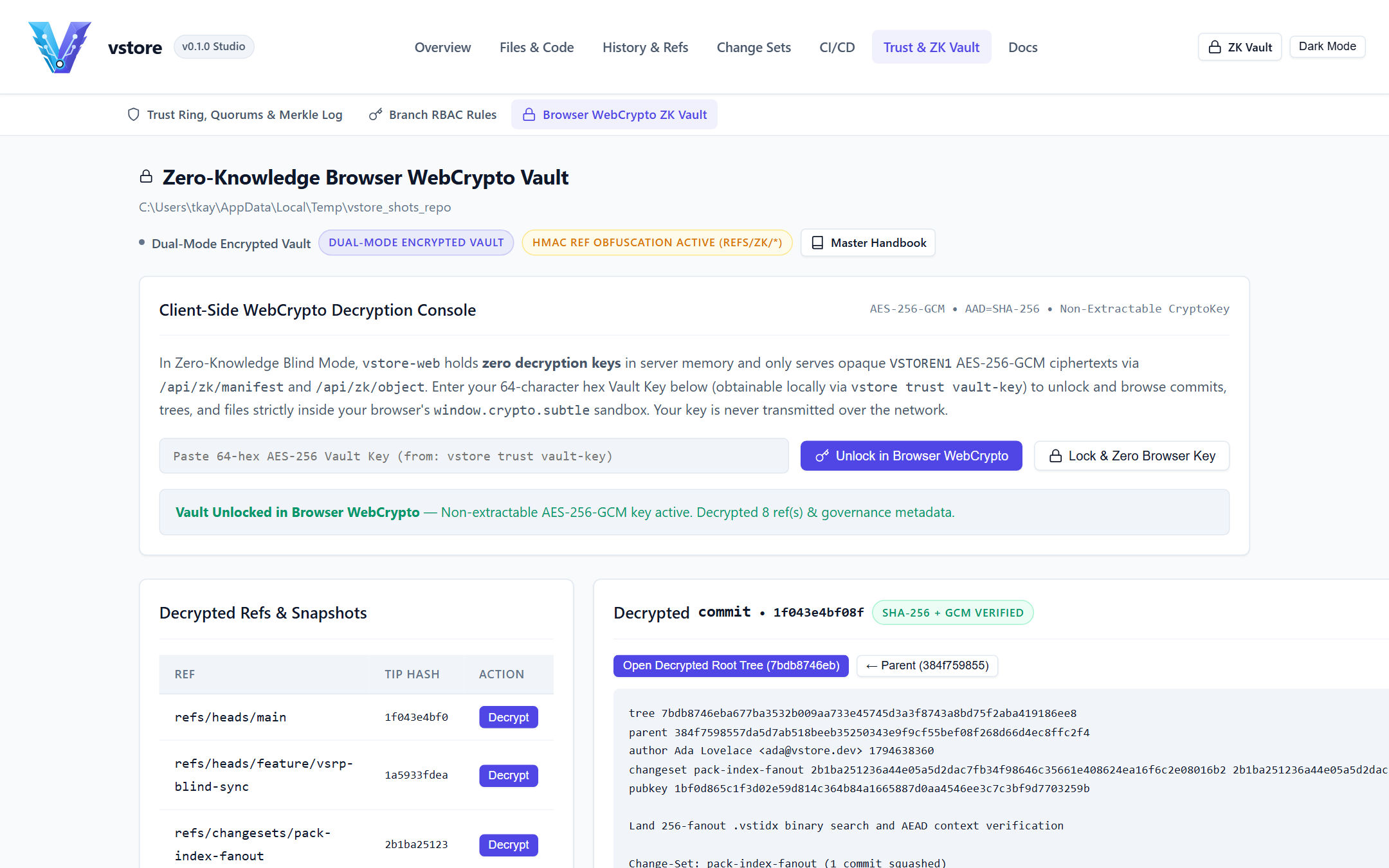
Inspect encrypted commits, trees, and blobs directly inside a standard browser using window.crypto.subtle while the hosting server operates in --blind mode with zero keys in RAM.
Platform & Release Engineers
Ed25519 Quorums, Transparency Log & Deterministic CI
Enforce $M$-of-$N$ multi-signer branch/tag quorums, RFC 6962 dual-signed Merkle Transparency Logs, and vstore-ci topological build pipelines with signed linked artifacts (vstore://, https://, s3://, scp://).
Security & Cryptographic Guarantees
Security Pillar
Enforcement Mechanism in vstore
Confidentiality
Two-tier Argon2id Key-Encryption Key (KEK) wrapping a random 256-bit Data-Encryption Key (wrapped_dek), sealing every repository object with AES-256-GCM (AAD = object_id).
Metadata Privacy
Optional HMAC-SHA256 reference obfuscation (refs/zk/<hmac>) plus encrypted ref_catalog so blind relay servers cannot observe branch, tag, or feature names.
Integrity & Non-Repudiation
End-to-end SHA-256 Merkle DAG addressing, automatic Ed25519 (or hardware FIDO2/HSM) signatures on every commit and release tag, and $M$-of-$N$ quorum enforcement.
Rollback & Split-View Defense
Append-only RFC 6962 Merkle Transparency Log (.vstore/transparency.log) recording dual-signed state roots verified automatically on every clone, fetch, pull, and push.
Storage Efficiency
Gear rolling-hash Content-Defined Chunking (.chunked for files $> 64\text{ KiB}$), VSTZ compression, and indexed .vstpack / .vstidx binary packfiles.
How-To Guide - Step-by-step operational recipes for encrypted repositories, parallel changesets, linear merges, blind remote sync, CI pipelines, and the vblog hands-on tutorial.
End-User Guide - Complete day-to-day manual for the vstore CLI, branches, logical releases, parallel changesets, sparse views, vstore-web Studio, and the /zk Browser Vault.
Administrator Guide - Production server deployment (systemd, reverse proxy TLS), Blind Zero-Knowledge relay hosting, RBAC (access.json), $M$-of-$N$ quorums, backups, fsck, packfile maintenance, and key rotation (rekey).
Operations, Use Cases & Comparisons - vstore-ci build pipelines, multi-developer review workflows, air-gapped compliance operations, Git migration, and architectural comparison against Git, Jujutsu, Pijul, Fossil, and Mercurial.
Configuration & CLI Reference - Exhaustive command, flag, environment variable, configuration schema, and HTTP/JSON REST API (/api/* and /api/v1/*) reference for vstore, vstore-web, and vstore-ci.
Performance & Capacity Guide - Content-addressed storage throughput, Gear-CDC deduplication ratios, .vstpack 256-fanout index latency, AES-256-GCM overhead, and server sizing guidelines.
Consolidated User Handbook - Single-file master handbook combining all End-User, How-To, Administrator, Operations, Reference, and Performance guides.
Quickstart
Use the prebuilt binaries for your platform (dist/bin/windows/, dist/bin/linux/, or dist/bin/macos/):
BASH
# 1. Verify installed CLI, CI runner, and Web Studio versions
vstore --version
vstore-ci --version
vstore-web --version

# 2. Initialize a signed, zero-knowledge encrypted repository
export VSTORE_PASSPHRASE="correct-horse-battery-staple"
vstore init --encrypt --obfuscate-refs --author "Ada Lovelace <ada@example.org>" ./my-service
cd ./my-service

# 3. Stage files and record an Ed25519-signed SHA-256 snapshot
echo '{"service":"payments","version":"1.0.0"}' > manifest.json
vstore add manifest.json
vstore snapshot -m "Initialize payments service manifest"
vstore verify HEAD

# 4. Launch the local Repository Web Studio on 127.0.0.1:8080
vstore-web --addr 127.0.0.1 --port 8080 --repo .
Open http://127.0.0.1:8080 in your browser to explore the Repository Dashboard, Commit DAG, Change Sets Studio, CI Provenance inspector, and /zk Browser WebCrypto Vault.
vstore - How-To Guide & Hands-On Tutorial
Overview
This guide provides copy-pasteable step-by-step recipes for everyday developer and operator tasks across vstore, vstore-ci, and vstore-web, followed by a complete end-to-end walkthrough using the vblog sample web application.
Recipe 1: Initialize Plain vs. Zero-Knowledge Encrypted Repositories
Standard Signed Repository (Plaintext Storage, Ed25519 Signed)
BASH
mkdir ./api-gateway && cd ./api-gateway
vstore init --author "Ada Lovelace <ada@example.org>"

# Check repository status and generated Ed25519 identity
vstore status
vstore trust status
Use --encrypt to seal every stored object with AES-256-GCM (VSTOREN1) and --obfuscate-refs to replace human-readable branch/tag filenames on disk with HMAC-SHA256 digests:
BASH
export VSTORE_PASSPHRASE="strong-team-vault-passphrase"
vstore init --encrypt --obfuscate-refs --author "Ada Lovelace <ada@example.org>" ./zk-vault-repo
cd ./zk-vault-repo

# Export the 64-character hex Vault Key for the /zk Browser WebCrypto Vault
vstore trust vault-key
Recipe 2: Configure .vstoreignore, Stage Selectively & Record Snapshots
Create a .vstoreignore file using standard glob (*, **) and negation (!) rules so runtime databases, build outputs, and temporary files never pollute snapshots:
GITIGNORE
# Ignore build outputs and runtime artifacts
dist/
target/
*.db
*.db-wal
*.db-shm
*.log
*.tmp

# Explicitly track versioned seed data and static web assets
!data/seed_posts.json
!src/assets/**
Stage specific paths, inspect staged vs. working-tree diffs, and record a signed commit:
BASH
vstore add .vstoreignore data/seed_posts.json src/assets/style.css
vstore diff --staged
vstore snapshot -m "Add ignore policy, starter seed data, and base stylesheet"

# Verify the Ed25519 cryptographic signature on HEAD
vstore verify HEAD
If you stage a file by mistake or want to revert a modified working file:
BASH
# Unstage a single path without modifying the file on disk
vstore reset src/assets/style.css

# Restore a working-tree file back to its HEAD contents
vstore restore src/assets/style.css

# Revert the last local branch or HEAD transition via the reflog
vstore reflog -n 5
vstore undo
Recipe 3: Work on Two Tasks Simultaneously with Parallel Change Sets (vstore cs)
Instead of juggling stash stacks or switching branches mid-thought, isolate concurrent workstreams inside named Change Sets in the same working folder:
BASH
# Create two independent Change Sets anchored at current HEAD
vstore cs create theme-and-search -m "Add dark-mode toggle and live post search"
vstore cs create xss-escape-fix   -m "Escape untrusted HTML in user comments"

# Edit files for both tasks in your working directory, then route each file to its Change Set
vstore cs add theme-and-search src/assets/style.css src/assets/app.js
vstore cs commit theme-and-search -m "Implement dark theme tokens and instant search filter"

vstore cs add xss-escape-fix src/sanitizer.ts
vstore cs commit xss-escape-fix -m "Escape angle brackets, quotes, and ampersands"

# Inspect open Change Sets, checkpoints, and combined diffs
vstore cs list
vstore cs diff xss-escape-fix
Temporarily shelve a Change Set if you want a clean working directory for testing, then unshelve or land it cleanly onto main:
BASH
# Shelve theme-and-search back to HEAD on disk without losing its checkpoints
vstore cs shelve theme-and-search

# Land the hotfix onto main as a clean single-parent linear commit with provenance headers
vstore cs merge xss-escape-fix -m "Land XSS comment sanitization hotfix"
vstore cs delete xss-escape-fix

# Re-apply theme-and-search to the working folder, then land it on main
vstore cs unshelve theme-and-search
vstore cs merge theme-and-search -m "Land dark-mode toggle and live search"
vstore cs delete theme-and-search
Recipe 4: Feature Branches, Clean Linear Merges & Conflict Resolution
vstore keeps main strictly linear by default (Option 1A): merging a feature branch performs a 3-way diff3 merge and writes a single-parent commit on main carrying changeset and changeset_tip provenance headers.
BASH
# Create and switch to a feature branch
vstore checkout -b feature/export-api
echo '{"export_version": 2}' > data/export_schema.json
vstore add data/export_schema.json
vstore snapshot -m "Add JSON export schema v2"

# Switch back to main and merge linearly
vstore checkout main
vstore merge feature/export-api -m "Integrate JSON export schema v2"

# Safely delete the merged branch (verified via ancestry or trunk provenance headers)
vstore branch -d feature/export-api
If both main and feature/export-api modified the same lines:
vstore merge feature/export-api writes standard diff3 conflict markers (<<<<<<<, =======, >>>>>>>) and pauses the merge (vstore snapshot automatically blocks commits while conflict markers remain).
Either edit the file to resolve the conflict and run vstore merge --continue, abort cleanly with vstore merge --abort, or explicitly resolve overlapping hunks in favor of the incoming branch (Option 1B) via vstore merge feature/export-api --authoritative.
Recipe 5: Enforce 2-of-2 Team Quorums & Co-Signed Releases
Require two distinct trusted Ed25519 signers before main or v* release tags can advance:
BASH
# Register a teammate's Ed25519 public key in the repository trust ring
vstore trust allow "Grace Hopper <grace@example.org>" 8f4a2d91c7e03b65a1d2e3f405162738495a6b7c8d9e0f1a2b3c4d5e6f708192
vstore trust policy strict

# Require 2 distinct signatures on main and production release tags
vstore trust quorum set "refs/heads/main" 2
vstore trust quorum set "refs/tags/v*" 2

# Reviewer attaches a detached co-signature attestation to HEAD or approves a Change Set
vstore trust attest HEAD
vstore cs approve release-prep

# Create and co-sign a production release tag
vstore tag -s -m "Production release v1.0.0" v1.0.0
vstore tag --cosign v1.0.0
vstore verify v1.0.0
Recipe 6: Sync with a Blind Zero-Knowledge Server (ws:// or https://)
Host a remote sync relay that stores ciphertext objects, verifies Ed25519 signatures and $M$-of-$N$ quorums, and appends RFC 6962 Merkle Transparency Log entries without ever possessing the repository passphrase or DEK:
BASH
# On the remote server: initialize or open in Blind Mode (--blind)
vstore serve --port 9418 --blind --require-auth

# On the developer workstation: register the remote and push encrypted packfiles
vstore remote add origin ws://127.0.0.1:9418
vstore push origin main
vstore push origin --tags

# On a teammate's workstation: clone with passphrase and audit the Merkle Transparency Log
export VSTORE_PASSPHRASE="strong-team-vault-passphrase"
vstore clone ws://127.0.0.1:9418 ./teammate-copy
cd ./teammate-copy
vstore trust verify-log
Recipe 7: Partial Checkouts with Sparse Workspace Views (vstore view)
For large monorepos or media-heavy repositories, check out only the subdirectories relevant to your role while fetching blobs by hash on demand:
BASH
# Define a frontend-only Workspace View
vstore view create frontend -i "src/assets/**,data/**,README.md" -e "*.bak" -m "Frontend assets and seed data"

# Activate the view (non-matching files are cleanly removed from the working directory)
vstore view use frontend
vstore view inspect frontend

# Hydrate any missing blobs from origin on demand, or return to the full repository tree
vstore view hydrate origin
vstore view clear
Recipe 8: Run Deterministic CI Pipelines & Hydrate Linked Artifacts (vstore-ci)
Execute topological build and verification waves, seal output artifacts into linked storage, and verify end-to-end build provenance:
BASH
# Inspect pipeline tasks and topological execution plan
vstore ci list
vstore ci graph

# Execute the pipeline in parallel across 4 workers and record a signed provenance receipt
vstore ci run --parallel -j 4

# Audit the recorded build run's Ed25519 signature, step hash chain, and artifact digests
vstore ci runs
vstore ci verify

# Pull and verify linked build artifacts directly onto a developer machine
vstore pull origin main --with-build latest
The vblog sample application (examples/vblog/ or [vblog-sample-app.zip](/docs/vblog-sample-app.zip)) demonstrates every vstore workflow on a realistic full-stack developer blog featuring SQLite persistence, JSON seed/export (data/seed_posts.json), responsive CSS3 dark/light themes (src/assets/style.css), and vanilla JavaScript live filtering (src/assets/app.js):
ARCHITECTURE DIAGRAM
vstore Architecture Flow #1
Click any component node to view contextual details.
Interactive SVG • Click any node (4 components)
Components:
Component
1. Init Encrypted vblog Repo
Core DVCS Architecture
Component 1 of 4
Architectural Role & Purpose
Architectural component "1. Init Encrypted vblog Repo" (Step1) in the vstore pipeline.
Contextual Description & System Interaction
Interactive diagram component parsed from Markdown specification.
Core Functionality & Security Mechanics
Participates in the Step1 execution stage
Maintains cryptographic integrity and zero-knowledge boundaries
Component
3. Packfiles & Sparse Views
Core DVCS Architecture
Component 2 of 4
Architectural Role & Purpose
Architectural component "3. Packfiles & Sparse Views" (Step3) in the vstore pipeline.
Contextual Description & System Interaction
Interactive diagram component parsed from Markdown specification.
Core Functionality & Security Mechanics
Participates in the Step3 execution stage
Maintains cryptographic integrity and zero-knowledge boundaries
Component
4. 2-of-2 Quorum & Signed v1.0.0
Core DVCS Architecture
Component 3 of 4
Architectural Role & Purpose
Architectural component "4. 2-of-2 Quorum & Signed v1.0.0" (Step4) in the vstore pipeline.
Contextual Description & System Interaction
Interactive diagram component parsed from Markdown specification.
Core Functionality & Security Mechanics
Participates in the Step4 execution stage
Maintains cryptographic integrity and zero-knowledge boundaries
Component
5. Blind Sync & /zk WebCrypto Tour
Core DVCS Architecture
Component 4 of 4
Architectural Role & Purpose
Architectural component "5. Blind Sync & /zk WebCrypto Tour" (Step5) in the vstore pipeline.
Contextual Description & System Interaction
Interactive diagram component parsed from Markdown specification.
Core Functionality & Security Mechanics
Participates in the Step5 execution stage
Maintains cryptographic integrity and zero-knowledge boundaries
Extract or copy vblog into a clean workspace and run vstore init --encrypt --obfuscate-refs --author "Ada Lovelace".
Stage .vstoreignore, README.md, data/seed_posts.json, and src/, then create your baseline signed snapshot (vstore snapshot -m "Initial vblog application snapshot").
Install a pre-commit quality hook (vstore hook install pre-commit -c "vstore status") and ergonomic shortcut (vstore alias set st "status").
Develop two changes concurrently (vstore cs create theme-and-search and vstore cs create xss-escape-fix), commit checkpoints independently, and merge both cleanly onto main.
Compact objects into an indexed .vstpack archive (vstore pack --packfile) and verify zero corruption via vstore status and /storage in vstore-web.
Launch vstore-web --blind --port 8080, open http://127.0.0.1:8080/zk, paste the output of vstore trust vault-key, and browse decrypted vblog commits, directory trees, and files entirely inside your browser's WebCrypto sandbox.
vstore - End-User Guide
Overview
This guide covers day-to-day software engineering workflows using the vstore command-line interface and the vstore-web Repository Studio, including staging, signed snapshots, trunk-based branching and logical releases, concurrent Parallel Change Sets, sparse Workspace Views, interactive Split Diffs and Line Blame, and client-side inspection inside the Browser WebCrypto Zero-Knowledge Vault (/zk).
1. Repository Lifecycle, Staging & Signed Snapshots
Every vstore repository stores its content-addressed object database, references, signing keys, and governance metadata inside a single .vstore/ directory at the root of your project.
Initializing or Cloning a Workspace
New Plaintext Repository: vstore init --author "Ada Lovelace <ada@example.org>" generates an Ed25519 signing keypair and sets the default branch to main.
New Encrypted Repository: vstore init --encrypt --obfuscate-refs --author "Ada Lovelace" derives an Argon2id Key-Encryption Key from your passphrase (VSTORE_PASSPHRASE or interactive prompt), wraps a random 256-bit Data-Encryption Key (wrapped_dek), seals all objects with AES-256-GCM, and hashes branch/tag filenames via HMAC-SHA256.
Cloning a Remote Repository: vstore clone ws://sync.example.org:9418 ./project (also supports wss://, http://, https://, and ssh://) downloads .vstpack streams, verifies the server's RFC 6962 Merkle Transparency Log, and unwraps wrapped_dek locally when encrypted.
Selective Staging, Status, Restore & Undo
Task
Command
Behavior
Inspect workspace state
vstore status
Displays active branch, remote ahead/behind counts (origin/main), active Workspace View, open Change Sets, staged index changes, unstaged edits, detected file renames, and untracked paths.
Stage files or folders
vstore add src/ manifest.json
Hashes and stages matching files into .vstore/index while respecting .vstoreignore glob and ! negation rules.
Record signed snapshot
vstore snapshot -m "Message"
Writes tree and commit objects, signs the canonical commit payload with your Ed25519 key, updates HEAD, and appends a local reflog entry.
Amend latest snapshot
vstore snapshot --amend -m "New msg"
Replaces the tip commit on the current branch with updated staged content or an updated commit message.
Unstage paths
vstore reset src/config.toml
Removes paths from .vstore/index (or clears the entire index when called without arguments) without altering working files.
Discard working edits
vstore restore src/config.toml
Restores files or directories from HEAD or --source <commit>.
Undo last ref transition
vstore undo
Reverts the most recent branch or HEAD movement recorded in .vstore/reflog.json.
2. Branches, Trunk-Based Linear Merges, Tags & Releases
Branch Management & Linear Provenance
vstore supports full feature branching (vstore branch, vstore checkout -b <branch>) while keeping trunk history clean and readable by default:
Option 1A - Clean Linear Merge (Default): vstore merge feature/search computes a 3-way diff3 merge against the lowest common ancestor and records a single-parent linear commit on the target branch carrying changeset and changeset_tip provenance headers. vstore branch -d feature/search recognizes both direct DAG ancestry and changeset_tip headers when verifying safe deletion.
Option 1B - Authoritative Merge (--authoritative / --theirs): vstore merge feature/search --authoritative resolves overlapping diff3 hunks deterministically in favor of the incoming branch while preserving non-conflicting trunk changes.
Commit History & Cryptographic Signatures (/commits)
Signed Tags & Logical Trunk Releases
Annotated Signed Tags: vstore tag -s -m "Release v1.0.0" v1.0.0 creates a signed tag object in the CAS; teammates can attach additional quorum signatures via vstore tag --cosign v1.0.0.
Logical Releases & Backports:
vstore release create 1.2.0 -m "Q4 Production Release" creates signed tag v1.2.0 (and optional release/1.2 maintenance branch with --branch).
vstore release list summarizes all semantic releases and their target commits.
3. Concurrent Development with Parallel Change Sets (vstore cs)
Parallel Change Sets allow a developer to work on two, three, or more independent tasks inside a single checkout without switching branches or stashing half-finished edits:
ARCHITECTURE DIAGRAM
vstore Architecture Flow #1
Click any component node to view contextual details.
Interactive SVG • Click any node (5 components)
Components:
Component
Trunk HEAD Commit
Core DVCS Architecture
Component 1 of 5
Architectural Role & Purpose
Architectural component "Trunk HEAD Commit" (BaseHead) in the vstore pipeline.
Contextual Description & System Interaction
Interactive diagram component parsed from Markdown specification.
Core Functionality & Security Mechanics
Participates in the BaseHead execution stage
Maintains cryptographic integrity and zero-knowledge boundaries
Component
Change Set: rbac-audit-fix
Core DVCS Architecture
Component 2 of 5
Architectural Role & Purpose
Architectural component "Change Set: rbac-audit-fix" (CsBeta) in the vstore pipeline.
Contextual Description & System Interaction
Interactive diagram component parsed from Markdown specification.
Core Functionality & Security Mechanics
Participates in the CsBeta execution stage
Maintains cryptographic integrity and zero-knowledge boundaries
Component
Signed Checkpoints + Reviewer Approval
Core DVCS Architecture
Component 3 of 5
Architectural Role & Purpose
Architectural component "Signed Checkpoints + Reviewer Approval" (CheckpointsA) in the vstore pipeline.
Contextual Description & System Interaction
Interactive diagram component parsed from Markdown specification.
Core Functionality & Security Mechanics
Participates in the CheckpointsA execution stage
Maintains cryptographic integrity and zero-knowledge boundaries
Component
Signed Checkpoints + Shelve/Unshelve
Core DVCS Architecture
Component 4 of 5
Architectural Role & Purpose
Architectural component "Signed Checkpoints + Shelve/Unshelve" (CheckpointsB) in the vstore pipeline.
Contextual Description & System Interaction
Interactive diagram component parsed from Markdown specification.
Core Functionality & Security Mechanics
Participates in the CheckpointsB execution stage
Maintains cryptographic integrity and zero-knowledge boundaries
Component
Clean Linear Trunk Commit (Provenance Linked)
Core DVCS Architecture
Component 5 of 5
Architectural Role & Purpose
Architectural component "Clean Linear Trunk Commit (Provenance Linked)" (LinearTrunk) in the vstore pipeline.
Contextual Description & System Interaction
Interactive diagram component parsed from Markdown specification.
Core Functionality & Security Mechanics
Participates in the LinearTrunk execution stage
Maintains cryptographic integrity and zero-knowledge boundaries
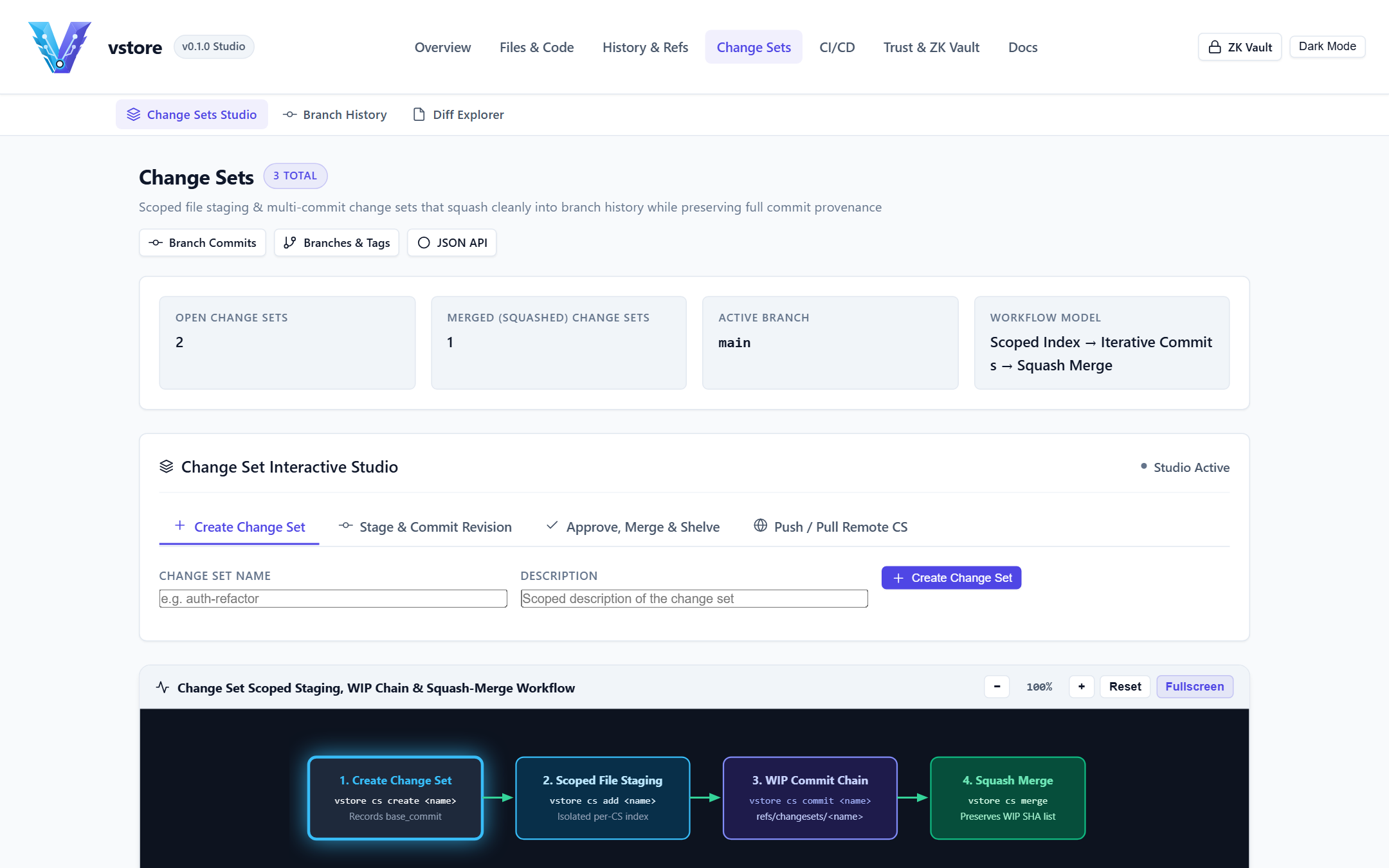
Create: vstore cs create zk-pack-stream -m "Optimize encrypted packfile streaming" anchors a named Change Set at HEAD.
Stage & Checkpoint: vstore cs add zk-pack-stream src/streamer.rs and vstore cs commit zk-pack-stream -m "Add buffered chunk reader" record signed checkpoint commits under refs/changesets/zk-pack-stream without moving main. Single-author ownership is enforced automatically unless --allow-coauthor is passed.
Shelve & Unshelve: vstore cs shelve zk-pack-stream temporarily restores touched files in your working folder back to HEAD; vstore cs unshelve zk-pack-stream puts them right back.
Remote Collaboration & Approval: vstore cs push zk-pack-stream origin publishes encrypted checkpoints so teammates can pull (vstore cs pull zk-pack-stream origin), inspect diffs, and co-sign (vstore cs approve zk-pack-stream).
Land on Trunk: vstore cs merge zk-pack-stream verifies any configured branch quorums and lands a single linear commit on main whose changeset_commits list links every checkpoint.
Parallel Change Sets Studio (/changesets)
4. Sparse Workspace Views (vstore view)
When working in large multi-project repositories or repositories containing large binary assets (automatically deduplicated via Gear rolling-hash .chunked manifests above 64 KiB), Workspace Views let you materialize only the paths you care about:
History & Refs (/commits, /commit, /branches, /releases, /remotes, /reflog, /inspect): Paginated commit DAG with signature badges, Unified vs. Side-by-Side Split Diff commit detail view, detached attestation list, branch/tag/release management, remote sync controls, reflog undo, and raw CAS object inspector.
Change Sets (/changesets, /changeset): Visual dashboard of open and merged Change Sets, checkpoint logs, combined diffs, shelve/unshelve actions, reviewer approval, and one-click linear landing.
CI/CD (/ci): Build run history, step-by-step execution hashes, stage mount digests, linked artifact signatures, and redacted secret key metadata.
Trust & ZK Vault (/trust, /access, /zk): Allowed Signers ring, key revocations, $M$-of-$N$ quorum rules, RFC 6962 Merkle Transparency Log audit report, branch RBAC table, and the Browser WebCrypto Vault.
Split Diff, Ed25519 Signature & Quorum Attestation View (/commit)
6. Using the Browser WebCrypto Zero-Knowledge Vault (/zk)
When vstore-web runs on an untrusted host with --blind (vstore-web --port 8080 --blind --repo ./repos/app), server-side plaintext routes lock down automatically and redirect to /zk:
Run vstore trust vault-key on an authorized workstation (or use your repository passphrase when PBKDF2/WebCrypto unwrap is configured) to copy your 64-character hex Vault Key.
Open /zk in any modern browser and paste the Vault Key into the Client-Side WebCrypto Unlock panel.
Your browser imports the key into non-exportable CryptoKey memory via window.crypto.subtle.importKey, fetches encrypted VSTOREN1 envelopes from /api/zk/manifest and /api/zk/object, verifies AAD = object_id, decompresses VSTZ payloads, and renders decrypted branches, commit histories, trees, and file contents locally - transmitting zero key material over the network.
vstore - Administrator Guide
Overview
This guide covers production deployment, network transport hardening, Blind Zero-Knowledge Relay Mode, role-based branch access control (access.json), cryptographic trust governance (allowed_signers, revocations, $M$-of-$N$ quorums, hardware signers, Merkle Transparency Logs), storage compaction (.vstpack), integrity verification (fsck), backups, and key rotation (rekey).
1. Deployment Topologies
vstore separates remote synchronization (vstore serve) from web browsing and REST inspection (vstore-web), allowing administrators to deploy either or both with minimal attack surface:
Component
Recommended Bind & Transport
Key Custody Mode
Primary Role
vstore serve --blind
127.0.0.1:9418 behind TLS reverse proxy, direct --tls-cert/--tls-key (wss://), or SSH --stdio (ssh://)
Create /etc/systemd/system/vstore-web.service (read-only by default; pass --enable-studio with VSTORE_WEB_TOKEN only if authenticated web mutations are required):
If you prefer terminating TLS at an edge proxy instead of using --tls-cert / --tls-key, bind vstore serve and vstore-web to 127.0.0.1 with --trust-proxy:
For teams using SSH keys and authorized_keys bastion controls without opening additional TCP ports, vstore speaks the VSRP sync framing directly over SSH standard input/output:
When --require-auth (and optionally --authorized-keys <pub1,pub2>) is passed to vstore serve, every connecting client must sign a per-session random 32-byte server challenge using its Ed25519 private key before reading or pushing refs.
Granular Per-Branch RBAC (vstore access)
Administrators define branch-pattern permissions (read, write, admin, deny) in .vstore/access.json, evaluated with explicit deny precedence:
BASH
# Grant write access on feature/* to all authenticated developers
vstore access add -k "*" -b "refs/heads/feature/*" -p write -a "All Developers"

# Restrict main and release/* writes to Release Engineering leads
vstore access add -k 3b6a27bcceb6a42d62a3a8d02a6f0d73653215771de243a63ac048a18b59da29 \
  -b "refs/heads/main,refs/heads/release/*" -p admin -a "Release Lead"

# Audit active RBAC policy
vstore access list
Revocations are Ed25519-signed records synchronized automatically via vstore trust sync, push, pull, and fetch.
$M$-of-$N$ Multi-Party Quorums:
BASH
   vstore trust quorum set "refs/heads/main" 2
   vstore trust quorum set "refs/tags/v*" 2
Both local merges and remote vstore serve ref updates reject updates to matching patterns unless at least $M$ distinct non-revoked Allowed Signers have signed the commit/tag and its detached .vstore/attestations/<hash>.json records.
As repositories accumulate thousands of loose objects, bundle them into indexed .vstpack / .vstidx archives with 256-entry first-byte fanout tables for $O(\log N)$ binary-search reads and single-stream network transfers:
BASH
# Bundle loose objects into a binary .vstpack + .vstidx archive
vstore pack --packfile

# Prune unreachable objects older than 24 hours (86400s) and consolidate packfiles
vstore gc --grace 86400 --packfile
Full Cryptographic Repository Verification (fsck & verify-log)
Run periodic scheduled health checks on both server relays and CI agents:
BASH
# Run full 4-tier cryptographic object and packfile integrity check
vstore fsck

# Verify Merkle Transparency Log hash chain and dual signatures
vstore trust verify-log

# Verify HEAD and release tag signatures against Allowed Signers & Revocations
vstore verify HEAD
vstore verify v1.0.0
You can also inspect live object counts, packfile indexes, and run full fsck verification via GET /api/fsck or /storage in vstore-web.
Consistent Backups & Disaster Recovery
Because vstore writes objects immutably (atomic_write_bytes via fsync + temp-file rename) and serializes ref updates under .vstore/repo.lock, backing up .vstore/ is straightforward:
For cold or snapshot backups: take an atomic ZFS/LVM/EBS filesystem snapshot of the repository directory, or run vstore clone / vstore fetch to a warm standby server.
After restoring a backup, run vstore trust verify-log against developers' locally cached remote checkpoints (.vstore/remote_checkpoints.json) to confirm zero silent rollback occurred.
For encrypted repositories, store the repository passphrase or wrapped recovery key in an offline enterprise secret vault; a --blind server backup contains only AES-256-GCM ciphertext and cannot be decrypted without the KEK/DEK.
vstore - Operations, Use Cases & DVCS Comparisons
Overview
This guide details operational playbooks for vstore-ci topological pipelines, linked artifact provenance (vstore://, https://, s3://, scp://), multi-developer Change Set code review, regulated/air-gapped release engineering, Git repository migration, and a comprehensive architectural comparison of vstore against Git, Jujutsu (jj), Pijul, Fossil, and Mercurial.
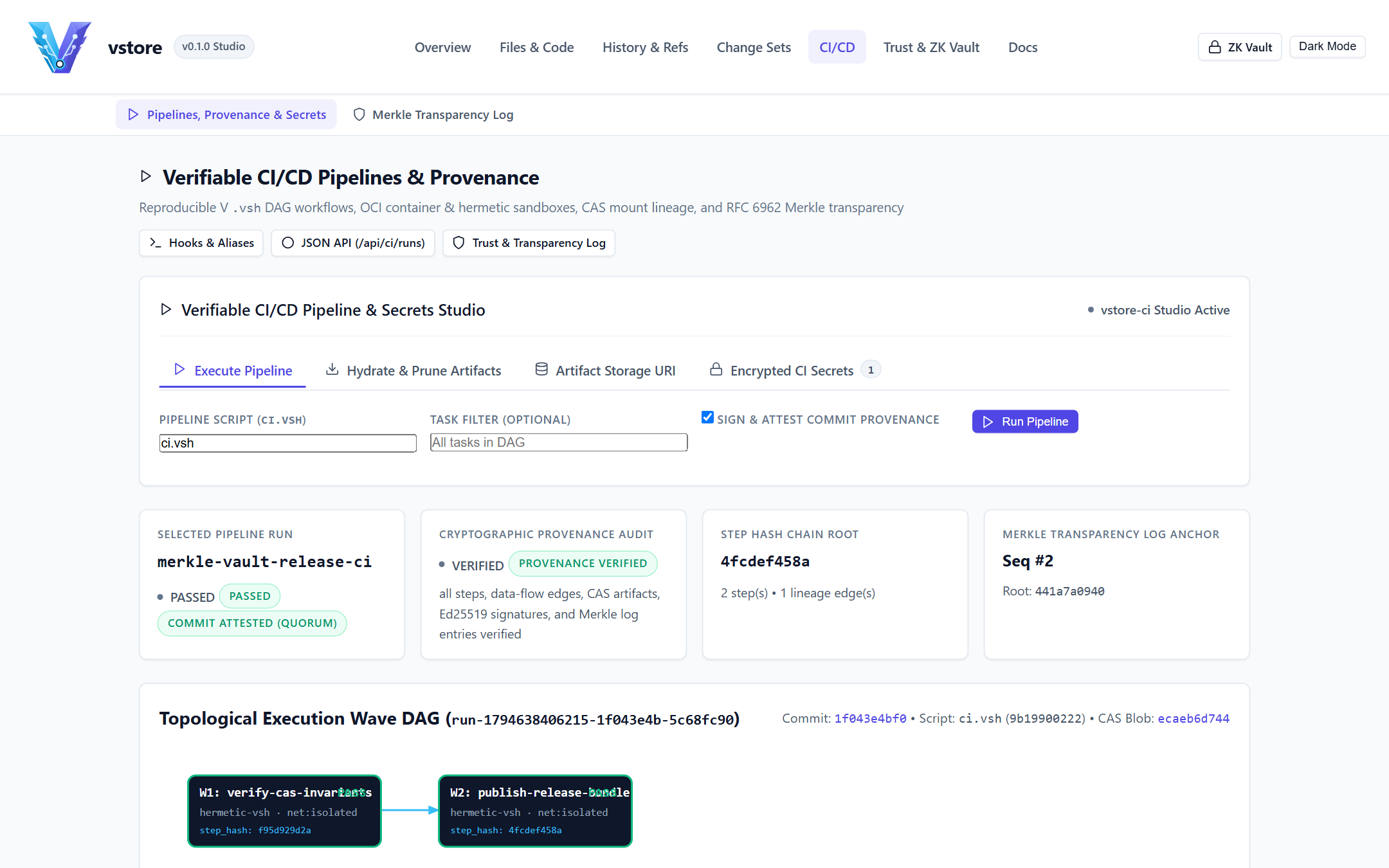
Unlike external CI SaaS platforms that run opaque YAML scripts decoupled from version-control cryptography, vstore-ci executes declarative DAG tasks directly against the content-addressed repository state and binds every build step, inter-stage mount, and published binary artifact to an Ed25519-signed provenance receipt (.vstore/ci/runs/<run_id>.json).
CI Pipeline & Cryptographic Trust Audit (/ci)
Key Operational Properties of vstore-ci
Topological Wave Execution (--parallel -j <N>): Tasks declare explicit dependencies (depends), timeouts (timeout_sec), optional OCI container sandboxes (docker, podman, nerdctl), and default-isolated network policies (isolated vs. enabled). Independent tasks within each wave execute concurrently.
Zero-CAS-Bloat Stage & Cache Mounts: Intermediate compiler outputs pass between stages via hashed staging directories (input_Digest -> output_Digest) without bloating .vstore/objects/ with transient object files.
Linked Artifact Storage with End-to-End Encryption: Final release binaries are signed with Ed25519, sealed with VSTOREN1AES-256-GCM (aad = "ci_artifact:<sha256>") when the repository is encrypted, and published to configurable storage backends:
vstore:// (built-in .vstore/ci/artifacts/<sha256>, synced over VSRP)
./artifacts/prod (shared NAS or air-gapped transfer volume)
Encrypted Secret Redaction: Secrets stored via vstore ci secret set <KEY> <VALUE> are encrypted at rest in .vstore/ci/secrets.enc and automatically scrubbed from captured step logs before provenance receipts are written.
Retention Without Provenance Loss (vstore ci prune): vstore ci prune --keep-last 5 --keep-tagged reclaims gigabytes of older binary artifacts while permanently preserving lightweight .vstore/ci/runs/*.json cryptographic receipts.
BASH
# Configure external S3 or HTTPS artifact storage and encrypted secrets
vstore ci storage set s3://prod-release-artifacts/payments
vstore ci secret set SIGNING_ENDPOINT "https://kms.internal.example.org"

# Trigger automated verification and release packaging
vstore ci run --parallel -j 4
vstore ci verify

# Hydrate verified release artifacts onto a target deployment host
vstore clone wss://vcs.example.org:9418 ./deploy-target --view runtime --with-build latest
2. Multi-Developer Change Set Code Review Playbook
Teams can collaborate on pre-merge changesets across a Blind Zero-Knowledge Relay without opening long-lived feature branches or exposing plaintext source code to the hosting server:
Use Case A: Untrusted Public Cloud Hosting (Zero-Knowledge SaaS Relay)
Challenge: Engineering teams want low-latency cloud replication across continents without granting cloud administrators or subpoenaed storage providers read access to proprietary algorithms, security patches, or roadmap branch names.
Solution: Initialize with vstore init --encrypt --obfuscate-refs and run vstore serve --blind --require-auth + vstore-web --blind on cloud VMs. Cloud disks hold only VSTOREN1 ciphertexts and HMAC-SHA256 ref tokens, while developers inspect repositories locally or via /zk WebCrypto in the browser.
Use Case B: Air-Gapped Defense & Financial Release Promotion
Challenge: Moving verified source snapshots and compiled release binaries across an air gap while proving 2-of-2 human review, deterministic CI execution, and zero history tampering.
Solution: Bundle .vstpack archives, .vstore/transparency.log, .vstore/attestations/, and .vstore/ci/artifacts/ onto read-only transfer media. On the high-side network, run vstore trust verify-log, vstore verify v1.0.0, and vstore ci verify entirely offline with zero external dependencies.
4. Migrating from Git (import-git & archive)
vstore provides built-in topological Git import and clean archive export:
BASH
# Initialize a new encrypted vstore repository and import existing Git history + tags
export VSTORE_PASSPHRASE="enterprise-migration-passphrase"
vstore init --encrypt --author "Migration Bot <releng@example.org>" ./migrated-repo
cd ./migrated-repo
vstore import-git /path/to/legacy-git-repo --branch main

# Export any snapshot or tag as a clean .zip source bundle without .vstore metadata
vstore archive v1.0.0 -o ./release-v1.0.0-src.zip --prefix service-1.0.0
5. Architectural Comparison with Other Version Control Systems
Capability
vstore
Git
Jujutsu (jj)
Pijul
Fossil
Mercurial (hg)
Object Hash Algorithm
SHA-256 (native everywhere)
SHA-1 default (SHA-256 opt-in)
SHA-256 / Git backend
BLAKE3
SHA3-256 / SHA-1
SHA-1
Client-Side Zero-Knowledge Encryption
Built-in (Argon2id + AES-256-GCM)
External plugins (git-crypt, age)
External via backend
None built-in
None built-in
External extensions
Branch/Ref Name Obfuscation
Built-in (HMAC-SHA256refs/zk/)
Not supported
Not supported
Not supported
Not supported
Not supported
Blind Zero-Knowledge Server & Browser WebCrypto UI
Built-in (--blind + /zk Vault)
Not supported
Not supported
Not supported
Server sees plaintext SQLite
Server sees plaintext revlogs
Concurrent Same-Tree Workstreams
Parallel Change Sets (vstore cs)
Requires worktrees or stash
Anonymous/named changes
Commutative patches
Branches / stash
Shelve / MQ / topics
Sub-File Large Binary Deduplication
Native Gear-CDC (.chunked $> 64\text{ KiB}$)
Requires external Git LFS
Via backend
Line/byte patches
Delta compression
Largefiles extension
Automatic Commit Signatures & $M$-of-$N$ Quorums
Native Ed25519 + FIDO2 + quorum.json
Optional GPG/SSH; server forge rules
Optional signing
Ed25519 patch keys
Optional PGP clearsign
GPG extension
Tamper-Evident Merkle Transparency Log
Native RFC 6962 Dual-Signed Log
External (gittuf / Sigstore)
Operation log (local)
Patch set state
Blockchain-like timeline
Revlog append-only
Integrated Deterministic CI & Signed Artifacts
Built-in (vstore-ci + 5 URI stores)
External (GitHub Actions, GitLab CI)
External
External
External
External
Embedded Web Studio & JSON API
Built-in (vstore-web binary)
git instaweb (CGI legacy)
Community GUIs
Nest (hosted)
Built-in (fossil ui)
hg serve (read-only)
vstore - Configuration, CLI & REST API Reference
Overview
This reference documents every command, subcommand, flag, environment variable, .vstore/ configuration file, and HTTP/JSON REST API endpoint across vstore, vstore-ci, and vstore-web.
{"status":"ready"} (verifies .vstore store directory accessibility; 503 if unavailable).
GET /metrics
none
Prometheus text exposition metrics (uptime, request/error/auth counters, active sessions).
GET /api/info
none
Repository encryption/blind flags, active branch, commit/branch/tag/changeset counts.
GET /api/branches, GET /api/tags, GET /api/releases
none
Branch tips, signed tag metadata, and logical release records.
GET /api/commits
branch, search, page, limit
Paginated commit summaries with Ed25519 verification flags.
GET /api/commit
id=<64-hex>
Full commit metadata, parents, Change Set provenance, signature, and detached attestations.
GET /api/tree
commit, branch, path
Directory entries (mode, name, hash, kind).
GET /api/blob
id=<64-hex>
Raw binary/UTF-8 blob payload (application/octet-stream).
GET /api/diff
from, to, path
Structured unified diff files and hunks.
GET /api/grep
q, branch, path
Matching file paths, line numbers, and snippets.
GET /api/status, GET /api/reflog
limit (reflog)
Working-tree status summary or reference transition entries.
GET /api/changesets, GET /api/changeset
name (detail)
Open/merged Change Sets and checkpoint metadata.
GET /api/views, GET /api/packs, GET /api/fsck
none
Sparse Workspace Views, .vstpack inventory, and live cryptographic fsck report.
GET /api/transparency, GET /api/quorum, GET /api/access
none
RFC 6962 Merkle Transparency Log audit report, quorum rules, and RBAC rules.
GET /api/ci/runs, GET /api/ci/run, GET /api/ci/secrets
id (run detail)
Recorded vstore-ci runs, step/artifact digests, and secret key names (values never exposed).
GET /api/zk/manifest
none
Encrypted KDF parameters, wrapped_dek, ref_catalog_b64, head_enc_b64, governance blobs, and TLog root for /zk WebCrypto.
GET /api/zk/object
id=<64-hex>
Base64-encoded raw storage envelope (VSTOREN1 ciphertext) for browser-side AES-256-GCM decryption.
Authenticated Studio Mutation Endpoints (POST /api/v1/*, Opt-In via --enable-studio)
By default, vstore-web runs in read-only mode and rejects all POST /api/v1/* requests with 403 Forbidden. When explicitly started with --enable-studio (and not in --blind mode), /api/v1/* routes enforce:
Authorization: Bearer <token> (constant-time verified against --studio-token / VSTORE_WEB_TOKEN or the startup-generated CSPRNG token)
Strict Content-Type: application/json and same-origin Origin/Host CSRF validation
Host-execution endpoints (/api/v1/hook/install, /api/v1/hook/run, /api/v1/trust/signer, /api/v1/ci/run) remain permanently disabled over HTTP (403 Forbidden) and must be run via the local vstore CLI.
Working Tree & Snapshots: /api/v1/stage, /api/v1/unstage, /api/v1/snapshot, /api/v1/restore, /api/v1/undo
vstore, vstore-ci, and vstore-web are compiled ahead-of-time to native machine code with zero garbage-collected VM startup penalty and zero external database dependencies. This guide documents storage deduplication ratios, SHA-256 + AES-256-GCM cryptographic throughput, .vstpack random-access lookup latency, DAG traversal scaling, and hardware sizing recommendations.
1. Subsystem Throughput & Latency Profile
Representative single-node measurements on a 4-core / 8-thread x86-64 workstation with NVMe SSD storage (Windows 11 and Linux 6.x-prod builds):
Operation
Subsystem Mechanics
Typical Latency / Throughput
SHA-256 Object Hashing & Framing
Canonical <kind> <len>\0<body> digesting
480 - 650 MiB/s per core
Gear-CDC Content-Defined Chunking
Rolling 64-bit Gear table scan for files $> 64\text{ KiB}$ (16 KiB min, 64 KiB avg, 256 KiB max)
520 - 700 MiB/s streaming
VSTOREN1AES-256-GCM Sealing
Per-object random 96-bit nonce + AAD = object_id + 128-bit authentication tag
Traditional whole-blob storage writes an entirely new compressed copy whenever a single byte changes inside a large asset (for example, SQLite seed fixtures, PDF specifications, container layers, or media bundles). vstore eliminates this amplification automatically:
Threshold Activation (> 64 KiB): Files $\le 64\text{ KiB}$ are stored directly as single blob objects to minimize metadata indirection. Files $> 64\text{ KiB}$ are split at content-defined Gear rolling-hash boundaries into variable-sized blob chunks referenced by a compact .chunked manifest.
Localized Mutation Cost: Editing 4 KiB in the middle of a 50 MiB binary file produces only 1-2 new ~64 KiB chunks plus a ~40-kilobyte .chunked manifest, achieving > 99.5% deduplication across incremental snapshots without requiring external plugins like Git LFS.
VSTZ Compression Before Encryption: Because ciphertext is indistinguishable from random noise and cannot be compressed after encryption, vstore applies VSTZ compression to raw canonical objects before sealing them with VSTOREN1AES-256-GCM.
.vstpack + .vstidx Compaction: Bundling 50,000 loose .vstore/objects/aa/bb... files into a single .vstpack eliminates filesystem inode fragmentation (especially NTFS 4 KiB cluster slack on Windows) and allows vstore push / vstore clone to stream contiguous ciphertext frames in a single network round-trip.
3. Encryption Overhead & Blind Server Advantages
Because all Argon2id key derivation, VSTZ compression, Gear-CDC chunking, and AES-256-GCM encryption happen on client workstations, running a central vstore serve --blind or vstore-web --blind server actually consumes less CPU and RAM than a traditional plaintext forge:
Zero Server KDF or Cipher CPU: A --blind relay never runs Argon2id, never decrypts payloads, and never decompresses trees to render server-side diffs.
Lightweight Server Verification: On push, a --blind relay verifies only the Ed25519 client challenge, checks .vstore/access.json RBAC and .vstore/quorum.json signature counts, validates .vstpack SHA-256 stream framing, and appends one 32-byte leaf to .vstore/transparency.log.
Part I: vstore - Zero-Knowledge Content-Addressed Version Control, CI & Web Studio
Overview
vstore is a self-contained, zero-external-dependency Content-Addressed Distributed Version Control System (DVCS) paired with vstore-ci (a deterministic topological build pipeline runner with linked artifact provenance) and vstore-web (an embedded Repository Studio, REST API, and client-side WebCrypto Zero-Knowledge Vault). Distributed as native single-file executables for Windows, Linux, and macOS, vstore protects source code, release provenance, and build artifacts across untrusted infrastructure without sacrificing developer speed.
ARCHITECTURE DIAGRAM
vstore Architecture Flow #1
Click any component node to view contextual details.
Interactive SVG • Click any node (5 components)
Components:
Component
Developer CLI & Web Studio
Core DVCS Architecture
Component 1 of 5
Architectural Role & Purpose
Architectural component "Developer CLI & Web Studio" (CliWeb) in the vstore pipeline.
Contextual Description & System Interaction
Interactive diagram component parsed from Markdown specification.
Core Functionality & Security Mechanics
Participates in the CliWeb execution stage
Maintains cryptographic integrity and zero-knowledge boundaries
Component
Browser WebCrypto ZK Vault (/zk)
Core DVCS Architecture
Component 2 of 5
Architectural Role & Purpose
Architectural component "Browser WebCrypto ZK Vault (/zk)" (BrowserZk) in the vstore pipeline.
Contextual Description & System Interaction
Interactive diagram component parsed from Markdown specification.
Core Functionality & Security Mechanics
Participates in the BrowserZk execution stage
Maintains cryptographic integrity and zero-knowledge boundaries
Component
Ed25519 Quorums & Merkle Log
Core DVCS Architecture
Component 3 of 5
Architectural Role & Purpose
Architectural component "Ed25519 Quorums & Merkle Log" (TrustEngine) in the vstore pipeline.
Contextual Description & System Interaction
Interactive diagram component parsed from Markdown specification.
Core Functionality & Security Mechanics
Participates in the TrustEngine execution stage
Maintains cryptographic integrity and zero-knowledge boundaries
Component
SHA-256 CAS, Gear-CDC & Packfiles
Core DVCS Architecture
Component 4 of 5
Architectural Role & Purpose
Architectural component "SHA-256 CAS, Gear-CDC & Packfiles" (CasStore) in the vstore pipeline.
Contextual Description & System Interaction
Interactive diagram component parsed from Markdown specification.
Core Functionality & Security Mechanics
Participates in the CasStore execution stage
Maintains cryptographic integrity and zero-knowledge boundaries
Component
Blind VSRP Sync & CI Runner
Core DVCS Architecture
Component 5 of 5
Architectural Role & Purpose
Architectural component "Blind VSRP Sync & CI Runner" (SyncPipeline) in the vstore pipeline.
Contextual Description & System Interaction
Interactive diagram component parsed from Markdown specification.
Core Functionality & Security Mechanics
Participates in the SyncPipeline execution stage
Maintains cryptographic integrity and zero-knowledge boundaries
Core Capabilities
Audience
Capability
Operational Value
Software Developers
Parallel Change Sets (vstore cs) & Clean Linear Merges
Develop multiple independent features and hotfixes concurrently inside a single working directory without branch-switching churn or stash collisions, then land changes as clean single-parent commits carrying full checkpoint provenance.
Software Developers
Repository Web Studio (vstore-web) & Split Diffs
Browse commit graphs, side-by-side split diffs, line-level blame, sparse workspace views, and interactive staging/branching workflows locally at http://127.0.0.1:8080.
Security-Conscious Teams
Zero-Knowledge Encryption & Ref Obfuscation
Seal every blob, tree, commit, tag, chunk, changeset, sparse view, and CI artifact on the client using Argon2id (64 MiB) + AES-256-GCM (VSTOREN1), and scramble branch/tag names via HMAC-SHA256 (--obfuscate-refs).
Remote Reviewers
Browser WebCrypto Zero-Knowledge Vault (/zk)
Inspect encrypted commits, trees, and blobs directly inside a standard browser using window.crypto.subtle while the hosting server operates in --blind mode with zero keys in RAM.
Platform & Release Engineers
Ed25519 Quorums, Transparency Log & Deterministic CI
Enforce $M$-of-$N$ multi-signer branch/tag quorums, RFC 6962 dual-signed Merkle Transparency Logs, and vstore-ci topological build pipelines with signed linked artifacts (vstore://, https://, s3://, scp://).
Security & Cryptographic Guarantees
Security Pillar
Enforcement Mechanism in vstore
Confidentiality
Two-tier Argon2id Key-Encryption Key (KEK) wrapping a random 256-bit Data-Encryption Key (wrapped_dek), sealing every repository object with AES-256-GCM (AAD = object_id).
Metadata Privacy
Optional HMAC-SHA256 reference obfuscation (refs/zk/<hmac>) plus encrypted ref_catalog so blind relay servers cannot observe branch, tag, or feature names.
Integrity & Non-Repudiation
End-to-end SHA-256 Merkle DAG addressing, automatic Ed25519 (or hardware FIDO2/HSM) signatures on every commit and release tag, and $M$-of-$N$ quorum enforcement.
Rollback & Split-View Defense
Append-only RFC 6962 Merkle Transparency Log (.vstore/transparency.log) recording dual-signed state roots verified automatically on every clone, fetch, pull, and push.
Storage Efficiency
Gear rolling-hash Content-Defined Chunking (.chunked for files $> 64\text{ KiB}$), VSTZ compression, and indexed .vstpack / .vstidx binary packfiles.
How-To Guide - Step-by-step operational recipes for encrypted repositories, parallel changesets, linear merges, blind remote sync, CI pipelines, and the vblog hands-on tutorial.
End-User Guide - Complete day-to-day manual for the vstore CLI, branches, logical releases, parallel changesets, sparse views, vstore-web Studio, and the /zk Browser Vault.
Administrator Guide - Production server deployment (systemd, reverse proxy TLS), Blind Zero-Knowledge relay hosting, RBAC (access.json), $M$-of-$N$ quorums, backups, fsck, packfile maintenance, and key rotation (rekey).
Operations, Use Cases & Comparisons - vstore-ci build pipelines, multi-developer review workflows, air-gapped compliance operations, Git migration, and architectural comparison against Git, Jujutsu, Pijul, Fossil, and Mercurial.
Configuration & CLI Reference - Exhaustive command, flag, environment variable, configuration schema, and HTTP/JSON REST API (/api/* and /api/v1/*) reference for vstore, vstore-web, and vstore-ci.
Performance & Capacity Guide - Content-addressed storage throughput, Gear-CDC deduplication ratios, .vstpack 256-fanout index latency, AES-256-GCM overhead, and server sizing guidelines.
Consolidated User Handbook - Single-file master handbook combining all End-User, How-To, Administrator, Operations, Reference, and Performance guides.
Quickstart
Use the prebuilt binaries for your platform (dist/bin/windows/, dist/bin/linux/, or dist/bin/macos/):
BASH
# 1. Verify installed CLI, CI runner, and Web Studio versions
vstore --version
vstore-ci --version
vstore-web --version

# 2. Initialize a signed, zero-knowledge encrypted repository
export VSTORE_PASSPHRASE="correct-horse-battery-staple"
vstore init --encrypt --obfuscate-refs --author "Ada Lovelace <ada@example.org>" ./my-service
cd ./my-service

# 3. Stage files and record an Ed25519-signed SHA-256 snapshot
echo '{"service":"payments","version":"1.0.0"}' > manifest.json
vstore add manifest.json
vstore snapshot -m "Initialize payments service manifest"
vstore verify HEAD

# 4. Launch the local Repository Web Studio on 127.0.0.1:8080
vstore-web --addr 127.0.0.1 --port 8080 --repo .
Open http://127.0.0.1:8080 in your browser to explore the Repository Dashboard, Commit DAG, Change Sets Studio, CI Provenance inspector, and /zk Browser WebCrypto Vault.
Part II: vstore - How-To Guide & Hands-On Tutorial
Overview
This guide provides copy-pasteable step-by-step recipes for everyday developer and operator tasks across vstore, vstore-ci, and vstore-web, followed by a complete end-to-end walkthrough using the vblog sample web application.
Recipe 1: Initialize Plain vs. Zero-Knowledge Encrypted Repositories
Standard Signed Repository (Plaintext Storage, Ed25519 Signed)
BASH
mkdir ./api-gateway && cd ./api-gateway
vstore init --author "Ada Lovelace <ada@example.org>"

# Check repository status and generated Ed25519 identity
vstore status
vstore trust status
Use --encrypt to seal every stored object with AES-256-GCM (VSTOREN1) and --obfuscate-refs to replace human-readable branch/tag filenames on disk with HMAC-SHA256 digests:
BASH
export VSTORE_PASSPHRASE="strong-team-vault-passphrase"
vstore init --encrypt --obfuscate-refs --author "Ada Lovelace <ada@example.org>" ./zk-vault-repo
cd ./zk-vault-repo

# Export the 64-character hex Vault Key for the /zk Browser WebCrypto Vault
vstore trust vault-key
Recipe 2: Configure .vstoreignore, Stage Selectively & Record Snapshots
Create a .vstoreignore file using standard glob (*, **) and negation (!) rules so runtime databases, build outputs, and temporary files never pollute snapshots:
GITIGNORE
# Ignore build outputs and runtime artifacts
dist/
target/
*.db
*.db-wal
*.db-shm
*.log
*.tmp

# Explicitly track versioned seed data and static web assets
!data/seed_posts.json
!src/assets/**
Stage specific paths, inspect staged vs. working-tree diffs, and record a signed commit:
BASH
vstore add .vstoreignore data/seed_posts.json src/assets/style.css
vstore diff --staged
vstore snapshot -m "Add ignore policy, starter seed data, and base stylesheet"

# Verify the Ed25519 cryptographic signature on HEAD
vstore verify HEAD
If you stage a file by mistake or want to revert a modified working file:
BASH
# Unstage a single path without modifying the file on disk
vstore reset src/assets/style.css

# Restore a working-tree file back to its HEAD contents
vstore restore src/assets/style.css

# Revert the last local branch or HEAD transition via the reflog
vstore reflog -n 5
vstore undo
Recipe 3: Work on Two Tasks Simultaneously with Parallel Change Sets (vstore cs)
Instead of juggling stash stacks or switching branches mid-thought, isolate concurrent workstreams inside named Change Sets in the same working folder:
BASH
# Create two independent Change Sets anchored at current HEAD
vstore cs create theme-and-search -m "Add dark-mode toggle and live post search"
vstore cs create xss-escape-fix   -m "Escape untrusted HTML in user comments"

# Edit files for both tasks in your working directory, then route each file to its Change Set
vstore cs add theme-and-search src/assets/style.css src/assets/app.js
vstore cs commit theme-and-search -m "Implement dark theme tokens and instant search filter"

vstore cs add xss-escape-fix src/sanitizer.ts
vstore cs commit xss-escape-fix -m "Escape angle brackets, quotes, and ampersands"

# Inspect open Change Sets, checkpoints, and combined diffs
vstore cs list
vstore cs diff xss-escape-fix
Temporarily shelve a Change Set if you want a clean working directory for testing, then unshelve or land it cleanly onto main:
BASH
# Shelve theme-and-search back to HEAD on disk without losing its checkpoints
vstore cs shelve theme-and-search

# Land the hotfix onto main as a clean single-parent linear commit with provenance headers
vstore cs merge xss-escape-fix -m "Land XSS comment sanitization hotfix"
vstore cs delete xss-escape-fix

# Re-apply theme-and-search to the working folder, then land it on main
vstore cs unshelve theme-and-search
vstore cs merge theme-and-search -m "Land dark-mode toggle and live search"
vstore cs delete theme-and-search
Recipe 4: Feature Branches, Clean Linear Merges & Conflict Resolution
vstore keeps main strictly linear by default (Option 1A): merging a feature branch performs a 3-way diff3 merge and writes a single-parent commit on main carrying changeset and changeset_tip provenance headers.
BASH
# Create and switch to a feature branch
vstore checkout -b feature/export-api
echo '{"export_version": 2}' > data/export_schema.json
vstore add data/export_schema.json
vstore snapshot -m "Add JSON export schema v2"

# Switch back to main and merge linearly
vstore checkout main
vstore merge feature/export-api -m "Integrate JSON export schema v2"

# Safely delete the merged branch (verified via ancestry or trunk provenance headers)
vstore branch -d feature/export-api
If both main and feature/export-api modified the same lines:
vstore merge feature/export-api writes standard diff3 conflict markers (<<<<<<<, =======, >>>>>>>) and pauses the merge (vstore snapshot automatically blocks commits while conflict markers remain).
Either edit the file to resolve the conflict and run vstore merge --continue, abort cleanly with vstore merge --abort, or explicitly resolve overlapping hunks in favor of the incoming branch (Option 1B) via vstore merge feature/export-api --authoritative.
Recipe 5: Enforce 2-of-2 Team Quorums & Co-Signed Releases
Require two distinct trusted Ed25519 signers before main or v* release tags can advance:
BASH
# Register a teammate's Ed25519 public key in the repository trust ring
vstore trust allow "Grace Hopper <grace@example.org>" 8f4a2d91c7e03b65a1d2e3f405162738495a6b7c8d9e0f1a2b3c4d5e6f708192
vstore trust policy strict

# Require 2 distinct signatures on main and production release tags
vstore trust quorum set "refs/heads/main" 2
vstore trust quorum set "refs/tags/v*" 2

# Reviewer attaches a detached co-signature attestation to HEAD or approves a Change Set
vstore trust attest HEAD
vstore cs approve release-prep

# Create and co-sign a production release tag
vstore tag -s -m "Production release v1.0.0" v1.0.0
vstore tag --cosign v1.0.0
vstore verify v1.0.0
Recipe 6: Sync with a Blind Zero-Knowledge Server (ws:// or https://)
Host a remote sync relay that stores ciphertext objects, verifies Ed25519 signatures and $M$-of-$N$ quorums, and appends RFC 6962 Merkle Transparency Log entries without ever possessing the repository passphrase or DEK:
BASH
# On the remote server: initialize or open in Blind Mode (--blind)
vstore serve --port 9418 --blind --require-auth

# On the developer workstation: register the remote and push encrypted packfiles
vstore remote add origin ws://127.0.0.1:9418
vstore push origin main
vstore push origin --tags

# On a teammate's workstation: clone with passphrase and audit the Merkle Transparency Log
export VSTORE_PASSPHRASE="strong-team-vault-passphrase"
vstore clone ws://127.0.0.1:9418 ./teammate-copy
cd ./teammate-copy
vstore trust verify-log
Recipe 7: Partial Checkouts with Sparse Workspace Views (vstore view)
For large monorepos or media-heavy repositories, check out only the subdirectories relevant to your role while fetching blobs by hash on demand:
BASH
# Define a frontend-only Workspace View
vstore view create frontend -i "src/assets/**,data/**,README.md" -e "*.bak" -m "Frontend assets and seed data"

# Activate the view (non-matching files are cleanly removed from the working directory)
vstore view use frontend
vstore view inspect frontend

# Hydrate any missing blobs from origin on demand, or return to the full repository tree
vstore view hydrate origin
vstore view clear
Recipe 8: Run Deterministic CI Pipelines & Hydrate Linked Artifacts (vstore-ci)
Execute topological build and verification waves, seal output artifacts into linked storage, and verify end-to-end build provenance:
BASH
# Inspect pipeline tasks and topological execution plan
vstore ci list
vstore ci graph

# Execute the pipeline in parallel across 4 workers and record a signed provenance receipt
vstore ci run --parallel -j 4

# Audit the recorded build run's Ed25519 signature, step hash chain, and artifact digests
vstore ci runs
vstore ci verify

# Pull and verify linked build artifacts directly onto a developer machine
vstore pull origin main --with-build latest
The vblog sample application (examples/vblog/ or [vblog-sample-app.zip](/docs/vblog-sample-app.zip)) demonstrates every vstore workflow on a realistic full-stack developer blog featuring SQLite persistence, JSON seed/export (data/seed_posts.json), responsive CSS3 dark/light themes (src/assets/style.css), and vanilla JavaScript live filtering (src/assets/app.js):
ARCHITECTURE DIAGRAM
vstore Architecture Flow #2
Click any component node to view contextual details.
Interactive SVG • Click any node (4 components)
Components:
Component
1. Init Encrypted vblog Repo
Core DVCS Architecture
Component 1 of 4
Architectural Role & Purpose
Architectural component "1. Init Encrypted vblog Repo" (Step1) in the vstore pipeline.
Contextual Description & System Interaction
Interactive diagram component parsed from Markdown specification.
Core Functionality & Security Mechanics
Participates in the Step1 execution stage
Maintains cryptographic integrity and zero-knowledge boundaries
Component
3. Packfiles & Sparse Views
Core DVCS Architecture
Component 2 of 4
Architectural Role & Purpose
Architectural component "3. Packfiles & Sparse Views" (Step3) in the vstore pipeline.
Contextual Description & System Interaction
Interactive diagram component parsed from Markdown specification.
Core Functionality & Security Mechanics
Participates in the Step3 execution stage
Maintains cryptographic integrity and zero-knowledge boundaries
Component
4. 2-of-2 Quorum & Signed v1.0.0
Core DVCS Architecture
Component 3 of 4
Architectural Role & Purpose
Architectural component "4. 2-of-2 Quorum & Signed v1.0.0" (Step4) in the vstore pipeline.
Contextual Description & System Interaction
Interactive diagram component parsed from Markdown specification.
Core Functionality & Security Mechanics
Participates in the Step4 execution stage
Maintains cryptographic integrity and zero-knowledge boundaries
Component
5. Blind Sync & /zk WebCrypto Tour
Core DVCS Architecture
Component 4 of 4
Architectural Role & Purpose
Architectural component "5. Blind Sync & /zk WebCrypto Tour" (Step5) in the vstore pipeline.
Contextual Description & System Interaction
Interactive diagram component parsed from Markdown specification.
Core Functionality & Security Mechanics
Participates in the Step5 execution stage
Maintains cryptographic integrity and zero-knowledge boundaries
Extract or copy vblog into a clean workspace and run vstore init --encrypt --obfuscate-refs --author "Ada Lovelace".
Stage .vstoreignore, README.md, data/seed_posts.json, and src/, then create your baseline signed snapshot (vstore snapshot -m "Initial vblog application snapshot").
Install a pre-commit quality hook (vstore hook install pre-commit -c "vstore status") and ergonomic shortcut (vstore alias set st "status").
Develop two changes concurrently (vstore cs create theme-and-search and vstore cs create xss-escape-fix), commit checkpoints independently, and merge both cleanly onto main.
Compact objects into an indexed .vstpack archive (vstore pack --packfile) and verify zero corruption via vstore status and /storage in vstore-web.
Launch vstore-web --blind --port 8080, open http://127.0.0.1:8080/zk, paste the output of vstore trust vault-key, and browse decrypted vblog commits, directory trees, and files entirely inside your browser's WebCrypto sandbox.
Part III: vstore - End-User Guide
Overview
This guide covers day-to-day software engineering workflows using the vstore command-line interface and the vstore-web Repository Studio, including staging, signed snapshots, trunk-based branching and logical releases, concurrent Parallel Change Sets, sparse Workspace Views, interactive Split Diffs and Line Blame, and client-side inspection inside the Browser WebCrypto Zero-Knowledge Vault (/zk).
1. Repository Lifecycle, Staging & Signed Snapshots
Every vstore repository stores its content-addressed object database, references, signing keys, and governance metadata inside a single .vstore/ directory at the root of your project.
Initializing or Cloning a Workspace
New Plaintext Repository: vstore init --author "Ada Lovelace <ada@example.org>" generates an Ed25519 signing keypair and sets the default branch to main.
New Encrypted Repository: vstore init --encrypt --obfuscate-refs --author "Ada Lovelace" derives an Argon2id Key-Encryption Key from your passphrase (VSTORE_PASSPHRASE or interactive prompt), wraps a random 256-bit Data-Encryption Key (wrapped_dek), seals all objects with AES-256-GCM, and hashes branch/tag filenames via HMAC-SHA256.
Cloning a Remote Repository: vstore clone ws://sync.example.org:9418 ./project (also supports wss://, http://, https://, and ssh://) downloads .vstpack streams, verifies the server's RFC 6962 Merkle Transparency Log, and unwraps wrapped_dek locally when encrypted.
Selective Staging, Status, Restore & Undo
Task
Command
Behavior
Inspect workspace state
vstore status
Displays active branch, remote ahead/behind counts (origin/main), active Workspace View, open Change Sets, staged index changes, unstaged edits, detected file renames, and untracked paths.
Stage files or folders
vstore add src/ manifest.json
Hashes and stages matching files into .vstore/index while respecting .vstoreignore glob and ! negation rules.
Record signed snapshot
vstore snapshot -m "Message"
Writes tree and commit objects, signs the canonical commit payload with your Ed25519 key, updates HEAD, and appends a local reflog entry.
Amend latest snapshot
vstore snapshot --amend -m "New msg"
Replaces the tip commit on the current branch with updated staged content or an updated commit message.
Unstage paths
vstore reset src/config.toml
Removes paths from .vstore/index (or clears the entire index when called without arguments) without altering working files.
Discard working edits
vstore restore src/config.toml
Restores files or directories from HEAD or --source <commit>.
Undo last ref transition
vstore undo
Reverts the most recent branch or HEAD movement recorded in .vstore/reflog.json.
2. Branches, Trunk-Based Linear Merges, Tags & Releases
Branch Management & Linear Provenance
vstore supports full feature branching (vstore branch, vstore checkout -b <branch>) while keeping trunk history clean and readable by default:
Option 1A - Clean Linear Merge (Default): vstore merge feature/search computes a 3-way diff3 merge against the lowest common ancestor and records a single-parent linear commit on the target branch carrying changeset and changeset_tip provenance headers. vstore branch -d feature/search recognizes both direct DAG ancestry and changeset_tip headers when verifying safe deletion.
Option 1B - Authoritative Merge (--authoritative / --theirs): vstore merge feature/search --authoritative resolves overlapping diff3 hunks deterministically in favor of the incoming branch while preserving non-conflicting trunk changes.
Commit History & Cryptographic Signatures (/commits)
Signed Tags & Logical Trunk Releases
Annotated Signed Tags: vstore tag -s -m "Release v1.0.0" v1.0.0 creates a signed tag object in the CAS; teammates can attach additional quorum signatures via vstore tag --cosign v1.0.0.
Logical Releases & Backports:
vstore release create 1.2.0 -m "Q4 Production Release" creates signed tag v1.2.0 (and optional release/1.2 maintenance branch with --branch).
vstore release list summarizes all semantic releases and their target commits.
3. Concurrent Development with Parallel Change Sets (vstore cs)
Parallel Change Sets allow a developer to work on two, three, or more independent tasks inside a single checkout without switching branches or stashing half-finished edits:
ARCHITECTURE DIAGRAM
vstore Architecture Flow #3
Click any component node to view contextual details.
Interactive SVG • Click any node (5 components)
Components:
Component
Trunk HEAD Commit
Core DVCS Architecture
Component 1 of 5
Architectural Role & Purpose
Architectural component "Trunk HEAD Commit" (BaseHead) in the vstore pipeline.
Contextual Description & System Interaction
Interactive diagram component parsed from Markdown specification.
Core Functionality & Security Mechanics
Participates in the BaseHead execution stage
Maintains cryptographic integrity and zero-knowledge boundaries
Component
Change Set: rbac-audit-fix
Core DVCS Architecture
Component 2 of 5
Architectural Role & Purpose
Architectural component "Change Set: rbac-audit-fix" (CsBeta) in the vstore pipeline.
Contextual Description & System Interaction
Interactive diagram component parsed from Markdown specification.
Core Functionality & Security Mechanics
Participates in the CsBeta execution stage
Maintains cryptographic integrity and zero-knowledge boundaries
Component
Signed Checkpoints + Reviewer Approval
Core DVCS Architecture
Component 3 of 5
Architectural Role & Purpose
Architectural component "Signed Checkpoints + Reviewer Approval" (CheckpointsA) in the vstore pipeline.
Contextual Description & System Interaction
Interactive diagram component parsed from Markdown specification.
Core Functionality & Security Mechanics
Participates in the CheckpointsA execution stage
Maintains cryptographic integrity and zero-knowledge boundaries
Component
Signed Checkpoints + Shelve/Unshelve
Core DVCS Architecture
Component 4 of 5
Architectural Role & Purpose
Architectural component "Signed Checkpoints + Shelve/Unshelve" (CheckpointsB) in the vstore pipeline.
Contextual Description & System Interaction
Interactive diagram component parsed from Markdown specification.
Core Functionality & Security Mechanics
Participates in the CheckpointsB execution stage
Maintains cryptographic integrity and zero-knowledge boundaries
Component
Clean Linear Trunk Commit (Provenance Linked)
Core DVCS Architecture
Component 5 of 5
Architectural Role & Purpose
Architectural component "Clean Linear Trunk Commit (Provenance Linked)" (LinearTrunk) in the vstore pipeline.
Contextual Description & System Interaction
Interactive diagram component parsed from Markdown specification.
Core Functionality & Security Mechanics
Participates in the LinearTrunk execution stage
Maintains cryptographic integrity and zero-knowledge boundaries
Create: vstore cs create zk-pack-stream -m "Optimize encrypted packfile streaming" anchors a named Change Set at HEAD.
Stage & Checkpoint: vstore cs add zk-pack-stream src/streamer.rs and vstore cs commit zk-pack-stream -m "Add buffered chunk reader" record signed checkpoint commits under refs/changesets/zk-pack-stream without moving main. Single-author ownership is enforced automatically unless --allow-coauthor is passed.
Shelve & Unshelve: vstore cs shelve zk-pack-stream temporarily restores touched files in your working folder back to HEAD; vstore cs unshelve zk-pack-stream puts them right back.
Remote Collaboration & Approval: vstore cs push zk-pack-stream origin publishes encrypted checkpoints so teammates can pull (vstore cs pull zk-pack-stream origin), inspect diffs, and co-sign (vstore cs approve zk-pack-stream).
Land on Trunk: vstore cs merge zk-pack-stream verifies any configured branch quorums and lands a single linear commit on main whose changeset_commits list links every checkpoint.
Parallel Change Sets Studio (/changesets)
4. Sparse Workspace Views (vstore view)
When working in large multi-project repositories or repositories containing large binary assets (automatically deduplicated via Gear rolling-hash .chunked manifests above 64 KiB), Workspace Views let you materialize only the paths you care about:
History & Refs (/commits, /commit, /branches, /releases, /remotes, /reflog, /inspect): Paginated commit DAG with signature badges, Unified vs. Side-by-Side Split Diff commit detail view, detached attestation list, branch/tag/release management, remote sync controls, reflog undo, and raw CAS object inspector.
Change Sets (/changesets, /changeset): Visual dashboard of open and merged Change Sets, checkpoint logs, combined diffs, shelve/unshelve actions, reviewer approval, and one-click linear landing.
CI/CD (/ci): Build run history, step-by-step execution hashes, stage mount digests, linked artifact signatures, and redacted secret key metadata.
Trust & ZK Vault (/trust, /access, /zk): Allowed Signers ring, key revocations, $M$-of-$N$ quorum rules, RFC 6962 Merkle Transparency Log audit report, branch RBAC table, and the Browser WebCrypto Vault.
Split Diff, Ed25519 Signature & Quorum Attestation View (/commit)
6. Using the Browser WebCrypto Zero-Knowledge Vault (/zk)
When vstore-web runs on an untrusted host with --blind (vstore-web --port 8080 --blind --repo ./repos/app), server-side plaintext routes lock down automatically and redirect to /zk:
Run vstore trust vault-key on an authorized workstation (or use your repository passphrase when PBKDF2/WebCrypto unwrap is configured) to copy your 64-character hex Vault Key.
Open /zk in any modern browser and paste the Vault Key into the Client-Side WebCrypto Unlock panel.
Your browser imports the key into non-exportable CryptoKey memory via window.crypto.subtle.importKey, fetches encrypted VSTOREN1 envelopes from /api/zk/manifest and /api/zk/object, verifies AAD = object_id, decompresses VSTZ payloads, and renders decrypted branches, commit histories, trees, and file contents locally - transmitting zero key material over the network.
Part IV: vstore - Administrator Guide
Overview
This guide covers production deployment, network transport hardening, Blind Zero-Knowledge Relay Mode, role-based branch access control (access.json), cryptographic trust governance (allowed_signers, revocations, $M$-of-$N$ quorums, hardware signers, Merkle Transparency Logs), storage compaction (.vstpack), integrity verification (fsck), backups, and key rotation (rekey).
1. Deployment Topologies
vstore separates remote synchronization (vstore serve) from web browsing and REST inspection (vstore-web), allowing administrators to deploy either or both with minimal attack surface:
Component
Recommended Bind & Transport
Key Custody Mode
Primary Role
vstore serve --blind
127.0.0.1:9418 behind TLS reverse proxy, direct --tls-cert/--tls-key (wss://), or SSH --stdio (ssh://)
Create /etc/systemd/system/vstore-web.service (read-only by default; pass --enable-studio with VSTORE_WEB_TOKEN only if authenticated web mutations are required):
If you prefer terminating TLS at an edge proxy instead of using --tls-cert / --tls-key, bind vstore serve and vstore-web to 127.0.0.1 with --trust-proxy:
For teams using SSH keys and authorized_keys bastion controls without opening additional TCP ports, vstore speaks the VSRP sync framing directly over SSH standard input/output:
When --require-auth (and optionally --authorized-keys <pub1,pub2>) is passed to vstore serve, every connecting client must sign a per-session random 32-byte server challenge using its Ed25519 private key before reading or pushing refs.
Granular Per-Branch RBAC (vstore access)
Administrators define branch-pattern permissions (read, write, admin, deny) in .vstore/access.json, evaluated with explicit deny precedence:
BASH
# Grant write access on feature/* to all authenticated developers
vstore access add -k "*" -b "refs/heads/feature/*" -p write -a "All Developers"

# Restrict main and release/* writes to Release Engineering leads
vstore access add -k 3b6a27bcceb6a42d62a3a8d02a6f0d73653215771de243a63ac048a18b59da29 \
  -b "refs/heads/main,refs/heads/release/*" -p admin -a "Release Lead"

# Audit active RBAC policy
vstore access list
Revocations are Ed25519-signed records synchronized automatically via vstore trust sync, push, pull, and fetch.
$M$-of-$N$ Multi-Party Quorums:
BASH
   vstore trust quorum set "refs/heads/main" 2
   vstore trust quorum set "refs/tags/v*" 2
Both local merges and remote vstore serve ref updates reject updates to matching patterns unless at least $M$ distinct non-revoked Allowed Signers have signed the commit/tag and its detached .vstore/attestations/<hash>.json records.
As repositories accumulate thousands of loose objects, bundle them into indexed .vstpack / .vstidx archives with 256-entry first-byte fanout tables for $O(\log N)$ binary-search reads and single-stream network transfers:
BASH
# Bundle loose objects into a binary .vstpack + .vstidx archive
vstore pack --packfile

# Prune unreachable objects older than 24 hours (86400s) and consolidate packfiles
vstore gc --grace 86400 --packfile
Full Cryptographic Repository Verification (fsck & verify-log)
Run periodic scheduled health checks on both server relays and CI agents:
BASH
# Run full 4-tier cryptographic object and packfile integrity check
vstore fsck

# Verify Merkle Transparency Log hash chain and dual signatures
vstore trust verify-log

# Verify HEAD and release tag signatures against Allowed Signers & Revocations
vstore verify HEAD
vstore verify v1.0.0
You can also inspect live object counts, packfile indexes, and run full fsck verification via GET /api/fsck or /storage in vstore-web.
Consistent Backups & Disaster Recovery
Because vstore writes objects immutably (atomic_write_bytes via fsync + temp-file rename) and serializes ref updates under .vstore/repo.lock, backing up .vstore/ is straightforward:
For cold or snapshot backups: take an atomic ZFS/LVM/EBS filesystem snapshot of the repository directory, or run vstore clone / vstore fetch to a warm standby server.
After restoring a backup, run vstore trust verify-log against developers' locally cached remote checkpoints (.vstore/remote_checkpoints.json) to confirm zero silent rollback occurred.
For encrypted repositories, store the repository passphrase or wrapped recovery key in an offline enterprise secret vault; a --blind server backup contains only AES-256-GCM ciphertext and cannot be decrypted without the KEK/DEK.
Part V: vstore - Operations, Use Cases & DVCS Comparisons
Overview
This guide details operational playbooks for vstore-ci topological pipelines, linked artifact provenance (vstore://, https://, s3://, scp://), multi-developer Change Set code review, regulated/air-gapped release engineering, Git repository migration, and a comprehensive architectural comparison of vstore against Git, Jujutsu (jj), Pijul, Fossil, and Mercurial.
Unlike external CI SaaS platforms that run opaque YAML scripts decoupled from version-control cryptography, vstore-ci executes declarative DAG tasks directly against the content-addressed repository state and binds every build step, inter-stage mount, and published binary artifact to an Ed25519-signed provenance receipt (.vstore/ci/runs/<run_id>.json).
CI Pipeline & Cryptographic Trust Audit (/ci)
Key Operational Properties of vstore-ci
Topological Wave Execution (--parallel -j <N>): Tasks declare explicit dependencies (depends), timeouts (timeout_sec), optional OCI container sandboxes (docker, podman, nerdctl), and default-isolated network policies (isolated vs. enabled). Independent tasks within each wave execute concurrently.
Zero-CAS-Bloat Stage & Cache Mounts: Intermediate compiler outputs pass between stages via hashed staging directories (input_Digest -> output_Digest) without bloating .vstore/objects/ with transient object files.
Linked Artifact Storage with End-to-End Encryption: Final release binaries are signed with Ed25519, sealed with VSTOREN1AES-256-GCM (aad = "ci_artifact:<sha256>") when the repository is encrypted, and published to configurable storage backends:
vstore:// (built-in .vstore/ci/artifacts/<sha256>, synced over VSRP)
./artifacts/prod (shared NAS or air-gapped transfer volume)
Encrypted Secret Redaction: Secrets stored via vstore ci secret set <KEY> <VALUE> are encrypted at rest in .vstore/ci/secrets.enc and automatically scrubbed from captured step logs before provenance receipts are written.
Retention Without Provenance Loss (vstore ci prune): vstore ci prune --keep-last 5 --keep-tagged reclaims gigabytes of older binary artifacts while permanently preserving lightweight .vstore/ci/runs/*.json cryptographic receipts.
BASH
# Configure external S3 or HTTPS artifact storage and encrypted secrets
vstore ci storage set s3://prod-release-artifacts/payments
vstore ci secret set SIGNING_ENDPOINT "https://kms.internal.example.org"

# Trigger automated verification and release packaging
vstore ci run --parallel -j 4
vstore ci verify

# Hydrate verified release artifacts onto a target deployment host
vstore clone wss://vcs.example.org:9418 ./deploy-target --view runtime --with-build latest
2. Multi-Developer Change Set Code Review Playbook
Teams can collaborate on pre-merge changesets across a Blind Zero-Knowledge Relay without opening long-lived feature branches or exposing plaintext source code to the hosting server:
Use Case A: Untrusted Public Cloud Hosting (Zero-Knowledge SaaS Relay)
Challenge: Engineering teams want low-latency cloud replication across continents without granting cloud administrators or subpoenaed storage providers read access to proprietary algorithms, security patches, or roadmap branch names.
Solution: Initialize with vstore init --encrypt --obfuscate-refs and run vstore serve --blind --require-auth + vstore-web --blind on cloud VMs. Cloud disks hold only VSTOREN1 ciphertexts and HMAC-SHA256 ref tokens, while developers inspect repositories locally or via /zk WebCrypto in the browser.
Use Case B: Air-Gapped Defense & Financial Release Promotion
Challenge: Moving verified source snapshots and compiled release binaries across an air gap while proving 2-of-2 human review, deterministic CI execution, and zero history tampering.
Solution: Bundle .vstpack archives, .vstore/transparency.log, .vstore/attestations/, and .vstore/ci/artifacts/ onto read-only transfer media. On the high-side network, run vstore trust verify-log, vstore verify v1.0.0, and vstore ci verify entirely offline with zero external dependencies.
4. Migrating from Git (import-git & archive)
vstore provides built-in topological Git import and clean archive export:
BASH
# Initialize a new encrypted vstore repository and import existing Git history + tags
export VSTORE_PASSPHRASE="enterprise-migration-passphrase"
vstore init --encrypt --author "Migration Bot <releng@example.org>" ./migrated-repo
cd ./migrated-repo
vstore import-git /path/to/legacy-git-repo --branch main

# Export any snapshot or tag as a clean .zip source bundle without .vstore metadata
vstore archive v1.0.0 -o ./release-v1.0.0-src.zip --prefix service-1.0.0
5. Architectural Comparison with Other Version Control Systems
Capability
vstore
Git
Jujutsu (jj)
Pijul
Fossil
Mercurial (hg)
Object Hash Algorithm
SHA-256 (native everywhere)
SHA-1 default (SHA-256 opt-in)
SHA-256 / Git backend
BLAKE3
SHA3-256 / SHA-1
SHA-1
Client-Side Zero-Knowledge Encryption
Built-in (Argon2id + AES-256-GCM)
External plugins (git-crypt, age)
External via backend
None built-in
None built-in
External extensions
Branch/Ref Name Obfuscation
Built-in (HMAC-SHA256refs/zk/)
Not supported
Not supported
Not supported
Not supported
Not supported
Blind Zero-Knowledge Server & Browser WebCrypto UI
Built-in (--blind + /zk Vault)
Not supported
Not supported
Not supported
Server sees plaintext SQLite
Server sees plaintext revlogs
Concurrent Same-Tree Workstreams
Parallel Change Sets (vstore cs)
Requires worktrees or stash
Anonymous/named changes
Commutative patches
Branches / stash
Shelve / MQ / topics
Sub-File Large Binary Deduplication
Native Gear-CDC (.chunked $> 64\text{ KiB}$)
Requires external Git LFS
Via backend
Line/byte patches
Delta compression
Largefiles extension
Automatic Commit Signatures & $M$-of-$N$ Quorums
Native Ed25519 + FIDO2 + quorum.json
Optional GPG/SSH; server forge rules
Optional signing
Ed25519 patch keys
Optional PGP clearsign
GPG extension
Tamper-Evident Merkle Transparency Log
Native RFC 6962 Dual-Signed Log
External (gittuf / Sigstore)
Operation log (local)
Patch set state
Blockchain-like timeline
Revlog append-only
Integrated Deterministic CI & Signed Artifacts
Built-in (vstore-ci + 5 URI stores)
External (GitHub Actions, GitLab CI)
External
External
External
External
Embedded Web Studio & JSON API
Built-in (vstore-web binary)
git instaweb (CGI legacy)
Community GUIs
Nest (hosted)
Built-in (fossil ui)
hg serve (read-only)
Part VI: vstore - Configuration, CLI & REST API Reference
Overview
This reference documents every command, subcommand, flag, environment variable, .vstore/ configuration file, and HTTP/JSON REST API endpoint across vstore, vstore-ci, and vstore-web.
{"status":"ready"} (verifies .vstore store directory accessibility; 503 if unavailable).
GET /metrics
none
Prometheus text exposition metrics (uptime, request/error/auth counters, active sessions).
GET /api/info
none
Repository encryption/blind flags, active branch, commit/branch/tag/changeset counts.
GET /api/branches, GET /api/tags, GET /api/releases
none
Branch tips, signed tag metadata, and logical release records.
GET /api/commits
branch, search, page, limit
Paginated commit summaries with Ed25519 verification flags.
GET /api/commit
id=<64-hex>
Full commit metadata, parents, Change Set provenance, signature, and detached attestations.
GET /api/tree
commit, branch, path
Directory entries (mode, name, hash, kind).
GET /api/blob
id=<64-hex>
Raw binary/UTF-8 blob payload (application/octet-stream).
GET /api/diff
from, to, path
Structured unified diff files and hunks.
GET /api/grep
q, branch, path
Matching file paths, line numbers, and snippets.
GET /api/status, GET /api/reflog
limit (reflog)
Working-tree status summary or reference transition entries.
GET /api/changesets, GET /api/changeset
name (detail)
Open/merged Change Sets and checkpoint metadata.
GET /api/views, GET /api/packs, GET /api/fsck
none
Sparse Workspace Views, .vstpack inventory, and live cryptographic fsck report.
GET /api/transparency, GET /api/quorum, GET /api/access
none
RFC 6962 Merkle Transparency Log audit report, quorum rules, and RBAC rules.
GET /api/ci/runs, GET /api/ci/run, GET /api/ci/secrets
id (run detail)
Recorded vstore-ci runs, step/artifact digests, and secret key names (values never exposed).
GET /api/zk/manifest
none
Encrypted KDF parameters, wrapped_dek, ref_catalog_b64, head_enc_b64, governance blobs, and TLog root for /zk WebCrypto.
GET /api/zk/object
id=<64-hex>
Base64-encoded raw storage envelope (VSTOREN1 ciphertext) for browser-side AES-256-GCM decryption.
Authenticated Studio Mutation Endpoints (POST /api/v1/*, Opt-In via --enable-studio)
By default, vstore-web runs in read-only mode and rejects all POST /api/v1/* requests with 403 Forbidden. When explicitly started with --enable-studio (and not in --blind mode), /api/v1/* routes enforce:
Authorization: Bearer <token> (constant-time verified against --studio-token / VSTORE_WEB_TOKEN or the startup-generated CSPRNG token)
Strict Content-Type: application/json and same-origin Origin/Host CSRF validation
Host-execution endpoints (/api/v1/hook/install, /api/v1/hook/run, /api/v1/trust/signer, /api/v1/ci/run) remain permanently disabled over HTTP (403 Forbidden) and must be run via the local vstore CLI.
Working Tree & Snapshots: /api/v1/stage, /api/v1/unstage, /api/v1/snapshot, /api/v1/restore, /api/v1/undo
Part VII: vstore - Performance, Benchmarks & Capacity Sizing
Overview
vstore, vstore-ci, and vstore-web are compiled ahead-of-time to native machine code with zero garbage-collected VM startup penalty and zero external database dependencies. This guide documents storage deduplication ratios, SHA-256 + AES-256-GCM cryptographic throughput, .vstpack random-access lookup latency, DAG traversal scaling, and hardware sizing recommendations.
1. Subsystem Throughput & Latency Profile
Representative single-node measurements on a 4-core / 8-thread x86-64 workstation with NVMe SSD storage (Windows 11 and Linux 6.x-prod builds):
Operation
Subsystem Mechanics
Typical Latency / Throughput
SHA-256 Object Hashing & Framing
Canonical <kind> <len>\0<body> digesting
480 - 650 MiB/s per core
Gear-CDC Content-Defined Chunking
Rolling 64-bit Gear table scan for files $> 64\text{ KiB}$ (16 KiB min, 64 KiB avg, 256 KiB max)
520 - 700 MiB/s streaming
VSTOREN1AES-256-GCM Sealing
Per-object random 96-bit nonce + AAD = object_id + 128-bit authentication tag
Traditional whole-blob storage writes an entirely new compressed copy whenever a single byte changes inside a large asset (for example, SQLite seed fixtures, PDF specifications, container layers, or media bundles). vstore eliminates this amplification automatically:
Threshold Activation (> 64 KiB): Files $\le 64\text{ KiB}$ are stored directly as single blob objects to minimize metadata indirection. Files $> 64\text{ KiB}$ are split at content-defined Gear rolling-hash boundaries into variable-sized blob chunks referenced by a compact .chunked manifest.
Localized Mutation Cost: Editing 4 KiB in the middle of a 50 MiB binary file produces only 1-2 new ~64 KiB chunks plus a ~40-kilobyte .chunked manifest, achieving > 99.5% deduplication across incremental snapshots without requiring external plugins like Git LFS.
VSTZ Compression Before Encryption: Because ciphertext is indistinguishable from random noise and cannot be compressed after encryption, vstore applies VSTZ compression to raw canonical objects before sealing them with VSTOREN1AES-256-GCM.
.vstpack + .vstidx Compaction: Bundling 50,000 loose .vstore/objects/aa/bb... files into a single .vstpack eliminates filesystem inode fragmentation (especially NTFS 4 KiB cluster slack on Windows) and allows vstore push / vstore clone to stream contiguous ciphertext frames in a single network round-trip.
3. Encryption Overhead & Blind Server Advantages
Because all Argon2id key derivation, VSTZ compression, Gear-CDC chunking, and AES-256-GCM encryption happen on client workstations, running a central vstore serve --blind or vstore-web --blind server actually consumes less CPU and RAM than a traditional plaintext forge:
Zero Server KDF or Cipher CPU: A --blind relay never runs Argon2id, never decrypts payloads, and never decompresses trees to render server-side diffs.
Lightweight Server Verification: On push, a --blind relay verifies only the Ed25519 client challenge, checks .vstore/access.json RBAC and .vstore/quorum.json signature counts, validates .vstpack SHA-256 stream framing, and appends one 32-byte leaf to .vstore/transparency.log.