vwarden is a self-contained, zero-external-dependency OpenID Connect (OIDC) 1.0, OAuth 2.1, SAML 2.0, SCIM 2.0, Access Policy Decision Point (PDP), and LDAPv3 Directory Bridge. Distributed as a single native executable for Windows, Linux, and macOS, vwarden serves as the central identity and authorization authority for both End Users and System Administrators.
Supports sharded MVCC, SQLite WAL, and PostgreSQL persistence backends
Core Capabilities
Audience
Capability
Operational Value
End Users
Single Sign-On (SSO) & Two-Step TOTP MFA
Sign in once using Argon2id password verification and a two-step RFC 6238 6-digit TOTP verification ceremony with 30-second replay protection across connected applications (vgate, vft, vsite, vstore, vsight, varc, vca).
End Users
Self-Service Identity Portal (/ui/portal)
Manage personal profile attributes, rotate passwords with current-password verification, enroll authenticator apps via offline ISO/IEC 18004 vector SVG QR codes, and request or revoke Just-in-Time (JIT) access leases.
Delegated Operators
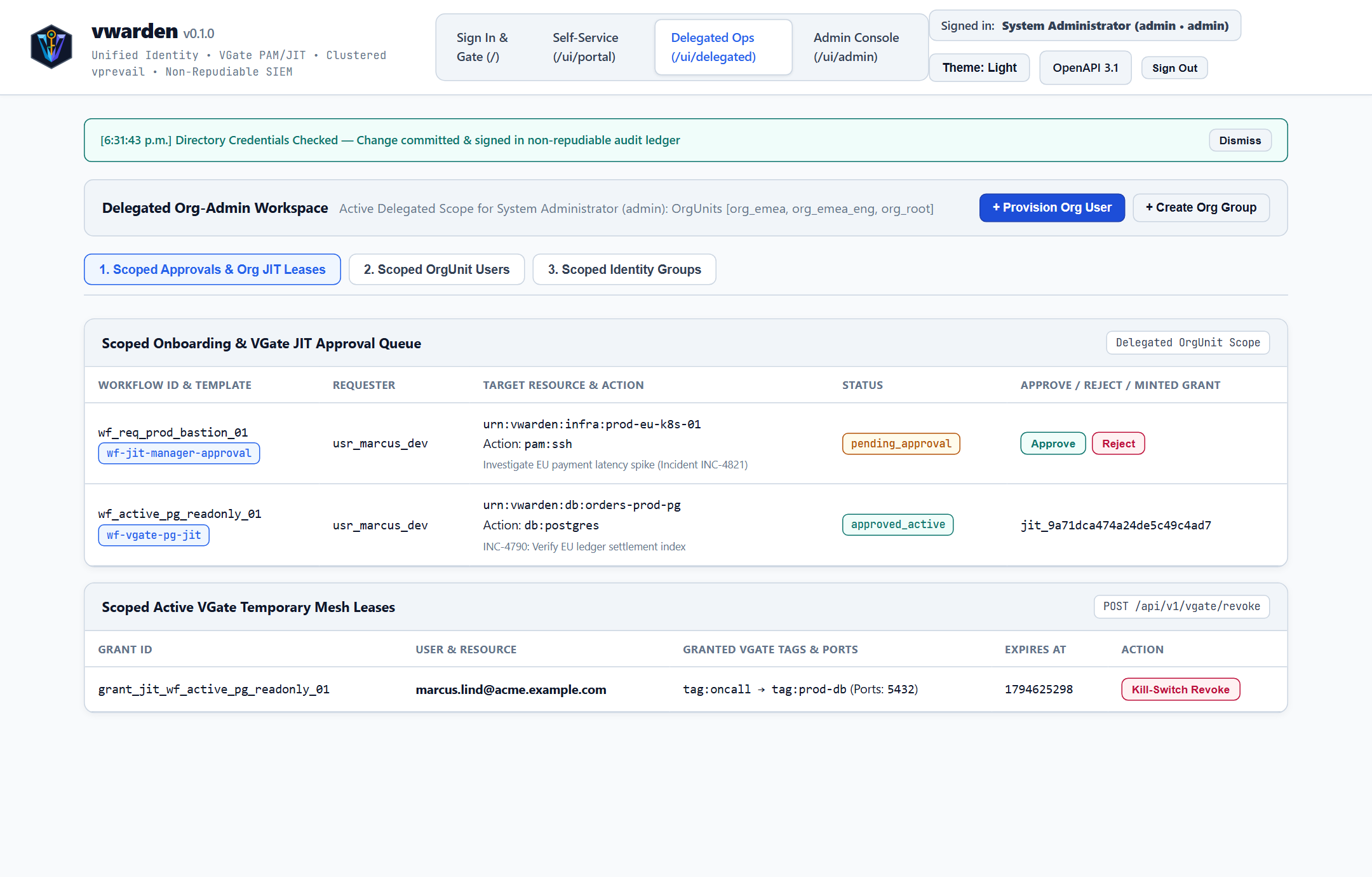
Organizational Unit Workspace (/ui/delegated)
Approve or reject staged onboarding requests and temporary JIT access workflows strictly within assigned Organizational Unit subtrees under separation-of-duties guardrails.
System Administrators
Unified Governance & Federation (/ui/admin)
Govern multi-tenant realms, RBAC/ABAC/Org-Graph policies, OAuth 2.1 PKCE clients, SAML 2.0 Service Providers, SCIM 2.0 lifecycle provisioning, Corporate Active Directory / LDAPv3 synchronization, clustered WAL replication, and Ed25519-signed SIEM audit trails.
Platform Engineers
Flexible Persistence & Standalone TLS
Run out of the box on the built-in 64-shard Copy-on-Write MVCC engine with CRC32-verified binary WAL and LZ4 snapshots, or connect to SQLite WAL / PostgreSQL; deploy behind vgate over loopback HTTP/1.1 or directly with built-in TLS 1.2+ (--tls-cert / --tls-key).
How-To Guide — Step-by-step operational recipes for TLS deployment, MFA enrollment, OIDC client registration, and JIT access workflows.
End-User Guide — Complete guide for signing in, enrolling TOTP authenticators, managing personal profiles, and requesting temporary infrastructure leases.
Administrator Guide — Production installation, master key vault management, tenant/OrgUnit governance, SCIM 2.0 deprovisioning, and SIEM audit verification.
Operations, Use Cases & Examples — End-to-end integration playbooks and runnable HTTP/CLI examples for OAuth 2.1 PKCE, Policy Decision Point evaluation, SCIM 2.0, SAML 2.0, and VGate PAM/JIT.
Configuration & CLI Reference — Complete reference for CLI subcommands, flags, environment variables, bootstrap configuration JSON, and REST API endpoints.
Consolidated User Handbook — Single-file master compendium combining all End-User, How-To, Administrator, Operations, Configuration, and Performance guides.
Quickstart
Launch vwarden locally using the prebuilt binary for your operating system (dist/bin/windows/vwarden.exe, dist/bin/linux/vwarden, or dist/bin/macos/vwarden):
BASH
# Check installed semantic version
./vwarden version

# Inspect generated OpenID Connect 1.0 discovery metadata
./vwarden discovery https://id.acme.example.com

# Start the identity server and Web Studio on 127.0.0.1:8443 using the built-in MVCC store
./vwarden serve 8443 vprevail

# Start with standalone HTTPS termination
./vwarden serve 8443 vprevail --tls-cert certs/fullchain.pem --tls-key certs/privkey.pem
Once running, open http://127.0.0.1:8443/ui/auth (or https://127.0.0.1:8443/ui/auth when TLS is enabled) in your browser.
vwarden — How-To Guide
1. How to Deploy Behind vgate vs. Standalone HTTPS
System administrators can deploy vwarden in two production network topologies without changing client configurations:
Recipe A — Loopback HTTP/1.1 Behind vgate Reverse Proxy (Recommended)
When vgate terminates public ACME/TLS 1.3 traffic on port 443, bind vwarden strictly to loopback (127.0.0.1) and configure a shared Policy Enforcement Point (PEP) secret:
When deploying vwarden directly on an internal network without an upstream proxy, supply a PEM certificate chain and private key. vwarden automatically activates Strict-Transport-Security and marks vwarden_session cookies as Secure:
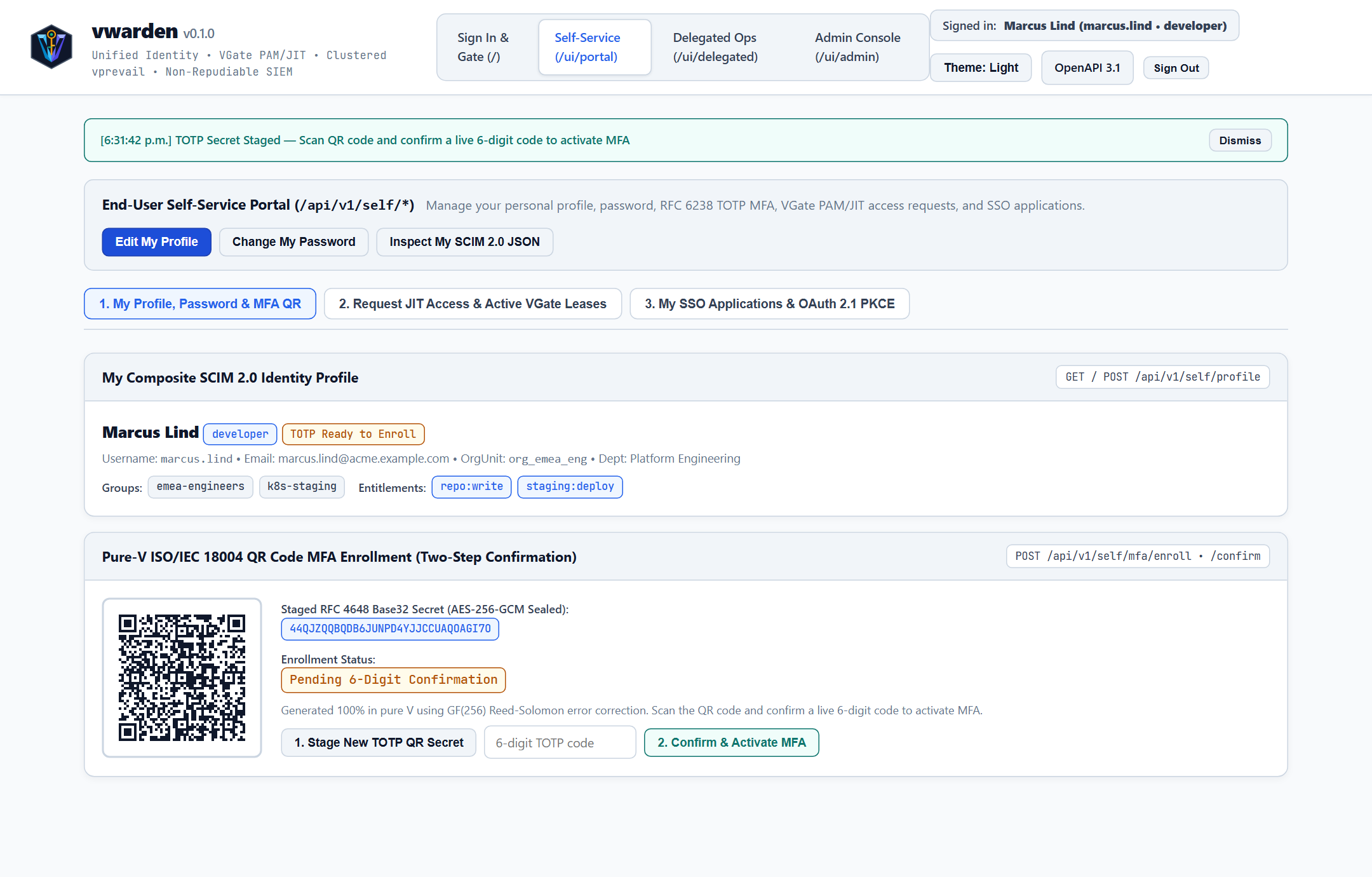
2. How to Enroll and Confirm Two-Step TOTP Multi-Factor Authentication
vwarden uses a two-phase MFA enrollment ceremony so users never lock themselves out if a browser tab closes mid-scan.
Sign in at /ui/auth and navigate to Self-Service (/ui/portal) -> 1. My Profile, Password & MFA QR.
Click 1. Stage New TOTP QR Secret (POST /api/v1/self/mfa/enroll). vwarden seals a fresh RFC 4648 Base32 secret in the AES-256-GCM vault under a pending key and renders an ISO/IEC 18004 SVG QR code locally in your browser.
Scan the QR code using any RFC 6238 authenticator app (1Password, Bitwarden, Proton Pass, Google Authenticator, or Microsoft Authenticator).
Enter the live 6-digit code in the confirmation input and click 2. Confirm & Activate MFA (POST /api/v1/self/mfa/confirm).
Your active session immediately upgrades to mfa_verified: true, and future sign-ins enforce the two-step challenge.
3. How to Submit and Approve a Staged User Onboarding Request
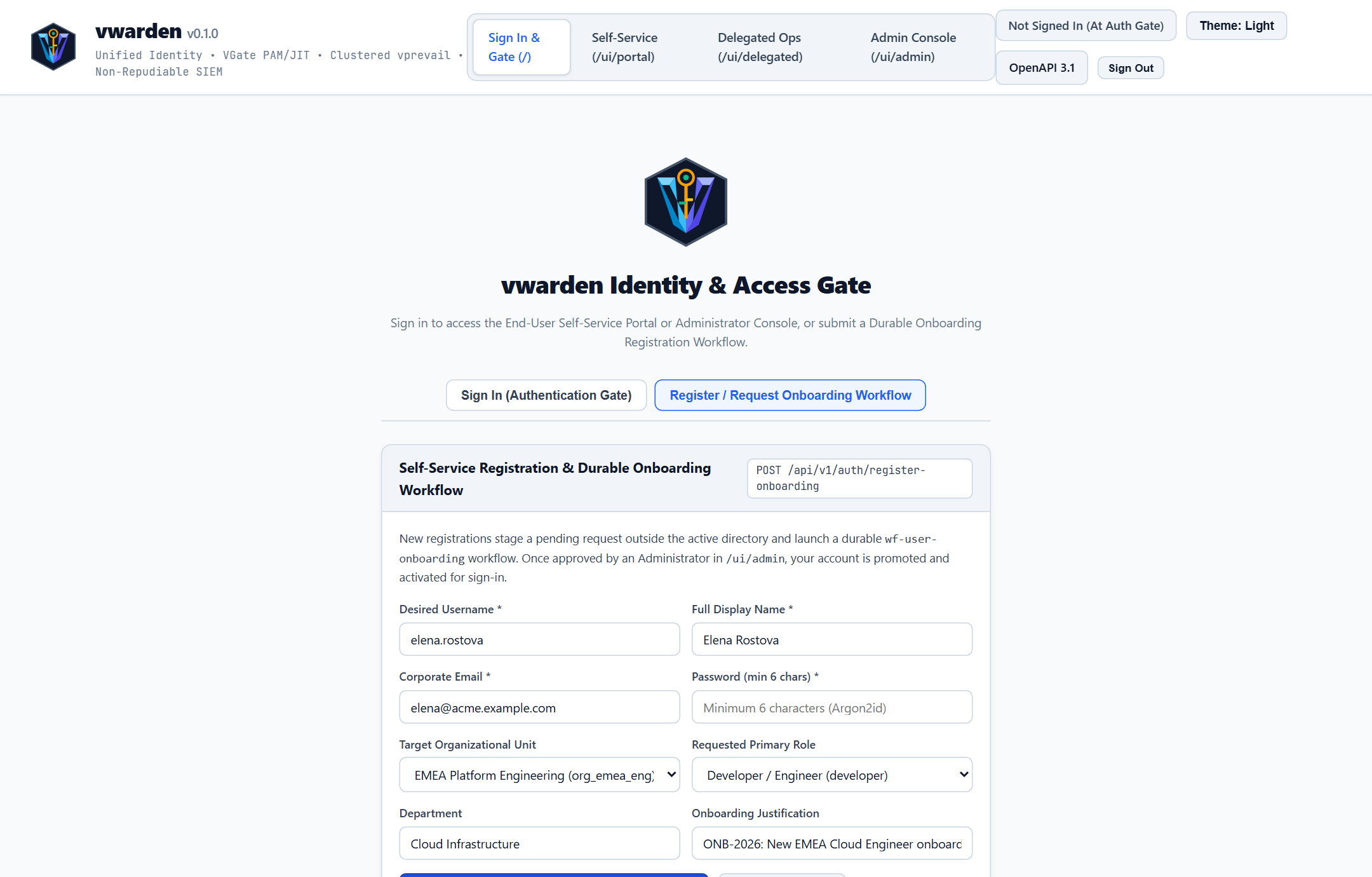
Self-service registration never writes unvetted accounts into the active directory. Instead, it launches a durable approval workflow.
Applicant Action (/ui/auth):
Select the Register / Request Onboarding Workflow tab.
Enter desired username, full name, corporate email, password, target Organizational Unit, department, and business justification.
Click Submit Registration & Start Onboarding Workflow. vwarden returns a workflow ID (for example, wf_onb_...) in pending_approval state.
Administrator / Delegated Admin Action (/ui/admin or /ui/delegated):
Sign in as an authorized administrator and open 1. Onboarding & JIT Approvals.
Review the applicant's requested Organizational Unit and justification.
Click Approve & Activate User to atomically provision the directory record and group bindings, or Reject to discard the staged request with a signed SIEM audit record.
4. How to Register an OpenID Connect 1.0 Relying Party Client
Sign in to /ui/admin and open 5. Federation & OAuth Clients.
Click + Register OAuth 2.1 Client and populate:
Client ID: Safe slug matching [a-zA-Z0-9_-]{1,64} (for example, vft-enterprise-portal).
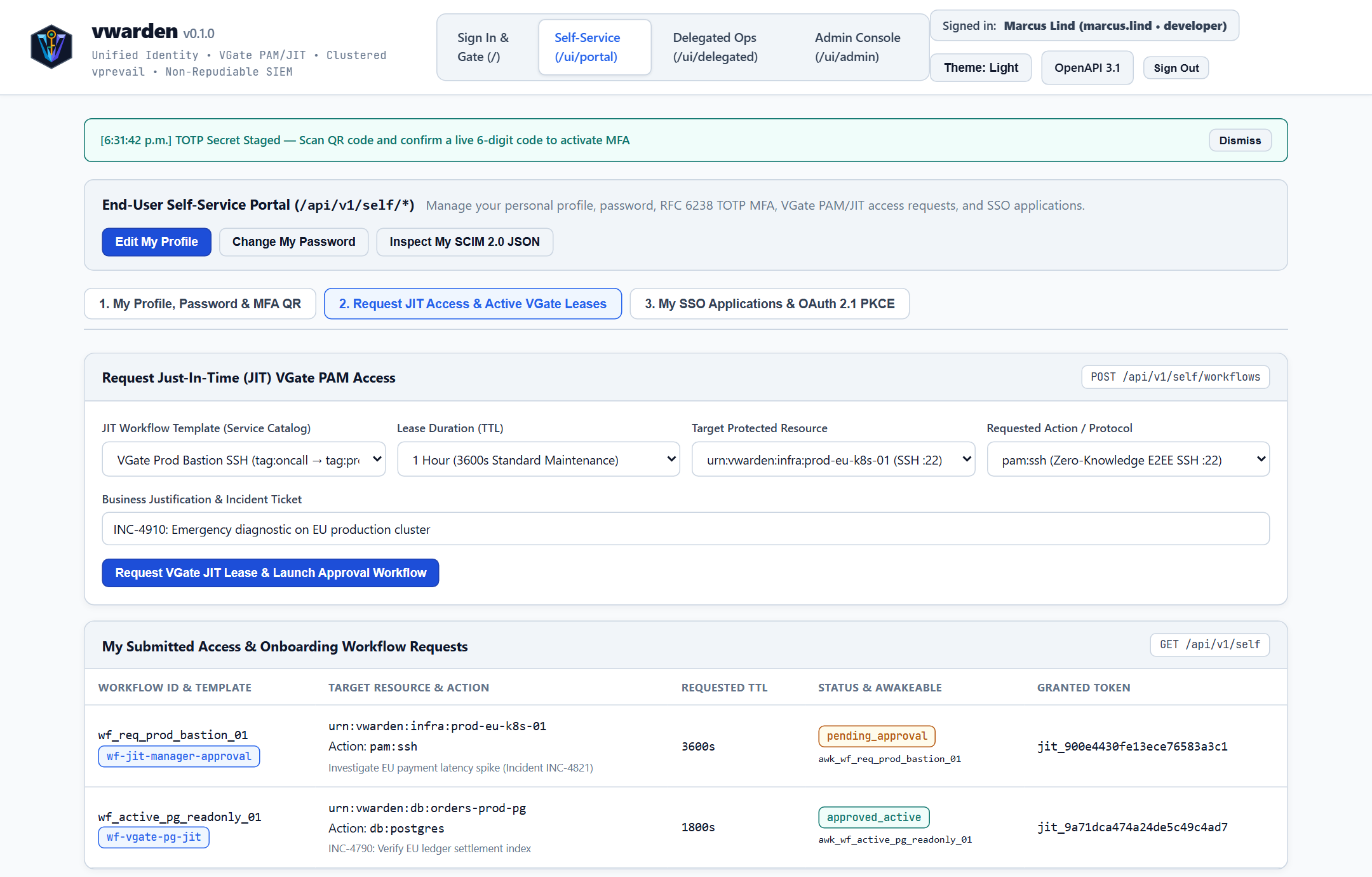
5. How to Request and Revoke Just-In-Time (JIT) Infrastructure Access
Open Self-Service (/ui/portal) -> 2. Request JIT Access & Active VGate Leases.
Choose a service catalog template (such as VGate Prod Bastion SSH or VGate Prod PostgreSQL), select the required lease duration (15m, 30m, 1h, or 4h), and enter the incident ticket ID.
Once your Organizational Unit manager approves the request in /ui/delegated, your active vnet_tok_... subject token appears in the Active VGate PAM TagGrants table with a live expiration countdown.
When maintenance concludes early, click Revoke Lease (POST /api/v1/self/vgate/revoke) to terminate the network grant immediately.
vwarden — End-User Guide
1. Welcome to vwarden Single Sign-On
vwarden is your organization's central sign-in, Multi-Factor Authentication (MFA), and access request portal. Instead of maintaining separate passwords for internal web applications, file transfer portals, observability consoles, and developer repositories, you authenticate once through vwarden to access authorized services seamlessly.
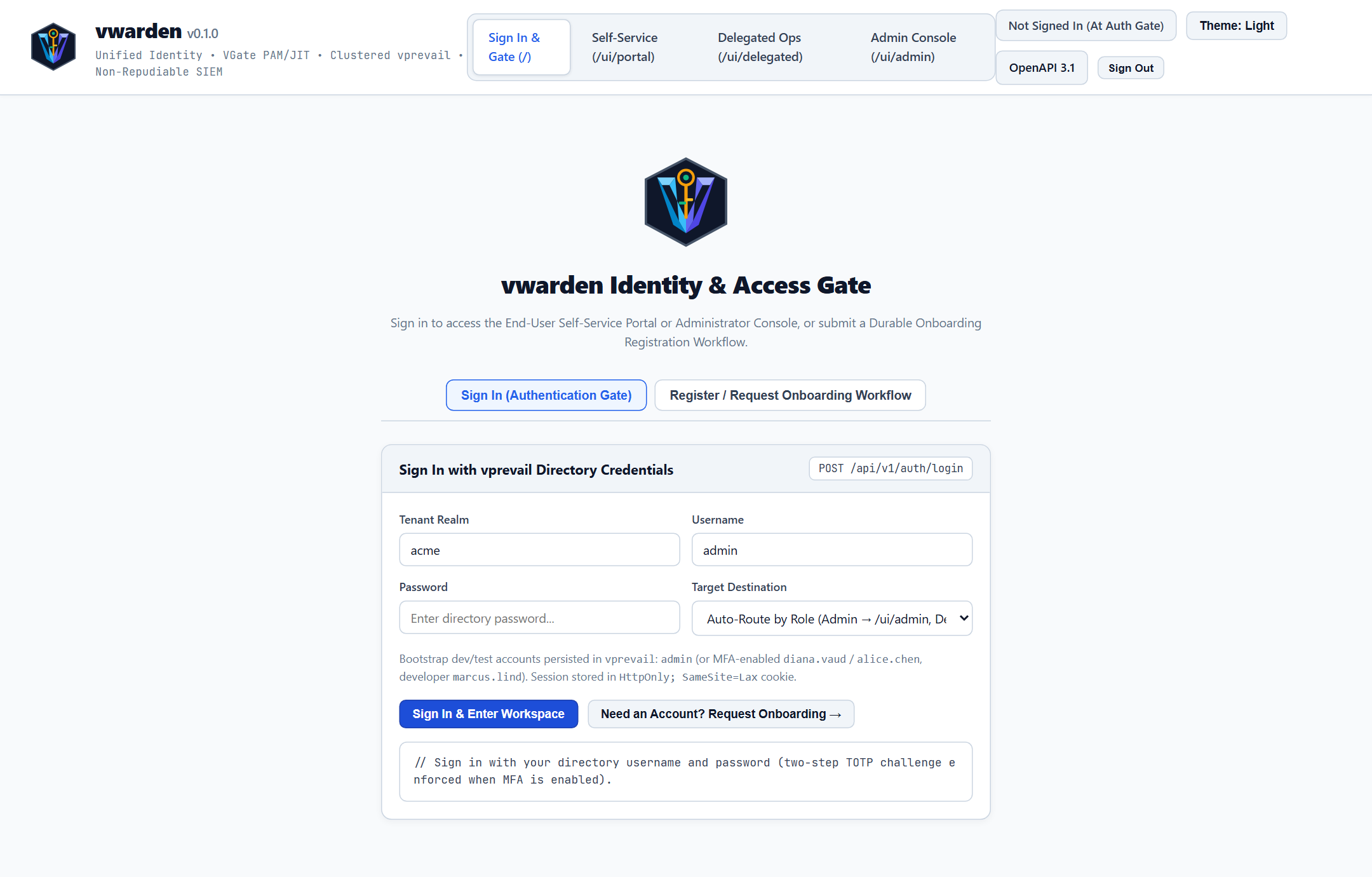
2. Signing In & Two-Step Verification (/ui/auth)
2.1 Step 1 — Directory Password Sign-In
When opening a protected application (or visiting /ui/auth directly), verify your Tenant Realm (for example, acme) and enter your Username and Password.
Your password is protected using memory-hard Argon2id hashing and is never transmitted to downstream applications.
If TOTP MFA is not yet enabled on your account, vwarden establishes your browser session inside an HttpOnly; SameSite=Lax cookie and routes you to /ui/portal.
2.2 Step 2 — 6-Digit Authenticator Challenge
When TOTP MFA is active on your account, Step 1 displays Step 2 — RFC 6238 6-Digit TOTP Verification Code instead of creating a session immediately.
Open your mobile or desktop authenticator application and enter the current 6-digit code within 5 minutes.
Every 6-digit TOTP code is single-use within its 30-second window—even if an onlooker sees your code, it cannot be replayed to open a second session.
Upon verification, your session carries the mfa_verified assurance claim so MFA-protected resources permit access automatically.
3. Requesting a New Account (Self-Service Onboarding)
If you are a new employee or contractor without an active directory account:
At /ui/auth, click Register / Request Onboarding Workflow.
Complete your desired username, display name, work email, password, Organizational Unit, department, and ticket or manager reference.
Your request enters a staged approval queue (pending_approval). As soon as an authorized administrator approves your onboarding workflow, your account becomes active for Single Sign-On.
4. Managing Your Identity in the Self-Service Portal (/ui/portal)
All operations in /ui/portal act strictly on your own identity (is_self reflexive scope), ensuring you can update personal preferences safely without administrative intervention.
4.1 Profile Attributes & Password Rotation
Edit My Profile: Click Edit My Profile in the top action bar to update your display name, email address, given/family name, department, POSIX home directory, or login shell.
Inspect My SCIM 2.0 JSON: View the exact standardized RFC 7643 identity payload shared with connected enterprise applications.
Change My Password: Click Change My Password, enter your current password and a new password, and submit. Your account immediately upgrades to a fresh Argon2id digest.
4.2 Offline QR Code MFA Enrollment
Click 1. Stage New TOTP QR Secret to render a crisp vector QR code generated locally by vwarden (zero data is sent to third-party QR websites).
Scan the QR code in your authenticator app, type the current 6-digit code, and click 2. Confirm & Activate MFA.
If you refresh or close the tab before confirming, your previous MFA configuration remains intact.
Production servers and databases enforce Zero Standing Privilege—access is granted only for explicit maintenance windows:
Open 2. Request JIT Access & Active VGate Leases.
Select the target workflow template, lease TTL, protected resource URN, and protocol (pam:ssh, db:postgres, or k8s:exec), then provide your incident or change ticket justification.
Track live approval status in My Submitted Access & Onboarding Workflow Requests.
Once approved, copy your time-bounded vnet_tok_... lease from Active VGate PAM TagGrants, or click Revoke to end the session early.
4.4 Testing SSO Applications & Signing Out
Open 3. My SSO Applications & OAuth 2.1 PKCE to inspect OIDC Discovery metadata, JWKS public keys, and SAML 2.0 metadata, or test OAuth 2.1 PKCE token exchange and revocation.
Passkeys (FIDO2 / WebAuthn): Under 1. My Profile & MFA, register a hardware security key or platform passkey (ES256 or EdDSA) and use Sign In with Passkey (FIDO2) on /ui/auth for passwordless MFA sign-in.
Device Authorization (/ui/device): When signing in from a CLI or headless device, open /ui/device (or follow the verification link), enter the XXXX-XXXX user code, and click Approve Device.
Click Sign Out in the top-right header at any time to destroy your server-side session and clear your browser cookie immediately.
vwarden — Administrator Guide
1. Deployment Architecture & Storage Modes
vwarden ships as a standalone native binary (dist/bin/windows/vwarden.exe, dist/bin/linux/vwarden, dist/bin/macos/vwarden) requiring zero external runtime VMs or C shared libraries beyond standard OS networking.
Storage Backend
Command Invocation
Recommended Operational Use Case
Built-In Sharded MVCC (vprevail)
vwarden serve 8443 vprevail
Default recommended appliance mode. Persists all directory objects, policies, SCIM schemas, workflows, JIT grants, signing keys, and SIEM state across 64 Copy-on-Write MVCC shards backed by CRC32-verified binary WAL segments and LZ4 snapshots, with native peer-to-peer WAL delta replication.
Embedded SQLite WAL (sqlite)
vwarden serve 8443 sqlite
Single-node relational persistence using SQLite in Write-Ahead Logging mode (busy_timeout=5000) paired with in-memory MVCC for high-frequency ephemeral tokens and rate-limit buckets.
PostgreSQL Cluster (postgres)
vwarden serve 8443 postgres
Shared external PostgreSQL cluster configured via VWARDEN_PG_HOST, VWARDEN_PG_PORT, VWARDEN_PG_USER, VWARDEN_PG_PASSWORD, and VWARDEN_PG_DBNAME.
2. Cryptographic Vault & Production Secrets Management
Sensitive secrets—including user TOTP seeds, Ed25519 OIDC signing private keys, VGate vnet_tok_ mesh leases, and SIEM signing keys—are encrypted at rest inside ENC[vw1:<hex>] envelopes using NIST SP 800-38D AES-256-GCM with per-record Associated Authenticated Data (AAD).
On initial startup against an empty data directory, vwarden reads config/vwarden_bootstrap.json to seed the initial tenant realm and global administrator account. Rotate the bootstrap administrator password immediately upon first sign-in and enroll TOTP MFA.
Large enterprises can delegate day-to-day user management and JIT approvals to regional or divisional leads (delegated_admin role) without granting global administrative privileges:
Subtree Confinement: Delegated administrators manage users, groups, and workflows strictly within Organizational Units where their user_id is listed in delegated_admins (plus child OrgUnits).
Mandatory Separation-of-Duties Guardrails: Built-in high-priority deny rules (pol-00-deny-delegated-self-approve and pol-00-deny-delegated-admin-escalation) are immutable:
A delegated administrator cannot approve their own workflow request (is_self).
A delegated administrator cannot assign the admin role or modify global admin accounts.
4. Global Policy Governance & Live PDP Simulation (/ui/admin)
Open 4. Access Policies & Topology in /ui/admin to author and test Zero-Trust PDP access policies combining RBAC, ABAC, Organizational Graph relations, and JIT lease checks:
Interactive Topology Map: Click any role, policy rule, or protected resource node on the vector canvas to inspect or edit bindings.
Live PDP Simulator: Select any subject, action, resource URN, and session assurance state to run POST /access/v1/evaluate and inspect the exact matched rule, obligations, and denial advice (request_workflow_approval) before rolling rules out to production gateways.
Execute SCIM Deprovision / Kill-Switch (POST /api/v1/scim/deprovision) when an employee separates or a credential compromise is suspected: vwarden atomically sets is_active = false, purges active sessions, revokes refresh tokens, and terminates all active VGateTagGrant infrastructure leases.
Every authentication, MFA challenge, policy change, workflow resolution, and SCIM event is chained with rolling SHA-256 (prev_hash -> chain_hash) and signed with Ed25519, formatted as RFC 5424 [vward@5424 ...] structured data.
Decoupled SIEM Integration: Stream events over UDP/TCP syslog (127.0.0.1:5514) or optionally configure an async HTTP collector URL (http_ingest_url / VWARDEN_SIEM_HTTP_URL, e.g. vsight's /api/v1/telemetry/ingest-raw) with a Bearer token (http_auth_token / VWARDEN_SIEM_HTTP_TOKEN). If the target SIEM is offline or unconfigured, vwarden continues operating without blocking.
Click Verify SHA-256 Chain & Ed25519 Signatures (GET /api/v1/siem/verify) to validate tamper-evidence, or Rotate & Seal Audit Log (.seal) (POST /api/v1/siem/rotate) for archival compliance.
vwarden — Operations, Use Cases & Examples
1. Operational Use Cases Overview
vwarden unifies five enterprise identity workloads that traditionally require separate identity servers, privileged access brokers, and policy engines:
Zero-Trust Edge Identity-Aware Proxy (IAP) with vgate: Authenticate external engineers via OAuth 2.1 Authorization Code + PKCE (S256) + Two-Step TOTP MFA before forwarding requests to internal web portals.
Just-In-Time (JIT) Privileged Infrastructure Access: Enforce Zero Standing Privilege on production SSH bastions and PostgreSQL clusters using manager-approved, auto-expiring VGateTagGrant mesh leases.
Externalized Policy Decision Point (PDP) for Microservices: Offload real-time RBAC + ABAC + Organizational Graph authorization checks to POST /access/v1/evaluate.
Automated HR-to-Cloud Provisioning & Instant Kill-Switch (SCIM 2.0): Provision multi-profile users from corporate HR/AD systems and atomically revoke sessions, tokens, and infrastructure leases upon separation.
High-Assurance Multi-Region Identity Clustering & SIEM Compliance: Replicate sharded WAL deltas across regional replicas while streaming Ed25519-signed RFC 5424 audit trails to vsight or enterprise SIEM platforms.
6. Example 5 — Programmable Zero-Trust Policies via vvm WebAssembly 3.0 (vwarden-wasm)
When running the vwarden-wasm build (-d vvm), administrators and platform teams can evaluate custom WebAssembly 3.0 (.wat or .wasm) policy predicates and claim mappers inside a zero-I/O, fuel-metered sandbox (POST /api/v1/policies/wasm/eval).
6.1 Real-Life Example A: Geo-Velocity & Risk-Score MFA Gate
Allow low-risk logins (risk <= 40) directly, require MFA for medium-risk logins (41..75), and deny high-risk logins (> 75):
Every Wasm plugin runs with an explicit instruction budget (max_fuel, default 50,000). If a buggy or malicious module enters an infinite loop, vwarden-wasm traps immediately once max_fuel is exhausted and returns HTTP 400 without impacting other tenants or worker threads.
7. Day-2 Operations Runbook Checklist
Operational Task
Cadence
Verification Endpoint / CLI
Verify SIEM Hash Chain & Ed25519 Signatures
Hourly / Automated
GET /api/v1/siem/verify
Rotate & Seal SIEM Audit Segment (.seal)
Daily
POST /api/v1/siem/rotate
Sweep Expired JIT Workflows & Ephemeral Leases
Every 60 seconds
POST /api/v1/workflows/tick (plus automatic runtime sweep)
Verify Replica WAL Lag Across Cluster Peers
Continuous
GET /api/v1/overview -> cluster.peers[].lag_entries == 0
Rotate Tenant Ed25519 OIDC Signing Key
Every 90 days
Publish new kid with overlap in GET /.well-known/jwks.json
Starts the HTTP/1.1 or standalone TLS 1.2+ identity server and role-separated Web Studio (127.0.0.1:8443 and vprevail by default; production-safe unless --demo is set).
version (-v, --version)
None
All Users
Prints the semantic version of the vwarden binary.
discovery
[issuer_url]
Developers & Integrators
Emits the complete RFC 8414 / OpenID Connect 1.0 /.well-known/openid-configuration JSON document for issuer_url (defaults to https://127.0.0.1:8443).
openapi
[issuer_url]
Developers & Integrators
Emits the complete OpenAPI 3.1.0 JSON specification for all authentication, self-service, federation, policy, and governance endpoints.
verify-id
<identifier>
Operators
Validates a tenant slug, client ID, or resource identifier against the strict [a-zA-Z0-9_-]{1,64} whitelist.
When starting with an empty data directory, vwarden loads config/vwarden_bootstrap.json to initialize the default tenant realm and global administrator account:
Remove a registered Passkey owned by the current user.
GET / POST /api/v1/policies/wasm
Global Admin (pdp:write)
List or persist named WebAssembly 3.0 Zero-Trust PDP plugins referenced via condition_expr: "wasm:<plugin_id>".
POST /api/v1/policies/wasm/delete
Global Admin (pdp:write)
Remove a persisted WebAssembly 3.0 policy plugin by plugin_id.
POST /api/v1/policies/wasm/eval
Bearer / PEP Token / Loopback
Evaluate a .wat or .wasm policy/claim plugin inside the fuel-metered vvm sandbox (vwarden-wasm build).
Optional SIEM Environment Variables
VWARDEN_SIEM_HTTP_URL: Optional HTTP/HTTPS SIEM ingest URL (e.g. http://127.0.0.1:8080/api/v1/telemetry/ingest-raw for vsight). Leave unset to disable HTTP streaming.
VWARDEN_SIEM_HTTP_TOKEN: Optional Bearer token sent in Authorization: Bearer <token> when VWARDEN_SIEM_HTTP_URL is configured.
vwarden — Performance & Capacity Guide
1. Performance Design Principles
Identity and policy engines sit directly on the critical path of user sign-ins, microservice token verifications, and zero-trust proxy evaluations. vwarden achieves predictable low tail latency and minimal memory footprint through four architectural choices:
Zero-GC-Pause Native Execution: Compiled directly to native x86_64/ARM64 machine code with deterministic value layouts and bounded socket buffers (16 KiB header cap, 1 MiB body cap).
64-Shard Copy-on-Write MVCC State Engine: Hot reads (GET /.well-known/jwks.json, POST /oauth2/introspect, POST /access/v1/evaluate, GET /api/v1/auth/session) execute against lock-free Copy-on-Write snapshots partitioned across 64 shards with {tenant} hash-tag co-location.
Intentionally Asymmetric Cryptography:
Primary Password Login (Argon2id, 19 MiB, t=2, p=1) is intentionally memory-hard (~25–45 ms per login) to defeat GPU/ASIC offline cracking while bounded by per-IP rate limiting and connection semaphores.
Downstream Token & Policy Verification (Ed25519 / SHA-256 / MVCC) runs in microseconds to sub-millisecond latency so authenticated traffic scales to tens of thousands of requests per second.
Sequential CRC32 Binary WAL + LZ4 Checkpoints: Mutations append compact 32-byte framed records sequentially to segmented .wal files (64 MiB segment threshold) with 24-byte sparse .idx indexes and LZ4-compressed .snap checkpoints for rapid cold-start recovery.
Each concurrent Argon2id verification allocates a 19 MiB memory arena for ~30 ms. With the default 256 socket concurrency cap and per-IP login rate limiting, worst-case simultaneous password hashing stays comfortably bounded; ensure at least 2 GiB free RAM on nodes handling heavy Monday-morning sign-in bursts.
Prefer Offline JWKS Verification at the Edge:
Configure vgate, vft, and vsite to cache GET /.well-known/jwks.json and verify EdDSA access tokens locally on every request, reserving POST /oauth2/introspect and POST /access/v1/evaluate for step-up privileged actions and instant JTI revocation checks.
Keep data/prevail/ on Local NVMe Storage:
Binary WAL segment appends and .snap LZ4 checkpoints benefit from low-latency NVMe fsync; avoid network-mounted NFS/SMB shares for active WAL directories.
Periodic SIEM Log Rotation (.seal):
Schedule daily POST /api/v1/siem/rotate calls so active SIEM ledger verification (GET /api/v1/siem/verify) scans bounded daily segments while archiving cryptographically sealed .seal files to cold storage.
vwarden is a self-contained, zero-external-dependency OpenID Connect (OIDC) 1.0, OAuth 2.1, SAML 2.0, SCIM 2.0, Access Policy Decision Point (PDP), and LDAPv3 Directory Bridge. Distributed as a single native executable for Windows, Linux, and macOS, vwarden serves as the central identity and authorization authority for both End Users and System Administrators.
Supports sharded MVCC, SQLite WAL, and PostgreSQL persistence backends
Core Capabilities
Audience
Capability
Operational Value
End Users
Single Sign-On (SSO) & Two-Step TOTP MFA
Sign in once using Argon2id password verification and a two-step RFC 6238 6-digit TOTP verification ceremony with 30-second replay protection across connected applications (vgate, vft, vsite, vstore, vsight, varc, vca).
End Users
Self-Service Identity Portal (/ui/portal)
Manage personal profile attributes, rotate passwords with current-password verification, enroll authenticator apps via offline ISO/IEC 18004 vector SVG QR codes, and request or revoke Just-in-Time (JIT) access leases.
Delegated Operators
Organizational Unit Workspace (/ui/delegated)
Approve or reject staged onboarding requests and temporary JIT access workflows strictly within assigned Organizational Unit subtrees under separation-of-duties guardrails.
System Administrators
Unified Governance & Federation (/ui/admin)
Govern multi-tenant realms, RBAC/ABAC/Org-Graph policies, OAuth 2.1 PKCE clients, SAML 2.0 Service Providers, SCIM 2.0 lifecycle provisioning, Corporate Active Directory / LDAPv3 synchronization, clustered WAL replication, and Ed25519-signed SIEM audit trails.
Platform Engineers
Flexible Persistence & Standalone TLS
Run out of the box on the built-in 64-shard Copy-on-Write MVCC engine with CRC32-verified binary WAL and LZ4 snapshots, or connect to SQLite WAL / PostgreSQL; deploy behind vgate over loopback HTTP/1.1 or directly with built-in TLS 1.2+ (--tls-cert / --tls-key).
How-To Guide — Step-by-step operational recipes for TLS deployment, MFA enrollment, OIDC client registration, and JIT access workflows.
End-User Guide — Complete guide for signing in, enrolling TOTP authenticators, managing personal profiles, and requesting temporary infrastructure leases.
Administrator Guide — Production installation, master key vault management, tenant/OrgUnit governance, SCIM 2.0 deprovisioning, and SIEM audit verification.
Operations, Use Cases & Examples — End-to-end integration playbooks and runnable HTTP/CLI examples for OAuth 2.1 PKCE, Policy Decision Point evaluation, SCIM 2.0, SAML 2.0, and VGate PAM/JIT.
Configuration & CLI Reference — Complete reference for CLI subcommands, flags, environment variables, bootstrap configuration JSON, and REST API endpoints.
Consolidated User Handbook — Single-file master compendium combining all End-User, How-To, Administrator, Operations, Configuration, and Performance guides.
Quickstart
Launch vwarden locally using the prebuilt binary for your operating system (dist/bin/windows/vwarden.exe, dist/bin/linux/vwarden, or dist/bin/macos/vwarden):
BASH
# Check installed semantic version
./vwarden version

# Inspect generated OpenID Connect 1.0 discovery metadata
./vwarden discovery https://id.acme.example.com

# Start the identity server and Web Studio on 127.0.0.1:8443 using the built-in MVCC store
./vwarden serve 8443 vprevail

# Start with standalone HTTPS termination
./vwarden serve 8443 vprevail --tls-cert certs/fullchain.pem --tls-key certs/privkey.pem
Once running, open http://127.0.0.1:8443/ui/auth (or https://127.0.0.1:8443/ui/auth when TLS is enabled) in your browser.
Part II: vwarden — How-To Guide
1. How to Deploy Behind vgate vs. Standalone HTTPS
System administrators can deploy vwarden in two production network topologies without changing client configurations:
Recipe A — Loopback HTTP/1.1 Behind vgate Reverse Proxy (Recommended)
When vgate terminates public ACME/TLS 1.3 traffic on port 443, bind vwarden strictly to loopback (127.0.0.1) and configure a shared Policy Enforcement Point (PEP) secret:
When deploying vwarden directly on an internal network without an upstream proxy, supply a PEM certificate chain and private key. vwarden automatically activates Strict-Transport-Security and marks vwarden_session cookies as Secure:
2. How to Enroll and Confirm Two-Step TOTP Multi-Factor Authentication
vwarden uses a two-phase MFA enrollment ceremony so users never lock themselves out if a browser tab closes mid-scan.
Sign in at /ui/auth and navigate to Self-Service (/ui/portal) -> 1. My Profile, Password & MFA QR.
Click 1. Stage New TOTP QR Secret (POST /api/v1/self/mfa/enroll). vwarden seals a fresh RFC 4648 Base32 secret in the AES-256-GCM vault under a pending key and renders an ISO/IEC 18004 SVG QR code locally in your browser.
Scan the QR code using any RFC 6238 authenticator app (1Password, Bitwarden, Proton Pass, Google Authenticator, or Microsoft Authenticator).
Enter the live 6-digit code in the confirmation input and click 2. Confirm & Activate MFA (POST /api/v1/self/mfa/confirm).
Your active session immediately upgrades to mfa_verified: true, and future sign-ins enforce the two-step challenge.
3. How to Submit and Approve a Staged User Onboarding Request
Self-service registration never writes unvetted accounts into the active directory. Instead, it launches a durable approval workflow.
Applicant Action (/ui/auth):
Select the Register / Request Onboarding Workflow tab.
Enter desired username, full name, corporate email, password, target Organizational Unit, department, and business justification.
Click Submit Registration & Start Onboarding Workflow. vwarden returns a workflow ID (for example, wf_onb_...) in pending_approval state.
Administrator / Delegated Admin Action (/ui/admin or /ui/delegated):
Sign in as an authorized administrator and open 1. Onboarding & JIT Approvals.
Review the applicant's requested Organizational Unit and justification.
Click Approve & Activate User to atomically provision the directory record and group bindings, or Reject to discard the staged request with a signed SIEM audit record.
4. How to Register an OpenID Connect 1.0 Relying Party Client
Sign in to /ui/admin and open 5. Federation & OAuth Clients.
Click + Register OAuth 2.1 Client and populate:
Client ID: Safe slug matching [a-zA-Z0-9_-]{1,64} (for example, vft-enterprise-portal).
5. How to Request and Revoke Just-In-Time (JIT) Infrastructure Access
Open Self-Service (/ui/portal) -> 2. Request JIT Access & Active VGate Leases.
Choose a service catalog template (such as VGate Prod Bastion SSH or VGate Prod PostgreSQL), select the required lease duration (15m, 30m, 1h, or 4h), and enter the incident ticket ID.
Once your Organizational Unit manager approves the request in /ui/delegated, your active vnet_tok_... subject token appears in the Active VGate PAM TagGrants table with a live expiration countdown.
When maintenance concludes early, click Revoke Lease (POST /api/v1/self/vgate/revoke) to terminate the network grant immediately.
Part III: vwarden — End-User Guide
1. Welcome to vwarden Single Sign-On
vwarden is your organization's central sign-in, Multi-Factor Authentication (MFA), and access request portal. Instead of maintaining separate passwords for internal web applications, file transfer portals, observability consoles, and developer repositories, you authenticate once through vwarden to access authorized services seamlessly.
2. Signing In & Two-Step Verification (/ui/auth)
2.1 Step 1 — Directory Password Sign-In
When opening a protected application (or visiting /ui/auth directly), verify your Tenant Realm (for example, acme) and enter your Username and Password.
Your password is protected using memory-hard Argon2id hashing and is never transmitted to downstream applications.
If TOTP MFA is not yet enabled on your account, vwarden establishes your browser session inside an HttpOnly; SameSite=Lax cookie and routes you to /ui/portal.
2.2 Step 2 — 6-Digit Authenticator Challenge
When TOTP MFA is active on your account, Step 1 displays Step 2 — RFC 6238 6-Digit TOTP Verification Code instead of creating a session immediately.
Open your mobile or desktop authenticator application and enter the current 6-digit code within 5 minutes.
Every 6-digit TOTP code is single-use within its 30-second window—even if an onlooker sees your code, it cannot be replayed to open a second session.
Upon verification, your session carries the mfa_verified assurance claim so MFA-protected resources permit access automatically.
3. Requesting a New Account (Self-Service Onboarding)
If you are a new employee or contractor without an active directory account:
At /ui/auth, click Register / Request Onboarding Workflow.
Complete your desired username, display name, work email, password, Organizational Unit, department, and ticket or manager reference.
Your request enters a staged approval queue (pending_approval). As soon as an authorized administrator approves your onboarding workflow, your account becomes active for Single Sign-On.
4. Managing Your Identity in the Self-Service Portal (/ui/portal)
All operations in /ui/portal act strictly on your own identity (is_self reflexive scope), ensuring you can update personal preferences safely without administrative intervention.
4.1 Profile Attributes & Password Rotation
Edit My Profile: Click Edit My Profile in the top action bar to update your display name, email address, given/family name, department, POSIX home directory, or login shell.
Inspect My SCIM 2.0 JSON: View the exact standardized RFC 7643 identity payload shared with connected enterprise applications.
Change My Password: Click Change My Password, enter your current password and a new password, and submit. Your account immediately upgrades to a fresh Argon2id digest.
4.2 Offline QR Code MFA Enrollment
Click 1. Stage New TOTP QR Secret to render a crisp vector QR code generated locally by vwarden (zero data is sent to third-party QR websites).
Scan the QR code in your authenticator app, type the current 6-digit code, and click 2. Confirm & Activate MFA.
If you refresh or close the tab before confirming, your previous MFA configuration remains intact.
Production servers and databases enforce Zero Standing Privilege—access is granted only for explicit maintenance windows:
Open 2. Request JIT Access & Active VGate Leases.
Select the target workflow template, lease TTL, protected resource URN, and protocol (pam:ssh, db:postgres, or k8s:exec), then provide your incident or change ticket justification.
Track live approval status in My Submitted Access & Onboarding Workflow Requests.
Once approved, copy your time-bounded vnet_tok_... lease from Active VGate PAM TagGrants, or click Revoke to end the session early.
4.4 Testing SSO Applications & Signing Out
Open 3. My SSO Applications & OAuth 2.1 PKCE to inspect OIDC Discovery metadata, JWKS public keys, and SAML 2.0 metadata, or test OAuth 2.1 PKCE token exchange and revocation.
Passkeys (FIDO2 / WebAuthn): Under 1. My Profile & MFA, register a hardware security key or platform passkey (ES256 or EdDSA) and use Sign In with Passkey (FIDO2) on /ui/auth for passwordless MFA sign-in.
Device Authorization (/ui/device): When signing in from a CLI or headless device, open /ui/device (or follow the verification link), enter the XXXX-XXXX user code, and click Approve Device.
Click Sign Out in the top-right header at any time to destroy your server-side session and clear your browser cookie immediately.
Part IV: vwarden — Administrator Guide
1. Deployment Architecture & Storage Modes
vwarden ships as a standalone native binary (dist/bin/windows/vwarden.exe, dist/bin/linux/vwarden, dist/bin/macos/vwarden) requiring zero external runtime VMs or C shared libraries beyond standard OS networking.
Storage Backend
Command Invocation
Recommended Operational Use Case
Built-In Sharded MVCC (vprevail)
vwarden serve 8443 vprevail
Default recommended appliance mode. Persists all directory objects, policies, SCIM schemas, workflows, JIT grants, signing keys, and SIEM state across 64 Copy-on-Write MVCC shards backed by CRC32-verified binary WAL segments and LZ4 snapshots, with native peer-to-peer WAL delta replication.
Embedded SQLite WAL (sqlite)
vwarden serve 8443 sqlite
Single-node relational persistence using SQLite in Write-Ahead Logging mode (busy_timeout=5000) paired with in-memory MVCC for high-frequency ephemeral tokens and rate-limit buckets.
PostgreSQL Cluster (postgres)
vwarden serve 8443 postgres
Shared external PostgreSQL cluster configured via VWARDEN_PG_HOST, VWARDEN_PG_PORT, VWARDEN_PG_USER, VWARDEN_PG_PASSWORD, and VWARDEN_PG_DBNAME.
2. Cryptographic Vault & Production Secrets Management
Sensitive secrets—including user TOTP seeds, Ed25519 OIDC signing private keys, VGate vnet_tok_ mesh leases, and SIEM signing keys—are encrypted at rest inside ENC[vw1:<hex>] envelopes using NIST SP 800-38D AES-256-GCM with per-record Associated Authenticated Data (AAD).
On initial startup against an empty data directory, vwarden reads config/vwarden_bootstrap.json to seed the initial tenant realm and global administrator account. Rotate the bootstrap administrator password immediately upon first sign-in and enroll TOTP MFA.
Large enterprises can delegate day-to-day user management and JIT approvals to regional or divisional leads (delegated_admin role) without granting global administrative privileges:
Subtree Confinement: Delegated administrators manage users, groups, and workflows strictly within Organizational Units where their user_id is listed in delegated_admins (plus child OrgUnits).
Mandatory Separation-of-Duties Guardrails: Built-in high-priority deny rules (pol-00-deny-delegated-self-approve and pol-00-deny-delegated-admin-escalation) are immutable:
A delegated administrator cannot approve their own workflow request (is_self).
A delegated administrator cannot assign the admin role or modify global admin accounts.
4. Global Policy Governance & Live PDP Simulation (/ui/admin)
Open 4. Access Policies & Topology in /ui/admin to author and test Zero-Trust PDP access policies combining RBAC, ABAC, Organizational Graph relations, and JIT lease checks:
Interactive Topology Map: Click any role, policy rule, or protected resource node on the vector canvas to inspect or edit bindings.
Live PDP Simulator: Select any subject, action, resource URN, and session assurance state to run POST /access/v1/evaluate and inspect the exact matched rule, obligations, and denial advice (request_workflow_approval) before rolling rules out to production gateways.
Execute SCIM Deprovision / Kill-Switch (POST /api/v1/scim/deprovision) when an employee separates or a credential compromise is suspected: vwarden atomically sets is_active = false, purges active sessions, revokes refresh tokens, and terminates all active VGateTagGrant infrastructure leases.
Every authentication, MFA challenge, policy change, workflow resolution, and SCIM event is chained with rolling SHA-256 (prev_hash -> chain_hash) and signed with Ed25519, formatted as RFC 5424 [vward@5424 ...] structured data.
Decoupled SIEM Integration: Stream events over UDP/TCP syslog (127.0.0.1:5514) or optionally configure an async HTTP collector URL (http_ingest_url / VWARDEN_SIEM_HTTP_URL, e.g. vsight's /api/v1/telemetry/ingest-raw) with a Bearer token (http_auth_token / VWARDEN_SIEM_HTTP_TOKEN). If the target SIEM is offline or unconfigured, vwarden continues operating without blocking.
Click Verify SHA-256 Chain & Ed25519 Signatures (GET /api/v1/siem/verify) to validate tamper-evidence, or Rotate & Seal Audit Log (.seal) (POST /api/v1/siem/rotate) for archival compliance.
Part V: vwarden — Operations, Use Cases & Examples
1. Operational Use Cases Overview
vwarden unifies five enterprise identity workloads that traditionally require separate identity servers, privileged access brokers, and policy engines:
Zero-Trust Edge Identity-Aware Proxy (IAP) with vgate: Authenticate external engineers via OAuth 2.1 Authorization Code + PKCE (S256) + Two-Step TOTP MFA before forwarding requests to internal web portals.
Just-In-Time (JIT) Privileged Infrastructure Access: Enforce Zero Standing Privilege on production SSH bastions and PostgreSQL clusters using manager-approved, auto-expiring VGateTagGrant mesh leases.
Externalized Policy Decision Point (PDP) for Microservices: Offload real-time RBAC + ABAC + Organizational Graph authorization checks to POST /access/v1/evaluate.
Automated HR-to-Cloud Provisioning & Instant Kill-Switch (SCIM 2.0): Provision multi-profile users from corporate HR/AD systems and atomically revoke sessions, tokens, and infrastructure leases upon separation.
High-Assurance Multi-Region Identity Clustering & SIEM Compliance: Replicate sharded WAL deltas across regional replicas while streaming Ed25519-signed RFC 5424 audit trails to vsight or enterprise SIEM platforms.
6. Example 5 — Programmable Zero-Trust Policies via vvm WebAssembly 3.0 (vwarden-wasm)
When running the vwarden-wasm build (-d vvm), administrators and platform teams can evaluate custom WebAssembly 3.0 (.wat or .wasm) policy predicates and claim mappers inside a zero-I/O, fuel-metered sandbox (POST /api/v1/policies/wasm/eval).
6.1 Real-Life Example A: Geo-Velocity & Risk-Score MFA Gate
Allow low-risk logins (risk <= 40) directly, require MFA for medium-risk logins (41..75), and deny high-risk logins (> 75):
Every Wasm plugin runs with an explicit instruction budget (max_fuel, default 50,000). If a buggy or malicious module enters an infinite loop, vwarden-wasm traps immediately once max_fuel is exhausted and returns HTTP 400 without impacting other tenants or worker threads.
7. Day-2 Operations Runbook Checklist
Operational Task
Cadence
Verification Endpoint / CLI
Verify SIEM Hash Chain & Ed25519 Signatures
Hourly / Automated
GET /api/v1/siem/verify
Rotate & Seal SIEM Audit Segment (.seal)
Daily
POST /api/v1/siem/rotate
Sweep Expired JIT Workflows & Ephemeral Leases
Every 60 seconds
POST /api/v1/workflows/tick (plus automatic runtime sweep)
Verify Replica WAL Lag Across Cluster Peers
Continuous
GET /api/v1/overview -> cluster.peers[].lag_entries == 0
Rotate Tenant Ed25519 OIDC Signing Key
Every 90 days
Publish new kid with overlap in GET /.well-known/jwks.json
Starts the HTTP/1.1 or standalone TLS 1.2+ identity server and role-separated Web Studio (127.0.0.1:8443 and vprevail by default; production-safe unless --demo is set).
version (-v, --version)
None
All Users
Prints the semantic version of the vwarden binary.
discovery
[issuer_url]
Developers & Integrators
Emits the complete RFC 8414 / OpenID Connect 1.0 /.well-known/openid-configuration JSON document for issuer_url (defaults to https://127.0.0.1:8443).
openapi
[issuer_url]
Developers & Integrators
Emits the complete OpenAPI 3.1.0 JSON specification for all authentication, self-service, federation, policy, and governance endpoints.
verify-id
<identifier>
Operators
Validates a tenant slug, client ID, or resource identifier against the strict [a-zA-Z0-9_-]{1,64} whitelist.
When starting with an empty data directory, vwarden loads config/vwarden_bootstrap.json to initialize the default tenant realm and global administrator account:
Remove a registered Passkey owned by the current user.
GET / POST /api/v1/policies/wasm
Global Admin (pdp:write)
List or persist named WebAssembly 3.0 Zero-Trust PDP plugins referenced via condition_expr: "wasm:<plugin_id>".
POST /api/v1/policies/wasm/delete
Global Admin (pdp:write)
Remove a persisted WebAssembly 3.0 policy plugin by plugin_id.
POST /api/v1/policies/wasm/eval
Bearer / PEP Token / Loopback
Evaluate a .wat or .wasm policy/claim plugin inside the fuel-metered vvm sandbox (vwarden-wasm build).
Optional SIEM Environment Variables
VWARDEN_SIEM_HTTP_URL: Optional HTTP/HTTPS SIEM ingest URL (e.g. http://127.0.0.1:8080/api/v1/telemetry/ingest-raw for vsight). Leave unset to disable HTTP streaming.
VWARDEN_SIEM_HTTP_TOKEN: Optional Bearer token sent in Authorization: Bearer <token> when VWARDEN_SIEM_HTTP_URL is configured.
Part VII: vwarden — Performance & Capacity Guide
1. Performance Design Principles
Identity and policy engines sit directly on the critical path of user sign-ins, microservice token verifications, and zero-trust proxy evaluations. vwarden achieves predictable low tail latency and minimal memory footprint through four architectural choices:
Zero-GC-Pause Native Execution: Compiled directly to native x86_64/ARM64 machine code with deterministic value layouts and bounded socket buffers (16 KiB header cap, 1 MiB body cap).
64-Shard Copy-on-Write MVCC State Engine: Hot reads (GET /.well-known/jwks.json, POST /oauth2/introspect, POST /access/v1/evaluate, GET /api/v1/auth/session) execute against lock-free Copy-on-Write snapshots partitioned across 64 shards with {tenant} hash-tag co-location.
Intentionally Asymmetric Cryptography:
Primary Password Login (Argon2id, 19 MiB, t=2, p=1) is intentionally memory-hard (~25–45 ms per login) to defeat GPU/ASIC offline cracking while bounded by per-IP rate limiting and connection semaphores.
Downstream Token & Policy Verification (Ed25519 / SHA-256 / MVCC) runs in microseconds to sub-millisecond latency so authenticated traffic scales to tens of thousands of requests per second.
Sequential CRC32 Binary WAL + LZ4 Checkpoints: Mutations append compact 32-byte framed records sequentially to segmented .wal files (64 MiB segment threshold) with 24-byte sparse .idx indexes and LZ4-compressed .snap checkpoints for rapid cold-start recovery.
Each concurrent Argon2id verification allocates a 19 MiB memory arena for ~30 ms. With the default 256 socket concurrency cap and per-IP login rate limiting, worst-case simultaneous password hashing stays comfortably bounded; ensure at least 2 GiB free RAM on nodes handling heavy Monday-morning sign-in bursts.
Prefer Offline JWKS Verification at the Edge:
Configure vgate, vft, and vsite to cache GET /.well-known/jwks.json and verify EdDSA access tokens locally on every request, reserving POST /oauth2/introspect and POST /access/v1/evaluate for step-up privileged actions and instant JTI revocation checks.
Keep data/prevail/ on Local NVMe Storage:
Binary WAL segment appends and .snap LZ4 checkpoints benefit from low-latency NVMe fsync; avoid network-mounted NFS/SMB shares for active WAL directories.
Periodic SIEM Log Rotation (.seal):
Schedule daily POST /api/v1/siem/rotate calls so active SIEM ledger verification (GET /api/v1/siem/verify) scans bounded daily segments while archiving cryptographically sealed .seal files to cold storage.